
1. Entwodiksyon
The ALLmeter FS899L is a USB rechargeable digital smart multimeter designed for accurate measurement and testing of various electrical parameters. It features auto-ranging capabilities and a large, backlit color display for clear readings in diverse environments. This manual provides essential information for the safe and effective operation, maintenance, and troubleshooting of your device.
2. Karakteristik kle
- Mezi miltifonksyonèl: Supports AC/DC voltage and current, resistance, capacitance, diode, continuity, NCV (Non-Contact Voltage) detection, and Live Check.
- Gwo ekspozisyon: 4.8-inch, 6000-count high-definition color display with backlight for visibility in low-light conditions.
- Flach entegre: Built-in flashlight for illuminating work areas.
- Konsepsyon itilizatè-zanmitay: Automatic shutdown feature to conserve battery life and an analog bar display for quick readings.
- Pòtab ak Rechargeable: Compact size with a built-in USB rechargeable lithium battery.
- Environmental Temperature Display: Shows real-time environmental temperature in Celsius.

Figure 2.1: Multimeter display with icons indicating various measurement capabilities.
3. Pwodwi konpozan
The ALLmeter FS899L package includes:
- ALLmeter FS899L Digital Smart Multimeter
- Fil tès (1 pè)
- Charge Cable (USB)
- Sak pwoteksyon
- Manyèl itilizatè
- Small Alligator Clips (for convenient test lead connections)
4. Enstalasyon
4.1 Premye chaj
Before first use, fully charge the multimeter using the provided USB cable. Connect the micro USB end to the multimeter's charging port (located at the top) and the standard USB end to a compatible USB power adapter or computer port.

Figure 4.1: Charging the multimeter via USB. The device features a built-in rechargeable battery, eliminating the need for frequent battery replacements.
4.2 Konekte fil tès yo
Insert the red test lead into the 'VΩHz' jack and the black test lead into the 'COM' jack for most measurements. For current measurements (Amperage), refer to the troubleshooting section regarding manual inaccuracies.
5. Operasyon Enstriksyon
5.1 Power On/Off and Auto-Ranging
Press and hold the power button (located on the right side) to turn the device on or off. The multimeter defaults to 'Auto' mode, which automatically selects the appropriate measurement range for voltage, resistance, and capacitance.
5.2 Mòd Mezi
The power button also functions as a mode selector. Short press the power button to cycle through different measurement functions such as capacitance, resistance, and diode testing. The display will indicate the active mode.

Figure 5.1: Measuring AC and DC Voltage. The multimeter automatically detects and displays the voltage type and frequency (for AC) or temperature (for DC).
5.3 NCV (Volim san kontak)tage) Deteksyon
To activate NCV mode, press the NCV/Flashlight button (top right side). The device will indicate the presence of AC voltage without direct contact, providing an audible and visual alarm. This feature is useful for quickly checking if an outlet or wire is live.

Figi 5.2: Itilizasyon fonksyon NCV a pou detekte volim an dirèktage san kontak fizik.
5.4 Flashlight and Backlight
Press and hold the NCV/Flashlight button to turn the built-in flashlight on or off. The display backlight is automatically activated when the device is on, ensuring readability in various lighting conditions.
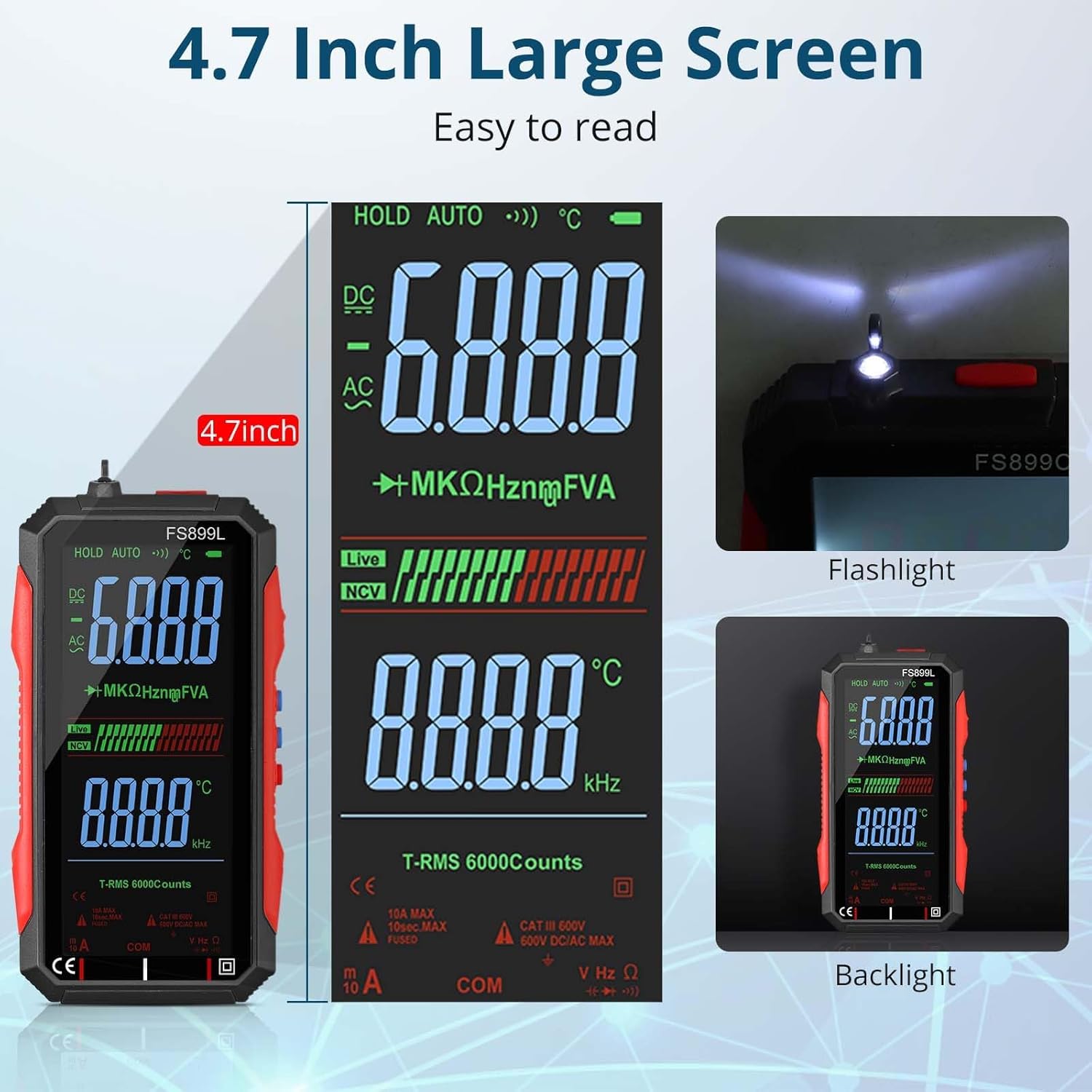
Figure 5.3: The large display and integrated flashlight for enhanced usability.
5.5 Done kenbe
Short press the 'Hold' button (middle button on the right side) to freeze the current reading on the display. Press it again to release the hold function.
5.6 Video Demonstration of Features
Video 5.1: This video demonstrates the ALLmeter FS899L multimeter's compact form factor, button functions including NCV and Hold, and its auto-switching/ranging capabilities for various measurements like resistance and capacitance. It also highlights the use of standard test leads and alligator clips, and discusses the temperature display in Celsius and the continuity beeper.
6. Antretyen
6.1 Chaje
The multimeter is equipped with a built-in USB rechargeable lithium battery. Recharge the device when the battery indicator shows low power. Use the provided USB cable for charging.
6.2 Netwayaj ak Depo
Clean the device with a soft, dry cloth. Do not use abrasive cleaners or solvents. Store the multimeter in its protective bag in a cool, dry place away from direct sunlight and extreme temperatures when not in use.
NAN. Depanaj
- Display Readability in Sunlight: The display may be difficult to read in direct sunlight. Adjust the angle of the device for better visibility.
- Inite Tanperati: The device displays temperature in Celsius only. There is no option to change this to Fahrenheit.
- Current Measurement Ports: The included manual may contain inaccuracies regarding the correct ports for current measurement. Always use the dedicated Amperage (A) port for current measurements, not the VΩHz port, to avoid damage to the device or inaccurate readings.
- Beeper kontinwite: The continuity test features an audible beeper. There is no function to disable this beeper.
- Presizyon: Readings may show slight variations compared to higher-end or calibrated testers. For critical applications, verify readings with a known accurate device.
- Screen Off Mode: The 'screen off' function only turns off the display backlight to save battery, the device remains operational.
8. Espesifikasyon
| Spesifikasyon | Valè |
|---|---|
| Mak | ALLmeter |
| Modèl | ALLWT325A |
| Sous pouvwa | Batri Powered (USB rechargeable) |
| Style | 6000 Counts Smart Multimeter |
| Koulè | RED / nwa |
| Pwa atik | 1 liv |
| Kalite Mezi | Multimeter, Voltmeter |
| Espesifikasyon Met | MSDS Certified (Battery) |
| Manifakti | ALLmeter |
9. Garanti ak sipò
For warranty information, technical support, or service inquiries, please refer to the contact information provided with your purchase documentation or visit the official ALLmeter websit la. Kenbe resi acha ou kòm prèv acha.