
Entwodiksyon
This user manual provides detailed instructions for the operation and maintenance of your Jensen CD-660 Portable Stereo CD Player Boombox. Please read this manual thoroughly before using the device to ensure proper function and to maximize your listening experience. Keep this manual for future reference.
Enstriksyon Sekirite Enpòtan
Pou diminye risk pou chòk elektrik, dife, oswa blesi, toujou swiv prekosyon sekirite debaz sa yo:
- Pa ekspoze aparèy sa a lapli oswa imidite.
- Pa bloke okenn ouvèti vantilasyon.
- Pa enstale tou pre okenn sous chalè tankou radyatè, rejis chalè, recho, oswa lòt aparèy (tankou amplifiers) ki pwodui chalè.
- Pwoteje kòd kouran an pou yo pa mache sou oswa kwense.
- Itilize sèlman atachman/akseswa manifakti a espesifye.
- Deploge aparèy sa a pandan tanpèt zèklè oswa lè li pa itilize pou yon tan long.
- Refere tout sèvis yo bay pèsonèl sèvis kalifye.
Kontni pake
Verifye ke tout atik ki nan lis anba a yo enkli nan pakè ou a:
- Jensen CD-660 Portable Stereo CD Player Boombox
- Adaptè kouran altènatif (120V)
- Manyèl Pwopriyetè a
Pwodwi souview
Familiarize yourself with the various parts and controls of your Jensen CD-660 boombox.
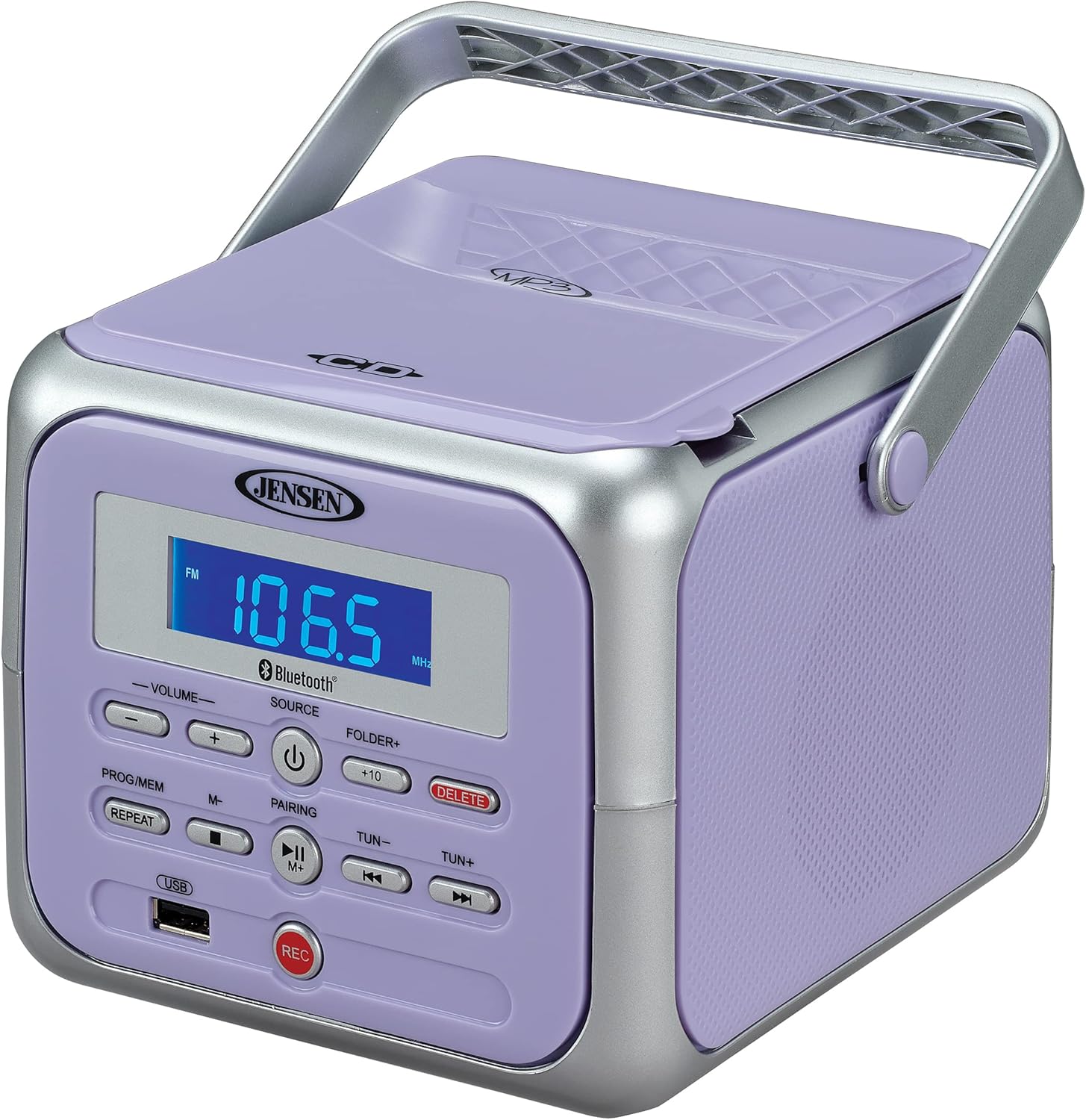
Figi 1: Devan view of the Jensen CD-660 with the carrying handle extended. This image displays the main control panel, including the display screen, volume controls, source selection, and playback buttons.

Figi 2: Devan view of the Jensen CD-660 with the carrying handle folded down. This perspective highlights the compact design and the arrangement of buttons and the LCD display.

Figi 3: Top view of the Jensen CD-660 with the CD compartment lid open, revealing the CD tray. This illustrates the top-loading mechanism for disc insertion.
Karakteristik panèl kontwòl:
- Ekspozisyon LCD: Shows current mode, track number, frequency, and other information.
- VOLUME +/- Buttons: Ajiste nivo pwodiksyon odyo a.
- Bouton SOURCE: Selects between CD, Bluetooth, FM Radio, and Aux-in modes.
- POUVWA bouton: Limen oswa etenn inite a.
- PROG/MEM Button: Programs CD tracks or stores FM radio presets.
- Bouton REPEAT: Repete tras aktyèl la oswa tout tras yo.
- PAIRING Button: Lanse mòd koneksyon Bluetooth la.
- Bouton PLAY/PAUSE: Kòmanse oswa poz lèktur.
- Bouton STOP: Sispann lekti.
- SKIP/SEARCH Buttons (◀◀ / ▶▶): Skips tracks or searches within a track.
- TUN +/- Buttons: Tunes FM radio frequency.
- FOLDER+ Button: Navigates to the next folder on a USB device.
- +10 Button: Skips 10 tracks forward on CD/USB.
- Bouton DELETE: Deletes recorded files soti nan USB.
- Bouton REC: Initiates recording to a USB flash drive.
- Pò USB: For USB flash drive playback and recording.
- Aux-in Jack: Konekte aparèy odyo ekstèn.
- Kas ekoutè Jack: Pou koute prive.
Enstalasyon
Alimente inite a
The Jensen CD-660 can be powered by either the included AC adapter or batteries.
Operasyon ak kouran AC:
- Plug the AC adapter into the AC IN jack located on the back of the unit.
- Branche lòt bout adaptè AC a nan yon priz miray estanda 120V AC.
Operasyon pouvwa batri:
For portable use, the unit requires 6 x 'C' (UM-2) batteries (not included).
- Louvri kouvèti konpatiman batri a ki anba aparèy la.
- Insert 6 'C' size batteries, ensuring correct polarity (+/-) as indicated inside the compartment.
- Fèmen kouvèti lòj batri a byen.
Nòt: Disconnect the AC adapter when operating on battery power. Remove batteries if the unit will not be used for an extended period.
Enstriksyon Operasyon
Operasyon Jeneral:
- Peze a POUVWA bouton pou limen inite a.
- Peze a SOUS button repeatedly to select your desired mode (CD, Bluetooth, FM, USB, AUX).
- Ajiste volim nan lè l sèvi avèk la VOLIM +/- bouton.
CD lèktur:
The unit supports CD, CD-R/RW, MP3, and WMA disc formats.
- Louvri kouvèti konpatiman CD a.
- Mete yon CD ak bò etikèt la anlè sou aks la.
- Fèmen kouvèti lòj CD a.
- Peze a SOUS bouton pou chwazi mòd CD.
- Peze a JWE/POZ bouton pou kòmanse lecture.
- Sèvi ak la SOTE / RECHÈCH buttons (◀◀ / ▶▶) to navigate tracks.
- Peze a SISPANN bouton pou sispann lèktur.
Bluetooth Operasyon:
Koute odyo san fil depi aparèy ou ki gen Bluetooth.
- Peze a SOUS button to select Bluetooth mode. The display will show "BT" and flash, indicating pairing mode.
- Sou aparèy Bluetooth ou a, aktive Bluetooth epi chèche aparèy ki disponib.
- Select "JENSEN CD-660" from the list of devices.
- Once paired, the display will stop flashing and show "BT".
- Start playing audio on your connected device.
- Sèvi ak la JWE/POZ epi SOTE / RECHÈCH buttons on the boombox or your device to control playback.
Radyo FM:
Listen to your favorite FM radio stations.
- Peze a SOUS button to select FM radio mode.
- Extend the FM wire antenna for optimal reception.
- Peze a TUN +/- bouton yo pou w sintonize yon estasyon manyèlman.
- Peze epi kenbe la TUN +/- buttons for automatic scanning to the next available station.
Sere ak raple Prereglaj:
The unit can store up to 30 FM presets.
- Branche sou estasyon FM ou vle a.
- Peze a PROG / MEM button. The display will show a flashing preset number.
- Sèvi ak la SOTE / RECHÈCH buttons (◀◀ / ▶▶) to select the desired preset number.
- Peze a PROG / MEM Peze bouton an ankò pou konfime epi sove estasyon an.
- Pou raple yon predefinisyon, peze bouton an PROG / MEM Peze bouton an plizyè fwa pou chanje estasyon ki estoke yo.
USB lèktur:
Play MP3, WAV, or FLAC audio files soti nan yon kondwi flash USB.
- Mete yon kle USB nan pò USB a.
- Peze a SOUS bouton pou chwazi mòd USB.
- The unit will automatically begin playing the first compatible audio file.
- Sèvi ak la SOTE / RECHÈCH buttons (◀◀ / ▶▶) to navigate tracks.
- Sèvi ak la DOSYE+ button to navigate between folders on the USB drive.
- La +10 button can be used to skip 10 tracks forward.
Anrejistreman USB:
Record audio directly to a USB flash drive from CD, FM Radio, Aux-in, or Bluetooth sources.
- Mete yon kle USB nan pò USB a.
- Select the desired audio source (CD, FM, AUX, or Bluetooth).
- Start playback of the audio you wish to record.
- Peze a REC button to begin recording. The display will indicate recording status.
- Peze a REC bouton ankò yo sispann anrejistreman.
- Pou efase yon anrejistre file, navige nan file in USB playback mode and press the EFASE bouton.
Aux-in Connection:
Connect external audio devices like smartphones or tablets.
- Connect one end of a 3.5mm audio cable (not included) to the Aux-in jack on the boombox.
- Konekte lòt bout kab la nan priz kas ekoutè a oswa nan pwodiksyon odyo aparèy ekstèn ou an.
- Peze a SOUS button to select Aux-in mode.
- Kòmanse jwe odyo sou aparèy ekstèn ou an.
- Adjust the volume on both the boombox and your external device for optimal sound.
Antretyen
Netwaye inite a:
- Siye eksteryè inite a ak yon mou, damp twal. Pa sèvi ak pwodui netwayaj abrazif oswa solvang.
- Pou lantiy CD a, sèvi ak yon disk netwayaj lantiy CD espesyalize.
Swen batri:
- Retire pil yo si ou pa pral itilize aparèy la pou yon peryòd tan pwolonje pou anpeche flit.
- Pa melanje ansyen ak nouvo pil, oswa diferan kalite pil.
Depanaj
If you encounter issues with your Jensen CD-660, refer to the following table for common problems and solutions.
| Pwoblèm | Kòz posib | Solisyon |
|---|---|---|
| Pa gen pouvwa | Adaptè AC pa konekte; Pil yo fin itilize oswa yo pa byen mete. | Ensure AC adapter is securely plugged in; Replace batteries or check polarity. |
| Pa gen son | Volim twò ba; Sous ki pa kòrèk la chwazi; Kas ekoutè konekte. | Increase volume; Select correct source; Disconnect headphones. |
| CD a pa ap jwe | CD inserted incorrectly; Disc is dirty or scratched; CD compartment not closed. | Insert CD with label side up; Clean or replace disc; Close compartment securely. |
| Aparèy Bluetooth echwe | Device too far; Bluetooth not enabled on external device; Boombox not in pairing mode. | Move device closer; Enable Bluetooth; Ensure boombox is in BT pairing mode. |
| Pòv resepsyon FM | Antèn pa lonje; Siyal fèb. | Fully extend the FM wire antenna; Reposition the unit for better reception. |
| Pwoblèm lekti USB | Pa sipòte file format; USB drive not properly inserted or corrupted. | Asire w files are MP3/WAV/FLAC; Reinsert USB drive; Try a different USB drive. |
Espesifikasyon
| Karakteristik | Detay |
|---|---|
| Nimewo Modèl | CD-660 |
| Sous pouvwa | AC 120V (included adapter) or 6 x 'C' (UM-2) batteries (not included) |
| Koneksyon | Bluetooth 5.1 (A2DP, AVRCP), USB, Aux-in |
| CD konpatibilite | CD, CD-R/RW, MP3, WMA |
| Lektur USB | MP3, WAV, FLAC |
| Radyo FM | Stereo Receiver with 30 Presets, PLL Digital Tuning |
| Dimansyon (W x H x P) | 6.38" x 5.2" x 6.57" (16.2 santimèt x 13.2 santimèt x 16.7 santimèt) |
| Pwa | Apeprè 2.46 lbs (1.12 kg) |
Garanti ak sipò
This Jensen CD-660 Portable Stereo CD Player Boombox comes with a manufacturer's warranty. Please refer to the included Owner's Manual for specific details regarding warranty coverage, terms, and conditions. For technical support or service inquiries, please contact Jensen customer service directly. Contact information can typically be found in the Owner's Manual or on the official Jensen websit.