
VR-robot build-in
VR-robot MP3 Player User Manual
Model: build-in
Entwodiksyon
Mèsi pou acha aasing the VR-robot MP3 Player. This device is designed to provide a versatile and portable entertainment experience, featuring music playback, video viewing, FM radio, voice recording, and e-book reading capabilities. With its compact design and expandable storage, it is ideal for various activities such as running, walking, or simply enjoying your favorite media on the go. This manual will guide you through the setup, operation, maintenance, and troubleshooting of your new MP3 player.
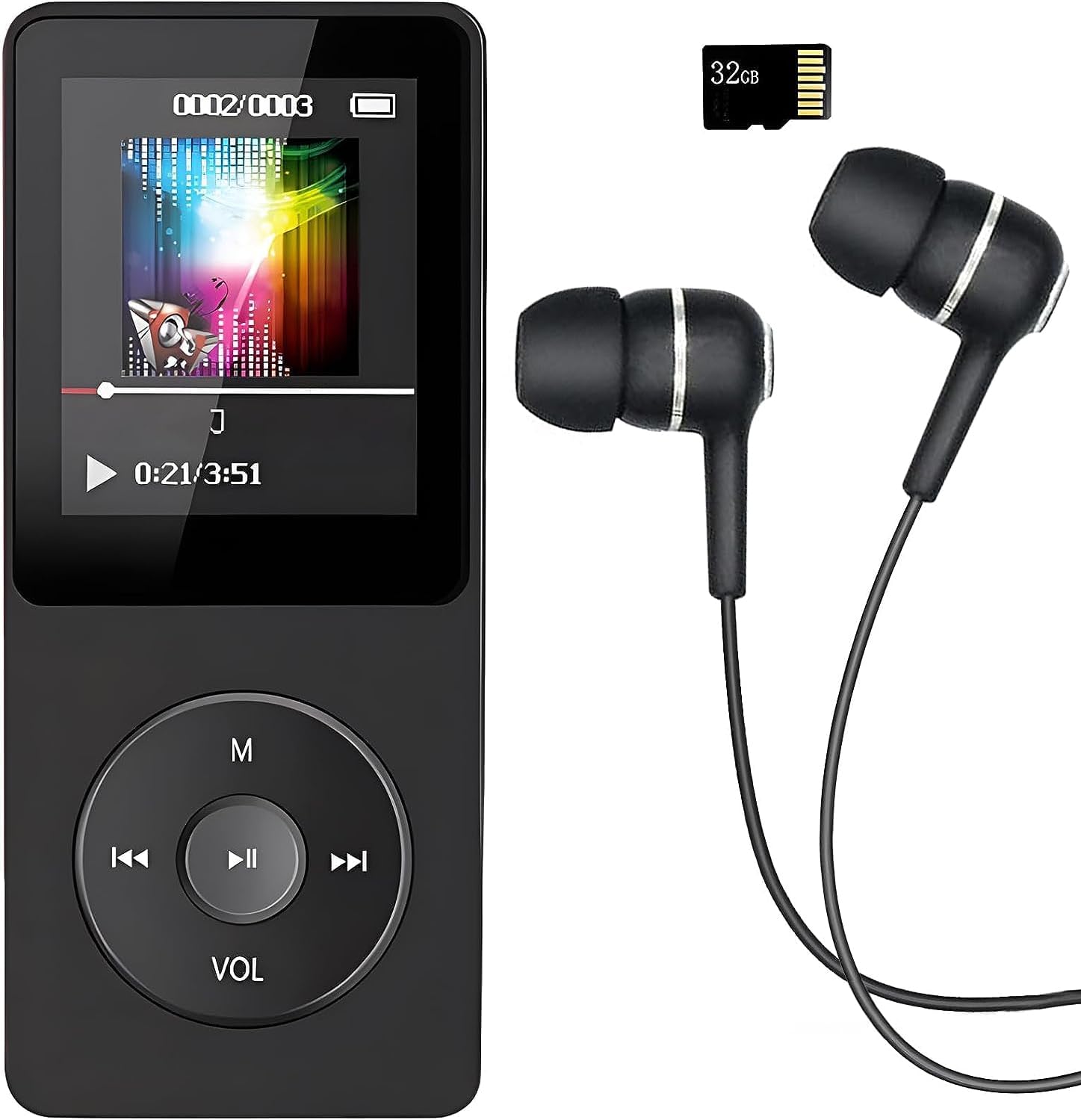
Image: The VR-robot MP3 Player, showcasing its compact design, screen, control buttons, and the included 32GB Micro SD card and wired earphones.
Enstalasyon
1. Chaje Aparèy la
Before first use, fully charge the MP3 player. Connect the device to a USB power adapter (not included) or a computer's USB port using the provided USB cable. The battery indicator on the screen will show charging progress. A full charge typically takes 2-3 hours and provides up to 10 hours of music playback.
2. Mete Kat Mikwo SD a
Your MP3 player comes with a 32GB Micro SD card. Locate the Micro SD card slot on the side of the device. Gently insert the Micro SD card into the slot until it clicks into place. The device supports Micro SD cards up to 128GB for expanded storage.

Image: A hand inserting a blue Micro SD card into the dedicated slot on the side of the VR-robot MP3 Player, illustrating the expandable storage feature.
3. Connecting to a Computer for File Transfè
To transfer music, videos, photos, or e-books to your MP3 player, connect it to your computer using the USB cable. The device will appear as a removable disk drive. You can then drag and drop files into the appropriate folders on the device or the inserted Micro SD card.
Enstriksyon Operasyon
Navigasyon debaz
The MP3 player features a central control pad with directional buttons and a central play/pause button. The 'M' button typically serves as a menu or back button, while 'VOL' controls volume. Navigate through menus and select options using these buttons.
Lèktur Klas Mizik
The player supports multiple audio formats including MP3, WMA, APE, WAV, and FLAC. For optimal sound quality, the device incorporates a professional intelligent digital noise reduction chip. Connect the included earphones or use the built-in speaker for audio output.

Image: A person wearing headphones, illustrating the high-fidelity sound experience provided by the MP3 player, with text indicating support for various audio formats.
- Jwe Mizik: Select "Music" from the main menu, then browse by artist, album, song, or folder.
- Kontwòl Volim: Use the 'VOL' button to adjust the playback volume.
- AB repete: This function allows you to loop a specific segment of an audio track. Select the start point (A) and end point (B) during playback.
Videyo lèktur
The MP3 player supports video playback. Ensure your video files are in a compatible format for smooth playback. Refer to the device specifications for supported video formats.
Radyo FM
To use the FM radio function, connect wired headphones to the device, as they serve as the antenna. Navigate to the "FM Radio" option in the main menu. You can then auto-scan for stations or manually tune to a specific frequency (87.5 MHz - 108 MHz).

Image: A person with an earphone in, surrounded by circular graphics indicating various FM radio frequencies, demonstrating the FM radio capability of the MP3 player.
Anrejistrè vwa
The built-in voice recorder allows you to capture audio notes or lectures. Select "Record" from the main menu to start a new recording. Recordings are typically saved in WAV format.

Image: The VR-robot MP3 Player displaying a recording interface, with a child studying in the background, highlighting its use as a voice recorder.
E-liv lektè
Load compatible e-book files onto your device to read on the go. Navigate to the "E-Book" section to access your digital library.
Fonksyon alam
The device includes an alarm function. Set alarms through the settings menu for reminders or as a wake-up call.
Dosye Navigasyon
Aksè files directly by browsing folders. This is useful for organizing different types of media or for audiobooks where tracks are separated into specific folders.

Image: The VR-robot MP3 Player screen displaying icons for E-Book, Alarm, Record, Music, Folder, FM Radio, A-B Repeat, and Video, illustrating its diverse functionalities.
Antretyen
- Netwayaj: Sèvi ak yon twal mou epi sèk pou netwaye aparèy la. Evite itilize pwodui netwayaj likid oswa materyèl abrazif.
- Depo: Sere lektè MP3 la nan yon kote ki fre epi sèk, lwen limyè solèy dirèk ak tanperati ekstrèm.
- Swen batri: Pou pwolonje lavi batri a, evite dechaje batri a nèt souvan. Chaje aparèy la regilyèman, menm si ou pa itilize li pandan yon bon bout tan.
- Mizajou lojisyèl: Tcheke manifakti a webVizite sit la detanzantan pou nenpòt mizajou firmwèr ki disponib pou asire pèfòmans optimal.
Depanaj
| Pwoblèm | Kòz posib / Solisyon |
|---|---|
| Aparèy la pa vire. | Battery is depleted. Charge the device for at least 30 minutes. If still unresponsive, try a different USB cable or charging port. |
| Pa ka transfere files nan aparèy la. | Ensure the USB cable is securely connected. Try a different USB port on your computer. The device might be in charging mode; check if it needs to be set to "Media Device (MTP)" or "USB Storage" mode. |
| Mizik files are not playing or are corrupted. | Verifye ke mizik la files are in a supported format (MP3, WMA, APE, WAV, FLAC). Ensure files are not corrupted. Re-transfer the files si sa nesesè. |
| FM Radio signal is weak or non-existent. | Ensure wired headphones are properly plugged in, as they act as the antenna. Try moving to an area with better signal reception. |
| Albums/folders are not separated correctly. | Asire mizik ou files have correct ID3 tags and are organized into distinct folders on the device's storage. Some players may combine tracks if metadata is inconsistent. |
| Anrejistreman vwa a pa fonksyone. | Check if there is sufficient storage space. Ensure the microphone is not obstructed. |
Espesifikasyon
- Mak: Robo VR
- Non modèl: build-in
- Kapasite Depo memwa: 32 GB (Micro SD card included), supports up to 128 GB
- Koneksyon Teknoloji: Bluetooth, USB
- Karakteristik espesyal: Video Playback, Voice Recorder, FM Radio, E-Book Reader, Built-in Speaker
- Gwosè ekran: 3.5 pous
- Koulè: Nwa
- Pwa atik: 2.89 ons
- Batri: 1 batri ityòm ion obligatwa (enkli)
- Dimansyon pake: 4.84 x 2.87 x 1.42 pous
- Eleman ki enkli: MP3 Player, 32GB Micro SD Card, Earphone, USB Cable
Garanti ak sipò
Your VR-robot MP3 Player comes with a 12-mwa garanti from the date of purchase. This warranty covers manufacturing defects and ensures the quality of your product.
If you encounter any problems or have questions regarding your device, please do not hesitate to contact our professional after-sales service team. You can typically find contact information on the seller's page or through your purchase platform. We are committed to providing a quick and satisfactory response to ensure your satisfaction.
For further assistance, please refer to the VR-robot store on Amazon: VR-robot Store
Ask a question about this manual
Ask about setup, troubleshooting, compatibility, parts, safety, or missing instructions. Manuals+ will review the question and use this page’s manual context to help answer it.