
1. Entwodiksyon
Thank you for choosing the LD Systems MAUI 28 G3 Compact Cardioid Column PA System. This system is designed to deliver powerful, clear, and precise sound for a variety of applications, including live music, DJ sets, and public address. Its compact design and advanced acoustic features make it an ideal solution for professionals seeking high-quality audio performance and ease of use.
This manual provides essential information for the safe and efficient operation of your MAUI 28 G3 system. Please read it thoroughly before initial use and keep it for future reference.
2. Enstriksyon Sekirite
Please observe the following safety precautions to prevent electric shock, fire, or damage to the unit:
- Sous pouvwa: Konekte aparèy la sèlman nan yon priz kouran AC ki gen vòltaj espesifye a.tage.
- Atè: Asire w ke aparèy la byen konekte atè pou anpeche chòk elektrik.
- Imidite: Pa ekspoze aparèy la anba lapli oswa imidite. Pa mete objè ki plen likid sou aparèy la.
- Vantilasyon: Asire bon jan vantilasyon. Pa bloke ouvèti vantilasyon yo.
- Chalè: Pa mete aparèy la toupre sous chalè oswa anba limyè solèy dirèk.
- Sèvis: Pa eseye fè antretyen aparèy la tèt ou. Konfye tout antretyen bay pèsonèl kalifye.
- Câbles: Pwoteje kòd kouran pou yo pa mache sou yo oswa kwense yo.
- Estabilite: Place the system on a stable, level surface to prevent tipping.
3. Pake kontni
Verifye ke tout konpozan yo prezan nan pake ou a:
- 1 x MAUI 28 G3 Subwoofer
- 2 x MAUI 28 G3 Column Elements
- 1 x pouvwa kab
- 1 x Manyèl Itilizatè (dokiman sa a)
4. Pwodwi souview
The MAUI 28 G3 system consists of a powerful subwoofer and two column elements that integrate seamlessly to form a compact and high-performance PA system.
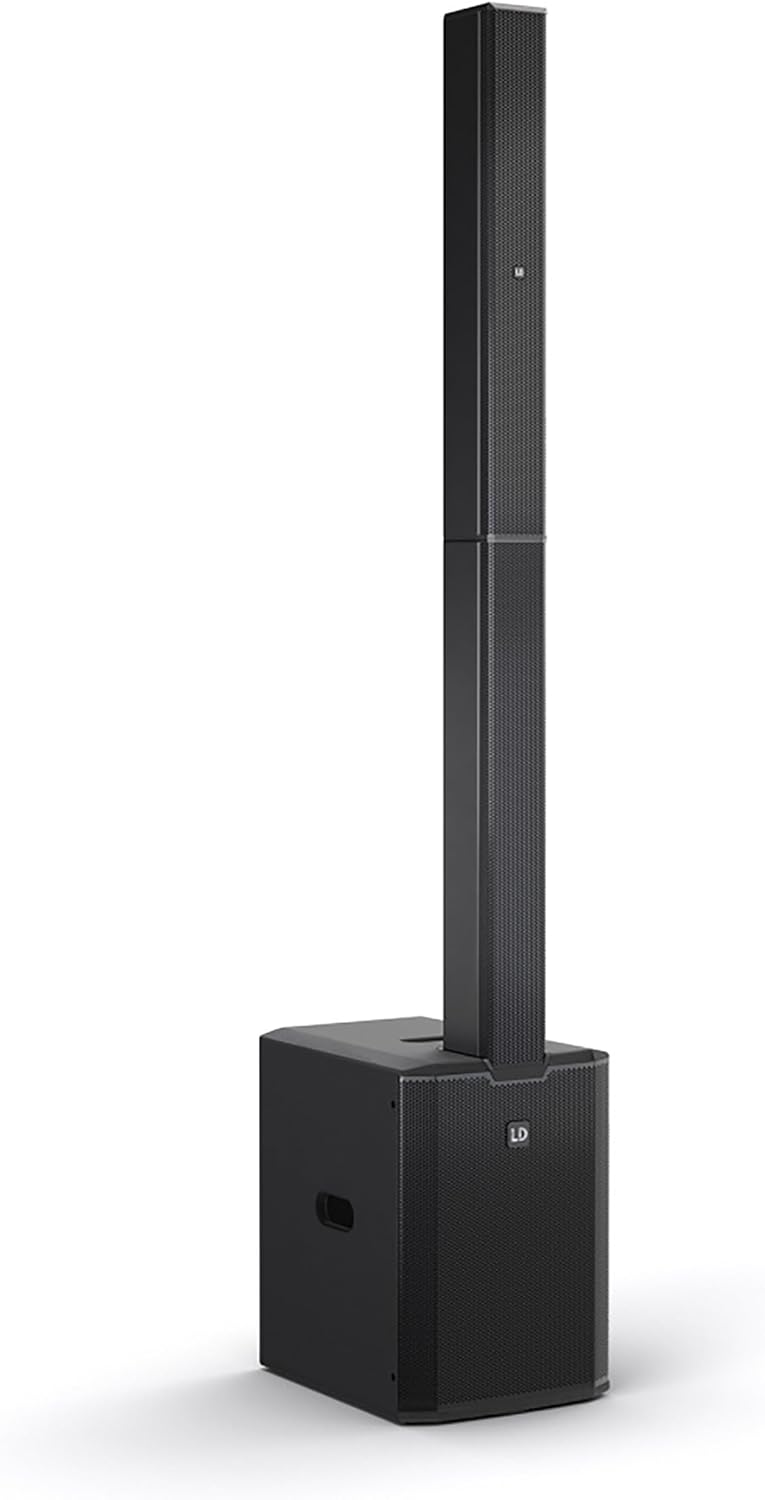
This image displays the complete LD Systems MAUI 28 G3 PA system, showing the subwoofer base with the two column elements securely mounted on top, forming a single, integrated unit.
4.1. Subwoofer
The subwoofer houses the main amplifier, power supply, and all input/output connections and controls. It provides robust bass frequencies for a full-range sound experience.

A direct, clear view of the MAUI 28 G3 subwoofer's control panel, detailing all labels for inputs, outputs, and adjustment knobs for main, sub, and cardioid settings.
Subwoofer Rear Panel Controls:
- MAIN Level: Ajiste volim pwodiksyon jeneral sistèm lan.
- SUB Level: Adjusts the volume of the subwoofer independently.
- Cardioid ON/OFF: Activates or deactivates the cardioid dispersion mode for the subwoofer, reducing rearward sound radiation.
- Input L/R: XLR/TS combo jacks for connecting audio sources (e.g., mixer, instrument).
- THRU L/R: XLR outputs for linking to additional PA systems or monitors.
- SUB SOTI: XLR output for connecting an external subwoofer.
- Pouvwa switch: Limen oswa etenn inite a.
- Pouvwa Inlet: Pou konekte kab kouran AC a.

An angled close-up of the subwoofer's rear panel, showing the various input and output connectors, level controls, and mode switches.
4.2. Column Elements
The two column elements contain 12 x 3.5-inch midrange drivers and 2 x 1-inch tweeters, designed for even sound distribution and constant horizontal dispersion. They connect directly to the subwoofer.

Yon detaye view of the protective metal grille covering the speakers within one of the MAUI 28 G3 column elements.

A close-up image of the base of a column element, highlighting the multi-pin connector and alignment pins used to secure it to the subwoofer or another column element.
5. Enstalasyon
Follow these steps to assemble and connect your MAUI 28 G3 system:
- Depake konpozan: Retire tout konpozan yo nan anbalaj yo avèk anpil atansyon.
- Pozisyon Subwoofer: Place the subwoofer on a stable, level surface in your desired location.
- Assemble Column Elements:
- Take the first column element and align its base connector with the top connector of the subwoofer. Gently push down until it clicks into place.
- Take the second column element and align its base connector with the top connector of the first column element. Gently push down until it clicks into place.
- Konekte Sous Odyo a: Connect your mixer, instrument, or other audio source to the Input L/R XLR/TS combo jacks on the subwoofer's rear panel.
- Konekte pouvwa: Plug the supplied power cable into the power inlet on the subwoofer and then into a suitable AC power outlet.

The subwoofer and the two column elements are shown individually, positioned to demonstrate how they connect to form the complete PA system.

This image illustrates the three main components of the MAUI 28 G3 system: the subwoofer base and the two distinct column elements, shown detached and ready for assembly.
6. Operasyon
- Pouvwa sou: Ensure all connections are secure, then switch the power button on the subwoofer to the 'ON' position.
- Ajiste Nivo: Kòmanse ak la MAIN Level epi SUB Nivo knobs set to their minimum positions. Gradually increase the MAIN Level to your desired overall volume. Adjust the SUB Nivo to balance the bass frequencies with the rest of the sound.
- Mòd kadyoyid: If you wish to reduce sound radiation behind the subwoofer, activate the Cardioid ON switch. This can help minimize stage rumble and improve sound clarity in certain environments.
- Monitoring/Linking: Sèvi ak la A L/R outputs to send the audio signal to additional PA systems or stage monitors if required. The SUB SOTI can be used to connect an external subwoofer for enhanced bass.
- Pouvwa Off: Before disconnecting power, turn down all level controls to minimum, then switch the power button to 'OFF'.
7. Antretyen
- Netwayaj: Use a soft, dry cloth to clean the exterior surfaces of the system. Do not use abrasive cleaners or solvents.
- Depo: When not in use, store the system in a dry, dust-free environment. If transporting, use appropriate protective covers or cases.
- Enspeksyon: Periodically check all cables and connectors for signs of wear or damage.
NAN. Depanaj
| Pwoblèm | Kòz posib | Solisyon |
|---|---|---|
| Pa gen pouvwa | Power cable disconnected; Power outlet faulty; Unit switched off | Check power cable connection; Test power outlet; Ensure power switch is ON |
| Pa gen pwodiksyon son | Input cables disconnected; Volume levels too low; Source device not playing | Check all audio cable connections; Increase MAIN/SUB levels; Verify audio source is active |
| Son defòme | Input signal too high; Volume levels too high; Faulty cable | Reduce input signal level from source; Lower MAIN/SUB levels; Try a different audio cable |
| Subwoofer pa travay | SUB Level too low; Cardioid mode affecting perception | Increase SUB Level; Test with Cardioid mode OFF |
9. Espesifikasyon
| Karakteristik | Detay |
|---|---|
| Nimewo Modèl | MAUI 28 G3 |
| Sous pouvwa | Fil elektrik |
| Materyèl | Aliminyòm |
| Pwa atik | 60 liv |
| Kantite Chanèl | 2 |
| Antre odyo | XLR/TS, 1/4'' (for line-level sources) |
| Koneksyon Teknoloji | XLR |
| Koulè | Nwa |
| Kalite aliye | Ploge mòn |
| Aparèy konpatib | Headphone, Keyboard, DVD Player, Headset, Guitar, Smartphone, Television, Drum, Tablet, Laptop, Piano, MP3 Player |
10. Garanti ak sipò
LD Systems products are manufactured to high-quality standards and come with a manufacturer's warranty. For specific warranty terms and conditions, please refer to the warranty card included with your product or visit the official LD Systems websit.
For technical support, service, or inquiries, please contact your authorized LD Systems dealer or visit the Sistèm LD websit pou enfòmasyon kontak.