
1. Entwodiksyon
Thank you for choosing the GenMachine Mini PC. This compact yet powerful computer is designed to deliver exceptional performance for a variety of tasks, including gaming, office productivity, and creative design. Equipped with an AMD Ryzen 7 3750H processor, ample memory, and fast storage, it offers a seamless computing experience. This manual provides essential information for setting up, operating, maintaining, and troubleshooting your new Mini PC.
2. Ki sa ki nan bwat la
Tanpri verifye ke tout atik yo prezan epi yo an bon kondisyon lè w ap debale yo.
- 1 x GenMachine Mini PC
- 1 x HDMI kab
- 1 x pouvwa adaptè
- 1 x Manyèl Itilizatè (dokiman sa a)
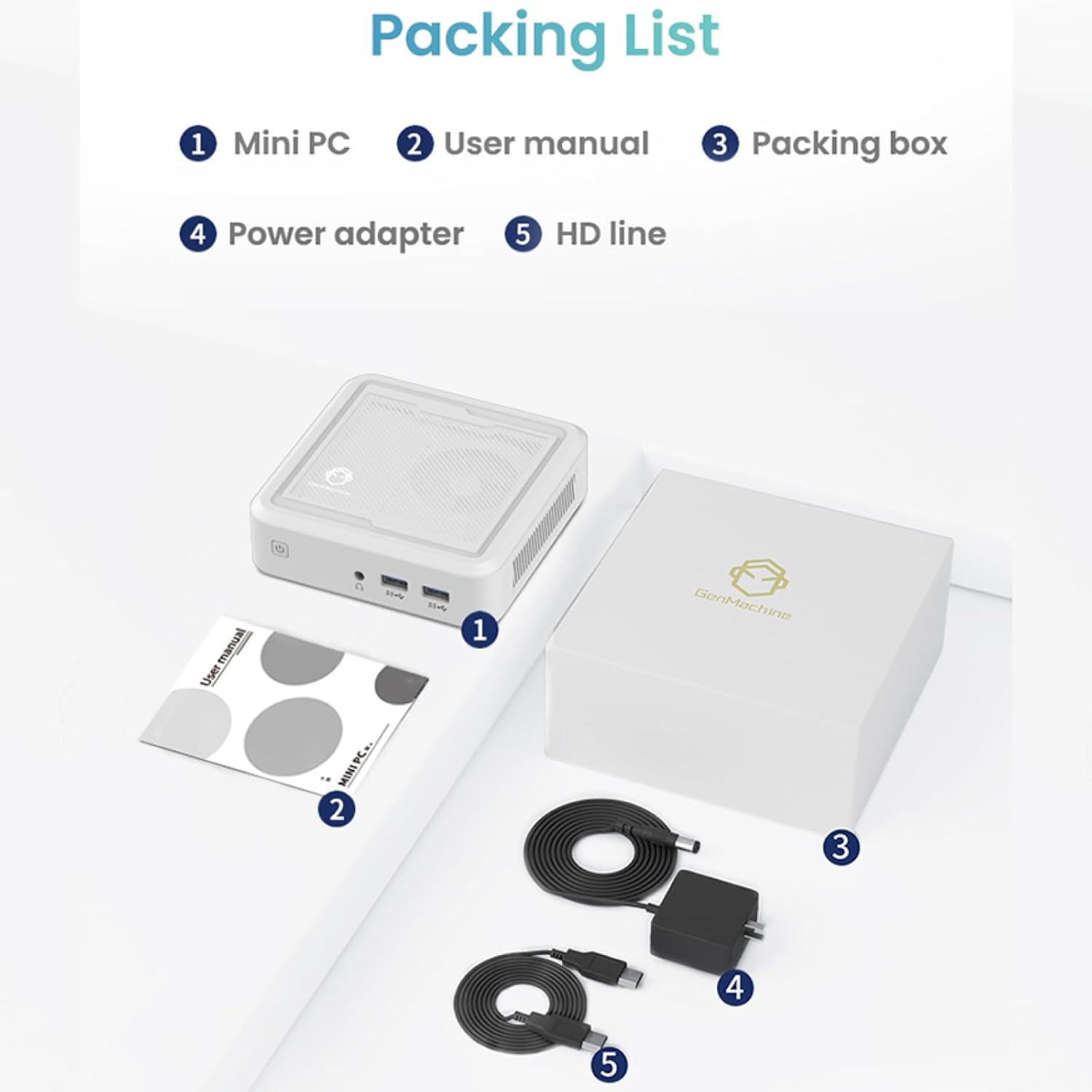
Figure 2.1: Packaging contents of the GenMachine Mini PC.
3. Pwodwi Features
The GenMachine Mini PC is engineered with features to enhance your computing experience:
- Pèfòmans pwisan: Equipped with an AMD Ryzen 7 3750H processor, delivering speeds up to 4.0GHz with 4 cores and 8 threads for demanding tasks.
- Ample Memory and Storage: Features 8GB of DDR4 RAM and a 256GB SSD with M.2 NVMe support for seamless multitasking and quick file aksè.
- Koneksyon versatile: Advanced WiFi 6 and Bluetooth 5.2 capabilities ensure high-speed internet and smooth device pairing.
- Konsepsyon kontra enfòmèl ant: A sleek, small form factor that fits easily into any workspace or gaming setup.
- Opsyon ekspozisyon miltip: HDMI and DisplayPort outputs support dual 4K displays for expanded productivity and immersive visuals.

Figi 3.1: Devan view of the GenMachine Mini PC.
3.1 Rich Interface for Easy Connection
The Mini PC offers a comprehensive set of ports to meet various connectivity needs:
- USB 3.0 x 4
- HDMIx1
- DisplayPort (DP) x 1
- LAN (Etènèt) x 1
- 3.5mm Audio Jack x 1
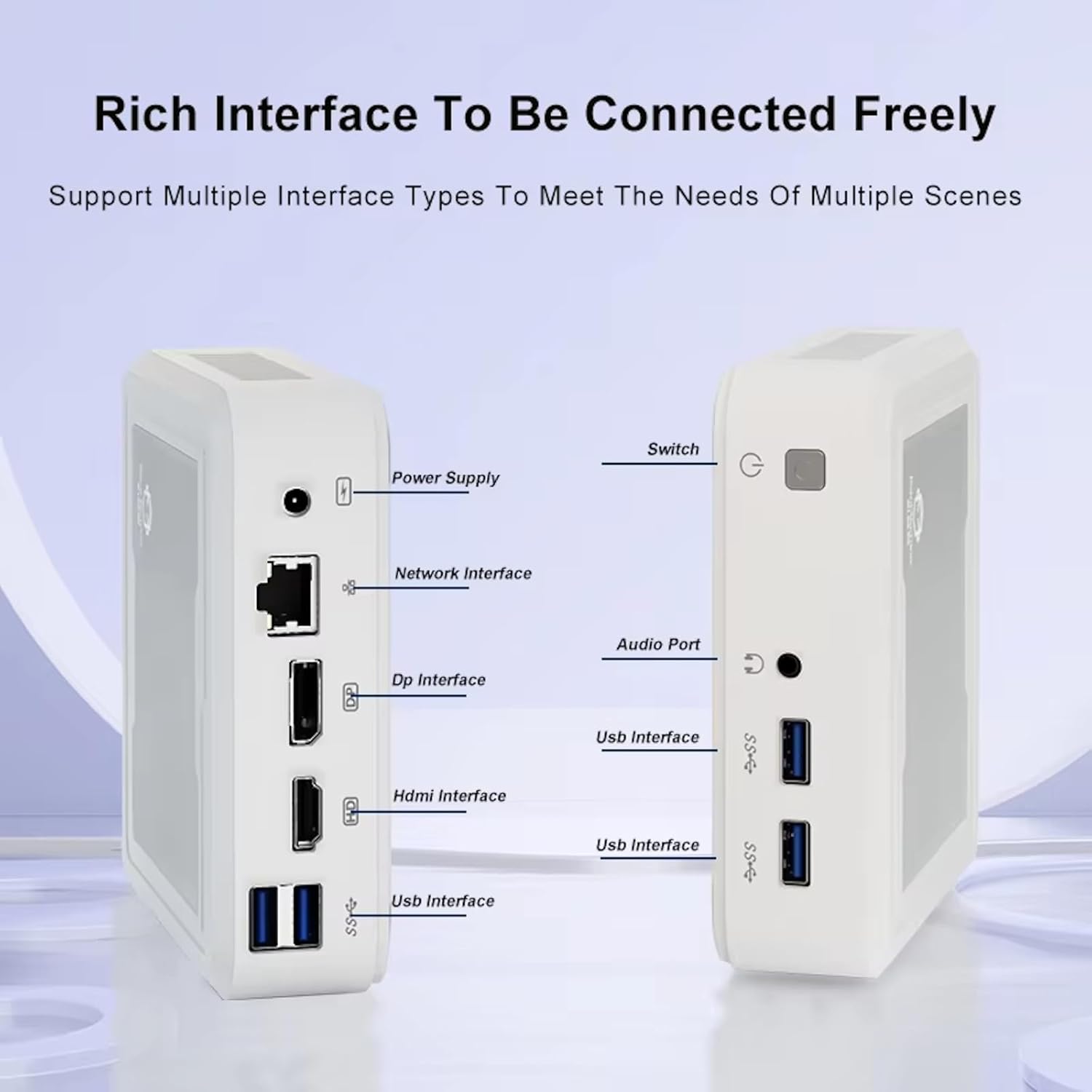
Figure 3.2: Available ports on the GenMachine Mini PC.
3.2 Dual Monitor Support
Enhance your productivity or gaming experience by connecting up to two 4K displays simultaneously using the HDMI and DisplayPort outputs.

Figure 3.3: Dual 4K display setup with the GenMachine Mini PC.
Video 3.1: Demonstration of the GenMachine Mini PC supporting two monitors simultaneously.
3.3 Efikasite Enèji ak Operasyon Silansye
Designed for low noise operation, the Mini PC maintains a quiet environment, making it suitable for various settings.

Figure 3.4: Noise level comparison of the GenMachine Mini PC.
3.4 Compact and Durable Design
The Mini PC features an ultra-durable, lightweight metal casing, making it space-saving and robust for any work environment.
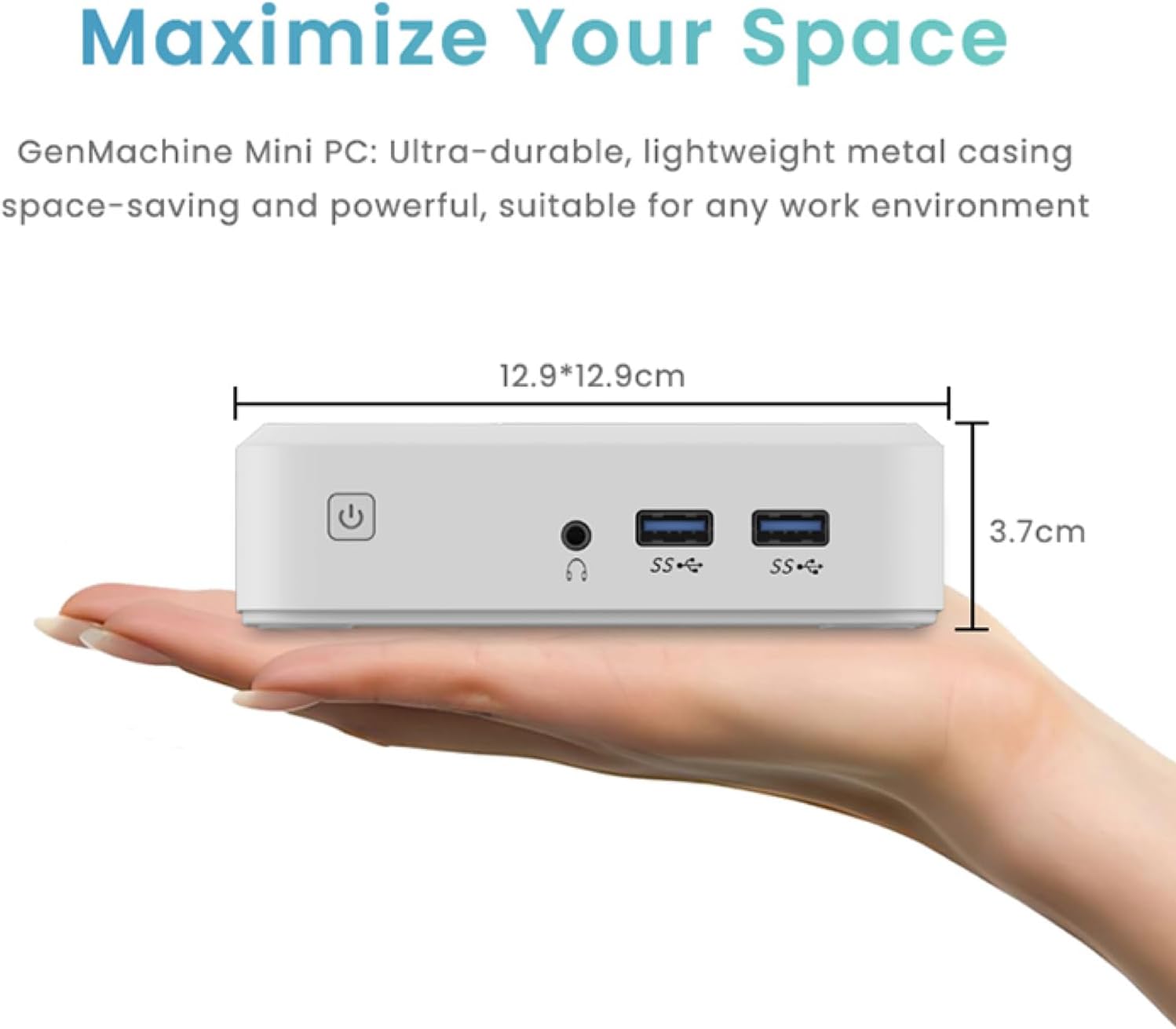
Figure 3.5: Compact size of the GenMachine Mini PC.
Videyo 3.2: Finiview of the GenMachine Mini PC's features and compact design.
4. Gid Enstalasyon
Follow these steps to set up your GenMachine Mini PC:
- Unpack the Mini PC: Ak anpil atansyon retire tout eleman nan anbalaj la.
- Konekte ak yon ekran: Use the provided HDMI cable to connect the Mini PC to your monitor or TV. If using a DisplayPort monitor, use a compatible DP cable (not included).
- Konekte periferik: Branche klavye ou, sourit ou, ak nenpòt lòt aparèy USB nan pò USB 3.0 ki disponib yo.
- Konekte ak rezo a (Si ou vle): For a wired internet connection, connect an Ethernet cable to the LAN port. For wireless, ensure your WiFi network is available during initial setup.
- Konekte pouvwa: Plug the power adapter into the DC-in port on the Mini PC, then plug the adapter into a power outlet.
- Pouvwa sou: Press the power button on the front of the Mini PC. The system should boot up.
5. Operasyon Enstriksyon
5.1 Premye Demaraj ak Enstalasyon Sistèm Operasyon an
Upon first power-on, the Mini PC will guide you through the operating system setup process. Follow the on-screen prompts to configure language, region, user accounts, and network settings.
5.2 Jesyon pouvwa
- Pouvwa sou: Peze bouton pouvwa a yon fwa.
- Fèmen: Access the power options through the operating system's start menu and select 'Shut down'.
- Rekòmanse: Access the power options through the operating system's start menu and select 'Restart'.
- Mòd dòmi: Access the power options through the operating system's start menu and select 'Sleep'.
5.3 Konekte ak Wi-Fi ak Bluetooth
To connect to a wireless network or Bluetooth device, use the respective settings within your operating system. The Mini PC supports WiFi 6 and Bluetooth 5.2 for fast and reliable connections.
6. Antretyen
Antretyen regilye ede asire lonjevite ak pèfòmans optimal Mini PC ou a:
- Netwayaj: Use a soft, dry cloth to clean the exterior. For dust in vents, use compressed air. Ensure the device is powered off and unplugged before cleaning.
- Vantilasyon: Ensure the Mini PC is placed in a well-ventilated area. Do not block the air vents.
- Mizajou lojisyèl: Regularly update your operating system, drivers, and applications to ensure security and performance.
- Sovgad done: Detanzantan, fè kopi done enpòtan yo sou yon disk ekstèn oswa yon depo nan nwaj la.
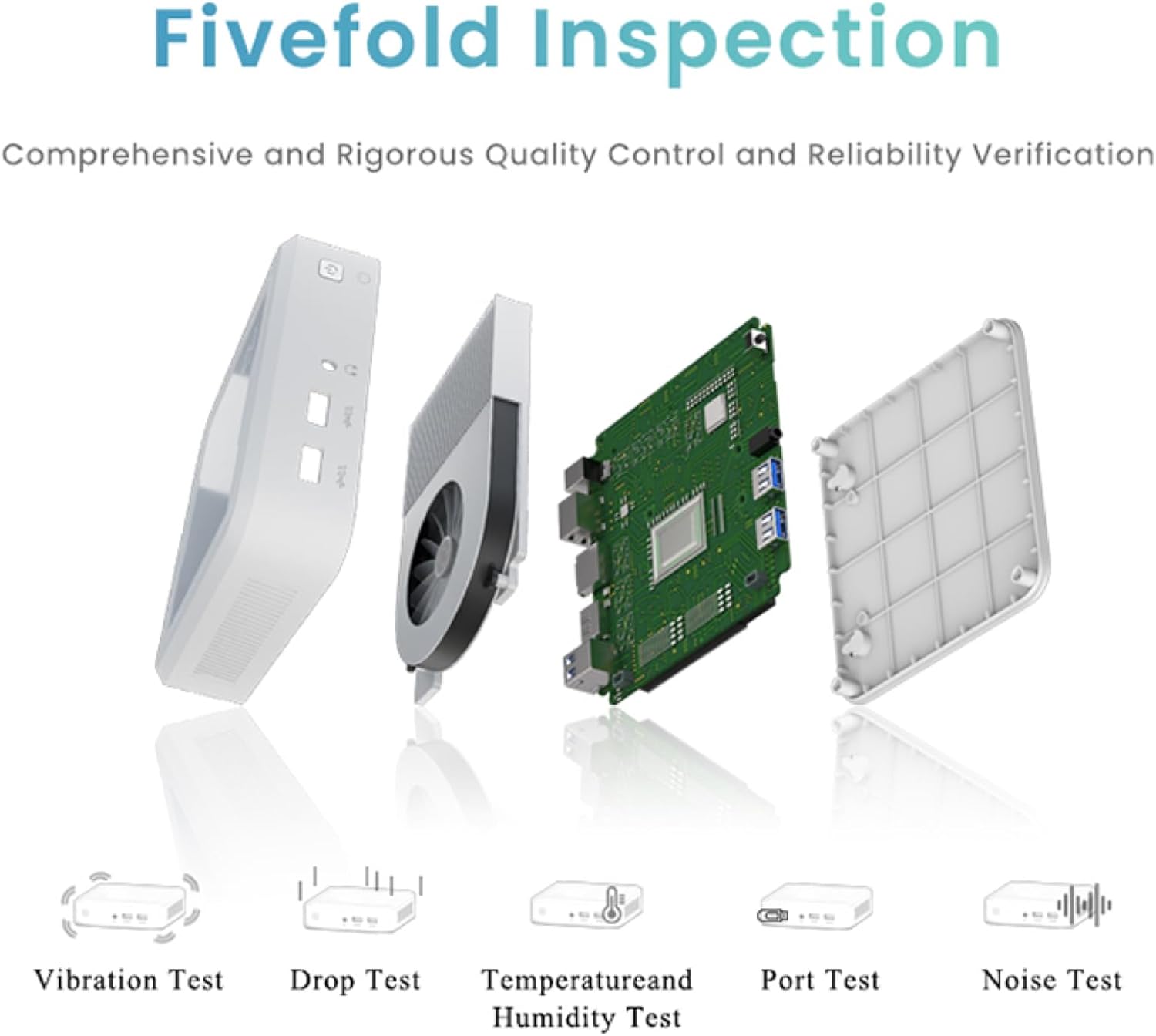
Figure 6.1: GenMachine's Fivefold Inspection process for quality control.
NAN. Depanaj
Si ou rankontre pwoblèm ak Mini PC ou a, gade pwoblèm ak solisyon komen sa yo:
- Pa gen pouvwa:
- Asire w ke adaptè kouran an byen konekte ak Mini PC a ak yon priz kouran ki fonksyone.
- Eseye yon priz kouran diferan.
- Pa gen ekspozisyon:
- Verify that the HDMI or DisplayPort cable is securely connected to both the Mini PC and the monitor.
- Asire w ke monitè a limen epi li configuré sou sous antre ki kòrèk la.
- Eseye yon lòt kab ekran oswa monitè si sa posib.
- System Freezes or Unresponsive:
- Perform a hard reset by holding the power button for 5-10 seconds until the device powers off, then restart.
- Ensure the operating system and drivers are up to date.
- Tcheke pou wè si l pa twò cho; asire bon vantilasyon.
- Run a system diagnostic or memory test if the issue persists.
- Pa gen koneksyon entènèt:
- Pou koneksyon filaire, tcheke kab Ethernet la ak estati routeur la.
- For Wi-Fi, ensure Wi-Fi is enabled in the operating system and you are connected to the correct network with the correct password.
- Rekòmanse routeur/modèm ou a.
8. Espesifikasyon
| Karakteristik | Spesifikasyon |
|---|---|
| Processeur | AMD Ryzen 7 3750H (4 cores, 8 threads, up to 4.0GHz) |
| RAM | 8GB DDR4 |
| Depo | 256GB SSD (with M.2 NVMe support) |
| Koprosesè grafik | Grafik AMD Radeon Vega 10 |
| Rezolisyon ekran maksimòm | 3840 x 2160 piksèl (4K) |
| Kalite san fil | 802.11ac (WiFi 6), Bluetooth 5.2 |
| Pò USB | 4 x USB 3.0 |
| Sorti Videyo | HDMI, DisplayPort |
| Sistèm operasyon | Sistèm operasyon (pre-enstale) |
| Pwa atik | 2.1 liv |
| Dimansyon pwodwi | 4.9 x 4.9 x 1.4 pous |
| Koulè | Nwa |
9. Garanti ak sipò
For warranty information and technical support, please refer to the warranty card included with your product or visit the official GenMachine websit la. Kenbe resi acha ou kòm prèv acha pou reklamasyon garanti.
If you require further assistance, please contact GenMachine customer support through the channels provided on their official websit.