
1. Pwodwi souview
The Cudy GS108D is an 8-port Gigabit Ethernet Network Switch designed for expanding your network connectivity. It offers high-speed data transfer for devices such as computers, IPTVs, printers, NAS, game consoles, and routers. Featuring a plug-and-play design, fanless operation, and energy-efficient technology, this switch provides a reliable and quiet solution for both home and office networks.

Imaj: Devan view of the Cudy GS108D switch, highlighting its 8 Gigabit Ethernet ports and LED indicators.
Karakteristik kle:
- 8 Gigabit Ethernet pò: Bay koneksyon filaire gwo vitès pou plizyè aparèy.
- Ploge epi jwe: Requires no software installation or configuration for immediate use.
- Konsepsyon san fanatik: Asire yon operasyon trankil, apwopriye pou nenpòt anviwònman.
- Enèji efikas: Compliant with IEEE802.3az standard, saving power when ports are idle.
- Montaj versatile: Sipòte tou de plasman sou biwo ak montaj sou miray.
2. Pake kontni
Verifye ke pake ou a gen atik sa yo:
- Cudy GS108D 8-Port Gigabit Ethernet Network Switch
- Adaptè pouvwa
- Manyèl Enstriksyon (dokiman sa a)
- Ethernet Cable (may vary by region/package)

Image: Contents of the Cudy GS108D package, showing the switch, power adapter, and an Ethernet cable.
3. Deskripsyon Fizik
Panèl devan:
The front panel features eight 10/100/1000 Mbps RJ45 ports. Each port has an associated LED indicator to show link/activity status.
- Pouvwa dirije: Endike estati pouvwa switch la.
- LED Lyen/Aksyon (1-8):
- Solid vèt: A device is connected and the link is active.
- Vèt flache: Done yo ap transmèt oswa resevwa sou pò a.
- Off: No device is connected or the link is inactive.

Imaj: Detaye view of the Cudy GS108D's front panel, showing the 8 RJ45 ports and their corresponding LED indicators.
Dèyè Panel:
The rear panel typically contains the power input port.
Dimansyon:
The compact design of the GS108D allows for flexible placement. Approximate dimensions are 138mm (5.43") L x 61.5mm (2.42") W x 24mm (0.94") H.
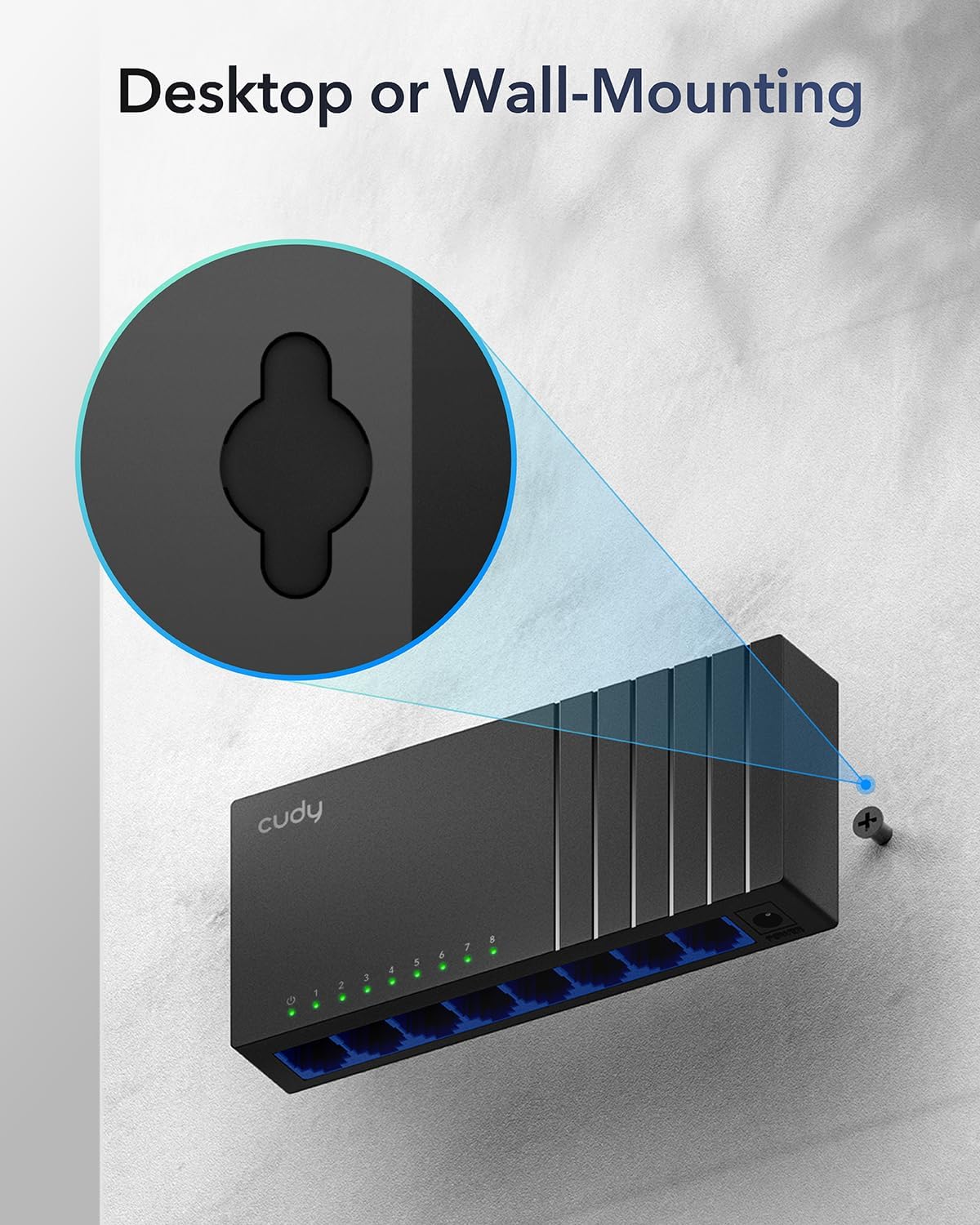
Image: The Cudy GS108D switch with its compact dimensions clearly indicated.
4. Enstriksyon Enstalasyon
The Cudy GS108D switch is designed for simple plug-and-play installation. No complex configuration is required.
Etap 1: Koneksyon pouvwa
- Connect one end of the provided power adapter to the power port on the rear panel of the GS108D switch.
- Branche lòt bout adaptè kouran an nan yon priz elektrik estanda.
- Verify that the Power LED on the front panel illuminates, indicating the switch is receiving power.

Image: The Cudy GS108D switch with its power adapter connected and ready for use.
Etap 2: Koneksyon aparèy
- Connect your network devices (e.g., computer, router, NAS, game console) to any of the 8 RJ45 ports on the front panel using standard Ethernet cables (Cat5e or higher recommended for Gigabit speeds).
- Ensure the Link/Act LED for each connected port illuminates, indicating a successful connection. If the LED is flashing, data is being transmitted.

Image: A laptop being connected to the Cudy GS108D switch with an Ethernet cable, demonstrating a typical setup.
Etap 3: Opsyon aliye
The GS108D supports both desktop placement and wall mounting.
- Plasman Desktop: Simply place the switch on a flat, stable surface.
- Montaj mi: The switch features mounting slots on its underside. Use appropriate screws (not included) to secure the switch to a wall.

Image: The Cudy GS108D switch shown with its wall-mounting slots, illustrating how it can be securely attached to a wall.
5. Operasyon Enstriksyon
Once connected, the Cudy GS108D operates automatically without further user intervention.
Oto-Negosyasyon
Each port on the switch automatically detects the network speed (10/100/1000 Mbps) and duplex mode (Half/Full Duplex) of the connected device and adjusts accordingly for optimal performance.
Optimizasyon trafik
The switch features a 4 Mbit packet buffer to ensure stable and efficient data forwarding, reducing packet loss and improving overall network performance, especially during high traffic loads.
Energy Efficiency (IEEE 802.3az)
The GS108D incorporates energy-efficient Ethernet technology. It automatically adjusts power consumption based on cable length and network traffic, reducing energy usage when ports are idle or when connected devices are turned off.

Image: Visual representation of the power-saving feature, showing reduced energy consumption when ports are idle.
Long-distans transmisyon
The switch supports long-distance Ethernet cable runs, allowing for reliable data transmission up to 170 meters (557 feet) with Cat5e or higher Ethernet cables.

Image: Illustration of the Cudy GS108D's capability for long-distance transmission, up to 170 meters, requiring Cat5e or higher cables.
6. Antretyen
To ensure optimal performance and longevity of your Cudy GS108D switch, follow these maintenance guidelines:
- Plasman: Place the switch in a cool, dry location away from direct sunlight, heat sources, and excessive moisture. Ensure adequate ventilation around the device.
- Netwayaj: Sèvi ak yon twal mou epi sèk pou netwaye deyò switch la. Pa sèvi ak pwodui netwayaj likid oswa ayewosòl.
- Pouvwa: Sèvi ak adaptè kouran ki vini ak li a sèlman. Dekonekte adaptè kouran an pandan tanpèt elektrik oswa lè ou pa itilize li pandan yon bon bout tan.
- Câbles: Ensure all Ethernet cables are securely connected and free from damage.
NAN. Depanaj
If you encounter issues with your Cudy GS108D switch, refer to the following common troubleshooting steps:
Pa gen pouvwa
- Asire w ke adaptè kouran an byen konekte ak switch la ak yon priz elektrik ki fonksyone.
- Tcheke si priz kouran an ap fonksyone lè w branche yon lòt aparèy ladan l.
- Verify that the Power LED on the switch is illuminated. If not, try a different power outlet.
Pa gen lyen/aktivite sou yon pò
- Asire w kab Ethernet la byen branche nan pò switch la ak nan aparèy ki konekte a.
- Try using a different Ethernet cable to rule out cable damage.
- Konekte aparèy la nan yon lòt pò sou switch la.
- Verify that the connected device (e.g., computer, router) is powered on and its network adapter is enabled.
- If connecting to a router, ensure the router's port is active.
Vitès rezo ba
- Ensure you are using Cat5e or higher Ethernet cables for Gigabit speeds. Older Cat5 cables may limit speed.
- Check the Link/Act LED for the port. A solid green light indicates a Gigabit connection. If it's amber or off, there might be a speed mismatch or connection issue.
- Verify that the connected devices also support Gigabit Ethernet.
- Reduce network congestion by limiting simultaneous high-bandwidth activities.
8. Espesifikasyon
| Karakteristik | Deskripsyon |
|---|---|
| Mak | Cudy |
| Nimewo Modèl | GS108D |
| Kantite pò | 8 |
| Entèfas | RJ45 |
| Pousantaj Transfè Done | 1000 Megabit pa segonn (Gigabit) |
| Chanje Kalite | Switch Ethernet |
| Aparèy konpatib | Camera, Desktop, Laptop, Router |
| Voltage | 28 Vòlt (Antre pou adaptè kouran) |
| Tanperati Fonksyònman | 40 ° F a 104 ° F (4.4 ° C a 40 ° C) |
| Case Material Type | Plastik |
| Dimansyon atik (L x W x H) | 7.87" x 5.91" x 5.91" (Product packaging dimensions, actual device is smaller) |
| Pwa atik | 200 gram |
9. Garanti ak sipò
Enfòmasyon sou garanti:
The Cudy GS108D 8-Port Gigabit Ethernet Network Switch comes with a 2-ane garanti apati dat acha a. Tanpri konsève prèv acha ou pou reklamasyon garanti. Garanti sa a kouvri domaj nan materyèl ak nan fabrikasyon anba itilizasyon nòmal.
Sipò teknik:
For technical assistance, troubleshooting, or further inquiries, please visit the official Cudy website or contact Cudy customer support. Cudy is committed to delivering high-performance, user-friendly communication technology and provides resources to help you with your product.
Ou ka souvan jwenn resous sipò, FAQ, ak enfòmasyon pou kontakte sou Cudy Store on Amazon or the main Cudy websit.