
Entwodiksyon
This manual provides detailed instructions for the installation, operation, and maintenance of your Strong SRT 7040 Digital Satellite HD Receiver. Please read this manual carefully before using the device to ensure proper functionality and to prevent damage.

Image: The Strong SRT 7040 DTT Tuner and its retail packaging.
The Strong SRT 7040 is a Full HD digital satellite receiver designed for Free-To-Air (FTA) channels. It features a USB port for multimedia playback and software updates, and supports Dolby Audio for enhanced sound quality.
1. Enstalasyon
1.1 Debake
Retire tout konpozan yo nan anbalaj la avèk prekosyon. Asire w ke atik sa yo la:
- Strong SRT 7040 DTT Tuner
- Kontwòl remote (avèk 2 pil AAA)
- Adaptè pouvwa
- Manyèl itilizatè
1.2 Konekte aparèy la
Follow these steps to connect your SRT 7040 receiver:
- Antre satelit: Connect your satellite dish cable to the SAT AN port on the back of the receiver.
- Sòti Videyo (HDMI): Konekte yon kab HDMI nan HDMI port on the receiver to an HDMI input on your television.
- Video Output (SCART): Alternatively, for older televisions, connect a SCART cable from the TV SCART port on the receiver to the SCART input on your television.
- Audio Output (Digital): Pou odyo dijital, konekte yon kab koaksyal ki soti nan COAXIAL S/PDIF port to your digital audio amplifier.
- Audio Output (Analog): For analog audio, connect RCA cables from the AUDIO R/L ports to your audio Hi-Fi amplifier.
- Aparèy USB: If desired, connect a USB storage device to the USB port for multimedia playback or software updates.
- Pouvwa: Konekte adaptè pouvwa a nan 12V === 1.5A input on the receiver, then plug the adapter into a wall outlet.

Image: Rear panel connections of the Strong SRT 7040 DTT Tuner, showing SAT IN, HDMI, TV SCART, COAXIAL S/PDIF, AUDIO R/L, USB, and Power input.
1.3 First-Time Installation and Channel Scan
Upon first power-on, the receiver will guide you through an initial setup wizard. Follow the on-screen prompts to select your language, country, and perform an automatic channel scan. This process will detect and store all available satellite channels.
2. Operasyon Enstriksyon
2.1 Remote Control Overview
The included remote control allows you to access all functions of the SRT 7040. Insert the two AAA batteries into the remote control, ensuring correct polarity.

Image: The remote control for the Strong SRT 7040 DTT Tuner, showing buttons for power, numbers, volume, channel, menu, and special functions.
2.2 Fonksyon debaz
- Pouvwa: Peze a POUVWA button to turn the receiver on or off (standby mode).
- Seleksyon chanèl: Sèvi ak la CH+ / CH- buttons to change channels sequentially, or use the numeric keypad to enter a channel number directly.
- Kontwòl Volim: Sèvi ak la VOL+ / VOL- bouton pou ajiste volim odyo a.
- Bèbè: Peze a BÈN bouton pou fèmen odyo a tanporèman.
2.3 Navigasyon meni
Peze a MENI button to access the main menu. Use the arrow keys (UP, DESANN, GÒCH, DWA) pou navige nan opsyon yo ak OK pou konfime seleksyon yo. Peze Sòti to return to the previous screen or live TV.
2.4 Karakteristik espesyal
- Timer: The receiver supports programming timers for recording or switching to specific channels at scheduled times. Access this feature via the menu.
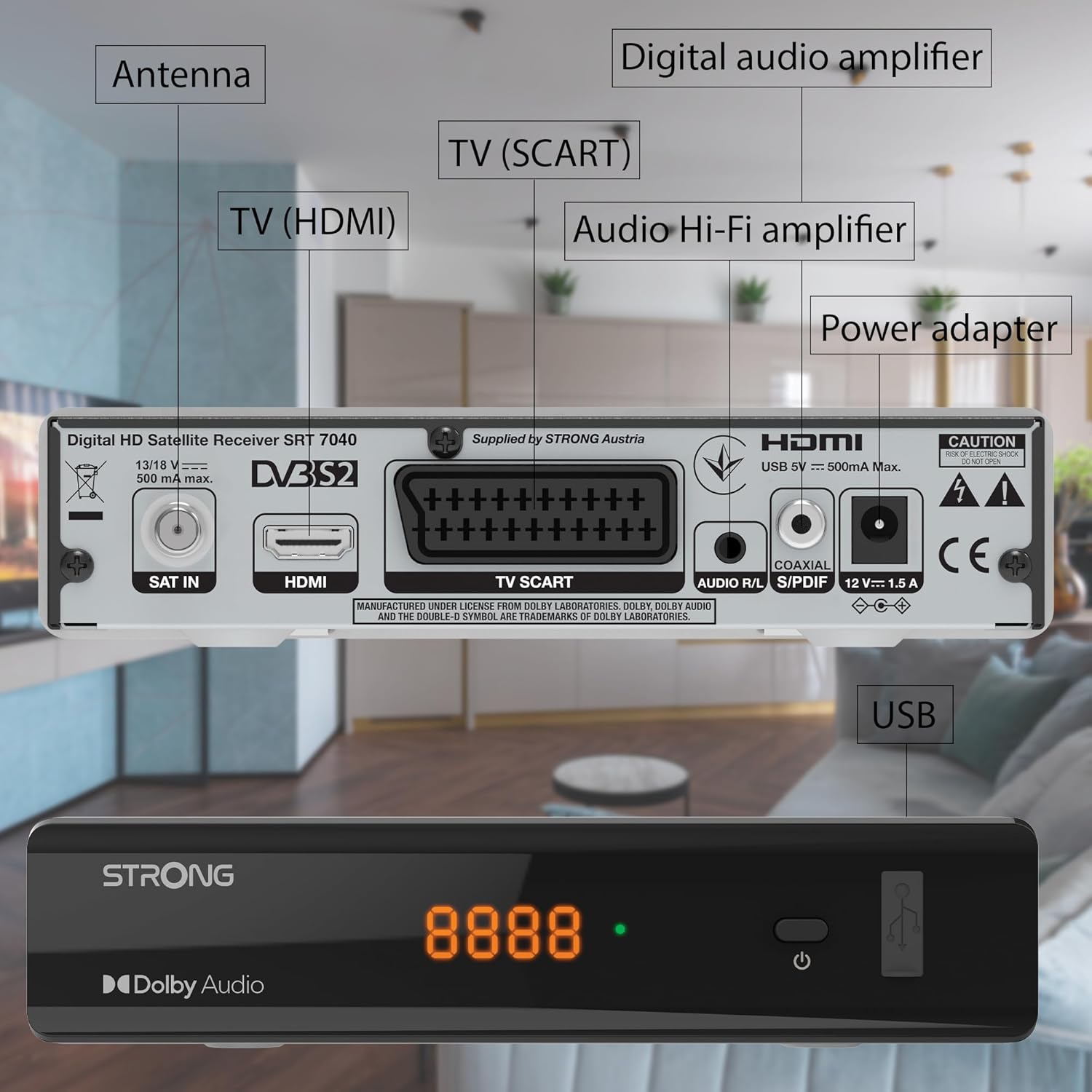
Image: The Strong SRT 7040 DTT Tuner displaying a timer icon, indicating its scheduling capabilities.
- Favorite Lists: Create customized lists of your preferred channels for quick access.
- Sou-titres: Enable or disable subtitles for compatible broadcasts using the SUB bouton sou remote la.
- Gid Pwogram Elektwonik (EPG): Peze a EPG bouton pou view program information for upcoming broadcasts.
- Dolby Audio: The receiver supports Dolby Audio for a high-quality sound experience.

Image: The Strong SRT 7040 DTT Tuner with the Dolby Audio logo, illustrating its sound processing capability.
3. Antretyen
3.1 Netwayaj
To clean the receiver, disconnect it from the power supply. Use a soft, dry cloth to wipe the exterior. Do not use liquid cleaners, aerosols, or abrasive materials, as these can damage the finish or internal components.
3.2 Mizajou lojisyèl
Tcheke manifakti a regilyèman website for available software updates. Updates can improve performance, add new features, or resolve issues. Software updates are typically performed via the USB port following specific instructions provided with the update file.
3.3 Enfòmasyon sou Sekirite
- Do not open the receiver casing. Pa gen pyès ki ka sèvi ak men itilizatè a anndan an. Konfye tout antretyen bay pèsonèl kalifye.
- Keep the receiver away from direct sunlight, heat sources, and moisture.
- Asire w ke gen ase vantilasyon toutotou aparèy la pou anpeche l chofe twòp.
- Sèlman sèvi ak adaptè pouvwa yo bay la.
NAN. Depanaj
If you encounter problems with your SRT 7040, consult the following table before contacting support.
| Pwoblèm | Kòz posib | Solisyon |
|---|---|---|
| Pa gen pouvwa | Adaptè kouran an pa konekte; Priz kouran an gen pwoblèm | Check power adapter connection; Try a different power outlet |
| Pa gen siyal / Ekran nwa | Satellite cable loose or disconnected; Incorrect input selected on TV; Satellite dish alignment issue | Check SAT IN cable connection; Ensure TV is on correct HDMI/SCART input; Perform a channel scan; Consult a professional for dish alignment if necessary |
| Remote kontwòl pa travay | Batteries depleted or incorrectly inserted; Obstruction between remote and receiver | Replace batteries; Ensure correct polarity; Remove any obstructions; Point remote directly at receiver |
| Pòv bon jan kalite foto | Weak satellite signal; Incorrect display settings | Check satellite signal strength in menu; Adjust TV display settings; Ensure Full HD content is being broadcast |
5. Espesifikasyon
The following are the technical specifications for the Strong SRT 7040 Digital Satellite HD Receiver:
- Modèl: SRT 7040 (SAT FTA Full HD)
- Mak: Fò
- Dimansyon: 3.39 x 6.46 x 1.38 pous (8.6 x 16.4 x 3.5 cm)
- Pwa atik: 9.2 ons (260 gram)
- Koulè: Nwa
- Koneksyon Teknoloji: USB
- Voltage: 100 - 240 V
- Frekans: 50 - 60 Hz
- Konsomasyon pouvwa: 18 kWh (operational, typical)
- Tanperati travay: 0ºC a 40ºC
- Imidite relatif: 10% - 95%
- Batri: 2 pil AAA (enkli pou kontwòl remote la)
- Spesifikasyon satisfè: DVB-S2
- Enkli: Wally Receiver
6. Garanti ak sipò
For warranty information and technical support, please refer to the warranty card included in your product packaging or visit the official Strong websit la. Kenbe resi acha ou kòm prèv acha pou reklamasyon garanti.
For further assistance, you may contact Strong customer service through the contact details provided on their official websit.