
1. Enstalasyon
This section guides you through the initial setup of your Blackview Telefòn entelijan A52.
1.1 Kontni pake a
Asire w tout atik yo prezan nan pakè a:
- Nwaview A52 Smartphone
- USB kab
- Adaptè pouvwa
- SIM Eject Zouti
- Gid pou kòmanse rapidman (si li enkli)
1.2 Mete kat SIM ak SD
Nwa aview A52 supports dual SIM cards and one microSD card for expanded storage.
- Jwenn plato kat SIM lan sou bò aparèy la.
- Mete zouti pou ejecte kat SIM lan nan ti twou ki akote plato a epi peze dousman jiskaske plato a soti.
- Mete kat Nano-SIM ou yo ak/oswa kat microSD ou yo nan fant ki fèt pou sa sou plato a. Asire w ke kontak lò yo fè fas anba.
- Pouse plato a tounen nan telefòn nan ak anpil atansyon jiskaske li fè yon klik.
1.3 Chaje Aparèy la
Anvan premye itilizasyon an, chaje Black ou nèt.view A52.
- Konekte kab USB a ak adaptè pouvwa a.
- Ploge adaptè pouvwa a nan yon priz miray.
- Konekte kab USB a nan pò chaje telefòn ou an.
- Endikatè chaj la ap parèt sou ekran an. Dekonekte chajè a yon fwa batri a plen.
1.4 Limen ak Konfigirasyon Inisyal
- Peze epi kenbe bouton Power la (ki sitiye sou bò a) jiskaske bouton nwa aview logo a parèt.
- Follow the on-screen prompts to select your language, connect to a Wi-Fi network, set up your Google account, and configure security options like Face Unlock.
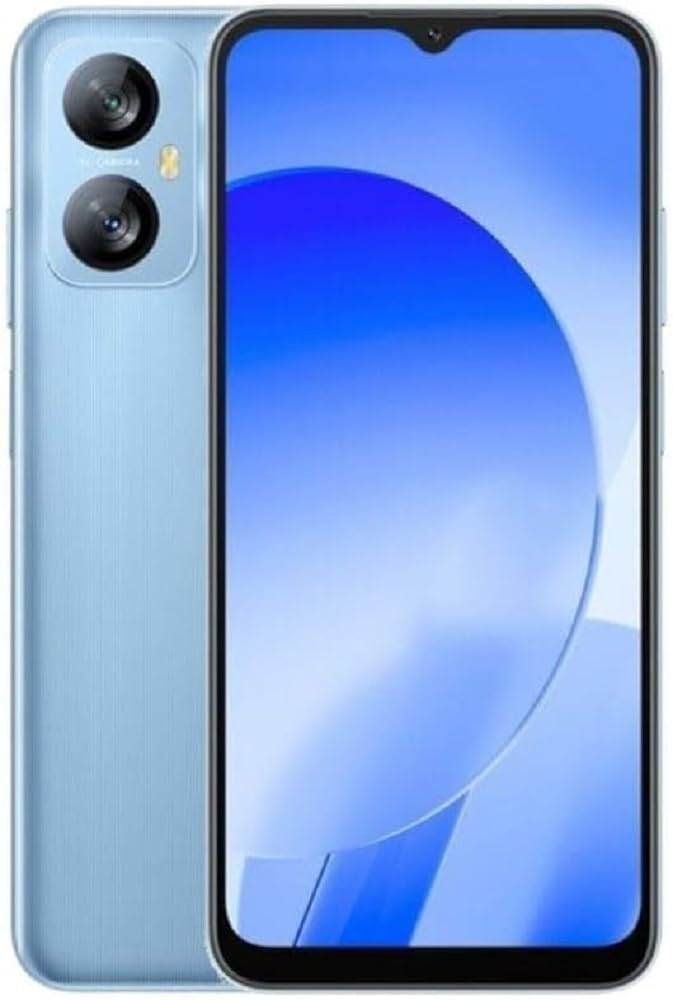
Imaj: Nwa aview A52 smartphone, showcasing its display and design. This image provides a general overview of the device's appearance.
2. Opere machin nwa ou aview A52
This section details the basic functions and features of your Blackview Telefòn entelijan A52.
2.1 Navigasyon debaz
- Jès ekran taktil: Tape pou chwazi, glise pou defile, pense pou agrandi.
- Ekran Kay: Jwenn aksè a aplikasyon, widjèt ak notifikasyon ou yo. Glise anba soti anwo pou wè panèl notifikasyon yo ak paramèt rapid yo.
- Tiwa aplikasyon: Glise anlè soti anba ekran prensipal la pou view tout aplikasyon enstale.
2.2 Apèl ak Kontak
- Fè yon apèl: Open the 'Phone' app, enter the number, and tap the call icon.
- Ajoute yon Kontak: Open the 'Contacts' app, tap the '+' icon, and enter the contact details.
2.3 Mesaj
Pou voye epi resevwa mesaj tèks (SMS):
- Louvri aplikasyon 'Mesaj' la.
- Tape sou ikòn 'Kòmanse chat' la oubyen ikòn '+' la pou konpoze yon nouvo mesaj.
- Antre nimewo moun k ap resevwa a oubyen chwazi nan kontak yo, epi tape mesaj ou a.
- Tape ikòn voye a.
2.4 Entènèt ak Konektivite
- Wi-Fi: Ale nan Anviwònman > Rezo ak entènèt > Wi-Fi. Aktive Wi-Fi a epi chwazi rezo ou vle a.
- Done mobil: Go to Settings > Network & internet > Mobile network. Ensure Mobile data is enabled.
- Bluetooth: Go to Settings > Connected devices > Bluetooth. Turn Bluetooth on to pair with other devices.
2.5 Fonksyon Kamera
Nwa ouview A52 features a 13MP rear camera and a 5MP front camera.
- Louvri aplikasyon 'Kamera' a.
- Tape bouton deklanchè a pou pran yon foto.
- Chanje ant kamera devan ak dèyè a lè w sèvi ak ikòn chanjman kamera a.
- Explore modes like 'Beauty Mode' for enhanced selfies.
2.6 Karakteristik Sekirite Sosyal
Nwa aview A52 includes Face Unlock for convenient and secure access.
- Ale nan Anviwònman > Sekirite > Debloke figi.
- Swiv enstriksyon ki sou ekran an pou anrejistre figi ou.
2.7 Doke OS G0 V3.0 Features
The device runs on Android 12 with Doke OS G0 V3.0, offering features such as:
- Dual-Window Entertainment: Split your screen to use two apps simultaneously.
- Manadjè Sistèm: Optimize performance, manage battery, and clean storage.
3. Antretyen
Bon antretyen asire lonjevite ak pèfòmans optimal Black ou a.view A52.
3.1 Netwaye Aparèy la
- Sèvi ak yon twal mou ki pa gen pousyè pou netwaye ekran an ak kò a.
- Evite itilize pwodui chimik ki agresif, pwodui netwayaj abrazif, oswa espre ayewosòl.
- Kenbe pò yo pwòp san pousyè ak debri.
3.2 Swen Batri
Nwa aview A52 is equipped with a 5180mAh battery.
- Evite tanperati ekstrèm, paske yo ka diminye lavi batri a.
- Pa kite telefòn nan ap chaje pou yon bon bout tan apre li fin chaje nèt.
- Sèvi sèlman ak plato ak kab orijinal la oubyen plato ak kab konpatib ki sètifye.
3.3 Mizajou lojisyèl
Tcheke epi enstale mizajou lojisyèl regilyèman pou asire aparèy ou an gen dènye karakteristik ak patch sekirite yo.
- Ale nan Anviwònman> Sistèm> Sistèm aktyalizasyon.
- Swiv enstriksyon ki sou ekran an pou tcheke epi enstale mizajou yo.
3.4 Jesyon Depo
Your device has 32GB of internal storage, expandable via a microSD card.
- Efase regilyèman sa ki pa nesesè files, apps, and media to free up space.
- Sèvi ak sèvis depo nwaj pou backup.
- Deplase an gwo files to an inserted microSD card.
NAN. Depanaj
Seksyon sa a adrese pwoblèm komen ou ka rankontre ak Black ou a.view A52.
4.1 Pwoblèm komen ak solisyon
- Aparèy pa limen:
- Asire w batri a chaje. Konekte chajè a epi tann kèk minit anvan ou eseye limen l.
- Peze epi kenbe bouton Pouvwa a pou omwen 10-15 segonn pou fòse yon rekòmanse.
- Ekran an pa reponn:
- Restart the device by holding the Power button.
- If the issue persists, perform a factory reset (see section 4.2).
- Network Issues (No Signal/Wi-Fi Disconnection):
- Aktive oubyen dezaktive Mòd Avyon an.
- Rekòmanse aparèy la.
- Tcheke ensèsyon kat SIM.
- Pou Wi-Fi a, bliye rezo a epi rekonekte li.
- Batri Vide byen vit:
- Diminye klète ekran an.
- Fèmen aplikasyon ki pa itilize yo kouri nan background nan.
- Disable unnecessary features like Bluetooth, GPS, or Wi-Fi when not in use.
- Tcheke itilizasyon batri a nan Anviwònman pou idantifye aplikasyon ki konsome anpil enèji.
4.2 Reset faktori
Warning: A factory reset will erase all data on your phone, including apps, photos, and settings. Back up important data before proceeding.
- Ale nan Anviwònman > Sistèm > Opsyon Reyajiste.
- Chwazi 'Efase tout done yo (reyajiste nan paramèt faktori)'.
- Konfime desizyon w lan epi antre kòd PIN/modèl ou a si yo mande w.
- The phone will restart and restore to its factory settings.
5. Espesifikasyon
Espesifikasyon teknik kle pou Nwa aview Telefòn entelijan A52.
| Karakteristik | Spesifikasyon |
|---|---|
| Modèl | Nwaview A52 |
| Ekspozisyon | 6.5-inch HD+ Waterdrop Display |
| Processeur | Octa-core SC9863A1 (up to 1.6GHz) |
| RAM | 2GB |
| Depo Entèn | 32GB |
| Depo dilatabl | Wi, atravè kat microSD |
| Kamera dèyè | 13MP |
| Kamera devan | 5MP |
| Kapasite batri | 5180mAh |
| Sistèm operasyon | Android 12 with Doke OS G0 V3.0 |
| Koneksyon | 4G LTE, Wi-Fi, Bluetooth |
| Navigasyon | 3-in-1 Navigation System |
| Dimansyon (L x W x H) | 19.69 x 19.69 x 11.02 pous |
| Koulè | Ble |
6. Garanti & Sipò
This section provides general information regarding product warranty and customer support.
6.1 Pwodwi Garanti
Nwa ouview A52 smartphone is covered by a limited manufacturer's warranty. The specific terms and duration of the warranty may vary by region and point of purchase. Please refer to the warranty card included in your product packaging or visit the official Blackview website for detailed information regarding warranty coverage, terms, and conditions.
6.2 Sipò pou Kliyan
For technical assistance, troubleshooting beyond this manual, or warranty claims, please contact Blackview sipò pou kliyan.
- Sipò sou entènèt: Vizite Nwa ofisyèl laview websit pou FAQ, resous sipò, ak fòm kontak.
- Sipò Imèl: Refer to your product documentation for the appropriate support email address.
When contacting support, please have your device model (A52) and purchase information readily available.