
Entwodiksyon
This manual provides essential information for the safe and efficient use of your ADEQWAT Magnetic Wall Charger with USB-C Cable. Please read these instructions carefully before using the product and retain them for future reference.
Enfòmasyon sou Sekirite
- Pa ekspoze chargeur a nan dlo, imidite, oswa tanperati ekstrèm.
- Do not attempt to disassemble, repair, or modify the charger. This may void the warranty and pose safety risks.
- Kenbe soti nan atenn timoun yo.
- Ensure the charger is plugged into a compatible power outlet.
- Disconnect the charger from the power outlet when not in use or during electrical storms.
- Evite lage chajè a oswa soumèt li a gwo enpak.
Kontni pake
Verifye ke tout atik yo prezan nan pakè a:
- ADEQWAT Magnetic Wall Charger
- Entegre USB-C kab
- Additional Metallic Plate (for magnetic attachment)
Enstalasyon
- Depliye ploge a: Gently pull out the retractable plug from the back of the charger until it locks into place.

Imaj: Dèyè view of the charger with the retractable plug extended.
- Konekte nan priz kouran: Insert the charger's plug into a standard wall power outlet.

Image: The charger plugged into a wall outlet, demonstrating its use with a smartphone and tablet.
- Optional: Attach Metallic Plate: If you wish to use the magnetic feature with a device that is not inherently magnetic, attach the provided metallic plate to the back of your smartphone or its case. Ensure the plate is securely positioned.
Opere
- Charging with USB-C Cable: Connect the integrated USB-C cable to your compatible device's USB-C port. Charging will begin automatically.
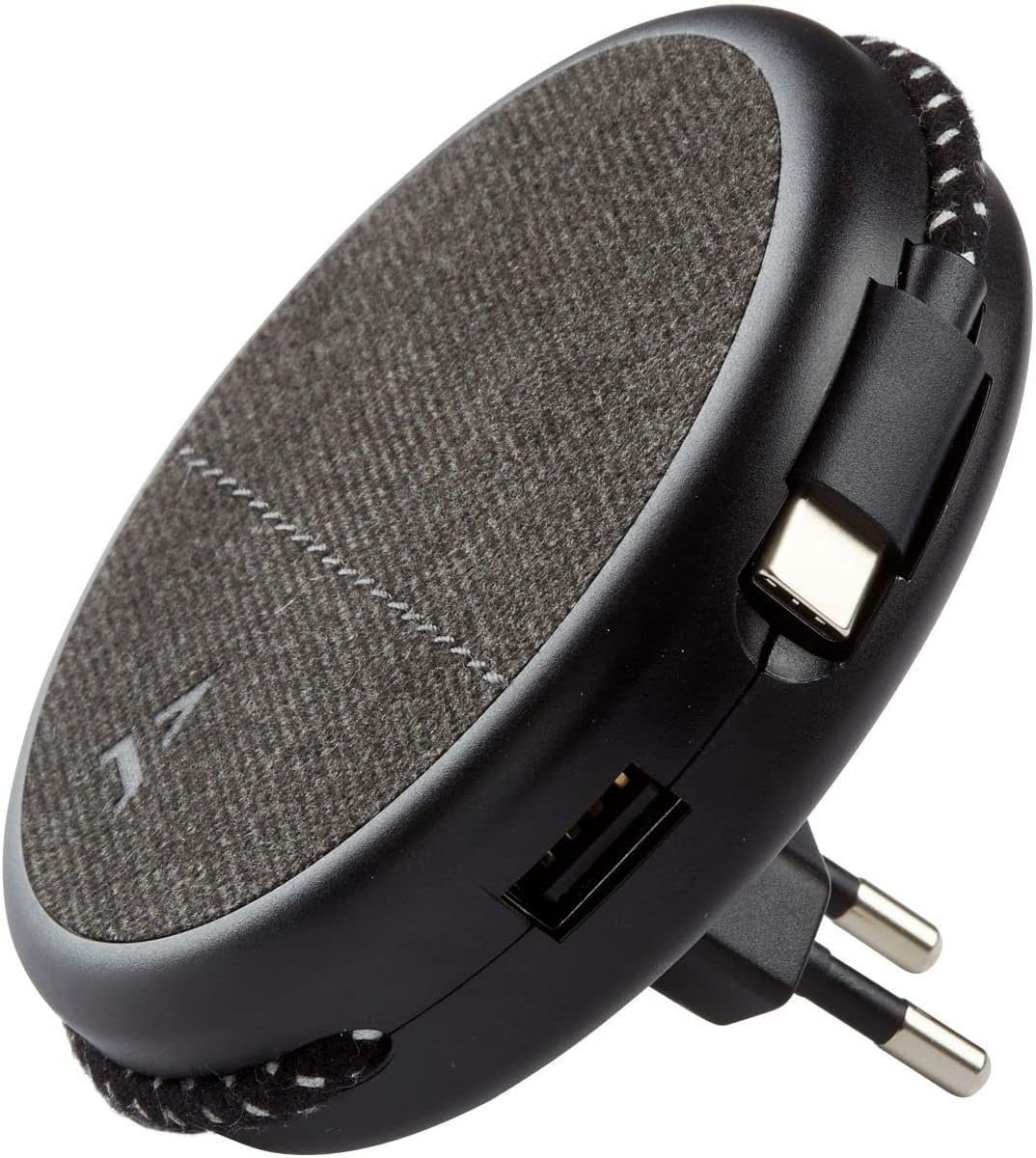
Image: Close-up of the charger, highlighting the integrated USB-C cable and an additional USB-A port.
- Charging with USB-A Port: For devices requiring a USB-A connection, use your own USB-A cable and plug it into the USB-A port on the charger.
- Sèvi ak karakteristik mayetik la: Once the charger is plugged into a wall outlet, you can magnetically attach your smartphone (with or without the metallic plate) to the charger's surface for convenient holding while charging.
Antretyen
- Netwayaj: Dekonekte plato a nan priz kouran an anvan ou netwaye li. Sèvi ak yon twal mou epi sèk pou siye sifas la. Pa sèvi ak pwodui netwayaj likid oswa materyèl abrazif.
- Depo: When not in use, store the charger in a cool, dry place, away from direct sunlight and extreme temperatures. The retractable plug can be folded back into the charger for compact storage.
Depanaj
| Pwoblèm | Kòz posib | Solisyon |
|---|---|---|
| Aparèy pa chaje. | Chargeur a pa byen branche. Device cable faulty. Device incompatible. | Ensure the charger is fully inserted into the wall outlet. Eseye yon lòt kab. Verify device compatibility with USB charging standards. |
| Atachman mayetik la fèb. | Device not magnetic. Metallic plate not properly attached. | Ensure your device has a magnetic back or use the provided metallic plate. Re-position or re-attach the metallic plate securely. |
| Chajè a santi l cho. | Operasyon nòmal. Surcharge. | A slight warmth during charging is normal. If it becomes excessively hot, disconnect immediately and contact support. Avoid charging multiple high-power devices simultaneously if it causes overheating. |
Espesifikasyon
| Mak | ADEQWAT |
| Nimewo Modèl | 8005668 |
| Koulè | Nwa |
| Koneksyon | USB (Integrated USB-C Cable, 1x USB-A Port) |
| Karakteristik espesyal | Mayetik |
| Total pò USB | 1 (USB-A) + 1 (Integrated USB-C) |
| Aparèy konpatib | Cellular Phones, Tablets |
| Sorti pouvwa | 17 Watts |
| Kantite Atik | 2 (Charger + Metallic Plate) |
| Sous pouvwa | Fil elektrik |
| Pòtab | Wi |
Garanti ak sipò
For warranty information or technical support, please refer to the documentation provided with your purchase or visit the official ADEQWAT websit la. Kenbe prèv acha ou pou reklamasyon garanti.