
1. Entwodiksyon
Thank you for choosing the HOREVO LED Ceiling Light with Remote Control and Bluetooth Speaker. This flush mount light fixture is designed to provide versatile lighting and audio entertainment for various indoor spaces. It features dimmable and color-changing LED lights, an integrated Bluetooth speaker, and convenient remote control operation. Please read this manual thoroughly before installation and use to ensure proper function and safety.
2. Enfòmasyon sou Sekirite
- Sekirite elektrik: Installation should be performed by a qualified electrician or a person with sufficient electrical knowledge to avoid electric shock or fire hazards. Always turn off the main power supply at the circuit breaker before beginning installation or maintenance.
- Voltage: Asire ekipman pou pouvwa a voltage matches the fixture's requirement (110 Volts).
- Kote: This fixture is designed for indoor use. To ensure long-term durability and optimal performance, avoid installation in areas with sustained high humidity, such as certain bathrooms, despite its water resistance level.
- Manyen: Handle the light fixture with care to prevent damage. Do not modify the product in any way.
3. Pake kontni
Verifye ke tout konpozan yo prezan anvan enstalasyon an:
- HOREVO LED Ceiling Light Fixture
- Kontwòl Remote
- Installation Hardware (screws, wire nuts, etc. - may vary, refer to actual packaging)
- Manyèl Itilizatè (dokiman sa a)
4. Pwodwi Features
- Oratè Bluetooth entegre: Connect your smartphone or other Bluetooth-enabled devices to play audio directly through the light fixture.
- Dimmable ekleraj: Adjust brightness from 1% to 100% using the remote control.
- Color Changing (RGB) & Color Temperature Adjustment: Choose from 7 single RGB colors, gradient color modes, or adjustable white light from 2700K (warm) to 6500K (cool daylight).
- Kontwòl Remote: Conveniently manage all light and speaker functions.
- LED ki efikas nan enèji: 24W power consumption, equivalent to a 150W incandescent bulb, saving over 85% on energy bills.
- Segondè CRI 80+: Renders colors vividly and accurately.
- Fonksyon memwa: Retains last used settings for light color and brightness.
- Fonksyon distribisyon: Mete yon revèy pou fèmen otomatik.
5. Enstriksyon Enstalasyon
This is a wired light fixture and requires proper electrical installation. If you are unsure about any steps, consult a qualified electrician.
- Etenn pouvwa: Before starting, ensure the power supply to the installation area is completely turned off at the main circuit breaker.
- Prepare Sifas Montage: Ensure the ceiling surface is clean, dry, and capable of supporting the fixture's weight.
- Sipò pou monte: Attach the mounting bracket to the junction box in the ceiling using the provided screws.
- Koneksyon fil elektrik: Connect the fixture's wires to the household electrical wires according to local electrical codes. Typically, connect the black wire from the fixture to the black wire from the ceiling (live), the white wire from the fixture to the white wire from the ceiling (neutral), and the ground wire to the ground wire. Secure connections with wire nuts.
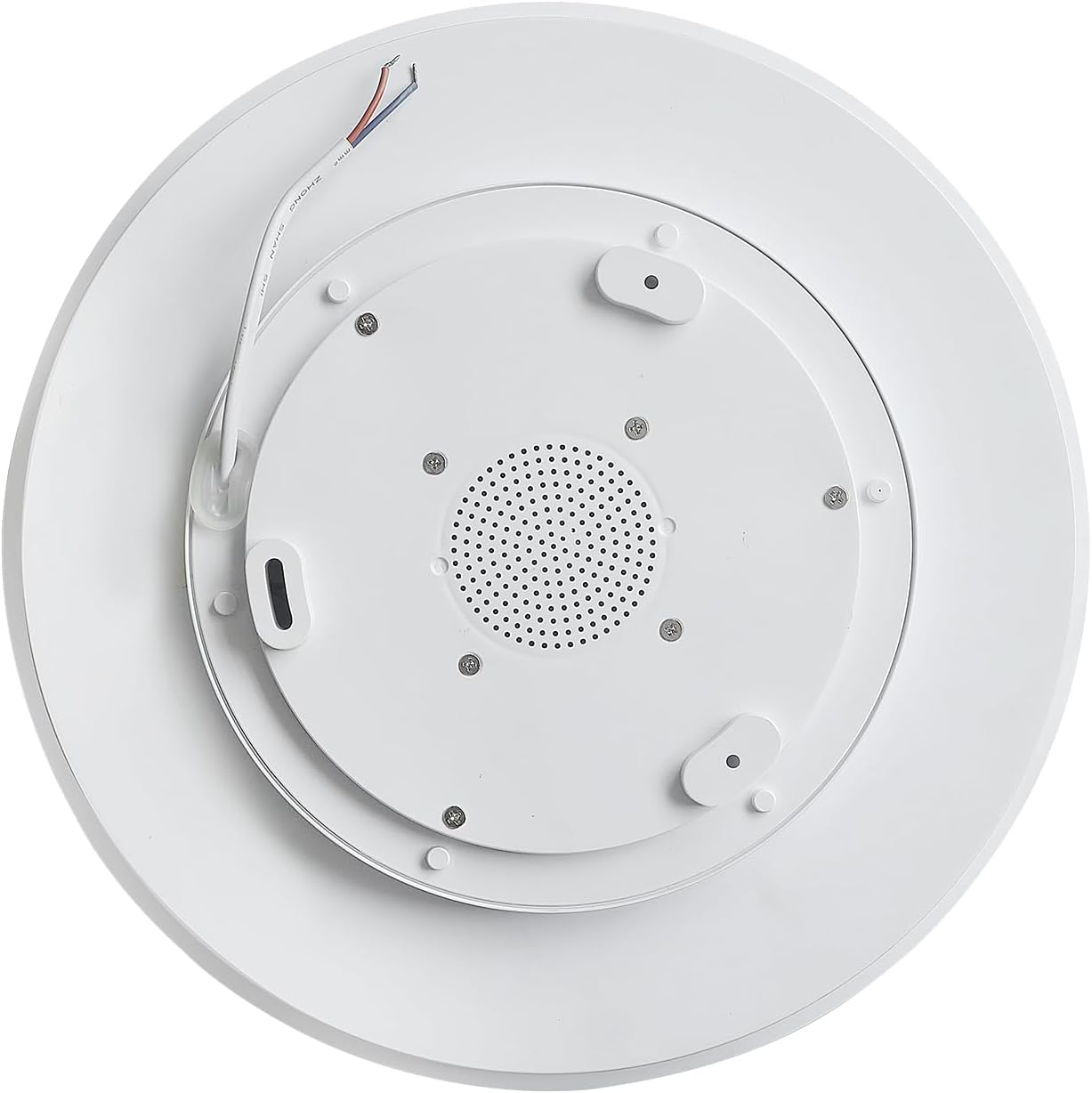
- Aparèy sekirite: Carefully push the wired connections into the junction box. Align the fixture with the mounting bracket and secure it in place with the provided screws.
- Retabli pouvwa: Once the fixture is securely installed, turn the main power supply back on at the circuit breaker.
6. Operasyon Enstriksyon
6.1 Fonksyon kontwòl Remote
The included remote control allows full command over the light and speaker features.

- Bouton pouvwa: Limen oswa etenn limyè a.
- Ajisteman klète: Ogmante oswa diminye entansite limyè a.
- Color Temperature (K) Buttons: Adjust white light from warm (2700K) to neutral (4000K) to cool (6500K).
- Bouton RGB: Cycles through various single color and gradient RGB modes.
- Kontwòl Mizik: Play/Pause, Skip Forward/Backward, Volume Up/Down for the Bluetooth speaker.
- Fonksyon distribisyon: Activates a timer for automatic light shut-off.
6.2 Bluetooth Pairing
To connect your device to the integrated Bluetooth speaker:
- Asire ke aparèy limyè a limen.
- Sou telefòn entelijan ou oswa aparèy ki gen Bluetooth, ale nan paramèt Bluetooth yo.
- Chèche pou available devices and select "AnSLong".
- Si yo mande w yon modpas, antre "1111".
- Once connected, you will hear a confirmation tone from the speaker. You can now play audio through the light fixture.
Note: Only one mobile phone can be connected to the light's Bluetooth at the same time. Disconnect the current device to connect another.
6.3 Color Changing and Dimming
The light offers a wide range of lighting options:
- Mòd Limyè Blan: Use the 'K' buttons on the remote to cycle between 2700K (warm), 4000K (neutral), and 6500K (cool daylight) white light.
- Mòd koulè RGB: Press the 'RGB' button to activate the full-spectrum color-changing feature. This includes 7 single color light modes and gradient colorful lights.
- Dimming: Use the brightness adjustment buttons to set the light intensity from 1% to 100% for any chosen color or white light setting.

7. Antretyen
- Netwayaj: Asire w ou koupe kouran an anvan ou netwaye li. Siye aparèy la avèk yon twal mou epi sèk. Pa sèvi ak pwodui netwayaj abrazif oswa solvan, paske yo ka domaje fini an.
- Ranplasman anpoul: Sous limyè LED la entegre epi itilizatè a pa ka ranplase li.
NAN. Depanaj
| Pwoblèm | Kòz posib | Solisyon |
|---|---|---|
| Limyè pa limen. | Pa gen kouran, fil elektrik ki lach, aparèy ki gen pwoblèm. | Check circuit breaker. Verify wiring connections. If problem persists, contact support. |
| Kontwòl remote pa reponn. | Remote battery low, remote not paired, interference. | Replace remote batteries. Try switching between warm and cool light by quickly pressing the wall switch. Ensure no obstructions between remote and light. |
| Pwoblèm koneksyon Bluetooth. | Incorrect pairing, device too far, interference. | Ensure "AnSLong" is selected and password "1111" is used. Move device closer to the light. Disconnect other Bluetooth devices. |
| Light color changes unexpectedly when using wall switch. | This is a feature. | The light is designed to cycle through warm and cool white light by quickly toggling the wall switch. Use the remote for precise control. |
9. Espesifikasyon
| Karakteristik | Detay |
|---|---|
| Nimewo Modèl | X002 |
| Mak | HOREVO |
| Sous pouvwa | Fil elektrik |
| Wattage | 24 Watts |
| Voltage | 110 Volts |
| Klète | 1800 Lumen |
| Tanperati Koulè | 2700K - 6500K (Dimabl) |
| Koulè limyè | RGB, White |
| Metòd kontwòl | Kontwòl Remote |
| Materyèl | Metal, Plastik |
| Dimansyon (L x W x H) | 11.02"L x 11.02"L x 2.36"H |
| Pwa atik | 1.1 liv |
| Kalite enstalasyon | Flush Mount |
| Itilizasyon Andedan kay la / Deyò | Andedan kay la |
10. Garanti ak sipò
This HOREVO LED Ceiling Light comes with a Garanti limite. For specific details regarding warranty coverage, duration, and terms, please refer to the product packaging or contact the seller directly through your purchase platform.
For technical support, troubleshooting assistance beyond this manual, or to inquire about replacement parts, please contact HOREVO customer service or the seller from whom you purchased the product. Please have your model number (X002) and purchase details ready when contacting support.