
Elite Aria
Manyèl Itilizatè Vantilatè Refwadisman Entelijan Elite Aria a
Model: Aria (Part No. 3204003750)
1. Entwodiksyon
The Elite Aria Smart Cooling Fan is an advanced device designed to enhance your indoor cycling experience by replicating outdoor ride conditions. It features intelligent airflow adjustment based on your workout intensity and data, reaching speeds up to 50 km/h. The Aria fan offers extensive compatibility with various sensors and devices, ensuring a highly immersive and effective training environment.
This manual provides essential information for the safe and efficient operation, setup, and maintenance of your Elite Aria Smart Cooling Fan. Please read it thoroughly before using the product.
2. Enfòmasyon sou Sekirite
- Always ensure the fan is placed on a stable, level surface to prevent tipping.
- Kenbe men, cheve, ak rad lach lwen lam vantilatè a pandan l ap fonksyone.
- Pa fè vantilatè a fonksyone si kòd kouran an oswa ploge a domaje.
- Do not immerse the fan in water or expose it to excessive moisture.
- Debranche vantilatè a nan priz kouran an anvan ou netwaye li oswa fè nenpòt antretyen.
- Aparèy sa a pa fèt pou itilize pa moun (ki gen ladan timoun) ki gen kapasite fizik, sansoryèl oswa mantal redwi, oswa ki pa gen eksperyans ak konesans, sof si yo te ba yo sipèvizyon oswa enstriksyon konsènan itilizasyon aparèy la pa yon moun ki responsab sekirite yo.
3. Pake kontni
Verifye ke tout atik yo prezan nan pakè a:
- Elite Aria Smart Fan Unit
- Adaptè pouvwa
- 2 x Activated Carbon Filters (pre-installed or separate)
- Manyèl Itilizatè (dokiman sa a)
4. Enstalasyon
4.1 Debalaj ak plasman
- Carefully remove the Elite Aria Smart Cooling Fan from its packaging.
- Place the fan on a flat, stable surface in front of your training setup.
- Adjust the fan's angle to optimize airflow. The Aria features 10 adjustable positions, ranging from 0° to 50°, to best cover a cyclist's body shape.
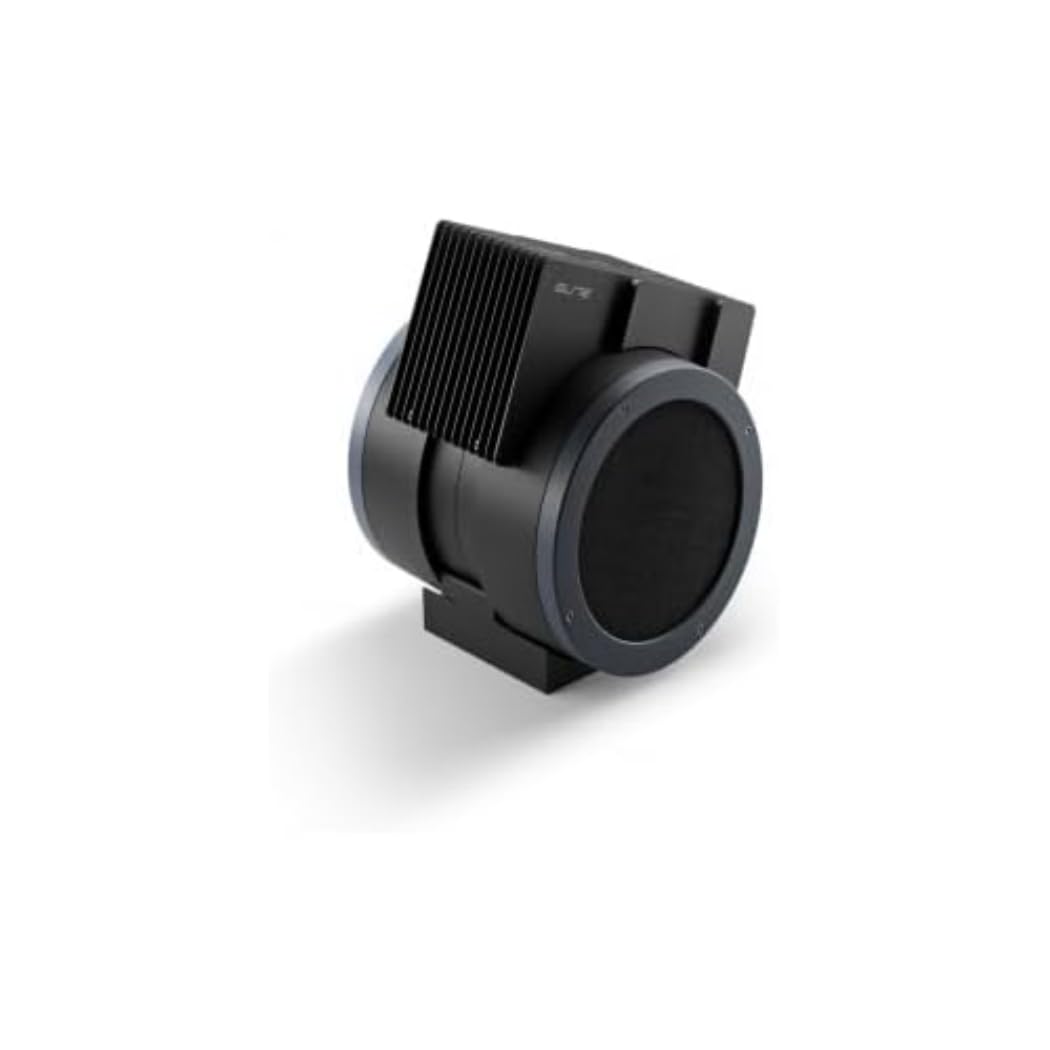
An image showing the Elite Aria Smart Cooling Fan, a black, cylindrical device with a rectangular top section containing cooling fins, designed for indoor cycling training.
4.2 Koneksyon pouvwa
- Connect the power adapter to the fan's power input port.
- Ploge adaptè pouvwa a nan yon priz elektrik apwopriye.
- The fan will power on in standby mode or manual mode, indicated by the control panel lights.
4.3 Enstalasyon Filtè (si li pa deja enstale)
The Aria includes 2 activated carbon filters designed to filter air and remove workout odors. If not pre-installed, follow these steps:
- Locate the filter compartments on the fan (refer to the diagram in the quick start guide if available).
- Insert the activated carbon filters into their respective slots. Ensure they are securely seated.
5. Operasyon Modes
5.1 Manyèl Mode
The Aria fan can be operated manually using the small keyboard on the unit:
- Bouton pouvwa: Press to turn the fan on/off or activate standby mode.
- Ajisteman vitès: Use the dedicated buttons to cycle through 4 manual wind intensity levels.
- Mode sibstiti: Activate standby mode when not actively training.
5.2 Smart Mode (Automatic Adjustment)
The Aria fan's primary feature is its ability to automatically adjust airflow based on your workout data. It communicates wirelessly with various sensors and devices:
- ANT+ FE-C & ANT+ Speed Devices/Sensors: For speed-based airflow.
- ANT+ Power Meters: For power-based airflow.
- ANT+ & BLE Heart Rate Monitors: For heart rate-based airflow.
- ANT+ Body Temperature Sensors: For body temperature-based airflow.
To pair with a device or sensor:
- Ensure your sensor/device is active and within range.
- On the Aria's keyboard, press the button to select the desired data source (speed, power, heart rate, body temperature).
- The fan will automatically search for and connect to compatible sensors. Once connected, airflow will adjust dynamically.
5.3 My E-Training App Control
The Elite Aria fan can also be controlled via the My E-Training app, providing quick access to all main functions and advanced settings:
- Download and install the My E-Training app on your smartphone or tablet.
- Open the app and ensure Bluetooth is enabled on your device.
- Follow the in-app instructions to connect to your Elite Aria fan.
- Through the app, you can select the device/sensor to be connected, adjust wind power percentage, and customize advanced settings to suit your workout needs.
Note: You do not need a subscription to the My E-Training app to access all of Aria's features within the app.
6. Antretyen
6.1 Netwayaj
- Toujou debranche fanatik la anvan w netwaye.
- Siye sifas ekstèn vantilatè a ak yon twal mou, damp twal. Pa sèvi ak pwodui netwayaj abrazif oswa solvang.
- Asire w ke pa gen dlo ki antre nan konpozan entèn yo.
6.2 Activated Carbon Filter Replacement
The activated carbon filters help remove workout odors. They should be replaced periodically depending on usage and air quality.
- Deploge fanatik la nan priz kouran an.
- Jwenn konpatiman filtè yo.
- Carefully remove the spent filters.
- Insert new activated carbon filters, ensuring they fit snugly.
- Dispose of old filters responsibly.
NAN. Depanaj
- Vantilatè a pa limen:
- Check if the power cord is securely plugged into both the fan and the electrical outlet.
- Asire w ke priz elektrik la fonksyone.
- No automatic airflow adjustment:
- Ensure your sensors/devices are turned on and within range of the fan.
- Verify that the correct data source (speed, power, HR, temp) is selected on the fan's control panel or via the My E-Training app.
- Check battery levels of your external sensors.
- Try restarting both the fan and your sensors/devices.
- Flux lè fèb:
- In manual mode, increase the speed level.
- In smart mode, ensure your workout intensity data is being correctly transmitted and interpreted.
- Check if the air intake or output is obstructed.
- Consider replacing the activated carbon filters if they are old or heavily used.
8. Espesifikasyon
| Karakteristik | Spesifikasyon |
|---|---|
| Non mak | Elit |
| Non modèl | Aria |
| Nimewo Pati | 3204003750 |
| Materyèl | Tèrmoplastik |
| Dimansyon atik (LxWxH) | 12.2 x 11.81 x 14.17 pous |
| Dimansyon pake (LxWxH) | 17.72 x 17.32 x 14.76 pous |
| Pwa pake | 6.2 Kilogram |
| Vitès maksimòm koule lè a | Jiska kilomèt kilomèt / h |
| Pozisyon reglabl | 10 (0° pou rive 50°) |
| Koneksyon | ANT+ FE-C, ANT+ Speed, ANT+ Power, ANT+ HR, BLE HR, ANT+ Body Temperature |
| Konpozan ki enkli | Aria Smart Fan, 2 Activated Carbon Filters |
9. Garanti ak sipò
Elite products are manufactured to high standards and are covered by a limited warranty. For specific warranty terms and conditions, please refer to the warranty card included with your product or visit the official Elite websit.
For technical support, troubleshooting assistance, or to inquire about replacement parts (such as activated carbon filters), please contact Elite customer service through their official websit la oswa enfòmasyon kontak ki nan anbalaj pwodwi ou a.
Resous sou entènèt:
Ask a question about this manual
Ask about setup, troubleshooting, compatibility, parts, safety, or missing instructions. Manuals+ will review the question and use this page’s manual context to help answer it.