
HCMOBI S100
HCMOBI Bone Conduction Headphones User Manual
Modèl: S100
Entwodiksyon
This user manual provides detailed instructions for the operation and maintenance of your HCMOBI Bone Conduction Headphones (Model S100). Please read this manual thoroughly before using the product to ensure proper function and longevity.

Image: HCMOBI Bone Conduction Headphones, featuring a black body with a green band, designed for open-ear wear.
Enstalasyon
Ki sa ki nan bwat la
- 1 x HCMOBI Bone Conduction Headphones (Model S100)
- 1 x Kab Chaje Kalite-C
- 1 x manyèl itilizatè
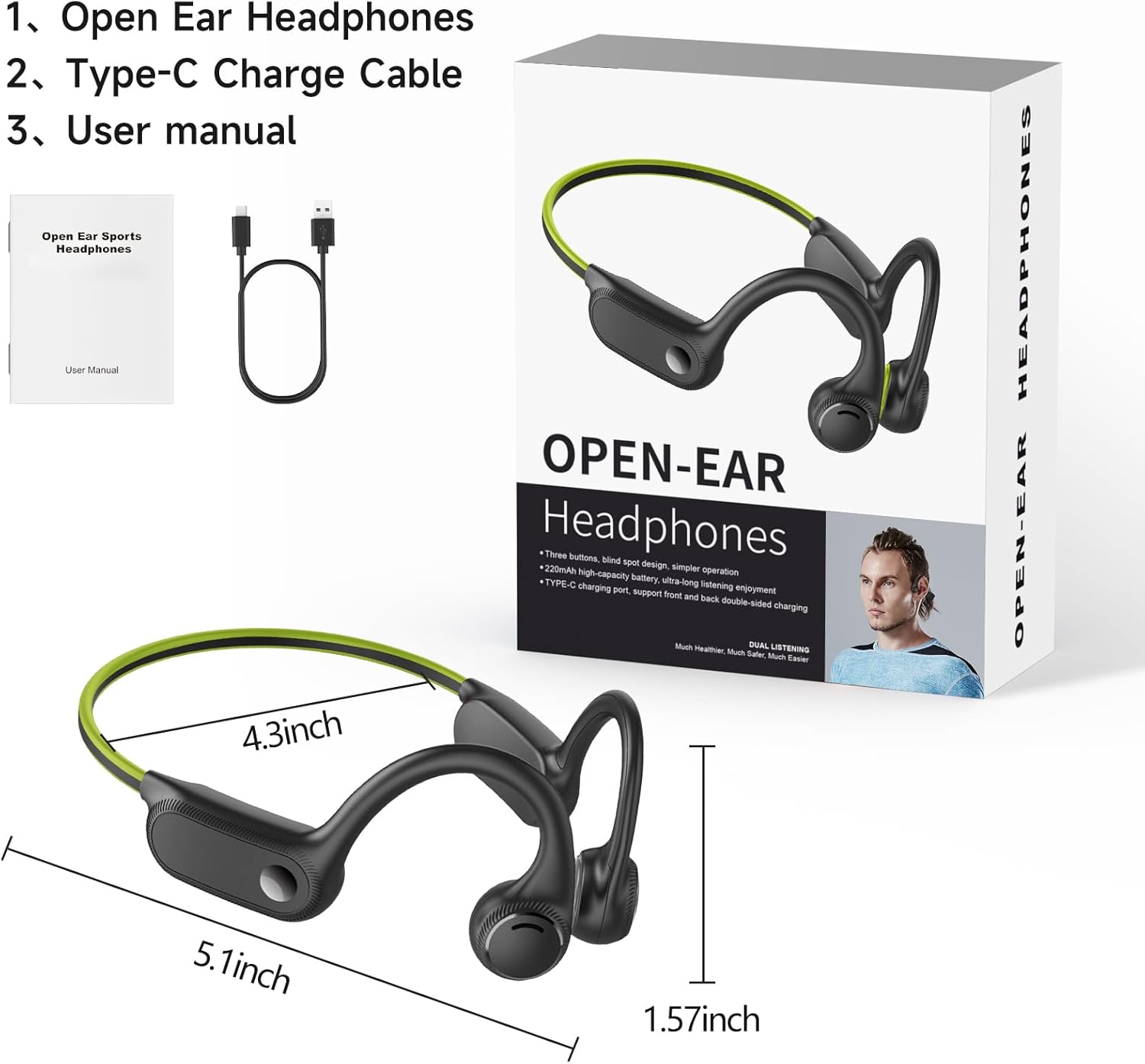
Image: The product packaging displaying the headphones, a Type-C charging cable, and the user manual.
Chaje kas ekoutè yo
Before first use, fully charge the headphones. Connect the provided Type-C charging cable to the charging port on the headphones and the other end to a compatible USB power source. The red LED indicator will be on during charging. Once fully charged, the LED indicator will turn blue.
A full charge takes approximately 1.5 hours and provides up to 10 hours of music playtime. A 10-minute fast charge can provide 1 hour of use.
Pairing ak yon Aparèy
Pou konekte kas ekoutè ou yo ak yon aparèy ki gen Bluetooth:
- Asire w ke kas ekoutè yo etenn.
- Press and hold the On/Off button for 3 seconds until the blue and red lights flash alternately, indicating pairing mode.
- On your device (smartphone, tablet, PC), open "Settings" and navigate to "Bluetooth".
- Select "S100" from the list of available devices to connect. Once connected, the blue light will stop flashing.
Video: This video demonstrates the power-on, Bluetooth pairing, music playback controls (play/pause, volume up/down, next/previous song), voice assistant activation, and Type-C charging process for the HCMOBI Bone Conduction Headphones.
Operasyon
Kontwòl ak Fonksyon
The headphones feature intuitive controls for easy management of your audio and calls.
- Limen/Etenyen: Peze epi kenbe bouton Pouvwa a pou 3 segonn.
- Jwe/Poz Mizik: Click the On/Off button once.
- Volim moute: Click the "+" button to increase volume by 10%.
- Volim desann: Click the "-" button to decrease volume by 10%.
- Pwochen chante: Peze bouton "+" la pandan yon bon bout tan.
- Chante Previous: Peze bouton "-" la pandan yon bon bout tan.
- Aktive Asistan Vwa a (Siri/Asistan Google): Double click the Power button.
- Reponn/Fen Apèl: Click the Power button once.
- Rejte apèl: Peze bouton Pouvwa a pandan lontan.

Image: A detailed diagram illustrating the location and function of each button on the headphone's control panel, including LED indicator, volume controls, power button, and Type-C charging port.
Karakteristik kle
- Comfortable & Stable Fit: Ergonomically designed with soft silicone material, lightweight (26g), and a flexible titanium headband for secure wear during various activities.
- Open Ear Design & Superior Sound Quality: Utilizes vibration-free bone conduction technology, allowing awareness of surroundings. Engineered for clear highs, soft mids, and deep bass.
- 10-Hour Battery & Fast Charge: Built-in 230 mAh battery provides 10 hours of playtime. USB-C fast charging allows 1 hour of use from a 10-minute charge.
- Bluetooth 5.2 & IP65 Waterproof: Offers faster data transmission and stable signal up to 33ft. IP65 rating protects against sweat, rain, and oil, suitable for sports and outdoor use.

Image: Demonstrates the comfortable and stable fit of the open-ear headphones compared to traditional in-ear headphones, highlighting the pain-free design.

Image: Highlights the lightweight (0.9oz/26g), elastic headband, and IPX4 waterproof features, emphasizing the headphones' suitability for sports activities.

Image: Illustrates the high-fidelity audio, noise-canceling microphone, and exclusive vocalizer features, showcasing the superior sound quality for music and calls.

Image: Compares Bluetooth 5.2 features of the headphones with older versions, highlighting faster speed, lower delay, and compatibility with various devices like smartwatches, iPhones, Android phones, and tablets.
Image: Details the 10-hour battery life, 230mAh battery capacity, and 1.5-hour quick charging feature, emphasizing long-lasting use and efficient charging.
Antretyen
Netwayaj
Regular cleaning helps maintain the performance and hygiene of your headphones. Use a soft, damp cloth to wipe down the surfaces. Avoid using harsh chemicals or abrasive materials. Given the IP65 waterproof rating, the headphones can withstand sweat and light rain, but should not be submerged in water.
Depo
Store the headphones in a cool, dry place away from direct sunlight and extreme temperatures. When not in use for extended periods, ensure they are fully charged before storage to preserve battery health.
Depanaj
If you encounter issues with your HCMOBI Bone Conduction Headphones, please refer to the following common problems and solutions:
| Pwoblèm | Kòz posib | Solisyon |
|---|---|---|
| Kas ekoutè yo pa limen. | Batri ki ba. | Chaje kas ekoutè yo konplètman. |
| Pa ka konekte ak aparèy la. | Kas ekoutè a pa nan mòd koneksyon; Bluetooth etenn sou aparèy la; aparèy la twò lwen. | Ensure headphones are in pairing mode (flashing red/blue). Turn on Bluetooth on your device. Move headphones closer to the device (within 33ft). |
| Pa gen son oswa son ki ba. | Volim nan twò ba; pa konekte; yo chwazi yon move sòti odyo sou aparèy la. | Increase headphone and device volume. Re-pair the headphones. Check device's audio output settings. |
| Headphones automatically turn off when charging. | This is normal behavior for the device. | Headphones are designed to turn off during charging. Power them on after disconnecting from charger. |
| Volume resets to 100% after re-pairing. | Device specific behavior. | Adjust volume manually after each re-pairing. |
Espesifikasyon
| Karakteristik | Detay |
|---|---|
| Mak | HCMOBI |
| Non modèl | S100 |
| Koneksyon Teknoloji | Bluetooth 5.2, San fil |
| Teknoloji kominikasyon san fil | Bluetooth |
| Ekoutè Jack | USB (Tip-C) |
| Lavi batri | 10 èdtan |
| Tan pou chaje | 1.5 èdtan |
| Kapasite batri | 230 mAh |
| Nivo rezistans dlo | IP65 ki enpèmeyab |
| Pwa atik | 3.2 ons (apeprè 90g) |
| Materyèl | Plastik |
| Plasman Zòrèy | Louvri Zòrèy |
| Kalite kontwòl | Kontwòl Medya |
| Metòd kontwòl | Manyen (bouton) |
| Gamme frekans | 20 Hz - 20,000 Hz |
| Gamme Bluetooth | 10 mèt (33 pye) |
| Manifakti | CelsusSound |
| UPC | 711523306424 |
Garanti ak sipò
HCMOBI offers a 90-jou garanti ranbousman ak yon yon ane garanti for these bone conduction headphones.
If you encounter any problems or have questions regarding your product, please contact our professional customer service team. We are committed to replying and solving your problem within 6 hours.
For support, please refer to the contact information provided on the product packaging or the official HCMOBI websit.
Ask a question about this manual
Ask about setup, troubleshooting, compatibility, parts, safety, or missing instructions. Manuals+ will review the question and use this page’s manual context to help answer it.