
Entwodiksyon
This instruction manual provides essential information for the proper use and maintenance of your Casio GLX-S5600-1ER G-Shock watch. Please read this manual carefully to ensure optimal performance and longevity of your timepiece. The GLX-S5600-1ER is a robust digital watch designed for durability and functionality, featuring a 200-meter water resistance and various digital functions.
Pwodwi souview
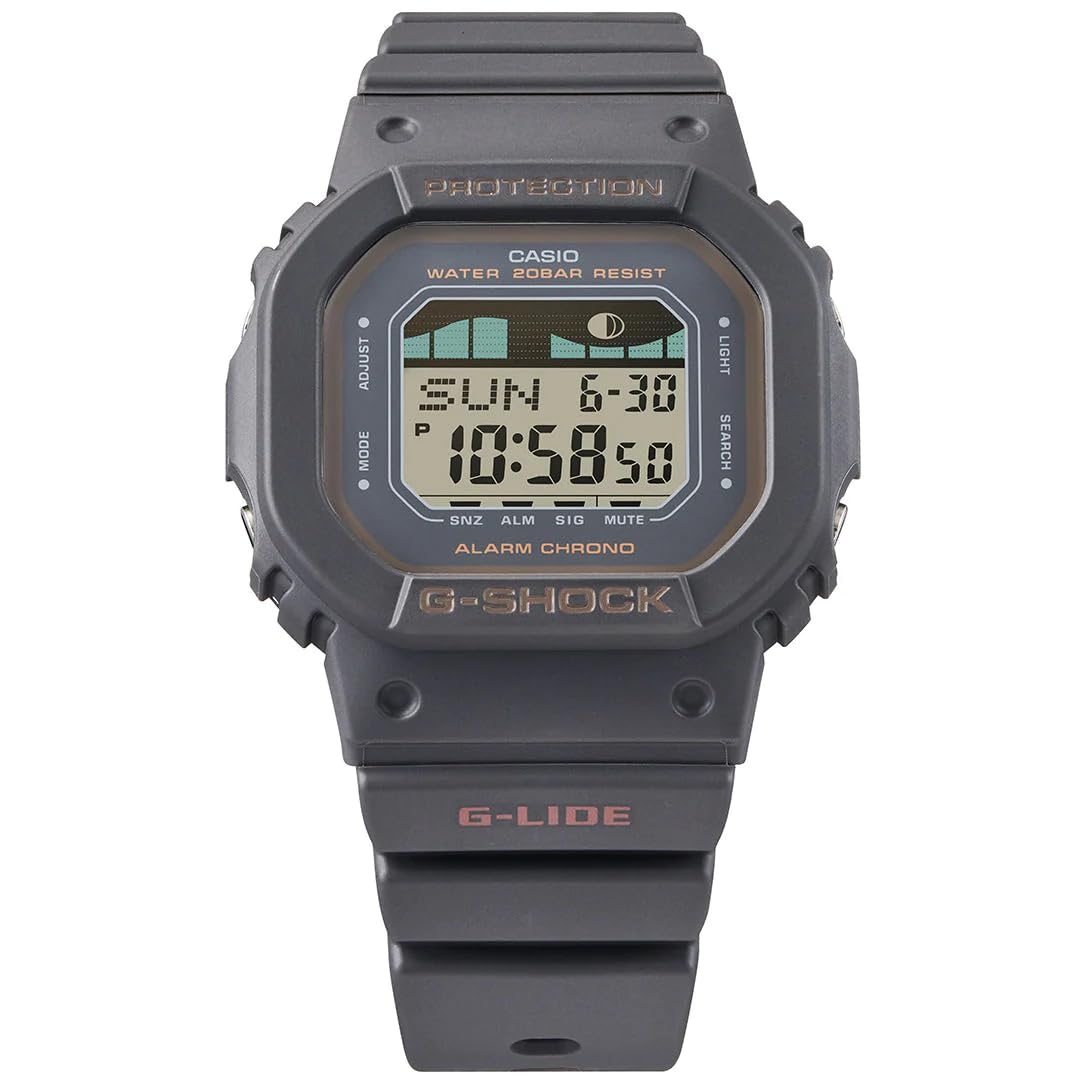
Imaj: Devan view of the Casio GLX-S5600-1ER G-Shock watch, showcasing its digital display and durable resin strap.

Image: The hexagonal G-Shock branded tin box, which typically contains the watch and its documentation.
The Casio GLX-S5600-1ER is a digital quartz watch with a square case and a plastic strap. It features a mineral glass display and is designed to withstand harsh conditions, making it suitable for various activities, including water sports.
Enstalasyon
Anviwònman Inisyal Tan
- Antre nan Mòd Anrejistreman Tan an: Press and hold the 'Adjust' button (usually top-left) until the city code starts flashing.
- Select Home City: Use the 'Forward' (usually top-right) and 'Reverse' (usually bottom-right) buttons to select your desired home city code. This is crucial for correct time and date display.
- Mete lè ete (DST): Press the 'Mode' button (usually bottom-left) to cycle through settings. When DST is flashing, use 'Forward'/'Reverse' to toggle ON/OFF.
- Mete lè ak dat: Continue pressing 'Mode' to navigate through hour, minute, year, month, and day settings. Use 'Forward'/'Reverse' to adjust each value.
- Sòti nan Mòd Anviwònman: Press the 'Adjust' button again to save your settings and exit.
Ajisteman senti
The watch features a standard buckle clasp on a plastic strap. Adjust the strap by selecting the appropriate hole for a comfortable and secure fit on your wrist. Ensure the watch is not too tight to avoid discomfort or restrict circulation, nor too loose to prevent it from moving excessively during activity.
Opere Watch la
Mòd debaz yo
Your GLX-S5600-1ER watch typically includes several modes accessible via the 'Mode' button (usually bottom-left). These commonly include:
- Mòd Timekeeping: Montre lè aktyèl la, dat la, ak jou nan semèn nan.
- Mòd tan mondyal: Pèmèt viewing of current time in various time zones.
- Mòd alam: Mete alam chak jou.
- Mode kronomètr: Mezire tan ki pase.
- Countdown revèy mòd: Set a countdown from a specified time.
- Moon Data/Tide Graph Mode: Displays moon phase and tide information based on your home city settings. Refer to the full Casio module manual for detailed setup of this feature.
Rezistans Dlo (200 Mèt)
The watch is rated for 200-meter water resistance, making it suitable for swimming, showering, and snorkeling. Do not operate any buttons while the watch is submerged in water or wet, as this can compromise the water resistance seals. Avoid exposing the watch to hot water or steam, which can also affect the seals.
Antretyen
Netwayaj
Regularly clean your watch with a soft, dry cloth. For dirt or grime, use a soft brush and mild soap solution, then rinse thoroughly with fresh water and dry completely. Avoid using chemical cleaners or solvents, which can damage the watch's materials.
Ranplasman batri
The watch is powered by a battery. When the display becomes dim or functions become erratic, it may be time for a battery replacement. It is recommended to have the battery replaced by an authorized Casio service center to ensure proper sealing and maintain water resistance.
Depo
When not in use for extended periods, store the watch in a cool, dry place away from direct sunlight and extreme temperatures. Avoid placing it near strong magnetic fields.
Depanaj
- Ekran an vid oswa li pa klere byen: Batri a ka fèb oswa li ka fin vid. Ranplase batri a.
- Lè a pa kòrèk: Re-adjust the time and date settings as described in the 'Setup' section. Ensure the correct home city and DST settings are applied.
- Bouton yo pa reponn: Ensure the watch is not in a locked mode (if applicable) or that it is not wet. If the issue persists, a reset may be required (refer to the full module manual for specific reset procedures).
- Dlo anndan mont lan: Immediately take the watch to an authorized service center. Do not attempt to open or dry it yourself, as this can cause further damage.
Espesifikasyon
| Karakteristik | Spesifikasyon |
|---|---|
| Nimewo Modèl | GLX-S5600-1ER |
| Kalite ekspozisyon | Digital |
| Kalite Mouvman | Quartz |
| Karakteristik espesyal | Water Resistant, Moon Data, Tide Graph |
| Sous pouvwa | Batri |
| Evalyasyon rezistans dlo | 200 mèt (20 BAR) |
| Materyèl senti | Plastik |
| Kalite agraf | Boukl |
| Ka Materyèl | Stainless Steel (back), Resin (bezel) |
| Kalite vè | Mineral Glass |
| Ka Dyamèt | 43 Milimèt |
| Ka epesè | 11 Milimèt |
| Pwa atik | 41 gram |
| Koulè | Black (Strap and Dial) |
Garanti ak sipò
Enfòmasyon sou Garanti
Your Casio GLX-S5600-1ER watch comes with a Garanti limite. The terms and duration of this warranty are typically provided with your purchase documentation. Please retain your proof of purchase for warranty claims.
Sipò pou Kliyan
For detailed operational instructions, specific module functions, or warranty service, please refer to the complete module manual included with your watch or visit the official Casio website for support and contact information. Authorized service centers are recommended for all repairs and battery replacements to ensure product integrity.