
1. Entwodiksyon
Thank you for choosing the Devoko Electric Height Adjustable Desk. This manual provides comprehensive instructions for the assembly, operation, and maintenance of your new desk. Designed for a healthier work-life balance, this desk allows you to seamlessly switch between sitting and standing positions, promoting better posture and productivity.
Key features include a robust steel frame, a spacious 120x80cm desktop, integrated USB-A and USB-C charging ports, and a smart control panel with memory presets and anti-collision functionality.

The Devoko Electric Height Adjustable Desk, showcasing its clean design and ampespas travay la.
2. Enfòmasyon sou Sekirite
- Li tout enstriksyon yo ak anpil atansyon anvan asanble ak itilize.
- Kenbe timoun ak bèt kay lwen biwo a pandan w ap opere.
- Asire w ke tout kab yo byen pase epi byen sere pou evite danje bite oswa domaj.
- Do not overload the desk beyond its maximum weight capacity (70 kg dynamic, 80 kg static).
- Evite mete likid dirèkteman sou panèl kontwòl la oswa toupre konpozan elektrik yo.
- In case of malfunction, unplug the desk immediately and contact customer support.
- The desk is equipped with an anti-collision system. Do not obstruct its movement.
3. Pake kontni
Tanpri verifye ke tout konpozan yo prezan anvan ou kòmanse asanblaj la:
- Desktop Panels (4 sections)
- Pye Biwo (2)
- Crossbar/Frame Components
- Bwat kontwòl
- Control Panel with USB Ports
- Adaptè pouvwa ak kab
- Kab Jesyon Plato
- Materyèl asanblaj (vis, boulon, elatriye)
- Assembly Tools (Allen wrench, screwdriver)
- Manyèl itilizatè
4. Enstriksyon Asanble
Assembly is designed to be straightforward, typically taking around 30 minutes. All necessary tools are included.
Gid etap pa etap:
- Depake epi òganize: Depake tout konpozan yo avèk atansyon epi mete yo sou yon sifas pwòp e mou pou evite reyur. Idantifye chak pati avèk dyagram ki bay la.
- Rasanble ankadreman an: Attach the crossbar components to the desk legs using the provided hardware. Ensure all connections are secure.
- Tache Panno Desktop yo: Secure the four desktop panels to the assembled frame. The pre-drilled holes will guide you.
- Install Control Box and Panel: Mount the control box and the control panel to the underside of the desktop as indicated in the instructions.
- Konekte kab: Connect the motor cables from the legs to the control box, and then connect the control panel cable to the control box. Finally, connect the power adapter to the control box.
- Install Cable Management Tray: Attach the cable management tray to the underside of the desk to organize your power strips and cables.
- Tèks final yo: Tcheke tout vis ak koneksyon yo de fwa pou asire yo sere epi byen fèm.

The desk is designed for very easy installation, with assembly tools included.

The included cable management tray helps keep your workspace tidy.
5. Gid operasyon
Your Devoko desk features an intelligent control panel for effortless height adjustment and convenient charging.
Fonksyon panèl kontwòl:
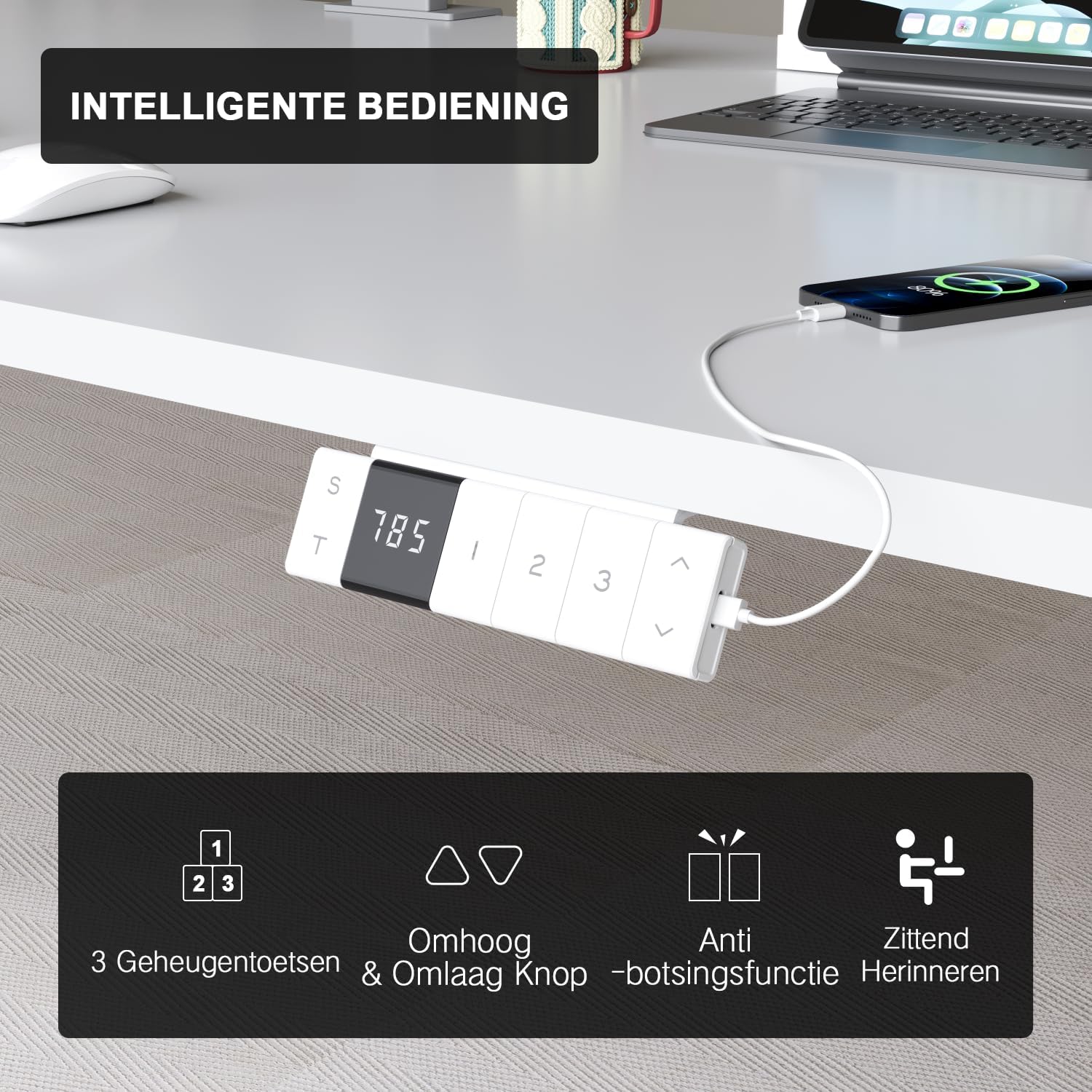
The intelligent control panel features a digital display, height adjustment buttons, memory presets, and USB charging ports.
- Up/Down Buttons (▲ / ▼): Press and hold to smoothly adjust the desk height. The desk moves at a speed of 20mm/s with operating noise less than 45dB.
- Prereglaj Memwa (1, 2, 3): Save your preferred sitting and standing heights. To set a preset: adjust the desk to the desired height, then press the 'S' button followed by the desired number (1, 2, or 3). The desk will automatically move to this height with a single press.
- USB-A & USB-C Charging Ports: Conveniently located on the control panel, these ports allow you to charge your devices directly from the desk, eliminating the need for extra wall adapters.
- Fonksyon Anti-Kolizyon: The desk is equipped with a sensitive anti-collision system that detects obstacles during movement and automatically stops to prevent damage or injury.
- Sitting Reminder (T): The control panel may feature a timer function (indicated by 'T') to remind you to switch between sitting and standing positions for healthier work habits.

Easily switch between sitting mode (72 cm) and standing mode (118 cm) to optimize your comfort and health.
6. Antretyen
- Netwayaj: Sèvi ak yon mou, damp cloth to wipe down the desktop and frame. Avoid abrasive cleaners or harsh chemicals that could damage the finish.
- Jesyon kab: Periodically check and reorganize cables to prevent tangles and ensure smooth operation.
- Fastener: Occasionally check all screws and bolts to ensure they remain tight. Retighten if necessary.
- Swen motè: The motor is designed for durability and has been tested over 10,000 cycles. No special maintenance is required for the motor itself.
NAN. Depanaj
If you encounter any issues with your Devoko desk, please refer to the following common problems and solutions:
| Pwoblèm | Kòz posib | Solisyon |
|---|---|---|
| Biwo a pa deplase. | Power cable disconnected; Control box error. | Check power connection. Unplug and replug the desk for 10 seconds to reset the control box. |
| Biwo a ap deplase yon fason inegal oswa li fè yon bri dwòl. | Loose connections; Obstruction. | Check all assembly connections. Ensure no objects are obstructing the legs' movement. |
| Anti-collision system triggers too often. | Sensitivity setting; Obstruction. | Ensure no objects are near the desk's path. Refer to the full manual for anti-collision sensitivity adjustment if available. |
| Pò USB yo pa chaje. | Desk not powered; Device compatibility. | Ensure the desk is plugged in and powered on. Check if the device requires specific charging protocols. |
If the problem persists after trying these solutions, please contact Devoko customer support for further assistance.
8. Espesifikasyon
| Karakteristik | Detay |
|---|---|
| Mak | Devoko |
| Nimewo Modèl | 0077B-1222 |
| Koulè | Blan |
| Dimansyon biwo (L x W) | 120 cm x 80 cm (47.2 x 31.5 pous) |
| Ranje Wotè | 72 cm pou rive 118 cm (28.3 pou rive 46.5 pous) |
| Materyèl | FSC-certified particle board (desktop), Industrial-grade steel (frame) |
| Dynamic Load Capacity | 70 kg (154 liv) |
| Kapasite chaj estatik | 80 kg (176 liv) |
| Leve vitès | 20 mm/s |
| Nivo bri | < 45 dB |
| Karakteristik espesyal | Electric height adjustment, Ergonomic design, Integrated USB-A & USB-C charging, 3-Function Memory, Anti-collision system, Mobile with wheels |
| Sètifikasyon | TÜV, CE |
| Pwa pwodwi | 24.5 kg (54 liv) |

Desktop dimensions: 120cm x 80cm.

Key performance metrics: 70kg load capacity, 20mm/s speed, quiet operation, and anti-collision safety.
9. Garanti ak sipò
The Devoko Electric Height Adjustable Desk comes with a 5-ane garanti, ensuring peace of mind regarding its durability and performance. This warranty covers manufacturing defects and motor malfunctions under normal use.
For technical support, warranty claims, or any questions not covered in this manual, please contact Devoko customer service through the retailer's platform or the official Devoko website. Please have your model number (0077B-1222) and purchase date ready when contacting support.