
Entwodiksyon
Mèsi pou acha aasing the ELECOM DE-C35L-5000BK Carabiner-Integrated Mobile Battery. This portable power bank is designed for convenience and durability, featuring a built-in carabiner, cable holder, and simple stand. It offers a 5000mAh capacity with 12W Type-C output, and is rated IP44 for dust and water resistance.

Karakteristik kle yo enkli:
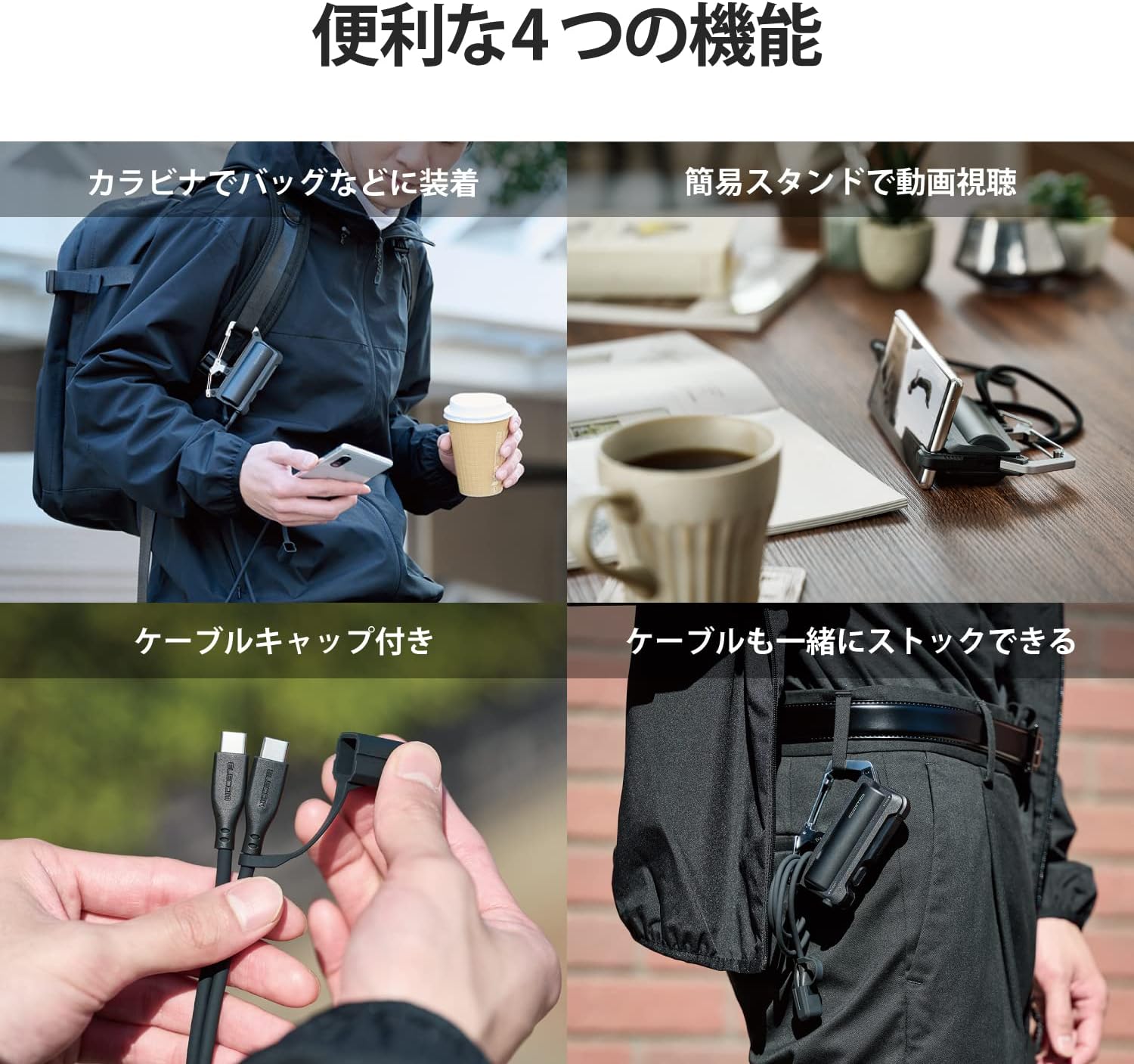
- Carabiner Integration: Easily attach the battery to your bag or belt for convenient carrying.
- Integrated Cable Holder: Keeps your charging cable neatly stored with the battery.
- Simple Stand Function: A built-in stand allows for hands-free viewpwodiksyon videyo.
- IP44 Pousyè ak Dlo Rezistans: Provides protection against dust and splashes, suitable for outdoor use in light rain.
- Absòbsyon chòk: Lithium-ion battery is encased in a silicone cushion to protect against impacts from accidental drops.
- Kapasite segondè: 5000mAh battery capacity, capable of charging a typical smartphone approximately 1.6 times.
- 12W Type-C Output: Delivers up to 2.4A output for efficient charging.

Enstalasyon
Initial Charging of the Mobile Battery
The mobile battery is approximately 70% charged at the time of factory shipment. For optimal performance, it is recommended to fully charge the battery before its first use.
- Connect the included USB Type-C to USB Type-C cable to the mobile battery's USB Type-C port.
- Connect the other end of the cable to a compatible AC charger (5V/2.4A or higher recommended).
- The battery will be fully charged in approximately 2 hours and 10 minutes when using a 5V/2.4A AC charger.

Konekte ak Aparèy
This mobile battery is compatible with iPhones, smartphones, tablets, and other small electronic devices that charge via a USB port.
- For USB Type-C devices, use the included USB Type-C to USB Type-C cable.
- For iOS devices (e.g., iPhone), a separate Lightning cable is required (not included).

Enstriksyon Operasyon
Chaje Aparèy Ekstèn yo
- Connect your device to the mobile battery using the appropriate cable.
- The battery will automatically begin charging your device.
- The battery can charge an 1800mAh smartphone approximately 1.6 times, and a 3000mAh smartphone approximately 0.9 times.
Tcheke Nivo Batri
The remaining battery level can be checked using the 4-stage LED indicator lights.

Using the Carabiner
The integrated carabiner allows you to easily attach the mobile battery to your backpack, belt, or other gear for hands-free carrying.

Using the Cable Holder and Cap
The battery features an integrated cable holder to keep the included USB Type-C cable organized. A connector cap is also provided to protect the cable's connector when not in use.


Using the Simple Stand
A simple stand is built into the battery, allowing you to prop up your smartphone for convenient video viewing while on the go.
- The stand supports smartphones up to 11mm thick. Note that some smartphone cases may prevent proper use even if the phone itself is within the thickness limit.
Antretyen
To ensure the longevity and optimal performance of your mobile battery, please follow these maintenance guidelines:
- Netwayaj regilye: Wipe the battery with a soft, dry cloth to remove dust and dirt. Avoid using harsh chemicals or abrasive materials.
- Depo: Sere batri a nan yon kote ki fre, sèk lwen limyè solèy la dirèk ak tanperati ekstrèm.
- Dekonekte lè yo pa itilize: Always disconnect the charging cable from the battery when it is not in use. Leaving the cable connected can lead to battery discharge over time.
- Carabiner Screw Check: Periodically check the carabiner screw for looseness. If it becomes loose, tighten it to prevent damage or loss.
- Evite gout ak enpak: While the battery has shock absorption, repeated drops or severe impacts can still cause damage. Handle with care.
Depanaj
If you encounter issues with your ELECOM mobile battery, please refer to the following common solutions:
- Batri pa chaje:
- Ensure the charging cable is securely connected to both the battery and the AC adapter.
- Verify that the AC adapter is functioning correctly and provides sufficient power (5V/2.4A or higher recommended).
- Try using a different USB Type-C cable or AC adapter.
- Device Not Charging from Battery:
- Check if the mobile battery itself is sufficiently charged (refer to the LED indicator).
- Ensure the cable connecting the device to the battery is securely attached and undamaged.
- Eseye sèvi ak yon lòt kab chaje pou aparèy ou an.
- Konfime aparèy ou an konpatib ak chaj USB.
- Chaje dousman:
- Ensure both the mobile battery and your device are not being used heavily during charging.
- Verify that the AC adapter used to charge the mobile battery meets the recommended specifications (5V/2.4A).
- Endikatè LED yo pa limen:
- The battery may be completely discharged. Connect it to an AC adapter for charging.
- Si pwoblèm nan kontinye, kontakte sipò kliyan.
Espesifikasyon
| Karakteristik | Detay |
|---|---|
| Aparèy konpatib | Smartphones, tablets, and other small electronic devices that charge via USB. (Separate Lightning cable required for iOS devices) |
| Connector Type (Input/Output) | USB Kalite-C (USB-C) pò |
| Rated Antre Voltage | 5V |
| Rated Antre Kouran | 2.4A |
| Rated Sòti Voltage | 5V |
| Rated pwodiksyon aktyèl | 2.4A (Max 12W) |
| Kalite batri | Rechargeable batri ityòm-ion |
| Batri Rated Kapasite | 3.6V 5000mAh |
| Charging Time (Battery) | Approx. 2 hours 10 minutes (using a 5V/2.4A AC charger) |
| Dimansyon (W x P x H) | Apeprè. 80mm x 32mm x 105mm |
| Pwa | Apeprè. 180g |
| Koulè | Nwa |
| Sik lavi | Apeprè. 500 fwa |
| Pwodwi pou Telefòn enkli | USB Type-C to USB Type-C cable (0.1m), Cable connector cap |
| Estanda Sekirite | PSE (Electrical Appliance and Material Safety Act), UN38.3 (Air transport compliant) |
| Karakteristik pwoteksyon | Overcharge protection, Over-discharge protection, Overcurrent protection, Short circuit protection, Temperature detection |
| Pwoteksyon Pousyè / Dlo | IP44 (Protected against solid objects over 1mm and splashing water from any direction) |
Garanti
This ELECOM mobile battery comes with a 1-ane garanti from the date of purchase. Please retain your proof of purchase for warranty claims. The warranty covers manufacturing defects under normal use. It does not cover damage caused by misuse, accidents, unauthorized modifications, or natural disasters.
Sipò
For product inquiries or technical assistance, please contact ELECOM Customer Support:
- Telefòn: 0570-084-465
- FAKS: 0570-050-012
- Orè operasyon: 10:00 - 19:00 (Year-round)
Battery Recycling Information:
This product is subject to collection by the General Incorporated Association JBRC. You can recycle this battery at cooperating local governments or participating stores (e.g., electronics retailers, home centers). Please check the JBRC website for collection points in your area.