
Entwodiksyon
Thank you for choosing the HOLMES 4-Inch Portable Rechargeable Personal Fan. This fan is designed to provide personal cooling with its compact, lightweight, and versatile features. It can be used handheld or placed on a surface, offering adjustable airflow for various environments.

Image: The HOLMES 4-Inch Portable Rechargeable Personal Fan shown with common personal items like sunglasses, a phone, and a hat, highlighting its portability.
Karakteristik kle:
- 3 Speeds and 6 Blades: Easily adjust airflow with simple digital controls.
- Konsepsyon milti-bi: Use as a handheld fan or fold the base to rest it on a tabletop or other flat surface.
- Pòtab ak lejè: Space-saving design makes it ideal for on-the-go use, home, or office.
- 180° Adjustable Head Tilt: Direct airflow precisely where needed for optimal comfort.
- Batri rechargeable: Features a long-lasting battery that provides up to 6 hours of operation on the lowest speed setting. Includes a USB-C charging cable.
- Pare pou itilize: Pa gen asanble obligatwa.
Enstalasyon
The HOLMES 4-Inch Portable Rechargeable Personal Fan comes ready for immediate use with no assembly required. Before first use, it is recommended to fully charge the fan's internal battery.
Chaje batri a:
- Locate the USB-C charging port on the fan's base.
- Connect the provided USB-C charging cable to the fan's charging port.
- Connect the other end of the USB-C cable to a compatible USB power source (e.g., computer USB port, USB wall adapter, power bank).
- The battery indicator lights will illuminate to show charging status. A solid red light typically indicates charging. The lights may not change color or turn off when fully charged, so monitor charging time. A full charge typically takes approximately 4-5 hours.
- Yon fwa konplètman chaje, dekonekte kab la chaje.

Imaj: Detaye view of the fan's control panel, highlighting the power/speed button, battery indicator lights, and the USB-C charging port with its included cable.
Enstriksyon Operasyon
Powering On/Off and Adjusting Speed:
- To turn the fan on, press the power button located on the control panel. The fan will start at the lowest speed setting.
- To increase the fan speed, press the power button repeatedly. Each press will cycle through the 3 available speed settings (Low, Medium, High).
- To turn the fan off, press the power button after the highest speed setting, or press and hold the power button for a few seconds.
Ajiste direksyon Airflow:
The fan head can be adjusted up to 180 degrees to direct airflow as desired.
- Gently tilt the fan head to your preferred angle. The fan's base is designed to provide stability whether used handheld or on a surface.
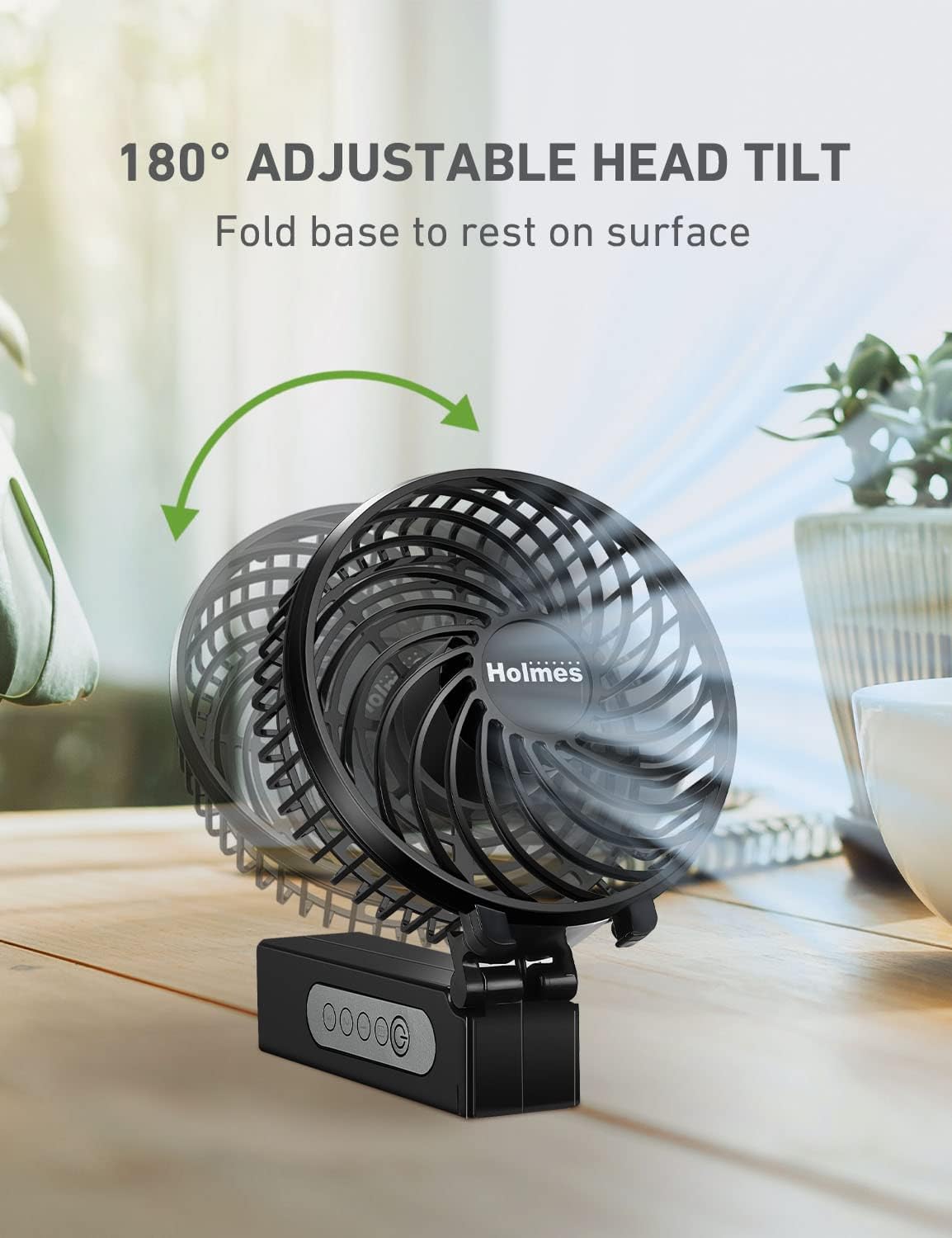
Image: The fan demonstrating its 180-degree adjustable head tilt, allowing users to position it for optimal airflow.
Using as a Desk Fan:
- Fold the handle of the fan to create a stable base.
- Place the fan on a flat, stable surface such as a desk, table, or nightstand.
- Adjust the head tilt to direct the airflow.

Image: A woman comfortably using the fan in a living room, showcasing its compact design suitable for personal spaces like homes or offices.
Antretyen
Netwayaj regilye ede kenbe pèfòmans vantilatè a epi pwolonje lavi li.
Netwaye fanatik la:
- Asire w ke vantilatè a etenn epi dekonekte li nan nenpòt sous kouran anvan ou netwaye li.
- Sèvi ak yon mou, damp twal pou siye sifas ekstèn vantilatè a.
- For dust accumulation on the fan blades or inside the grille, use a soft brush or a vacuum cleaner with a brush attachment to gently remove dust. Do not attempt to disassemble the fan.
- Do not use abrasive cleaners, solvents, or harsh chemicals, as these may damage the fan's finish or internal components.
- Allow the fan to dry completely before storing or using it again.
Depo:
Lè w pa itilize vantilatè a pou yon bon bout tan, sere l nan yon kote ki fre epi sèk, lwen limyè solèy dirèk ak tanperati ekstrèm.
Depanaj
| Pwoblèm | Kòz posib | Solisyon |
|---|---|---|
| Vantilatè a pa limen. | Batri ap vide. | Charge the fan using the provided USB-C cable. Ensure the charging cable is securely connected to both the fan and a working power source. |
| Fan runs for a short period after charging. | Battery not fully charged or battery degradation. | Ensure the fan is charged for the recommended 4-5 hours. If the issue persists, the battery may require service or replacement (refer to warranty). |
| Vantilatè a fè yon bri dwòl. | Obstruction in fan blades or motor vibration. | Turn off and unplug the fan. Carefully check for any obstructions in the fan blades and remove them. If the noise is due to motor vibration, ensure the fan is on a stable, flat surface. |
| Charging indicator light does not change. | Normal operation for this model. | The indicator light remains solid red during charging and may not change color or turn off when fully charged. Monitor charging time (approx. 4-5 hours for a full charge). |
Espesifikasyon
| Karakteristik | Detay |
|---|---|
| Mak | HOLMES |
| Nimewo Modèl | 32510014 |
| Koulè | Nwa |
| Style | Vantilatè pòtab / tab |
| Longè lam | 4 pous |
| Kantite vitès | 3 |
| Sous pouvwa | Batri Powered (Rechargeable) |
| Kalite Connector | USB Kalite C |
| Battery Life (Lowest Speed) | Jiska 6 èdtan |
| Dimansyon pwodwi (D x W x H) | 4.3"D x 8.7"W x 1.7"H |
| Pwa atik | 0.42 liv |
| Materyèl | Plastik |
| Karakteristik espesyal | Adjustable Tilt (180°), Foldable |

Image: A diagram illustrating the physical dimensions (height, width, depth) of the fan.
Garanti ak sipò
Enfòmasyon sou garanti:
This HOLMES Personal Fan (Model 32510014) comes with a Garanti 1-ane limite apati dat acha a. Tanpri konsève prèv acha ou pou reklamasyon garanti. Garanti a kouvri domaj nan materyèl ak nan fabrikasyon anba itilizasyon nòmal.
Sipò Kliyan:
For further assistance, troubleshooting not covered in this manual, or warranty inquiries, please refer to the official HOLMES customer support channels or visit the HOLMES Store on Amazon.
Yon Manyèl Itilizatè ofisyèl (PDF) disponib tou pou telechaje: Telechaje PDF Manyèl