
Entwodiksyon
Thank you for choosing the Genai True Wireless Earphones. This manual provides detailed instructions on how to set up, operate, maintain, and troubleshoot your new earphones. Please read this manual carefully before use to ensure optimal performance and longevity of your device.
Pwodwi souview
The Genai True Wireless Earphones feature a digital intelligence LED display on the charging case, tap control for easy operation, and Bluetooth 5.0 for stable connectivity. They are designed for comfortable in-ear wear and deliver clear stereo sound.
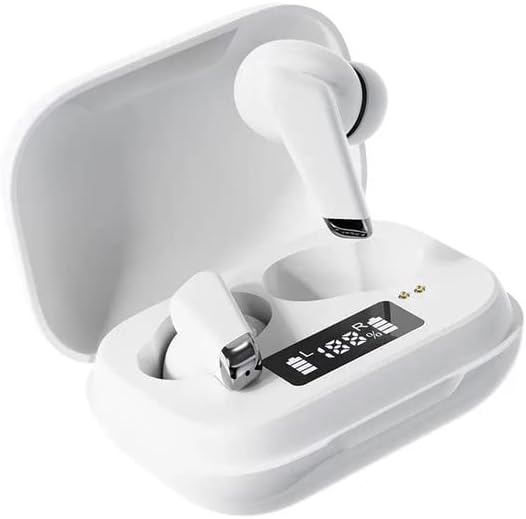
Image: Genai True Wireless Earphones in their charging case, showcasing the digital LED display indicating battery levels.
Karakteristik kle:
- True Wireless Stereo (TWS): Seamless audio experience without cables.
- Tape Kontwòl: Intuitive touch-sensitive controls for music and calls.
- Digital Intelligence LED Display: Shows real-time battery status of earbuds and charging case.
- Bluetooth 5.0: Asire yon koneksyon san fil ki estab e efikas.
- Konsepsyon ergonomik nan zòrèy: Comfortable and secure fit.
Gid Enstalasyon
1. Chaje ekoutè yo ak bwat la
- Inisyal chaj: Before first use, fully charge the charging case and earbuds. Place the earbuds into the charging case.
- Konekte Charger: Konekte bwat chaje a nan yon sous kouran avèk yon kab USB konpatib.
- Monitè ki ap dirije ekspozisyon: The digital LED display on the case will show the charging status and battery percentage. Ensure both earbuds and the case are fully charged before proceeding.

Image: The charging case with its digital LED display, indicating the charge level of both the case and the individual earbuds.
2. Konekte ak aparèy ou an
- Pouvwa sou: Louvri bwat chaje a. Ekoutè yo ap limen otomatikman epi antre nan mòd koneksyon. Ou ka tande yon mesaj sonab.
- Aktive Bluetooth: Sou telefòn entelijan ou oswa lòt aparèy ki gen Bluetooth, ale nan paramèt Bluetooth yo epi aktive Bluetooth.
- Chwazi Aparèy: Look for "Genai Earphones" (or similar name) in the list of available devices and select it to connect.
- Konfimasyon: Once successfully paired, you will hear a confirmation sound, and the earbuds will be ready for use.

Image: A visual representation of the Bluetooth 5.0 chipset, highlighting the stable wireless connection technology.
Enstriksyon Operasyon
The Genai True Wireless Earphones feature intuitive tap controls. The specific functions may vary slightly, but common controls are listed below:
Power On/Off
- Pouvwa sou: Open the charging case, or long-press the touch area on both earbuds for a few seconds.
- Pouvwa Off: Place the earbuds back into the charging case and close the lid, or long-press the touch area on both earbuds for several seconds until they power off.
Lèktur Klas Mizik
- Jwe/Poz: Tape yon sèl sou chak ekoutè.
- Pwochen Track: Tape de fwa sou ekoutè dwat la.
- Track Previous: Tape de fwa sou ekoutè gòch la.
Jesyon Rele
- Reponn/Fen Apèl: Yon sèl ti tape sou nenpòt ekoutè pandan yon apèl k ap antre oswa yon apèl aktif.
- Rejte apèl: Peze lontan sou nenpòt ekoutè pandan yon apèl k ap antre.
Asistan vwa
- Aktive Asistan Vwa: Tape twa fwa sou nenpòt ekoutè (fonksyonalite yo ka varye selon aparèy la).

Image: An illustration showing an earbud comfortably and ergonomically fitted within the ear canal.
Antretyen
Netwayaj
- Sèvi ak yon twal mou, sèk, epi ki pa gen pousyè pou netwaye ekoutè yo ak bwat chaje a.
- Pa sèvi ak pwodui netwayaj abrazif, solvan, oswa espre ayewosòl.
- Gently clean the ear tips and speaker mesh to remove any earwax or debris.
Depo
- Sere ekoutè yo nan bwat chaje yo lè w pa ap itilize yo pou pwoteje yo epi kenbe yo chaje.
- Evite estoke nan tanperati ekstrèm, limyè solèy dirèk, oswa imidite ki wo.
Depanaj
- Earbuds not pairing with each other or with device:
- Asire ke tou de ekoutè yo chaje.
- Place both earbuds back into the charging case, close the lid, wait a few seconds, then open the lid again.
- On your device, forget/delete the "Genai Earphones" from the Bluetooth list and try pairing again.
- Pa gen son oswa volim ki ba:
- Tcheke nivo volim nan tou de aparèy ou an ak ekoutè yo.
- Asire w ke ekoutè yo byen konekte ak aparèy ou an.
- Netwaye tout debri ki sou may oratè ekoutè a.
- Pwoblèm chaj:
- Asire w ke kab chaje a byen konekte ak tou de bwat la ak sous kouran an.
- Verifye si sous kouran an aktif.
- Netwaye kontak chaje yo sou tou de ekoutè yo ak sou kouvèti a.
Espesifikasyon
| Karakteristik | Detay |
|---|---|
| Modèl | B0BX5G53VT |
| Koneksyon Teknoloji | San fil (Bluetooth 5.0) |
| Kalite ekoutè | Semi-louvri |
| Kantite Chofè | 2 |
| Chaje Metòd | Ka chaje |
| Materyèl kousinen kas ekoutè | Silicone |
| Dyamèt Chofè | 10mm |
| Distòsyon amonik total | 0.02% |
| Ranje enpedans | Jiska 32 Ω |
| Materyèl | Silicone |
| Plasman Zòrèy | Nan Zòrèy |
| Faktè fòm | Vrè Wireless |
Garanti ak sipò
The Genai True Wireless Earphones come with a 12-mwa garanti from the date of purchase, covering manufacturing defects. For any quality problems or support inquiries, please contact the seller directly through your purchase platform.
We are committed to ensuring 100% customer satisfaction. If you encounter any issues, please do not hesitate to reach out for assistance, including full refunds or replacements as applicable.