
1. Entwodiksyon
This manual provides comprehensive instructions for the installation, operation, and maintenance of the AXIS F9111 Main Unit. The AXIS F9111 is a crucial component of the F-Series, designed to integrate with F21 and F7 sensor units to provide advanced surveillance capabilities. It serves as the central processing unit for connected camera sensors, handling video streams, audio, and I/O signals.
2. Pwodwi Features
- Nimewo Modèl: 01990-001
- Compact design with a weight of approximately 2.0 kg (4 pounds).
- Designed for integration within the AXIS F-Series surveillance system.
3. Pake kontni
Please verify the contents of your package against the packing list provided with your AXIS F9111 Main Unit. Typically, the package includes:
- AXIS F9111 Main Unit
- Gid enstalasyon
- Adaptè kouran (si w pa itilize Power over Ethernet)
- Pwodwi pou Montaj (si sa aplikab)
Note: Actual contents may vary. Refer to your specific product packaging for details.
4. Enstalasyon ak Enstalasyon
Follow these steps to set up your AXIS F9111 Main Unit. Ensure all connections are secure before powering on the device.
4.1. Plis paseview of Ports and Indicators
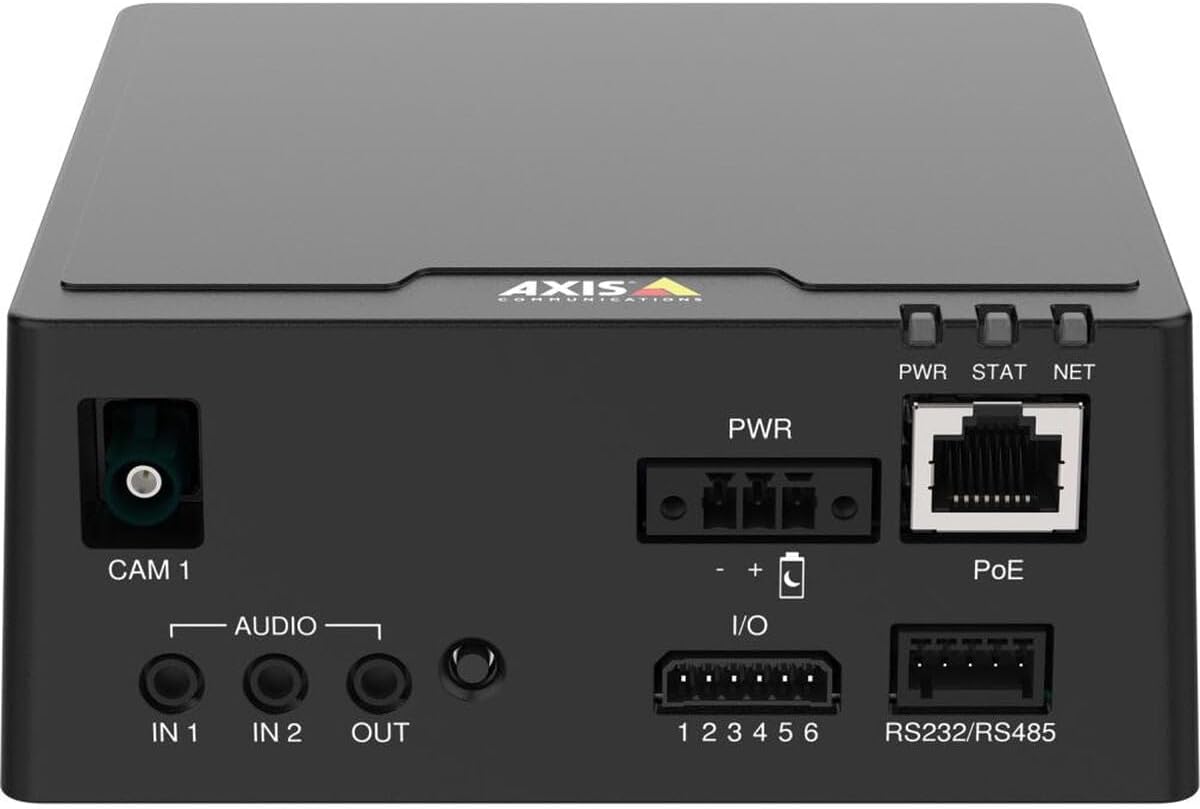
Figi 1: Anwo-anba view of the AXIS F9111 Main Unit, highlighting the various connection ports and status indicators. From left to right, it shows the CAM 1 input, Audio IN/OUT, PWR input, I/O terminals, PoE Ethernet port, RS232/RS485 terminals, and PWR, STAT, NET LED indicators.
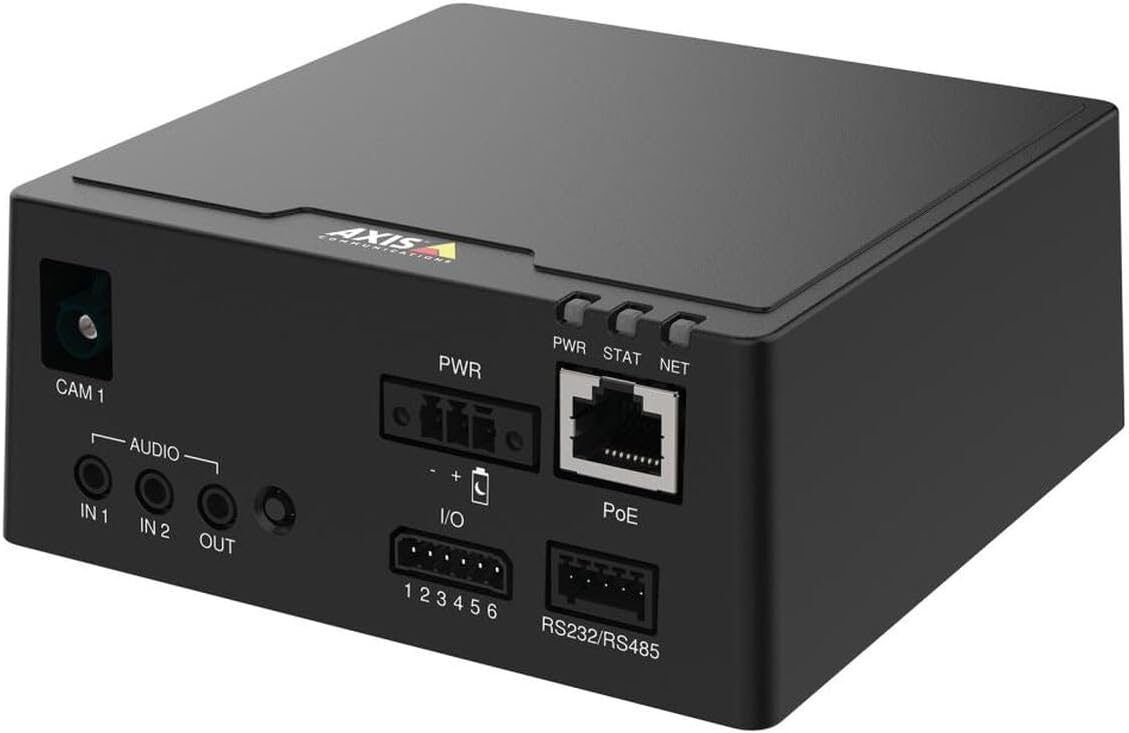
Figure 2: Angled perspective of the AXIS F9111 Main Unit, providing a clearer view of the front panel connections including CAM 1, Audio IN/OUT, PWR, I/O, PoE, and RS232/RS485 ports, along with the status LEDs.

Figure 3: A different angled view of the AXIS F9111 Main Unit, further illustrating the layout of the various input/output ports and power/network connections for comprehensive system integration.
4.2. Etap Koneksyon yo
- Connect Sensor Unit: Connect an AXIS F-Series sensor unit (e.g., F21, F7) to the KAN 1 port. Ensure the connection is firm.
- Koneksyon pouvwa:
- Pouvwa sou Ethernet (PoE): Connect an Ethernet cable from a PoE-enabled switch or injector to the PoE port on the main unit. This will provide both power and network connectivity.
- Ekstèn pouvwa: If PoE is not used, connect a compatible power adapter to the PWR opinyon.
- Rezo Koneksyon: If not using PoE, connect an Ethernet cable from your network to the PoE port. This port functions as a standard Ethernet port when not receiving PoE.
- Koneksyon odyo: If required, connect external audio devices to the AUDIO IN 1, IN 2 (inputs) and SOTI (output) ports.
- Koneksyon I/O: For external device control or alarm integration, connect to the I/O (1-6) terminals. Refer to the detailed wiring diagram in the full technical manual for specific configurations.
- Kominikasyon seri: For serial data communication, connect devices to the RS232/RS485 tèminal yo.
- Pouvwa sou: Once all connections are made, power on the unit. Observe the PWR, STAT, NET Endikatè LED pou estati.
5. Operating the AXIS F9111 Main Unit
The AXIS F9111 Main Unit operates as the central hub for your connected AXIS F-Series sensor units. Once powered on and connected to the network, it can be accessed and configured via a web browser or AXIS Camera Station software.
5.1. Aksè Inisyal ak Konfigirasyon
- Dekouvri aparèy: Use AXIS IP Utility or AXIS Device Manager to discover the unit on your network.
- Aksè Web Entèfas: Louvri a web browser and enter the IP address of the unit. Log in using the default credentials (or those you have set).
- Konfigirasyon Anviwònman: Nan la web interface, you can configure video streams, audio settings, I/O events, network parameters, and user access.
5.2. Endikatè ki ap dirije
- PWR (pouvwa): Indicates power status. Typically solid green when powered on.
- STAT (Status): Indicates operational status. Blinking patterns may indicate different states (e.g., booting, error). Refer to the full user manual for detailed status codes.
- NET (Rezo): Endike aktivite sou rezo a. Li flache lè done ap transmèt oswa resevwa.
6. Antretyen
Regular maintenance ensures optimal performance and longevity of your AXIS F9111 Main Unit.
- Netwayaj: Use a soft, dry cloth to clean the exterior of the unit. Do not use harsh chemicals or abrasive materials. Ensure no liquids enter the ports.
- Mizajou mikrolojisyèl: Periodically check the Axis Communications website for firmware updates. Keeping the firmware updated ensures you have the latest features, security patches, and bug fixes. Follow the instructions provided with the firmware update package carefully.
- Kondisyon anviwònman: Ensure the unit is operated within its specified temperature and humidity ranges to prevent damage. Avoid exposing the unit to direct sunlight, excessive dust, or moisture.
NAN. Depanaj
If you encounter issues with your AXIS F9111 Main Unit, refer to the following common troubleshooting steps:
| Pwoblèm | Kòz posib | Solisyon |
|---|---|---|
| Unit does not power on (PWR LED off) | No power supply; faulty power adapter/PoE; loose connection. | Check power cable connection. Verify power outlet. Ensure PoE switch/injector is active. Try a different power source if available. |
| No network connectivity (NET LED off/no blink) | Ethernet cable disconnected/faulty; incorrect network settings; network issue. | Check Ethernet cable connection. Verify network settings (IP address, subnet mask). Restart network equipment (router/switch). |
| No video from connected sensor unit | Sensor unit not connected properly; faulty sensor unit; software configuration issue. | Ensure sensor unit is firmly connected to CAM 1 port. Check sensor unit's functionality. Verify video stream settings in the unit's web koòdone. |
| STAT LED blinking rapidly/red | Error state; firmware issue. | Refer to the full Axis Communications user manual for specific STAT LED error codes. Try restarting the unit. Consider a firmware reinstallation if persistent. |
For more detailed troubleshooting or advanced issues, please refer to the official Axis Communications support documentation or contact their technical support.
8. Espesifikasyon
| Atribi | Detay |
|---|---|
| Mak | Aks Kominikasyon |
| Nimewo Modèl | 01990-001 |
| Pwa atik | 4 liv (apeprè 2.0 kg) |
| Dimansyon pwodwi (LxWxH) | 19.69 x 19.69 x 11.02 pous |
| Manifakti | AXIS - CAMERA |
| ASIN | B0BWNP6NGD |
| Dat Premye Disponib | 29 mas 2023 |
9. Garanti ak sipò
The AXIS F9111 Main Unit is manufactured by Axis Communications. For warranty information, please refer to the official warranty statement provided with your product or visit the Axis Communications websit.
Optional protection plans may be available for purchase, such as a 4-Year Protection Plan or a Complete Protect plan. These plans are separate from the manufacturer's warranty and offer extended coverage.
For technical support, product documentation, and software downloads, please visit the official Axis Communications support portal:
Visit Axis Communications Support
For returns, please adhere to the return policy of your retailer, which typically allows for returns within 30 days of purchase.