
1. Entwodiksyon
The Schlage Encode Smart Wi-Fi Lever Lock provides convenient and secure keyless entry for your home. With built-in Wi-Fi, this smart lock connects directly to your home network, allowing remote control and monitoring via the Schlage Home app. It supports up to 100 access codes, offers customizable notifications, and integrates with popular smart home platforms like Amazon Alexa and Google Assistant. Designed for durability and security, it is ideal for various doors including garage, side, and interior doors where controlled access is desired.
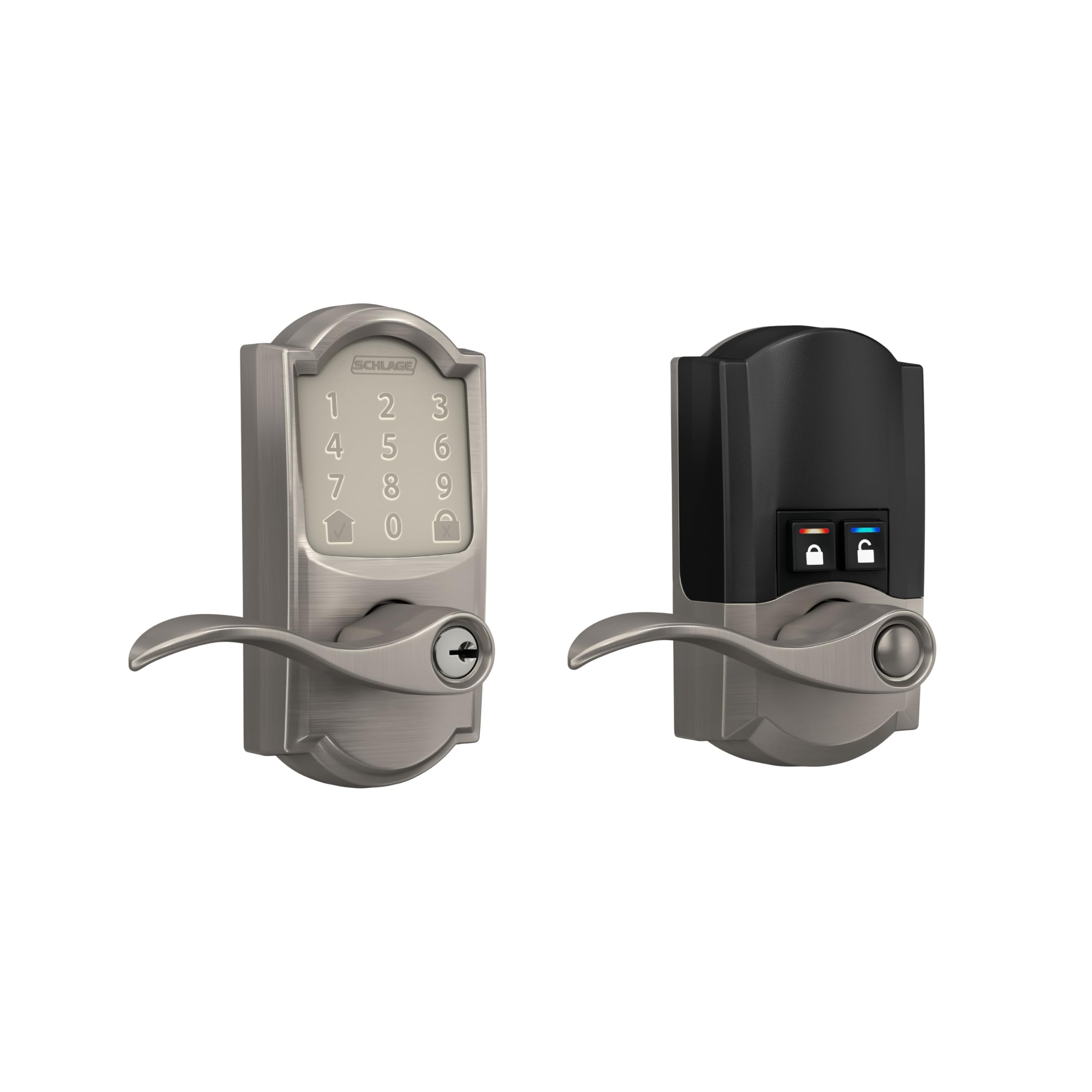
Figure 1: Schlage Encode Smart Wi-Fi Lever Lock (Satin Nickel)
2. Karakteristik kle
- ANYWHERE ACCESS: Built-in Wi-Fi allows secure connection to your home network for remote control and monitoring via the Schlage Home app, no additional accessories needed.
- LAPÈ LESPRI: Fèmen/debloke adistans, jere jiska 100 kòd aksè, view istwa bloke, epi resevwa notifikasyon personnalisable.
- ADVANCED SECURITY: Secure, encrypted connection; built-in, customizable alarm for door movement and forced entry attempts; fingerprint-resistant touchscreen; certified highest residential Security, Durability and Finish rating by BHMA industry experts.
- ENSTALASYON FASIL: Installs in minutes with just a screwdriver, no hardwiring required; reversible levers fit right and left handed doors; fits standard doors with 1-3/8 in to 1-3/4 in door thickness and 2-3/8 in or 2-3/4 in backset.
- COME AND GO WITH EASE: Auto-lock feature with various time delay options; convenient control buttons on the interior for quick unlocking.
- SECURE AND STYLISH: Available in traditional and contemporary styles with multiple finishes, offering premium quality and craftsmanship.
- BATTERY-OPERATED: Uses four AA batteries (included); up to six months of battery life with typical use; low-battery indicator on lock touchscreen and in Schlage Home app; one physical backup key included.

Figi 2: Plis paseview of Schlage Encode Smart Wi-Fi Lever features.
3. Pake kontni
The Schlage Encode Smart Wi-Fi Lever Lock package includes all necessary components for installation and immediate use:
- Schlage Encode Smart Wi-Fi Lever Lock (Exterior and Interior Assemblies)
- Materyèl enstalasyon
- Enstriksyon Enstalasyon
- Kat pil AA
- One Physical Backup Key

Figure 3: What's included in the box.
4. Enstalasyon
Installation of the Schlage Encode Smart Wi-Fi Lever Lock is designed to be straightforward, requiring only a screwdriver. No hardwiring is necessary.
- Prepare Pòt: Ensure your door meets the standard thickness (1-3/8 in to 1-3/4 in) and backset (2-3/8 in or 2-3/4 in) requirements.
- Retire ansyen pyès ki nan konpitè yo: Carefully remove any existing door hardware.
- Enstale Latch ak plak frape: Follow the included instructions to install the new latch and strike plate.
- Enstale asanble eksteryè: Position the exterior keypad assembly on the door. The reversible levers accommodate both right and left-handed doors.
- Enstale Asanble Enteryè: Connect the interior assembly, ensuring the wiring harness is properly routed and connected.
- Mete pil: Install the four AA batteries into the interior assembly.
- Operasyon tès: Verify that the lock operates smoothly both manually and electronically.

Figure 4: Easy installation with a screwdriver.
Video 1: Official product video demonstrating the Schlage Encode Smart WiFi Lever.
5. Setup & Configuration
After physical installation, configure your lock using the Schlage Home app:
- Telechaje App: Download the Schlage Home app from your device's app store.
- Kreye kont: Enskri pou yon nouvo kont oubyen konekte si ou deja genyen youn.
- Ajoute Aparèy: Follow the in-app instructions to add your new Schlage Encode lock. This typically involves scanning a QR code or entering a serial number.
- Konekte ak Wi-Fi: The app will guide you through connecting the lock to your home's Wi-Fi network. No additional hub is required.
- Program Access Codes: Create and manage up to 100 unique 4-8 digit access codes for family, friends, or service providers. You can set permanent, recurring, or temporary codes.
- Customize Anviwònman: Adjust auto-lock times, enable/disable the built-in alarm, and set up notifications for lock activity.

Figi 5: Jere kadna ou a avèk aplikasyon Schlage Home la.
6. Operasyon Enstriksyon
6.1. Keypad Operation (Exterior)
- Pou déblotché: Touch the keypad to activate it. Enter your 4-8 digit access code. The lock will unlock, and you can turn the lever to open the door.
- Pou fèmen: Press the dedicated lock button (usually a padlock icon) on the keypad. The lock will engage automatically.
6.2. Manual Operation (Interior)
From the interior side of the door, you have two buttons for quick control:
- Bouton fèmen: Press the lock button to secure the door.
- Bouton Debloke: Press the unlock button to disengage the lock.
You can also use the physical key for manual override if needed.
7. Entegrasyon Kay Entelijan
The Schlage Encode Smart Wi-Fi Lever Lock offers seamless integration with various smart home ecosystems:
- Amazon Alexa: Pair your lock with Amazon Alexa for voice control. You can ask Alexa to lock or unlock your door (with a voice PIN for unlocking).
- Google Asistan: Connect to Google Assistant for similar voice commands and smart home routines.
- Airbnb Compatible: Ideal for rental properties, the lock can integrate with Airbnb to automatically generate and manage access codes for guests, expiring upon their departure.

Figure 6: Smart home compatibility.
8. Antretyen
8.1. Ranplasman batri
The lock is powered by four AA batteries, providing approximately six months of battery life with typical use. The lock features a low-battery indicator on the touchscreen and within the Schlage Home app to provide advance notice for replacement.
- Access the battery compartment on the interior assembly (refer to the full installation guide for specific instructions).
- Retire ansyen pil yo.
- Insert four new AA batteries, ensuring correct polarity.
- Fèmen lòj batri a.
8.2. Netwayaj
To clean the touchscreen and exterior of the lock, use a soft, damp twal. Evite pwodui netwayaj abrazif oswa solvan ki ka domaje fini an oswa konpozan elektwonik yo.
NAN. Depanaj
- Kadna a pa reponn: Check battery levels. Replace batteries if low. Ensure the lock is properly installed and all connections are secure.
- Pwoblèm koneksyon Wi-Fi: Verify your home Wi-Fi network is active and the signal strength at the door is adequate. Re-pair the lock with the Schlage Home app if necessary. If Wi-Fi drops, the lock will still operate using previously saved codes.
- Keypad Not Lighting Up: The keypad is touch-sensitive. Ensure you are touching the screen firmly. If still unresponsive, check battery levels.
- Kle fizik la pa fonksyone: The physical key is designed to turn the mechanism that controls the lever, not directly retract the latch. Ensure the key is fully inserted and turned correctly.
- Door Alarm Triggering: The lock has a built-in alarm for door movement and forced entry attempts. Adjust sensitivity or disable the alarm through the Schlage Home app if it's triggering unnecessarily.
10. Espesifikasyon
| Karakteristik | Detay |
|---|---|
| Mak | SCHLAGE |
| Nimewo Modèl | FE789WBCAM619ACC |
| Kalite fèmen | Klavye |
| Materyèl | Zenk |
| Dimansyon atik (L x W x H) | 3 x 3 x 5.88 pous |
| Pwa atik | 4.25 liv |
| Koulè | Nikèl saten |
| Non Style | Camelot |
| Pwotokòl Koneksyon | Bluetooth, fil |
| Metòd kontwòl | Manyen |
| Kalite kontwolè | Amazon Alexa, Google Asistan |
| Sous pouvwa | 4 batri AA (enkli) |
| Konpatibilite epesè pòt | 1-3/8 in to 1-3/4 in |
| Konpatibilite Backset | 2-3/8 in or 2-3/4 in |

Figure 7: Product Dimensions (Camelot Trim)
11. Garanti & Sipò
The Schlage Encode Smart Wi-Fi Lever Lock is backed by a limited lifetime mechanical and finish warranty, and a limited three-year electronics warranty. For full details, please refer to the official Schlage warranty documentation. Warranty is valid only on purchases shipped from and sold by Amazon or Buildcom.
For further assistance, technical support, or warranty claims, please visit the official SCHLAGE websit oswa kontakte sèvis kliyan yo.