
Entwodiksyon
The Vikeri 1520P 20MP Trail Camera is designed for wildlife monitoring, hunting, and property surveillance. It features high-resolution video and photo capabilities, a fast trigger speed, and a durable, waterproof design. This manual provides detailed instructions for setting up, operating, and maintaining your trail camera to ensure optimal performance.

Figure 1: Vikeri 1520P 20MP Trail Camera package contents.
Enstalasyon
1. Debale ak Konpozan
Anvan ou kòmanse enstalasyon an, asire w ke tout konpozan yo prezan:
- Vikeri 1520P 20MP Trail Camera (2 units)
- Mounting senti
- 32GB Micro SD Card (2 units)
- AA Batteries (8 units)
- USB kab
- Manyèl Itilizatè (dokiman sa a)
2. Enstalasyon batri
- Jwenn konpatiman batri a sou dèyè kamera a.
- Open the two latches on the side of the camera to access the interior.
- Insert 4 AA batteries into the designated slots, ensuring correct polarity (+/-).
- Fèmen lòj batri a byen.
3. Mete Kat SD
- Locate the micro SD card slot inside the camera, typically near the battery compartment.
- Insert the provided 32GB micro SD card into the slot until it clicks into place. Ensure the card is inserted in the correct orientation.
- It is recommended to format the SD card through the camera's menu before first use.
4. Monte Kamera a
The camera can be mounted to a tree or post using the included strap:
- Pase braslè montaj la nan fant ki sou dèyè kamera a.
- Secure the camera to a tree or post at a height of 1-2 meters (approximately 3-6 feet).
- Ensure the camera is aligned parallel to the ground in the desired direction for optimal detection.
- Tighten the strap firmly to prevent movement.

Figure 2: Camera mounted on a tree, demonstrating its IP66 waterproof rating.
Opere kamera a
1. Powering On / Off
- To power on the camera, slide the mode switch to the 'ON' position.
- Pou etenn li, glise switch la nan pozisyon 'OFF'.
2. Navige nan meni an
The camera features a built-in 2.4-inch LCD color screen and control buttons for easy navigation and settings adjustment.
- Sèvi ak bouton direksyon yo (moute, desann, agoch, dwa) pou navige nan opsyon meni yo.
- Peze bouton 'OK' la pou konfime seleksyon yo.
- Press the 'MENU' button to access the main settings menu.
3. Anviwònman Foto ak Videyo
Adjust the camera settings to suit your monitoring needs:
- Rezolisyon: The camera supports up to 1520P video and 20MP photos, providing clear and vibrant images.
- Vitès deklanche: With a lightning-fast 0.2-second trigger speed, the camera captures movements quickly, minimizing missed events.
- Ang deteksyon: The 120° wide-angle PIR (Passive Infrared) detection provides a broad field of view, capturing more activity.
- Vizyon lannwit: Equipped with 48pcs 940nm no-glow infrared LEDs, the camera provides clear night vision up to 65 feet without disturbing wildlife.
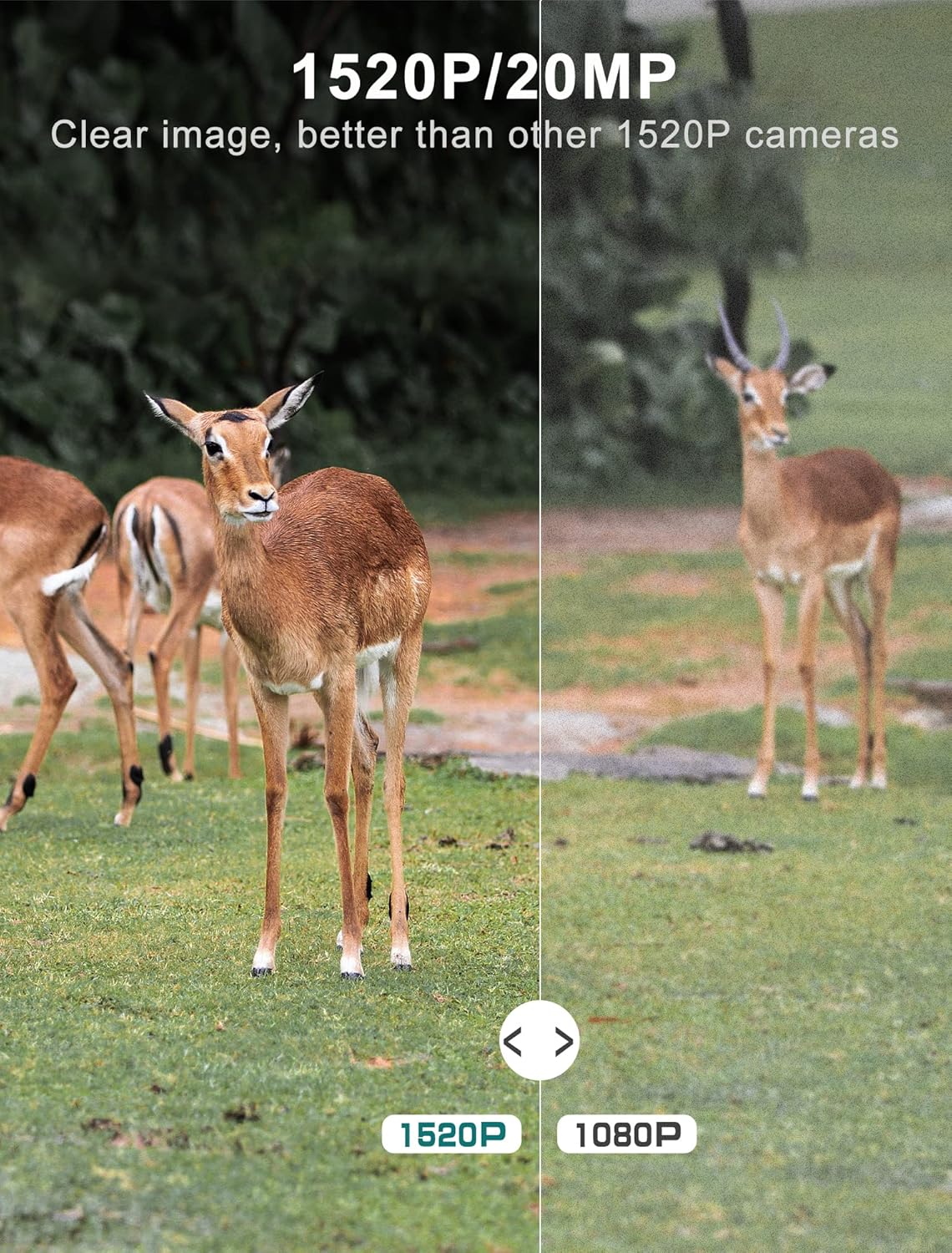
Figure 3: Image quality comparison between 1520P and 1080P resolutions.

Figure 4: Demonstration of the 0.2s trigger speed capturing fast-moving subjects.

Figure 5: The 120° wide-angle detection captures a broader area.

Figure 6: Night vision capability with 940nm no-glow IR LEDs.
4. Viewmedya kaptire
Ou kapab view photos and videos directly on the camera's LCD screen:
- Switch the camera to 'PLAYBACK' mode using the mode switch.
- Use the directional buttons to browse through captured images and videos.
- Press 'OK' to view yon chwazi file.
- Pou transfere files to a computer, remove the micro SD card and insert it into a card reader, or connect the camera directly via the USB cable.
Antretyen
- Netwayaj: Regularly clean the camera lens and PIR sensors with a soft, dry cloth to ensure clear images and accurate detection. Avoid abrasive materials.
- Tcheke batri: Monitor battery levels through the LCD screen. Replace all batteries when low to prevent interruption of recording.
- SD Kat Jesyon: Periodically format the SD card to maintain optimal performance and prevent data corruption. Back up important files anvan fòma.
- Bouche ki enpèmeyab: Ensure the latches are securely closed and the rubber seal around the camera housing is free from debris to maintain its IP66 waterproof rating.
- Depo: Lè w pa itilize kamera a pou yon bon bout tan, retire pil yo epi sere l nan yon kote ki fre epi sèk.
Depanaj
| Pwoblèm | Kòz posib | Solisyon |
|---|---|---|
| Kamera a pa limen | Low or dead batteries; Incorrect battery insertion | Replace all batteries with new ones; Ensure correct polarity (+/-) |
| Move kalite imaj/videyo | Dirty lens; Incorrect resolution settings; Insufficient lighting | Clean the lens; Adjust resolution settings in the menu; Ensure adequate light for non-night vision modes |
| Capteur mouvman an pa deklanche | PIR sensor obstructed; Sensitivity set too low; Subject out of range | Clear any obstructions from the sensor; Increase PIR sensitivity in settings; Ensure subject is within detection range (up to 65-80ft) |
| SD card error message | SD card not formatted; Corrupted SD card; Incompatible SD card | Format the SD card via the camera menu; Try a different, high-quality micro SD card (up to 32GB) |
| Kout lavi batri | Frequent triggers; Extreme temperatures; Low-quality batteries | Reduce trigger frequency if possible; Use high-quality alkaline or lithium batteries; Avoid extreme temperature exposure |
Espesifikasyon teknik
| Karakteristik | Spesifikasyon |
|---|---|
| Rezolisyon Capture Videyo | 1520P |
| Rezolisyon toujou efikas | 20 MP |
| Deklanche vitès | 0.2 segonn |
| Viewing Ang | 120 Degre |
| Vizyon lannwit Range | 65 pye |
| Kantite IR poul | 48 (940nm No Glow) |
| Rating Pwoteksyon Entènasyonal | IP66 (enpèmeyab) |
| Sous pouvwa | Batri Powered (4 pil AA obligatwa) |
| Koneksyon Teknoloji | Wireless (USB for data transfer) |
| Ekspozisyon | 2.4" LCD Color Screen |
| Materyèl | Akrilonitrile butadien stirèn (ABS) |
| Dimansyon pwodwi | 5.39 x 3.42 x 2.36 pous |
| Pwa atik | 2.79 liv (pou 2 kamera) |
Garanti ak sipò
For information regarding product warranty, returns, or technical support, please refer to the official Vikeri brand store or contact Vikeri customer service directly.
Official Vikeri Brand Store: Visit the Vikeri Store on Amazon
Tanpri konsève resi acha ou a pou nenpòt reklamasyon garanti.