
Lindy 38365
Lindy 38365 Extender, SDVoE HDMI 4K60 and USB Transmitter User Manual
Modèl: 38365
1. Entwodiksyon
The Lindy 38365 Extender is an advanced SDVoE (Software Defined Video over Ethernet) device designed for transmitting high-quality 4K@60Hz 4:4:4 HDMI video and USB signals over a 10G network. This device supports uncompressed resolution with HDR10 and no latency, making it ideal for professional AV installations. It can operate in either Encoder (Transmitter) or Decoder (Receiver) mode, offering flexibility for various system configurations.
2. Enfòmasyon sou Sekirite
- Li tout enstriksyon yo ak anpil atansyon anvan ou opere aparèy la.
- Pa ekspoze aparèy la anba imidite, tanperati ekstrèm, oswa limyè solèy dirèk.
- Use only the provided power supply and mounting hardware.
- Pa eseye ouvri oswa repare aparèy la tèt ou. Konfye tout antretyen bay pèsonèl kalifye.
- Asire bon vantilasyon pou anpeche surchof.
3. Pake kontni
- Lindy 38365 Extender Unit
- Ekipman pou pouvwa
- Montaj pyès ki nan konpitè
- Manyèl Itilizatè (dokiman sa a)
4. Pwodwi souview
The Lindy 38365 Extender is a versatile unit capable of functioning as both an SDVoE HDMI 4K60 and USB Transmitter (Encoder) or Receiver (Decoder). It features multiple ports for video, audio, USB, and network connectivity.
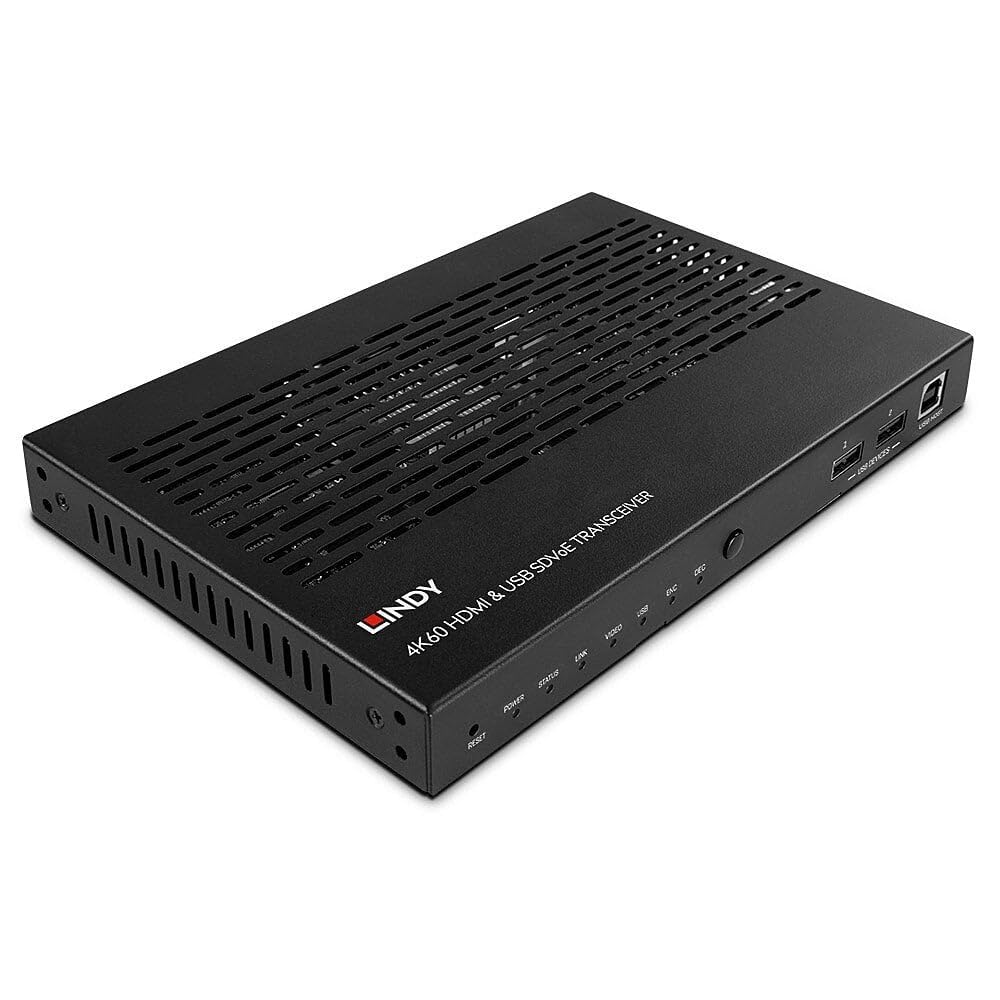
Figure 4.1: Lindy 38365 Extender - Overall View. This image displays the top and side panels of the black extender unit, highlighting its ventilation grilles and various input/output ports.
4.1 Panèl devan

Figure 4.2: Front Panel. The front panel includes LED indicators for Power, Status, Link, Video, USB, Encoder (ENC), and Decoder (DEC) modes. It also features a Reset button, a Mode button, two USB device ports, and one USB Host port.
- Bouton RESET: Reyajiste aparèy la.
- Endikatè ki ap dirije: Power, Status, Link, Video, USB, ENC (Encoder), DEC (Decoder).
- Bouton MODE: Toggles between Encoder and Decoder modes.
- USB DEVICES (1, 2): USB ports for connecting peripheral devices.
- USB HOST: USB port for connecting to a host computer.
4.2 Panèl dèyè

Figure 4.3: Rear Panel. This view shows the DC 12V power input, RS-232 terminal block, IR In/Out jacks, HDMI In/Out ports, 10G (PoE) SFP+ port, 1G LAN port, and Audio In/Out jacks.
- DC 12V: Konektè antre pouvwa.
- RS-232 (TX, RX): Pò kontwòl seri.
- IR IN / IR OUT: Infrared signal input and output for remote control.
- HDMI nan: HDMI pò D '.
- HDMI SOTI: HDMI pò pwodiksyon.
- 10G (PoE) SFP+: 10 Gigabit Ethernet port with SFP+ cage, supporting Power over Ethernet.
- 1G LAN: 1 pò Gigabit Ethernet.
- AUDIO IN / AUDIO OUT: Analog audio input and output jacks.

Figure 4.4: Rear Panel Close-up. A detailed view of the power, control, and HDMI ports on the rear panel, showing the DC 12V input, RS-232 terminal, IR In/Out, and HDMI In/Out connectors.
5. Enstalasyon
Follow these steps to set up your Lindy 38365 Extender:
- Determine Mode: Decide whether the unit will function as an Encoder (Transmitter) or a Decoder (Receiver). Use the MODE button on the front panel to switch between modes. The corresponding LED (ENC or DEC) will illuminate.
- Koneksyon pouvwa: Connect the provided 12V DC power supply to the DC 12V port on the rear panel. Alternatively, if using a PoE-enabled 10G network switch, the unit can be powered via the 10G (PoE) SFP+ port.
- Rezo Koneksyon: Connect the 10G (PoE) SFP+ port to your 10 Gigabit Ethernet network switch using an appropriate SFP+ module and fiber or copper cable. The 1G LAN port can be used for additional network connectivity or control.
- HDMI Connection (Encoder Mode):
- Connect your HDMI source (e.g., Blu-ray player, PC) to the HDMI-AN pò.
- If local monitoring is required, connect an HDMI display to the HDMI SOTI pò.
- HDMI Connection (Decoder Mode):
- Connect your HDMI display (e.g., TV, projector) to the HDMI SOTI pò.
- Koneksyon USB:
- In Encoder mode, connect a host computer to the USB HOST pò.
- Connect USB peripheral devices (e.g., keyboard, mouse) to the Aparèy USB ports (1, 2).
- Audio Koneksyon: If using external analog audio, connect your audio source to ODYO NAN and your audio receiver/speakers to ODYO SOTI.
- RS-232 & IR Control: Connect RS-232 control devices to the terminal block and IR emitters/receivers to the IR IN/OUT jacks as needed for system integration.
6. Operasyon Enstriksyon
Once all connections are made and the unit is powered on, the Lindy 38365 Extender will automatically detect the connection type and begin operation based on its configured mode (Encoder or Decoder).
- Chanje mòd: Peze a MÒD button on the front panel to toggle between Encoder (ENC) and Decoder (DEC) functionality. The active mode is indicated by the illuminated LED.
- Endikatè ki ap dirije: Monitor the front panel LEDs to confirm power, network link, video signal presence, and USB activity.
- SDVoE Features: The device supports advanced SDVoE features such as Multicast, Video Wall, and Multiview configurations. These advanced functionalities typically require a compatible SDVoE controller and software for configuration and management. Refer to your SDVoE system documentation for detailed setup of these features.
- Ekstansyon USB: USB devices connected to the "USB DEVICES" ports on the Decoder unit will be extended to the host connected to the "USB HOST" port on the Encoder unit.
7. Antretyen
- Netwayaj: Netwaye aparèy la avèk yon twal mou epi sèk. Pa sèvi ak pwodui netwayaj likid oswa ayewosòl.
- Vantilasyon: Asire w ke ouvèti vantilasyon yo pa bloke pou anpeche surchof.
- Mizajou mikrolojisyèl: Periodically check the Lindy websit la pou nenpòt mizajou firmwèr ki disponib pou asire pèfòmans ak konpatibilite optimal.
NAN. Depanaj
- Pa gen Sorti Videyo:
- Verify all HDMI cables are securely connected.
- Ensure the unit is in the correct mode (Encoder/Decoder).
- Check the network connection and ensure the 10G link is active.
- Confirm the source and display are powered on and functioning correctly.
- No USB Functionality:
- Ensure USB cables are properly connected to the USB HOST and USB DEVICES ports.
- Verify the unit is in the correct mode for USB extension.
- Pwoblèm koneksyon rezo:
- Check the 10G (PoE) SFP+ port and 1G LAN port connections.
- Confirm your network switch supports 10G and PoE (if used).
- Verify network cable integrity.
- Aparèy pa limen:
- Ensure the 12V DC power supply is correctly connected and plugged into a working outlet.
- If using PoE, confirm the 10G network switch is providing power.
9. Espesifikasyon
| Karakteristik | Detay |
|---|---|
| Mak | Lindy |
| Nimewo Modèl | 38365 |
| Koneksyon Teknoloji | Ethernet |
| Rezolisyon sipòte | Up to 4K@60Hz 4:4:4 with HDR10 (uncompressed) |
| Latansi | Pa gen latansi |
| Mòd fonksyònman | Ankode oswa Dekodeur |
| Pò rezo | 1x 10G (PoE) SFP+, 1x 1G LAN |
| Pò HDMI | 1x HDMI In, 1x HDMI Out |
| Pò USB | 1x USB Host, 2x USB Devices |
| Audio Sòti Mode | Stereo, Antoure (5.1) |
| Metòd kontwòl | Push Button (Mode), RS-232, IR, Remote |
| Antre pouvwa | DC 12V, PoE (Power over Ethernet) |
| Wattage | 5 Watts |
| Pwa atik | 1.29 Kilogram |
| Koulè | Nwa |
10. Garanti
The Lindy 38365 Extender comes with a 3-ane garanti from the date of purchase. Please retain your proof of purchase for warranty claims. This warranty covers manufacturing defects and faults under normal use conditions.
11. Sipò
For technical support, troubleshooting assistance, or further information regarding your Lindy 38365 Extender, please visit the official Lindy website or contact your local Lindy customer service representative. Ensure you have your product model number and purchase details available when seeking support.
Ask a question about this manual
Ask about setup, troubleshooting, compatibility, parts, safety, or missing instructions. Manuals+ will review the question and use this page’s manual context to help answer it.