
Entwodiksyon
This manual provides instructions for the Beyution RC877S replacement infrared remote control. This remote is designed to be a direct replacement for various Onkyo Audio Soundbar and Home Theater Systems, including models LS-T10, LS-B50, LSB50, LST10, 24140877, RC-877S, and RC877. It operates using infrared technology and typically requires no programming or setup for compatible devices.
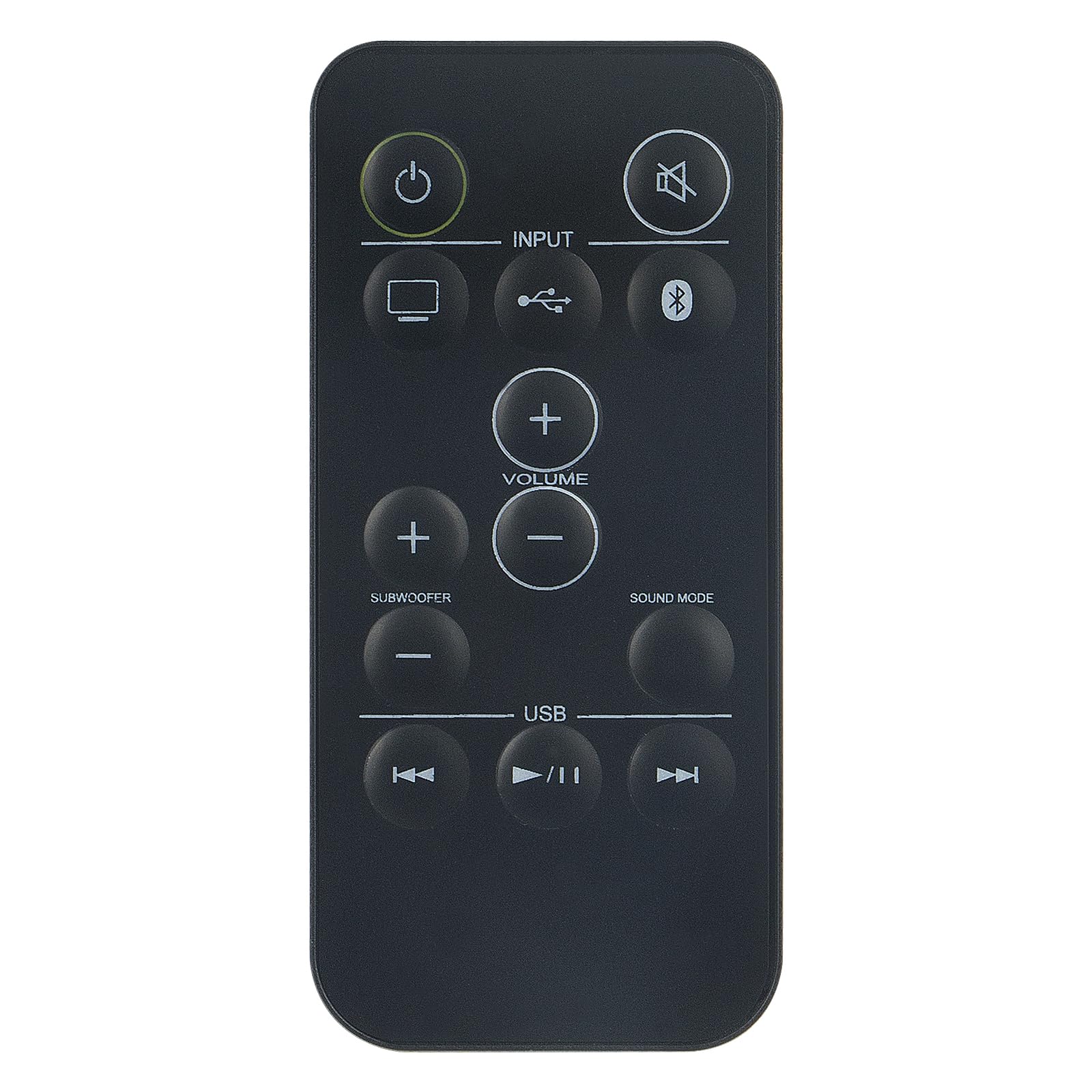
Imaj: Devan view of the Beyution RC877S remote control, showing all buttons clearly labeled.
Enstalasyon
Enstalasyon batri
The RC877S remote control requires two AAA batteries for operation. Follow these steps to install the batteries:
- Jwenn kouvèti lòj batri a sou do kontwòl remote la.
- Glise kouvèti a anba oubyen peze lokèt la (si genyen) pou ouvri konpatiman an.
- Mete de pil AAA ladan l, asire w ke tèminal pozitif (+) ak negatif (-) yo byen aliyen ak mak ki anndan konpatiman an.
- Remèt kouvèti konpatiman batri a lè w glise l tounen nan plas li jiskaske li fè yon klik byen fèm.
Nòt: This remote control is designed to work immediately with compatible devices without any additional programming. If the remote does not respond, ensure batteries are installed correctly and have sufficient charge.

Imaj: Angle view of the Beyution RC877S remote control, highlighting its ergonomic design.
Enstriksyon Operasyon
Point the remote control directly at your Onkyo audio soundbar or home theater system. The maximum effective operating distance is approximately 10 meters (33 feet).
Fonksyon bouton:
- Pouvwa (⏻): Limen oswa etenn aparèy la.
- Silans (🔇): Silenn oswa dekole pwodiksyon odyo a.
- Antre: Cycles through available input sources (e.g., TV, USB, Bluetooth).
- Volim (+/-): Increases or decreases the main volume level.
- Subwoofer (+/-): Ajiste nivo volim subwoofer la.
- Son Mode: Changes the audio sound mode or preset.
- USB: Selects the USB input source.
- Tras anvan an (⏮): Skips to the beginning of the current track or the previous track during media playback.
- Play/Pause (⏸/⏸): Jwe oswa mete sou poz lekti medya a.
- Pwochen Moso (⏭): Skips to the next track during media playback.

Image: A person comfortably using the remote control to operate a home theater system, demonstrating typical usage.
Antretyen
Pou asire lonjevite ak pèfòmans optimal kontwòl remote ou a, swiv gid antretyen sa yo:
- Netwayaj: Siye kontwòl remote la ak yon twal mou epi sèk. Pou pousyè tè ki difisil pou retire, siye l yon ti kras.ampRense twal la avèk dlo oswa yon solisyon netwayaj dou, epi siye l sèk imedyatman. Evite itilize pwodui netwayaj abrazif oswa solvang.
- Ranplasman batri: Ranplase pil yo lè repons telekòmand lan vin ralanti oswa li sispann fonksyone. Toujou ranplase tou de pil yo an menm tan ak nouvo ki gen menm kalite (AAA).
- Depo: Sere kontwòl remote la nan yon kote ki fre epi sèk, lwen limyè solèy dirèk, tanperati ekstrèm, ak imidite ki wo. Si ou pa pral itilize kontwòl remote la pou yon peryòd tan pwolonje, retire pil yo pou anpeche flit.
- Evite gout: Pwoteje telekòmand lan kont enpak fizik, paske si li tonbe, li ka domaje konpozan entèn yo.
Depanaj
If you experience issues with your RC877S remote control, refer to the following common solutions:
- Remote pa reponn:
- Check if the batteries are installed correctly with the correct polarity (+/-).
- Ranplase pil fin vye yo ak pil AAA nèf.
- Ensure there is a clear line of sight between the remote control and the device's infrared receiver. Obstructions can block the signal.
- Make sure you are within the effective operating range (approximately 10 meters).
- Bouton espesifik ki pa fonksyone:
- Clean the remote control, especially around the buttons, to remove any dirt or debris that might be obstructing them.
- If only certain buttons are unresponsive, the remote might be damaged.
- Device not compatible:
- Verify that your Onkyo audio system model is listed as compatible (LS-T10, LS-B50, LSB50, LST10, 24140877, RC-877S, RC877).
- This remote is an infrared replacement and does not require programming. If your original remote used a different technology (e.g., RF), this replacement may not be suitable.
Si etap sa yo pa rezoud pwoblèm nan, tanpri al gade seksyon Garanti ak Sipò a pou plis asistans.
Espesifikasyon
| Mak | Beyution |
| Non modèl | RC877S |
| Nimewo Modèl | WY-RC877S-US |
| Koneksyon Teknoloji | Enfrawouj |
| Maksimòm Range | 10 mèt (33 pye) |
| Kantite pil ki nesesè | 2 |
| Kalite batri | AAA asid |
| Materyèl | ABS plastik |
| Koulè | Nwa |
| Dimansyon atik (L x W x H) | 5" x 1" x 0.5" |
Garanti ak sipò
Enfòmasyon sou Garanti
This Beyution RC877S remote control comes with a 1-ane garanti apati dat acha a. Garanti sa a kouvri domaj fabrikasyon epi li asire pwodwi a fonksyone jan li dwe ye anba itilizasyon nòmal. Tanpri konsève prèv acha ou pou reklamasyon garanti.
Sipò pou Kliyan
For any questions, concerns, or issues regarding your remote control, including damage or malfunction, please contact our customer service team. We are committed to providing a satisfactory solution within 24 hours.
Kontakte: Please refer to the seller's contact information on your purchase platform for direct assistance.