
1. Entwodiksyon
Thank you for choosing the Devoko Electric Height Adjustable Desk. This manual provides essential information for the safe and efficient operation of your new desk. Please read it thoroughly before assembly and use, and retain it for future reference.
This desk is designed to promote healthy work habits by allowing you to easily switch between sitting and standing positions, which can help reduce the effects of a sedentary lifestyle and alleviate back pain.
2. Enstriksyon Sekirite
- Ensure all components are present and undamaged before assembly. Do not use if any parts are missing or damaged.
- Kenbe timoun ak bèt kay lwen biwo a pandan w ap opere pou evite blesi.
- Do not place hands or other body parts near moving parts of the desk during height adjustment.
- Ensure there are no obstructions above or below the desk when adjusting its height. The anti-collision system is designed to prevent impacts, but caution is always advised.
- Do not overload the desk. The maximum load capacity is approximately 70 kg.
- Sèvi sèlman ak adaptè kouran ki vini ak biwo a.
- Dekonekte ekipman pou kouran an anvan ou netwaye oswa fè antretyen.
- Pwodwi sa a fèt pou itilize andedan kay la sèlman.

Image: Desk highlighting 70KG load capacity, anti-collision system, 21mm/s lift speed, and quiet operation (under 45dB).
3. Pake kontni
Tanpri verifye pake a pou asire w ke tout atik yo enkli:
- Desktop sections (4 pieces)
- Desk frame (legs, crossbar)
- Panèl kontwòl
- Adaptè pouvwa ak kab
- Plato jesyon kab
- Mounting hardware (screws, Allen keys)
- Optional: Caster wheels (4 pieces)
- Manyèl itilizatè

Imaj: Plis paseview of the Devoko Electric Height Adjustable Desk setup, including optional caster wheels.
4. Enstalasyon ak Asanble
Assembly typically requires two people. Follow the detailed instructions provided in the separate assembly guide for step-by-step installation.
- Asanble ankadreman biwo a: Attach the legs to the crossbar using the provided screws.
- Tache seksyon Desktop yo: Secure the four desktop sections to the assembled frame. Ensure they are aligned correctly.
- Enstale Panèl Kontwòl la: Mount the control panel to the underside of the desktop in an easily accessible location.
- Konekte kab: Connect the motor cables to the control box and the control panel cable to the control box. Plug the power adapter into the control box and then into a power outlet.
- Install Cable Management Tray: Attach the cable management tray to the underside of the desk to organize wires.
- Optional Caster Wheels: If desired, replace the standard feet with the provided caster wheels for mobility. The desk supports both fixed and mobile modes.
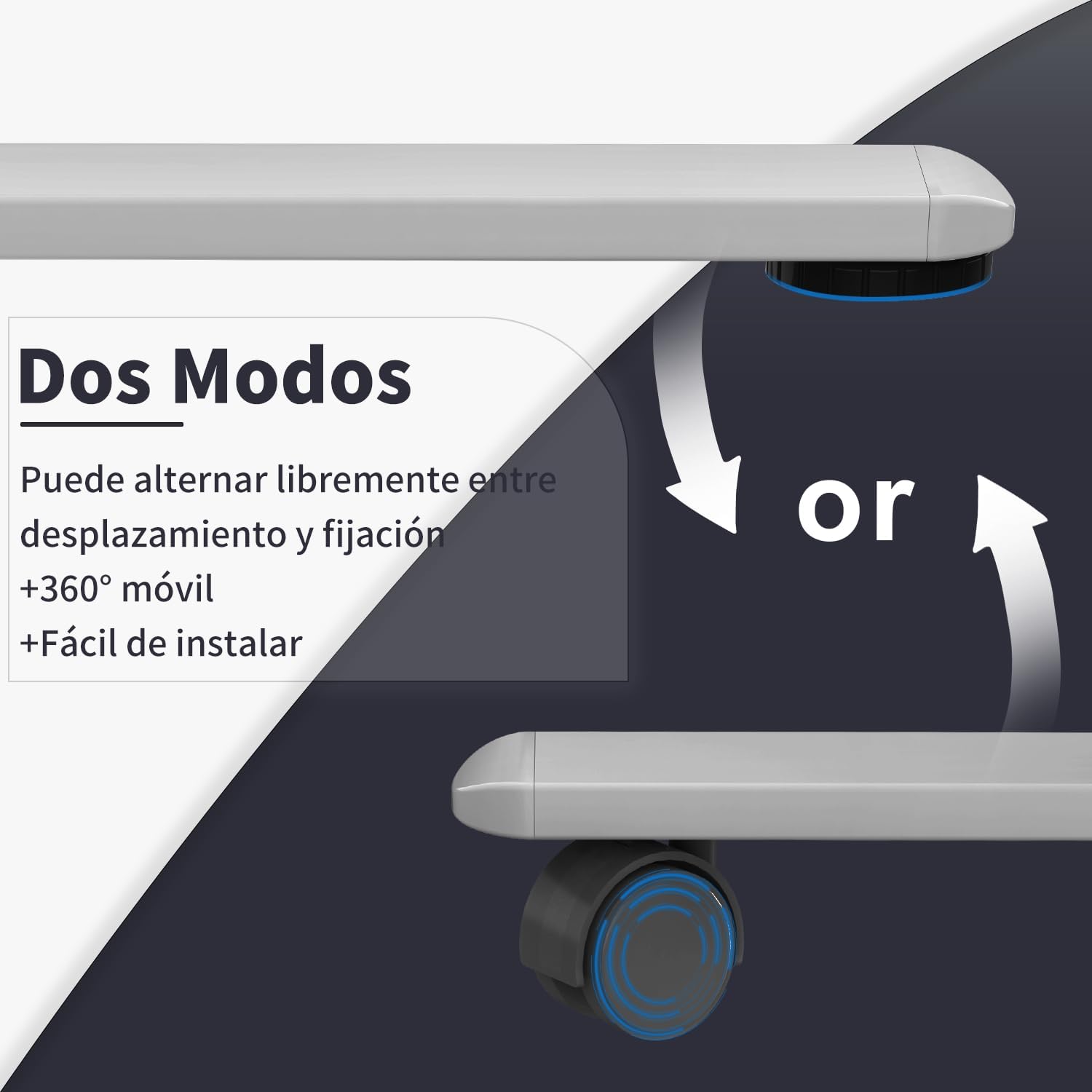
Image: Desk modes, illustrating the option to use fixed feet or 360-degree mobile caster wheels.
5. Operasyon Enstriksyon
5.1 Kontwòl Panel Overview

Image: Multifunctional control panel with USB charging ports and height adjustment buttons.
- Up/Down Buttons (▲ / ▼): Press and hold to adjust the desk height manually.
- Prereglaj Memwa (1, 2, 3): Store and recall preferred sitting and standing heights.
- "S" Button (Set): Used to save a memory preset.
- USB-C / USB-A Charging Ports: For charging compatible electronic devices.
5.2 Ajisteman Wotè
- Ajisteman manyèl: Peze epi kenbe la Anlè (▲) or Desann (▼) button until the desk reaches your desired height. Release the button to stop.
- Using Memory Presets:
- Pou Save a Preset: Adjust the desk to your desired height. Press the "S" button, then press one of the memory buttons (1, 2, oswa 3) within 3 seconds. The display will show "S-" followed by the number to confirm.
- Pou Raple yon Predefinisyon: Press the corresponding memory button (1, 2, oswa 3Biwo a ap deplase otomatikman nan wotè ki anrejistre a.
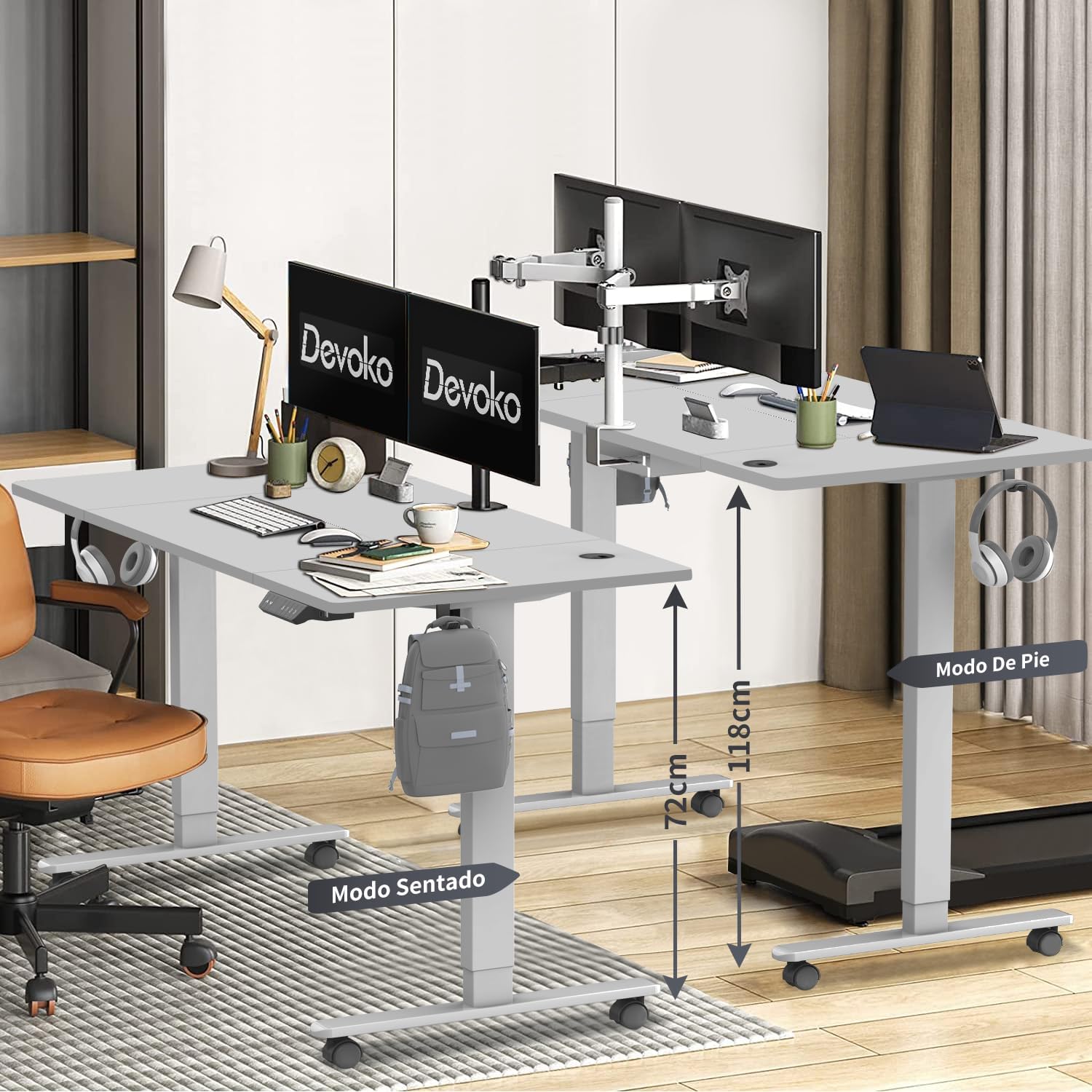
Image: Desk height adjustment range from 72cm (sitting) to 118cm (standing).
5.3 USB chaje pò
The integrated USB-C and USB-A ports allow you to conveniently charge your electronic devices directly from the desk. Simply connect your device's charging cable to the appropriate port.
6. Antretyen
- Netwayaj: Siye sifas biwo a ak ankadreman an avèk yon twal mou.amp cloth. Avoid abrasive cleaners or solvents. Ensure the power is disconnected before cleaning.
- Jesyon kab: Tcheke epi òganize kab yo regilyèman nan plato jesyon kab la pou evite yo mele ak domaje.
- Enspeksyon: Tcheke tout vis ak koneksyon yo detanzantan pou asire yo byen sere. Sere yo ankò si sa nesesè.
NAN. Depanaj
| Pwoblèm | Kòz posib | Solisyon |
|---|---|---|
| Biwo a pa deplase. | Power cable disconnected. Surcharge. Erè motè. |
Tcheke koneksyon pouvwa a. Reduce weight on desk. Unplug for 10 minutes, then plug back in. If issue persists, contact support. |
| Biwo a ap deplase yon fason inegal oswa li fè yon bri dwòl. | Koneksyon ki lach. Obstruction. |
Tcheke epi sere boulon tout vis. Ensure no objects are interfering with the legs. |
| Anti-collision system triggers frequently. | Sansiblite a twò wo. Obstruction. |
Check for obstructions. Refer to the full assembly guide for anti-collision sensitivity adjustment if available. |
| Pò USB yo pa chaje. | Desk not powered. Enkonpatibilite aparèy. |
Ensure desk is plugged in and powered on. Try a different device or cable. |
8. Espesifikasyon
- Mak: Devoko
- Nimewo Modèl: 0428
- Koulè: Gri
- Dimansyon biwo: 160 cm (longè) x 80 cm (lajè)
- Ranje wotè reglabl: 72 santimèt - 118 santimèt
- Materyèl: Engineered Wood (Desktop), Steel/Metal (Frame)
- Pwa pwodwi: 25.6 kg
- Kapasite chaj maksimòm: Apeprè 70 kg
- Lift Speed: 20 mm/s
- Nivo bri: < 45 dB
- Karakteristik espesyal: USB-C & USB-A Charging Ports, 3 Memory Presets, Anti-Collision System, Optional Caster Wheels
- Sètifikasyon: TUV, CE

Image: Desk dimensions (160cm x 80cm) with protective edge detail.
9. Garanti ak sipò
Garanti: The Devoko Electric Height Adjustable Desk comes with a 5-year warranty on the motor and desk frame, effective from the date of purchase.
Règleman retounen: A 30-day unconditional return policy is offered.
Sipò Kliyan: For any installation issues, operational questions, or warranty claims, please contact Devoko customer support through the Amazon platform. We aim to respond to all inquiries within 24 hours.