
Edifier CX7
Edifier CX7 Active 2.1 Home Entertainment System User Manual
Modèl: CX7
Entwodiksyon
The Edifier CX7 is an active 2.1 home entertainment system designed to deliver high-quality audio for various devices, including televisions, personal computers, and notebooks. This system features Bluetooth V5.0 connectivity, an 8-inch subwoofer, and an infrared remote control for convenient operation. This manual provides essential information for setting up, operating, and maintaining your CX7 system.
Kontni pake
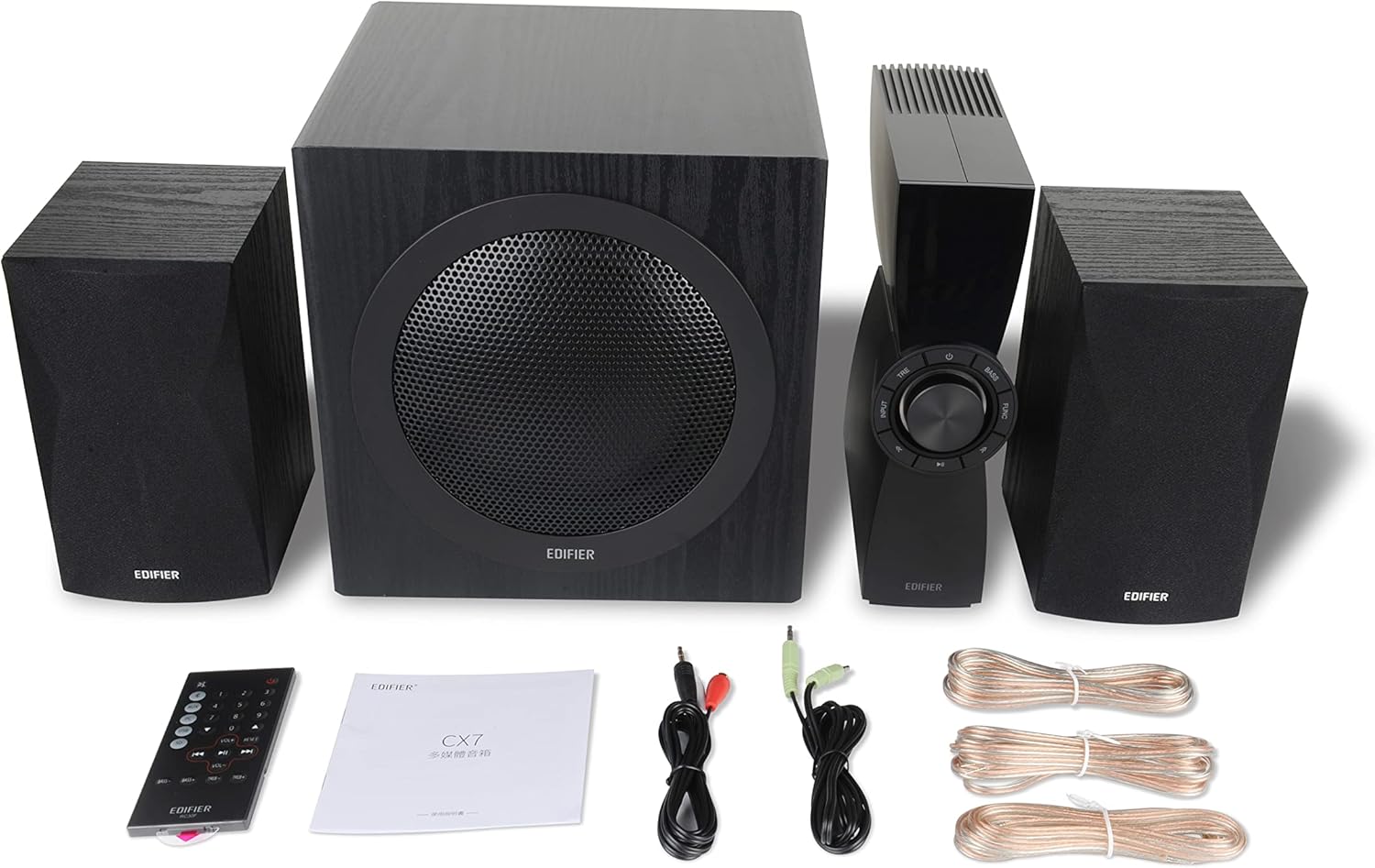
Figure 1: Edifier CX7 System Components
Tanpri verifye ke tout atik ki nan lis anba a yo enkli nan pakè ou a:
- Subwoofer (1)
- Oratè satelit (2)
- Control Unit (1)
- Infrared Remote Control (1)
- 3.5mm to RCA Audio Cable (1)
- RCA to RCA Audio Cable (1)
- Speaker Connection Cables (2)
- Manyèl itilizatè (1)
Gid Enstalasyon
1. Plasman
Position the subwoofer on the floor, preferably in a corner or near a wall for optimal bass response. Place the satellite speakers on either side of your listening area, equidistant from the listener, and at ear level if possible. Ensure the control unit is easily accessible.

Figure 2: Recommended System Placement
2. Konekte Oratè yo
Connect the satellite speakers to the speaker output terminals on the rear of the control unit using the provided speaker cables. Ensure correct polarity (red to red, black to black) for each speaker.
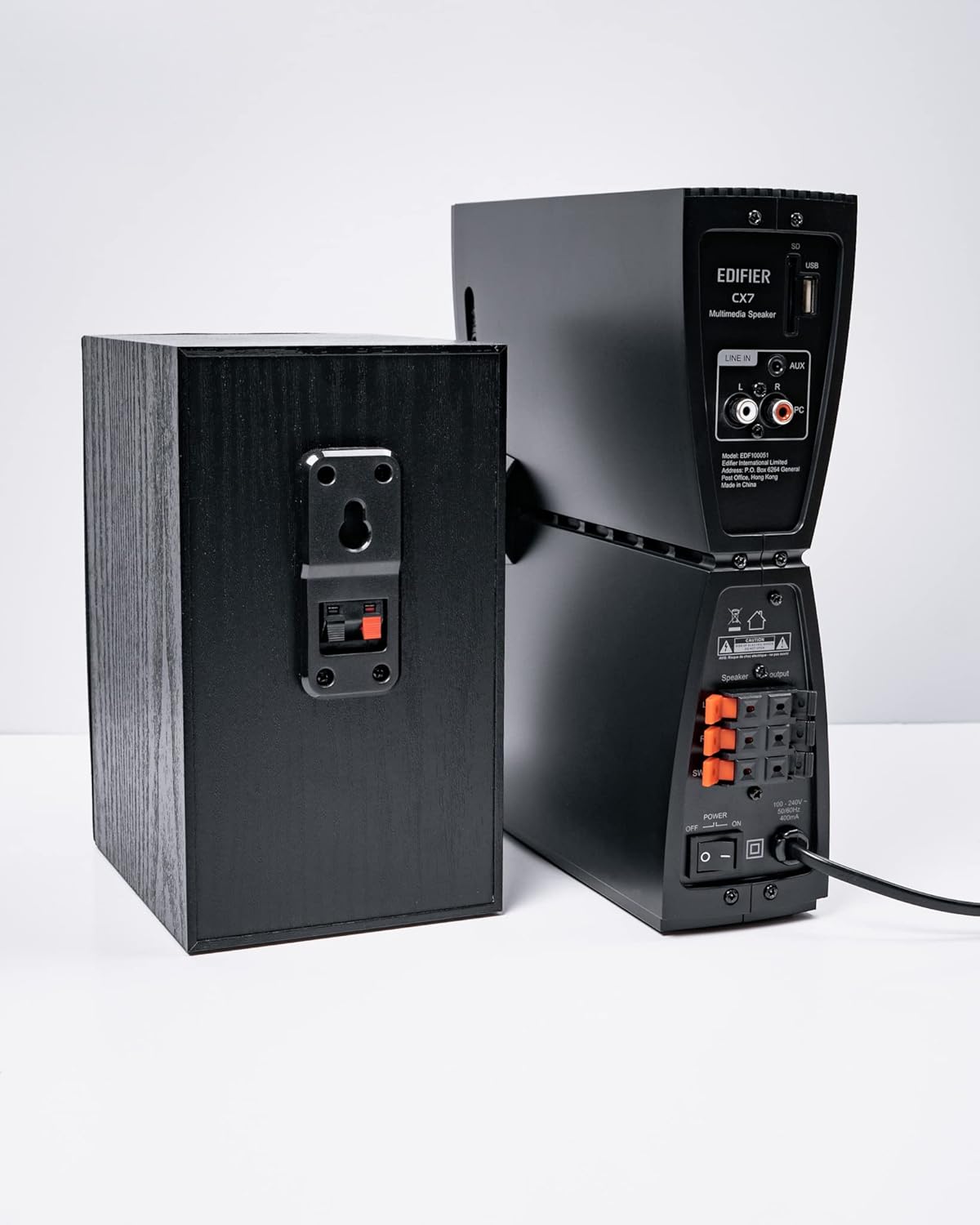
Figi 3: Koneksyon oratè
3. Konekte Sous Odyo yo
The CX7 system supports multiple audio input options:
- Antre AUX: Use the 3.5mm to RCA audio cable to connect devices like smartphones, tablets, or computers to the AUX input on the control unit.
- Antre PC: Use the RCA to RCA audio cable to connect your PC's audio output to the PC input on the control unit.
- Bluetooth: For wireless connection, refer to the "Bluetooth Pairing" section under Operating Instructions.
4. Koneksyon pouvwa
Connect the power cable to the control unit and then plug it into a standard wall outlet. Turn on the power switch located on the rear of the control unit.
Enstriksyon Operasyon
1. Power On/Off
After connecting the power, press the power button on the control unit or the remote control to turn the system on or off. The display on the control unit will illuminate when powered on.

Figure 4: Control Unit Display
2. Seleksyon Antre
Press the "INPUT" button on the control unit or the remote control to cycle through available audio sources: AUX, PC, and Bluetooth. The selected input will be displayed on the control unit's screen.

Figure 5: Control Knob and Input Buttons
3. Kontwòl Volim
Rotate the large knob on the control unit clockwise to increase volume and counter-clockwise to decrease it. Alternatively, use the "VOL+" and "VOL-" buttons on the remote control.
4. Ajisteman Bas ak Treble
Press the "BASS" or "TRE" (Treble) buttons on the control unit or remote control, then rotate the main knob to adjust the respective levels. The display will show the current bass/treble setting.
5. Pè Bluetooth
- Select the Bluetooth input on the CX7 system. The display will show "BT" and flash, indicating it's in pairing mode.
- Sou aparèy ou an (telefòn entelijan, tablèt, elatriye), aktive Bluetooth epi chèche aparèy ki disponib yo.
- Select "EDIFIER CX7" from the list of found devices.
- Once paired, the "BT" indicator on the CX7 display will stop flashing and remain solid.
To disconnect a Bluetooth device, press and hold the "FUNC" button on the control unit or the Bluetooth button on the remote control for a few seconds.
6. Fonksyon kontwòl Remote

Figure 6: Infrared Remote Control
The remote control provides convenient access to all major functions:
- Pouvwa: Vire sistèm lan sou / koupe.
- Seleksyon Antre: Cycles through AUX, PC, Bluetooth.
- Volim: Ajiste volim mèt.
- Bass/Treble: Ajiste nivo bas ak treble.
- Bèbè: Pèdi/retire odyo.
- Kontwòl Lekti: Play/Pause, Previous/Next track (for Bluetooth mode).
Antretyen
- Netwayaj: Use a soft, dry cloth to clean the surfaces of the speakers and control unit. Do not use liquid cleaners or abrasive materials.
- Vantilasyon: Ensure adequate ventilation around the control unit and subwoofer to prevent overheating. Do not block ventilation openings.
- Anviwònman: Evite ekspoze sistèm nan nan tanperati ekstrèm, imidite, pousyè, oswa limyè solèy dirèk.
- Pouvwa Off: If the system will not be used for an extended period, disconnect it from the power outlet.
Depanaj
| Pwoblèm | Kòz posib | Solisyon |
|---|---|---|
| Pa gen son |
|
|
| Koneksyon Bluetooth echwe |
|
|
| Son defòme |
|
|
Espesifikasyon
| Karakteristik | Detay |
|---|---|
| Non modèl | CX7 |
| Kalite Oratè | 2.1 Sistèm oratè |
| Koneksyon Teknoloji | Bluetooth |
| Teknoloji kominikasyon san fil | Bluetooth V5.0 |
| Gamme Bluetooth | 10 mèt |
| Audio Sòti Mode | Antoure |
| Oratè maksimòm pwodiksyon pouvwa | 69 Watts |
| Teknoloji Koneksyon Subwoofer | San fil |
| Woofer Dyamèt | 8 pous |
| Materyèl | Polypropylène |
| Koulè | Nwa |
| Dimansyon pwodwi | 16.93"D x 17.72"W x 13.39"H |
| Pwa atik | 29 liv (13.2 kilogram) |
| Sous pouvwa | Fil elektrik |
| Kalite kontwolè | Kontwòl Remote |
| Itilizasyon Rekòmande | Pou Televizyon, Pou Òdinatè, Pou Smartphones oswa Tablèt |
Garanti ak sipò
For warranty information and technical support, please refer to the warranty card included with your product or visit the official Edifier websit la. Kenbe resi acha ou kòm prèv acha pou reklamasyon garanti.
Edifier Official Websit: www.edifier.com
Ask a question about this manual
Ask about setup, troubleshooting, compatibility, parts, safety, or missing instructions. Manuals+ will review the question and use this page’s manual context to help answer it.