
1. Entwodiksyon
This manual provides detailed instructions for the installation, operation, and maintenance of the Supermicro X13SEI-F Server Motherboard. This motherboard is designed for high-performance server applications, supporting Intel Xeon processors with an LGA4677 socket and DDR5 memory.
Please read this manual thoroughly before attempting to install or operate the motherboard to ensure proper setup and to prevent damage to the components.
2. Enfòmasyon sou Sekirite
Obsève prekosyon sekirite sa yo pou evite blesi ak domaj nan ekipman an:
- Always disconnect the power cord from the power supply before installing or removing any components.
- Wear an anti-static wrist strap when handling the motherboard and other components to prevent electrostatic discharge (ESD).
- Ensure the installation environment is dry and free from static electricity.
- Pa ekspoze kat manman an nan imidite oswa tanperati ekstrèm.
- Manyen kat manman an nan kwen li yo pou evite touche konpozan sansib yo.
- Refer to the power supply unit's manual for specific safety guidelines related to power connections.
3. Pake kontni
Verify that all items are present and in good condition. If any items are damaged or missing, contact your vendor.
- Supermicro X13SEI-F Server Motherboard
- I / O Shield
- Kab SATA (kantite a ka varye)
- Quick Reference Guide / User Manual (this document)
- Driver CD/DVD or USB drive (or download instructions)
4. Pwodwi souview
The Supermicro X13SEI-F is a high-performance server motherboard featuring the LGA4677 socket, designed to support Intel Xeon Scalable processors. It offers robust memory capabilities with 8 DDR5 DIMM slots, supporting up to 4800MHz memory speed. The board also includes multiple PCIe slots for expansion.
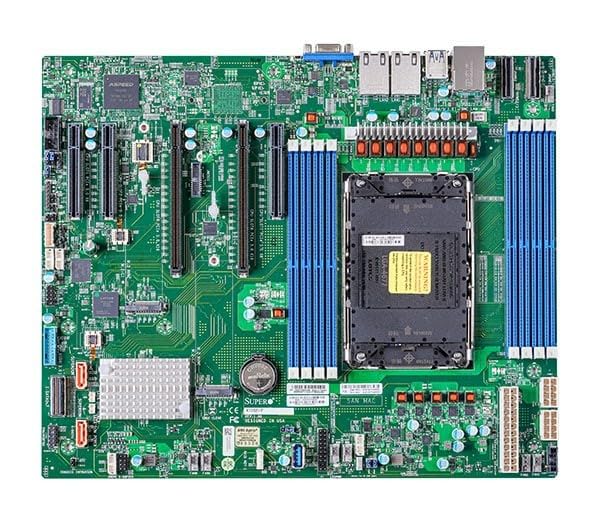
Figure 1: Supermicro X13SEI-F Server Motherboard. This image displays the overall layout of the motherboard, including the CPU socket, DIMM slots, and various connectors.
4.1 Karakteristik kle
- Sokèt CPU: LGA4677 for Intel Xeon Scalable Processors
- Chipset: Intel C621
- memwa: 8x DDR5 DIMM slots, up to 4800MHz
- Fant ekspansyon: Multiple PCIe slots (specific configuration depends on model variant)
- Depo: Support for various storage interfaces (SATA, NVMe - specific details in specifications)
- Rezo: Integrated LAN controllers
5. Enstalasyon ak Enstalasyon
Before beginning installation, ensure your system case is compatible with the motherboard's form factor and that you have all necessary components.
5.1 Enstalasyon CPU (LGA4677)
- Jwenn priz LGA4677 la sou kat manman an.
- Carefully open the CPU socket retention mechanism according to the instructions provided with your CPU or motherboard.
- Align the CPU with the socket, ensuring the triangular mark on the CPU matches the mark on the socket. Do not force the CPU into the socket.
- Dousman desann CPU a nan priz la.
- Close the CPU socket retention mechanism until it locks securely.
- Enstale radyatè CPU a dapre enstriksyon manifakti a.
5.2 Enstalasyon RAM (DDR5)
- Locate the 8 DDR5 DIMM slots on the motherboard.
- Open the retention clips at both ends of the DIMM slot.
- Aliyen dan ki sou modil memwa DDR5 la ak kle ki nan plas DIMM lan.
- Insert the memory module firmly into the slot until the retention clips snap into place. Ensure both clips are closed.
- For optimal performance, refer to the motherboard's manual for recommended memory population order.
5.3 Enstalasyon Kat PCIe
- Identify the appropriate PCIe slot for your expansion card (e.g., GPU, RAID card).
- Retire kouvèti plas ekspansyon ki koresponn lan nan chasi ou a.
- Align the PCIe card with the slot and press down firmly until it is fully seated.
- Secure the card with a screw or retention clip to the chassis.
5.4 Enstalasyon Aparèy Depo
- Disques SATA yo: Connect SATA data cables from the motherboard's SATA ports to your SATA hard drives or SSDs. Connect power cables from the PSU to the drives.
- NVMe M.2 Drives: Locate the M.2 slots. Insert the M.2 drive at an angle, then push it down and secure it with the provided screw or retention mechanism.
5.5 Koneksyon pouvwa
- Konekte konektè pouvwa ATX 24-pin ki soti nan ekipman pou pouvwa a nan priz kouran prensipal la sou kat manman an.
- Connect the 8-pin (or 4+4 pin) EPS 12V CPU power connector(s) to the corresponding sockets near the CPU.
- Asire w tout koneksyon kouran yo byen fèm.
5.6 Koneksyon Front Panel
Connect the front panel cables (Power LED, HDD LED, Power Switch, Reset Switch, USB, Audio) from your chassis to the corresponding headers on the motherboard. Refer to the motherboard's silkscreen labels or the detailed manual for exact pin configurations.
6. Operasyon Enstriksyon
6.1 Premye Demaraj
- After completing all hardware installations, connect the monitor, keyboard, and mouse.
- Connect the power cord to the power supply and turn on the power switch on the PSU.
- Peze bouton pouvwa a sou chasi ou a.
- The system should power on, and you should see the BIOS/UEFI POST screen.
6.2 Enstalasyon BIOS/UEFI
Pou antre nan zouti konfigirasyon BIOS/UEFI a, peze bouton an. DEL or F2 key repeatedly during the POST process. Within the BIOS/UEFI, you can configure:
- Lòd bòt
- Tan ak dat sistèm
- Anviwònman CPU ak memwa
- Storage configurations (RAID, AHCI)
- Kontwòl vitès fanatik
- Anviwònman sekirite
Save changes before exiting the BIOS/UEFI.
6.3 Enstalasyon sistèm operasyon
Insert your operating system installation media (USB drive or DVD) and set it as the primary boot device in the BIOS/UEFI. Follow the on-screen instructions to install your preferred operating system. After installation, install all necessary drivers from the Supermicro website or the provided driver media.
7. Antretyen
7.1 Netwayaj
- Regularly clean dust from the motherboard and system components using compressed air.
- Asire w ke sistèm nan etenn epi debranche anvan ou netwaye li.
- Evite sèvi ak pwodui netwayaj likid dirèkteman sou konpozan yo.
7.2 Mizajou Firmware
Periodically check the Supermicro website for updated BIOS/UEFI firmware. Firmware updates can improve system stability, performance, and compatibility. Follow the specific instructions provided by Supermicro for updating the firmware to avoid system damage.
NAN. Depanaj
Seksyon sa a bay solisyon pou pwoblèm komen ou ka rankontre.
8.1 Pa gen kouran / Pa gen POST (Oto-tès lè w ap limen)
- Tcheke Koneksyon Pouvwa: Ensure the 24-pin ATX and 8-pin EPS 12V power connectors are securely seated.
- Verify PSU: Test the power supply unit (PSU) with another system or a PSU tester.
- Remonte konpozan yo: Reseat the CPU, RAM modules, and any expansion cards.
- Klè CMOS: Refer to the motherboard manual for instructions on how to clear the CMOS (Complementary Metal-Oxide-Semiconductor) settings, which can resolve boot issues.
- Konfigirasyon minimòm: Try booting with only the CPU, one RAM stick, and the necessary power connections.
8.2 Pa gen okenn pwodiksyon ekspozisyon
- Koneksyon pou kontwole: Ensure the monitor is properly connected to the graphics output (either integrated or discrete GPU) and is powered on.
- Kat grafik: If using a discrete graphics card, ensure it is fully seated in its PCIe slot and has all necessary power connectors from the PSU.
- Grafik entegre: If your CPU supports integrated graphics, try connecting the monitor to the motherboard's video output to rule out a discrete GPU issue.
8.3 Sistèm operasyon an pa demarre
- Lòd bòt: Check the BIOS/UEFI settings to ensure the correct boot device (e.g., SSD, HDD) is selected as the primary boot option.
- Drive Connections: Verify that your storage drives are properly connected (data and power).
- Enstalasyon sistèm operasyon an: If the OS is newly installed, ensure the installation process completed successfully and all drivers are installed.
9. Espesifikasyon
| Karakteristik | Detay |
|---|---|
| Mak | Supermicro |
| Non modèl | MBD-X13SEI-F-B |
| CPU Socket | LGA 4677 |
| Procesè konpatib yo | Intel Xeon Scalable |
| Kalite Chipset | Intel C621 |
| Teknoloji memwa RAM | DDR5 |
| Vitès memwa | 4800 MHz |
| RAM Slots | 8x DDR5 DIMM slots |
| Dimansyon pwodwi (LxWxH) | 16 x 12 x 5 pous |
| Pwa atik | 3.19 liv |
| Premye Dat ki disponib | 20 janvye 2023 |
Note: Specifications are subject to change without notice. For the most current information, please refer to the official Supermicro product page.
10. Garanti ak sipò teknik
10.1 Enfòmasyon sou Garanti
Supermicro products are covered by a limited warranty. For detailed warranty terms and conditions, including duration and coverage, please visit the official Supermicro website or consult the warranty card included with your product. Keep your proof of purchase for warranty claims.
10.2 Sipò teknik
For technical assistance, driver downloads, BIOS updates, and further product information, please visit the official Supermicro support websit:
https://www.supermicro.com/support
Before contacting support, please have your motherboard model number (MBD-X13SEI-F-B) and serial number ready.