
Sigma SG60600L
Sigma 60-600mm F4.5-6.3 DG DN OS for L-Mount Instruction Manual
Model: SG60600L
1. Entwodiksyon
This manual provides detailed instructions for the safe and effective use of your Sigma 60-600mm F4.5-6.3 DG DN OS Sports Lens for L-Mount. Please read this manual thoroughly before using the product and retain it for future reference. This lens is designed for mirrorless cameras and offers a versatile 10x zoom range, suitable for various photographic applications from landscapes to wildlife.
2. Ki sa ki nan bwat la
Lè w ap ouvri pake a, asire w ke tout bagay sa yo la:
- Sigma 60-600mm F4.5-6.3 DG DN OS Sports Lens
- Lens Hood
- Cap Lens devan
- Dèyè Lens Cap
- Tripod Socket (removable)
- Manyèl Enstriksyon (dokiman sa a)
3. Karakteristik kle
- Versatile 10x Zoom: Covers a broad focal length range from 60mm to 600mm.
- High-response Linear Actuator (HLA) AF Motor: Provides fast and precise autofocus performance.
- Dust and Splash-Resistant Structure: Designed for durability in various shooting conditions.
- Maximum Magnification Ratio of 1:2.4: Allows for detailed close-up shots.
- Dual Action Zoom Function: Offers both rotary and push-pull zoom mechanisms for flexible operation.
- Optical Stabilization (OS): Minimizes camera shake for sharper images, especially at longer focal lengths.
- Manual Focus Override: Enables manual focus adjustments even when using autofocus.
- Zoom Lock Switch: Secures the lens at a desired focal length to prevent accidental extension.
4. Enstalasyon
4.1 Mete lantiy la sou kamera ou a
- Asire w ke ni kamera a ni lantiy la etenn.
- Retire bouchon dèyè lantiy la ak bouchon kò kamera a.
- Align the mounting index marks on the lens and camera body.
- Insert the lens into the camera's lens mount and rotate it clockwise until it clicks into place.
4.2 Mete kouvèti lantiy la
The included lens hood helps to block stray light and protect the front element of the lens. Align the red dot on the lens hood with the red dot on the front of the lens, then twist the hood clockwise until it locks securely.
4.3 Using the Tripod Socket
For stable shooting, especially at longer focal lengths, attach the lens to a tripod using the integrated tripod socket. The tripod collar can be rotated for optimal balance and composition. Loosen the locking knob on the tripod collar to rotate the lens, then tighten it to secure the position.
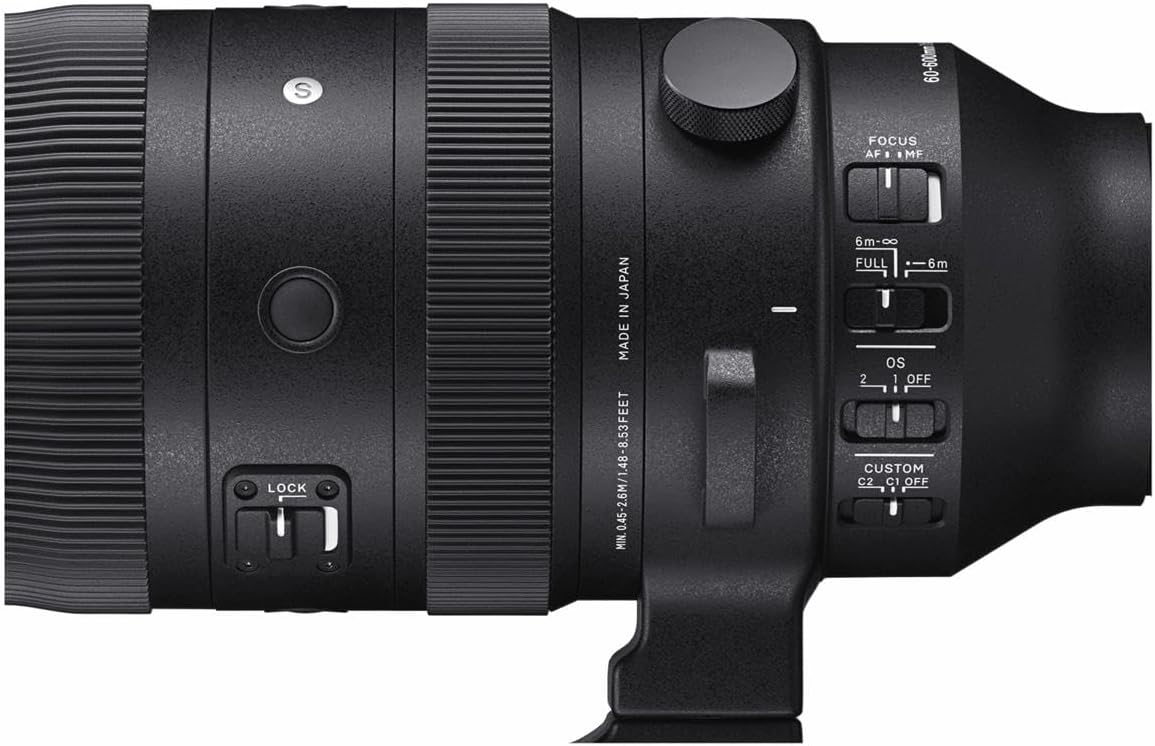
Image: Sigma 60-600mm lens securely mounted on a tripod, demonstrating its use for stable photography.
5. Operasyon Modes
5.1 Focus Modes (AF/MF)
The lens features a switch to select between Autofocus (AF) and Manual Focus (MF). In AF mode, the camera automatically focuses on the subject. In MF mode, you manually adjust the focus ring on the lens. The Manual Override (MO) function allows for fine-tuning focus manually even when AF is engaged.
5.2 Optical Stabilizer (OS) Modes
The Optical Stabilizer (OS) system helps reduce blur caused by camera shake. The lens offers different OS modes:
- Mòd 1: General-purpose stabilization for static subjects.
- Mòd 2: Optimized for panning shots, stabilizing vertical movement while allowing horizontal movement.
- OFF: Disables optical stabilization.
5.3 Zoom Lock Switch
The zoom lock switch prevents the lens barrel from extending or retracting unintentionally, which is useful during transport or when shooting at a fixed focal length.

Imaj: Detaye view of the lens control panel, highlighting the various switches for focus, optical stabilization, and zoom lock.
6. Espesifikasyon
| Karakteristik | Spesifikasyon |
|---|---|
| Mak | Sigma |
| Non modèl | SG60600L |
| Longè Fokal | 60-600mm |
| Kalite lantiy | Zoom teleobjèktif |
| Montaj konpatib | Leica L-Mount |
| Ouverture maksimòm | F4.5-6.3 |
| Ouverture minimòm | F22-32 |
| Estabilizasyon Imaj | Optical (OS) |
| Kalite Konsantre | Autofocus (HLA) with Manual Focus Override |
| Kantite lam dyafram | 9 (Rounded) |
| Distans Minimòm Konsantre | 45 cm (17.7 inches) at 200mm |
| Maksimòm Pwopòsyon agrandisman | 1:2.4 (at 200mm) |
| Gwosè filtre | 105mm |
| Pwa atik | 2500 gram (5.5 liv) |
| Nivo rezistans dlo | Dlo rezistan |
7. Antretyen
7.1 Netwaye Lantiy la
- Sèvi ak yon bwòs souflè pou retire pousyè sou sifas lantiy la.
- For smudges or fingerprints, use a clean, soft microfiber cloth specifically designed for optics, along with a lens cleaning solution.
- Never use harsh chemicals or abrasive materials, as these can damage the lens coatings.
7.2 Depo
Store the lens in a cool, dry place away from direct sunlight and extreme temperatures. Use the front and rear lens caps to protect the glass elements. If storing for an extended period, consider using a dehumidifying agent to prevent mold growth.
NAN. Depanaj
8.1 Image Blur
- Check OS setting: Ensure the Optical Stabilizer is set to an appropriate mode (Mode 1 or Mode 2) for your shooting conditions, or OFF if using a tripod.
- Vitès vole: Use a faster shutter speed, especially when shooting handheld at longer focal lengths.
- Konsantre: Verify that the lens is properly focused on your subject.
8.2 Pwoblèm otofokus
- Chanjman AF/MF: Confirm the lens is set to AF mode.
- Kondisyon ekleraj: Autofocus may struggle in very low light. Consider using manual focus or a brighter light source.
- Anviwònman kamera: Check your camera's autofocus settings to ensure they are appropriate for your subject.
9. Garanti ak sipò
The Sigma 60-600mm F4.5-6.3 DG DN OS Sports Lens comes with a 4-year warranty. For warranty claims, technical support, or service inquiries, please contact Sigma customer service or visit their official websit la. Kenbe prèv acha ou a pou validasyon garanti a.
Pou plis enfòmasyon, vizite ofisyèl la Sigma Global websit.
Ask a question about this manual
Ask about setup, troubleshooting, compatibility, parts, safety, or missing instructions. Manuals+ will review the question and use this page’s manual context to help answer it.