
Entwodiksyon
This manual provides essential instructions for the safe and efficient use of your Olympia 2298 foldable 4G mobile phone. Please read it thoroughly before operating the device and keep it for future reference.
1. Enstalasyon
1.1 Kontni pake a
- Olympia 2298 Mobile Phone
- Batri (ityòm-ion)
- USB-C Chaje Kab
- Charging Cradle (if included)
- Manyèl itilizatè
1.2 Inserting the Battery and SIM Card
- Open the phone: Gently open the phone to access the battery compartment.
- Retire kouvèti dèyè a: Retire kouvèti dèyè telefòn nan avèk anpil atansyon.
- Mete kat SIM: Locate the SIM card slot(s). Insert your 4G compatible SIM card(s) into the designated slot(s) with the gold contacts facing down, ensuring it clicks into place.
- Mete batri: Place the Lithium-ion battery into the battery compartment, aligning the contacts.
- Replace back cover: Securely attach the back cover until it clicks.
 Imaj: Devan view of the Olympia 2298 foldable phone, showing the main display with time and date.
1.3 Chaje batri a
Anvan premye itilizasyon an, chaje batri telefòn nan nèt.
- Connect charger: Plug the USB-C cable into the phone's USB-C port or place the phone in the charging cradle. Connect the other end of the cable to a suitable power adapter.
- Endikatè chaje: The phone will display a charging indicator on the screen.
- Chaj konplè: Allow the phone to charge until the battery indicator shows a full charge. This may take several hours for the initial charge.
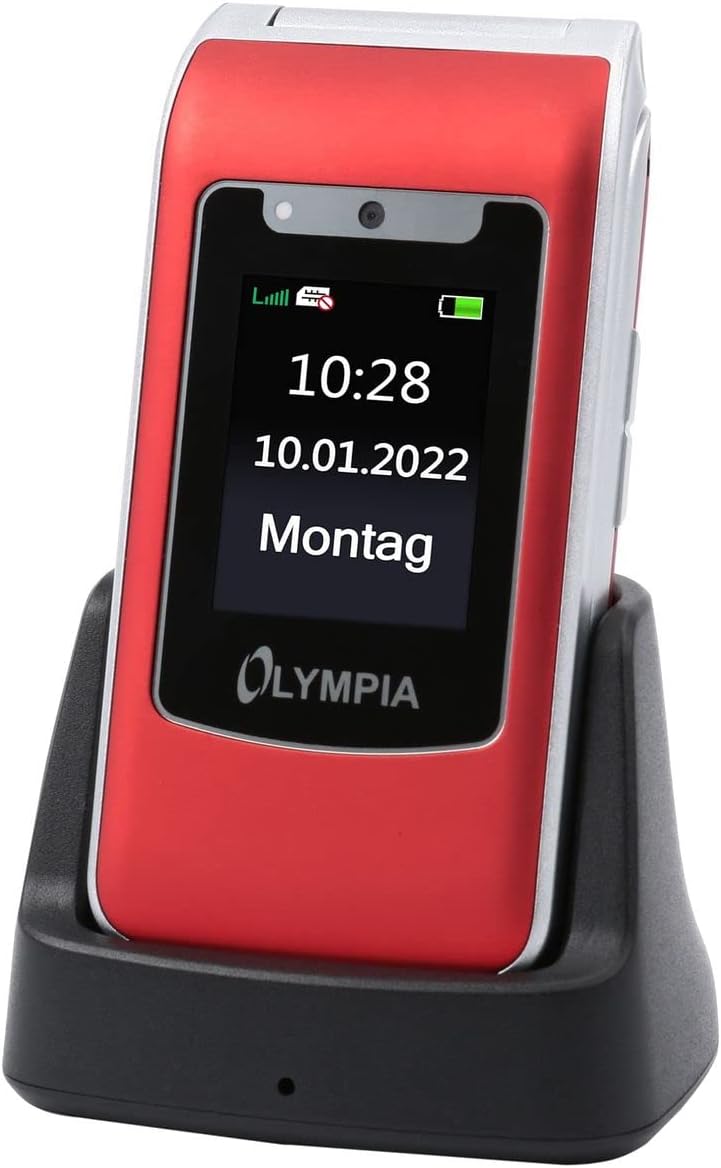 Image: The Olympia 2298 phone placed in its charging cradle, indicating ease of charging.
1.4 Limen/Etenyen
- Pou limen: Peze epi kenbe bouton Pouvwa/Fen Apèl la jiskaske ekran an limen.
- Pou etenn: Peze epi kenbe bouton Pouvwa/Fini Apèl la, answit chwazi "Etenn" nan opsyon ki sou ekran an.
2. Operasyon Enstriksyon
2.1 Fonksyon Apèl Debaz yo
- Fè yon apèl: Dial the number using the keypad and press the Green Call button.
- Reponn yon apèl: When the phone rings, press the Green Call button.
- Fini yon apèl: Peze bouton wouj pou fini apèl la.
- Ajiste Volim: Use the volume buttons on the side of the phone during a call.
2.2 Emergency Call Button (SOS)
The Olympia 2298 features a dedicated SOS button for emergencies.
 Imaj: Dèyè view of the Olympia 2298 phone, highlighting the prominent SOS emergency call button.
- Setup Emergency Contacts: Before using, configure up to 5 emergency contacts in the phone's settings. Refer to the "Settings" section in the menu for details.
- Aktive SOS la: In an emergency, press and hold the SOS button on the back of the phone for several seconds.
- Automatic Dialing: The phone will automatically dial the pre-set emergency contacts one by one until a connection is made. It will also send an emergency SMS message to these contacts.
Enpòtan: Ensure emergency contacts are regularly updated and aware they are listed as such.
2.3 Navigasyon meni
Use the navigation keys (up, down, left, right) and the central "OK" button to browse the phone's menu. The "Back" button typically returns to the previous screen.
- Kontak: Store and manage phone numbers.
- Mesaj: Voye epi resevwa mesaj SMS.
- Rele Journal: View missed, dialed, and received calls.
- Anviwònman: Customize phone preferences, including sound, display, and emergency contacts.
- Kamera: Access the integrated camera.
- Zouti: Includes features like alarm, calendar, and calculator.
2.4 Voye ak Resevwa Mesaj
- To Send: Go to "Messages" -> "Write Message". Enter the recipient's number or select from contacts, type your message, and send.
- Pou resevwa: New messages will appear as a notification. Go to "Messages" -> "Inbox" to read them.
3. Antretyen
3.1 Netwayaj
- Sèvi ak yon twal mou epi sèk pou netwaye deyò telefòn nan.
- Avoid using liquid cleaners, aerosols, or harsh chemicals.
- Keep the USB-C port free from dust and debris.
3.2 Swen Batri
- Pa ekspoze batri a nan tanperati ekstrèm.
- Evite dechaje batri a nèt souvan pou pwolonje dire lavi li.
- Si ou pa pral itilize telefòn nan pou yon bon bout tan, chaje l a anviwon 50% anvan ou sere l.
NAN. Depanaj
| Pwoblèm | Kòz posib | Solisyon |
|---|---|---|
| Telefòn nan pa limen. | Battery is discharged or not inserted correctly. | Chaje batri a. Asire w ke batri a byen mete. |
| Pa ka fè oswa resevwa apèl. | No network signal, SIM card not inserted, or SIM card issue. | Tcheke fòs siyal rezo a. Mete kat SIM nan ankò. Kontakte founisè sèvis ou a. |
| SOS button not working. | Kontak ijans yo pa configuré oswa yo pa kòrèk. | Verify and update emergency contacts in settings. |
| Move kalite apèl. | Siyal rezo fèb oswa entèferans. | Ale nan yon zòn ki gen pi bon siyal. Evite obstak. |
5. Espesifikasyon
- Nimewo Modèl: 2298
- Mak: OLYMPIA
- Gwosè ekran: 2.4 pous
- Teknoloji selilè: 4G (LTE)
- Koneksyon Teknoloji: USB (USB Type C)
- Konpayi asirans san fil: Tout transpòtè yo
- Batri: 1 ityòm-ion (enkli)
- Pwa atik: 105 gram
- Tan pou pale: 6 èdtan
- Dimansyon: 5.3 x 2.1 x 10.5 santimèt
6. Garanti ak sipò
For warranty information and technical support, please refer to the documentation provided with your purchase or visit the official OLYMPIA websit la. Kenbe prèv acha ou pou reklamasyon garanti.
Nòt: Spare parts availability and software update guarantees are not specified in the product information provided.