
United LED24HS82A11
Manyèl Itilizatè UNITED LED24HS82A11 Televizyon Entelijan Android 24 pous HD Ready
Model: LED24HS82A11
Entwodiksyon
This user manual provides comprehensive instructions for the setup, operation, maintenance, and troubleshooting of your UNITED LED24HS82A11 24-inch HD Ready Smart Android TV. Please read this manual thoroughly before using your television to ensure proper and safe operation.
The UNITED LED24HS82A11 is a versatile 24-inch HD Ready Smart TV powered by Android 11, offering a wide range of entertainment options. It features pre-installed applications, built-in Chromecast and Airplay for seamless content streaming, and full internet connectivity via Wi-Fi and Ethernet. It also supports DVB/T2/S2/C, MPEG-4, and HEVC Main 10 for various broadcasting standards.
Enfòmasyon sou Sekirite
Toujou obsève prekosyon sekirite sa yo pou anpeche dife, chòk elektrik, oswa blesi:
- Pa ekspoze televizyon an ak lapli oswa imidite.
- Pa bloke ouvèti vantilasyon.
- Asire w ke yo pa kwense kòd elektrik la oswa mache sou li.
- Dekonekte televizyon an pandan tanpèt zèklè oswa lè ou pa itilize li pou yon bon bout tan.
- Refere tout sèvis yo bay pèsonèl sèvis kalifye.
Enstalasyon
1. Debalaj ak Enstalasyon Sipò a
Carefully remove the TV and all accessories from the packaging. Place the TV face down on a soft, clean surface to prevent screen damage.
Attach the two stand feet to the bottom of the TV using the provided screws. Ensure they are securely fastened.

Figi 1: Side view of the UNITED LED24HS82A11 TV, illustrating its slim profile and potential port locations.
2. Konekte Câbles
- Pouvwa: Konekte kòd kouran an nan antre kouran televizyon an epi answit nan yon priz miray.
- Antèn/Kab: Connect your antenna or cable TV coaxial cable to the "RF In" port.
- Aparèy HDMI: Konekte aparèy ekstèn tankou lektè Blu-ray, konsola jwèt, oswa dekodeur nan pò HDMI yo.
- Ethernet (Si ou vle): Pou yon koneksyon entènèt filaire, konekte yon kab Ethernet ki soti nan routeur ou a nan pò LAN televizyon an.
3. Inisyal Enstalasyon Sòsye
Once powered on, the TV will guide you through the initial setup process. Follow the on-screen prompts to:
- Chwazi lang ou pi pito.
- Connect to your Wi-Fi network (if not using Ethernet).
- Sign in with your Google account (optional, but recommended for full Smart TV features).
- Chèche chanèl televizyon ki disponib yo (Antèn/Kab).
Opere
Remote kontwòl souview
Familiarize yourself with the buttons on the remote control for easy navigation and control of your TV's functions.
Fonksyon televizyon debaz yo
- Limen/Etenyen: Peze bouton pouvwa a sou telekòmand lan oswa televizyon an.
- Kontwòl Volim: Sèvi ak bouton Monte/Diminye Volim yo.
- Seleksyon chanèl: Sèvi ak bouton Chanèl Anwo/Desann yo oubyen klavye nimewo a.
- Sous Antre: Press the "Source" or "Input" button to switch between HDMI, TV, and other inputs.
Smart TV Features (Android 11)
Your TV runs on Android 11, providing access to a vast ecosystem of apps and services.

Figure 2: The UNITED LED24HS82A11 TV showcasing its Android TV home screen, featuring popular streaming applications like YouTube, Prime Video, and Netflix.
- Ekran Kay: Navigate the home screen to access pre-installed apps (Netflix, YouTube, Prime Video), recommended content, and settings.
- Google Play Store: Download additional apps, games, and content from the Google Play Store.
- Chromecast entegre: Cast content directly from your compatible smartphone, tablet, or computer to the TV. Look for the Cast icon in supported apps.
- Antèn: For Apple devices, use Airplay to stream videos, photos, and music from your iPhone, iPad, or Mac to the TV.
- Koneksyon Entènèt:
- Wi-Fi: Go to Settings > Network & Internet to connect to your wireless network.
- Ethernet: If an Ethernet cable is connected, the TV will automatically use the wired connection.
Antretyen
Netwaye televizyon an
- Toujou debranche televizyon an anvan ou netwaye li.
- Sèvi ak yon twal mou ki pa gen pousyè pou siye ekran an dousman. Pou mak ki difisil pou retire,ampen the cloth slightly with water or a screen cleaner specifically designed for electronics.
- Siye televizyon an casinSiye ak yon twal mou epi sèk. Evite itilize pwodui netwayaj abrazif oswa solvan.
Mizajou lojisyèl
Your TV may receive software updates to improve performance and add new features. You can check for updates via Settings > Device Preferences > About > System update.
Depanaj
Si w rankontre pwoblèm ak televizyon w lan, gade pwoblèm ak solisyon komen sa yo:
| Pwoblèm | Kòz posib / Solisyon |
|---|---|
| Pa gen pouvwa | Tcheke si kòd kouran an byen branche nan televizyon an ak nan priz miray la. Eseye yon lòt priz. |
| Pa gen imaj / Pa gen son | Ensure the correct input source is selected (e.g., HDMI 1, TV). Check cable connections. For TV channels, perform a channel scan. |
| Pa ka konekte ak Wi-Fi | Verify your Wi-Fi password. Restart your router and the TV. Ensure the TV is within range of your Wi-Fi signal. |
| Remote Control pa travay | Tcheke epi ranplase pil yo. Asire w pa gen okenn obstak ant telekòmand lan ak detèktè IR televizyon an. |
| Aplikasyon yo pa chaje / Pèfòmans ralanti | Check your internet connection speed. Clear app cache (Settings > Apps > [App Name] > Clear cache). Restart the TV. |
Espesifikasyon
Below are the technical specifications for the UNITED LED24HS82A11 TV:
| Karakteristik | Spesifikasyon |
|---|---|
| Mak | Etazini |
| Nimewo Modèl | LED24HS82A11 |
| Gwosè ekran | 24 pous |
| Teknoloji ekspozisyon | dirije |
| Rezolisyon | 768p (1366 x 768 piksèl) |
| Rafrechisman pousantaj | 60 Hz |
| Sistèm operasyon | Android 11 |
| Koneksyon | Wi-Fi, Ethernet, HDMI, RF, USB |
| Karakteristik espesyal | Flat Screen, Chromecast Built-in, Airplay, Pre-installed Apps (Netflix, YouTube, Prime Video) |
| Aspè rapò | 16:9 |
| Dimansyon pwodwi (L x W x H) | 12D x 60.5W x 43.2H santimèt |
| Konpozan ki enkli | 1 mini AV adapter cable, 1 remote control with 2 AAA 1.5V batteries |
| Klas efikasite enèji | F |
| Konsomasyon Enèji (SDR) | 21.0 W |
| Konsomasyon Enèji (HDR) | 21.0 W |
| Konsomasyon pouvwa (stand-by) | 0.3 W |

Figure 3: The energy efficiency label for the UNITED LED24HS82A11 TV, indicating an 'F' energy class rating and 21 kWh per 1000 hours of operation.
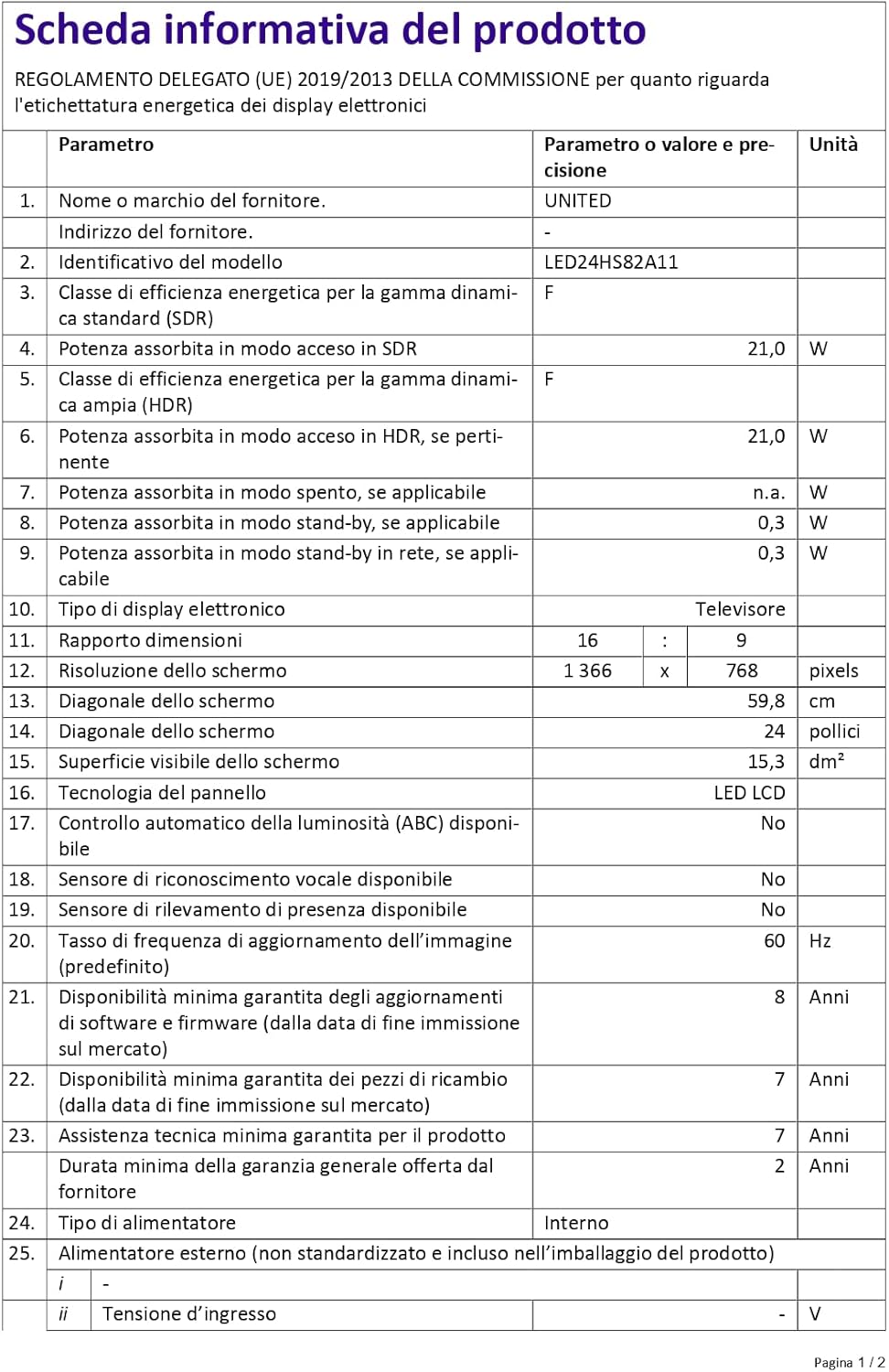
Figure 4: A detailed product information sheet for the UNITED LED24HS82A11 TV, providing comprehensive technical specifications and compliance details.
Pou plis enfòmasyon detaye, tanpri al gade baz done ofisyèl EPREL la: https://eprel.ec.europa.eu/qr/1087921
Garanti ak sipò
Your UNITED LED24HS82A11 TV comes with the following support and warranty provisions:
- Minimum General Warranty: 2 Ane
- Technical Assistance Availability: 7 Ane
- Mizajou lojisyèl garanti jiska: 8 Years from market placement date
- Disponibilite pyès rezèv: 7 Years from market placement date
For technical support or warranty claims, please contact your retailer or the manufacturer's authorized service center. Keep your proof of purchase for warranty validation.
Ask a question about this manual
Ask about setup, troubleshooting, compatibility, parts, safety, or missing instructions. Manuals+ will review the question and use this page’s manual context to help answer it.