1. Entwodiksyon
This manual provides essential information for the safe and efficient operation of your Admark K420 Class D Professional Power Amplifier. Please read this manual thoroughly before installation and use to ensure optimal performance and to prevent damage to the unit or other equipment. The Admark K420 is a high-performance, four-channel Class D amplifier designed for professional audio applications, delivering 2000 Watts per channel at 8 Ohms.
3. Pake kontni
Upon opening the package, please verify that all components are present and in good condition. If any items are missing or damaged, contact your dealer immediately.
- Admark K420 Professional Power Amplifier
- AC pouvwa kòd
- Manyèl Itilizatè (dokiman sa a)
5. Enstalasyon
5.1 Montaj etajè
The Admark K420 is designed for standard 19-inch rack mounting and occupies 1U of rack space. Ensure the rack is stable and has adequate ventilation. Secure the amplifyè a lè l sèvi avèk vis etajè ki apwopriye yo.
5.2 Koneksyon Panèl Dèyè
The rear panel provides all input and output connections. Refer to the image below for a visual guide.

Image: Rear panel of the Admark K420 amplifier, displaying four XLR input connectors, four SpeakON output connectors, and the power inlet.
5.2.1 Koneksyon pouvwa
Connect the supplied AC power cord to the power inlet on the rear panel and then to a suitable grounded AC power outlet. Ensure the amplifier's power switch is in the OFF position before connecting power.
5.2.2 Koneksyon Antre
Use balanced XLR cables to connect your audio source (e.g., mixer, audio processor) to the XLR input connectors (CH A, CH B, CH C, CH D) on the rear panel. Ensure correct polarity.
5.2.3 Koneksyon Sòti
Connect your loudspeakers to the SpeakON output connectors (OUTPUT CH A, OUTPUT CH B, OUTPUT CH C, OUTPUT CH D) using appropriate SpeakON cables. Ensure the impedance of your loudspeakers matches the amplifier's specifications (minimum 8 Ohms per channel for full power output). Observe correct wiring for stereo or bridged modes if applicable (refer to specific wiring diagrams on the unit or in advanced documentation).
6. Operasyon Enstriksyon
The front panel of the Admark K420 provides controls and indicators for monitoring and adjusting the ampoperasyon lifikatè a.
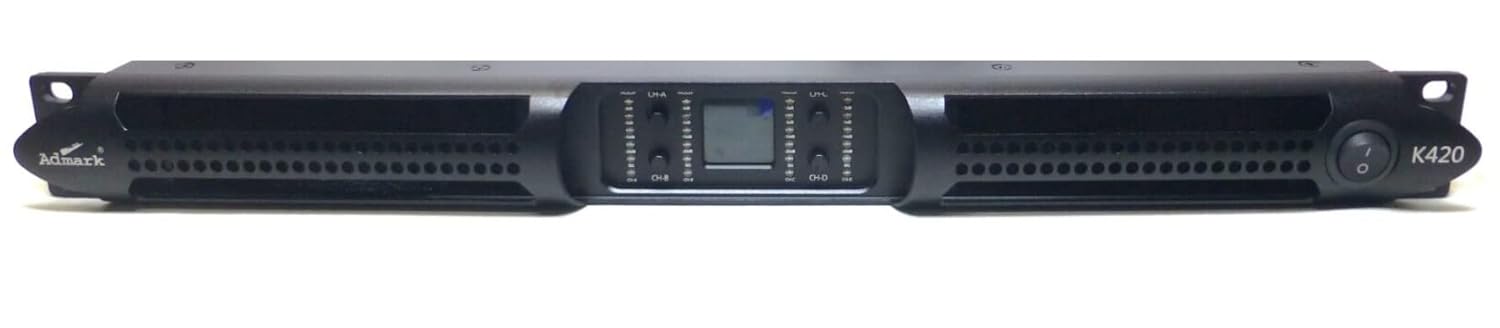
Image: Front panel of the Admark K420 amplifier, featuring the power switch, individual channel level controls, and LED indicators for signal, clip, and protection status.
6.1 Limen/Etenyen
- Pouvwa sou: Ensure all connections are secure and input levels are turned down. Press the power switch on the front panel. The power indicator LED should illuminate.
- Pouvwa Off: Turn down all input levels, then press the power switch to turn off the amplifier.
6.2 Kontwòl Panèl Front ak Endikatè
- Pouvwa switch: Baskile la amplifier sou oswa sou.
- Channel Level Controls: Individual rotary controls for adjusting the output level of each channel (CH A, CH B, CH C, CH D). Start with these controls fully counter-clockwise (minimum) and gradually increase to the desired level.
- Siyal ki ap dirije: Illuminates when an audio signal is present on the corresponding channel.
- Clip ki ap dirije: Illuminates when the output signal is clipping (distorting). Reduce the input level or channel level control immediately to prevent damage to speakers and the amplifier.
- Pwoteje LED: Limen lè a amplifier's protection circuitry is activated due to fault conditions (e.g., overheating, short circuit). The ampLifter la ap mete son an sou kote. Etenn aparèy la, rezoud pwoblèm nan, epi relouvri li.
6.3 Operasyon debaz
- Ensure all audio sources and speakers are connected correctly.
- Turn down all channel level controls on the amplifier.
- Power on your audio source equipment first, then the Admark K420 amplifier.
- Gradually increase the channel level controls on the amplifier to achieve the desired volume. Monitor the Signal and Clip LEDs.
- When finished, turn down the amplifier's channel level controls, then power off the amplifier, followed by your audio source equipment.
