
Logicool C700OW
Logicool Brio 300 Full HD 1080P WebCam Itilizatè Manyèl
Model: C700OW
1. Pwodwi souview
The Logicool Brio 300 is a Full HD 1080p webcam designed to enhance your online meeting experience. It features automatic light correction, a noise-reduction microphone, and a convenient privacy shutter. With its modern design and compatibility with major video conferencing platforms, the Brio 300 ensures clear visuals and audio for all your virtual interactions.

Figure 1: Logicool Brio 300 Webkam
2. Karakteristik kle
- Videyo Full HD 1080p: Delivers crisp and clear video at 30 frames per second, ensuring you look your best in every call.
- Teknoloji RightLight 2: Automatically corrects lighting conditions, from dim environments to direct sunlight, to ensure natural and balanced images.
- Mikwofòn pou Rediksyon Bri: The built-in mono microphone captures your voice clearly while suppressing ambient background noise, ensuring your message is heard without distraction.
- Vole Entegre pou Konfidansyalite: A simple twist of the integrated shutter instantly blocks the camera lens, providing complete privacy when the webCam pa itilize.
- Konsepsyon dirab: Constructed with over 48% recycled plastic, contributing to a more climate-positive world.
- Sètifye konpatibilite: Officially certified for Zoom, Microsoft Teams, and Google Meet, ensuring seamless integration and reliable performance across popular video conferencing platforms.
- Logi Tune Software: Free software available for download to customize webcam settings, including color tone, screen resolution, and automatic firmware updates. (Note: Logi Tune currently supports English, French, German, Italian, Spanish, and Portuguese only.)

Figure 2: Full HD 1080p Video Quality

Figure 3: RightLight 2 Automatic Light Correction

Figure 4: Noise Reduction Microphone

Figure 5: Privacy Shutter in Action

Figure 6: Environmentally Conscious Product
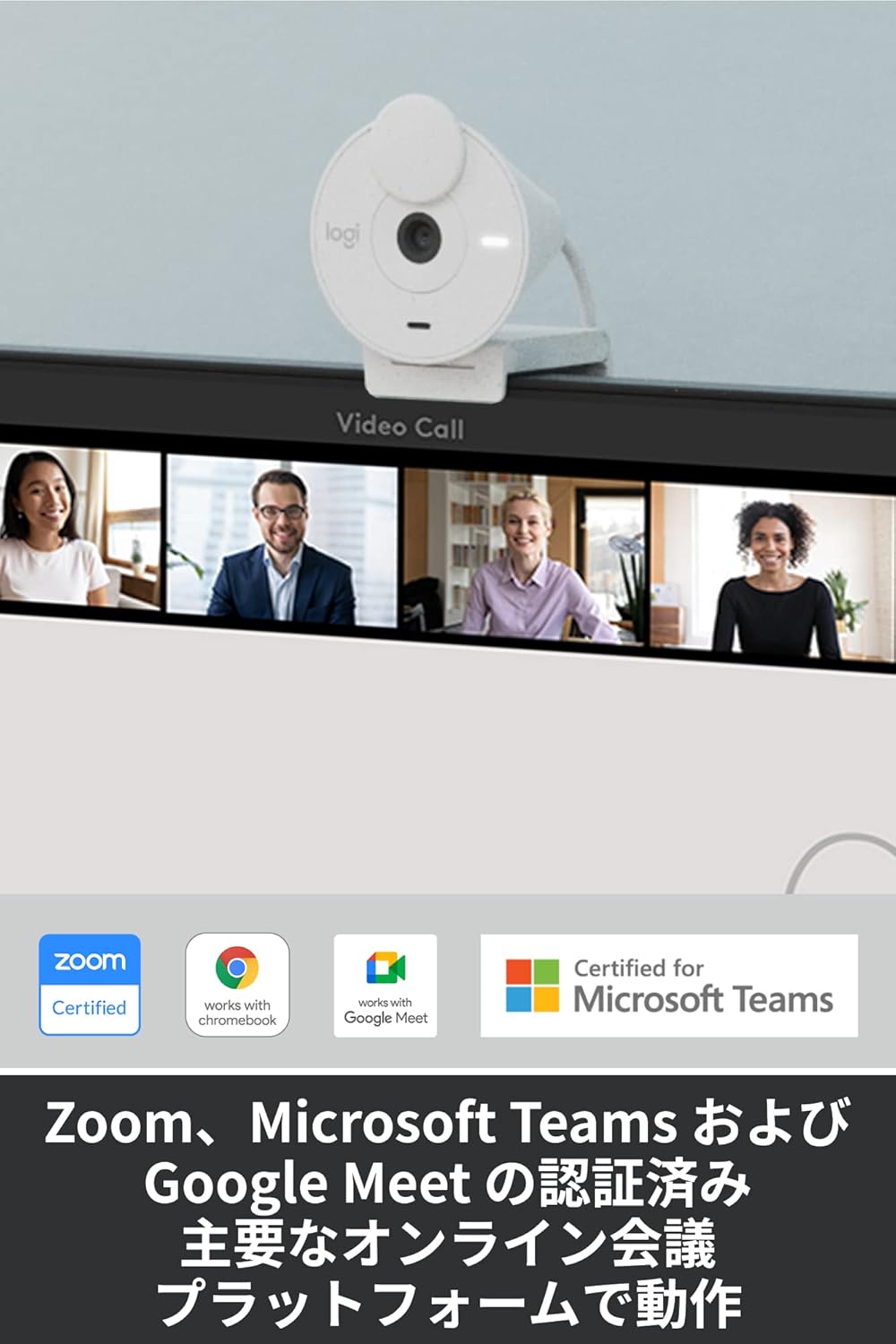
Figure 7: Certified for Major Platforms
3. Enstalasyon
3.1 Koneksyon Fizik
- Unpack the Brio 300 webcam from its packaging.
- Konekte kab USB-C entegre a nan webcam to an available USB-C port on your computer (laptop or desktop).
- La webKamera a se yon aparèy plug-and-play epi sistèm operasyon ou an ta dwe rekonèt li otomatikman.
3.2 Montaj
The Brio 300 comes with a versatile mount clip suitable for laptops and monitors.
- Open the mount clip to fit over the top edge of your laptop screen or monitor.
- Asire w la webcam is stable and positioned centrally for optimal framing.
3.3 Enstalasyon lojisyèl (opsyonèl)
For advanced customization and features, download the free Logi Tune software from the official Logicool websit.
- Visit the Logicool support websit.
- Locate and download the Logi Tune software compatible with your operating system (Windows or macOS).
- Swiv enstriksyon ki sou ekran an pou enstale lojisyèl an.
4. Operasyon Enstriksyon
4.1 Itilizasyon Obturatè Konfidansyalite a
- To block the camera lens and ensure privacy, simply rotate the integrated privacy shutter until it covers the lens completely.
- To use the camera, rotate the shutter back to expose the lens.
4.2 Adjusting Settings with Logi Tune
Once Logi Tune is installed, you can fine-tune your webcam's performance:
- Open the Logi Tune application.
- Adjust settings such as color tone, brightness, contrast, and resolution to suit your preferences and lighting conditions.
- Enable automatic firmware updates to keep your webcam's software current.
4.3 Compatibility with Video Conferencing Applications
The Brio 300 is designed for seamless use with most video conferencing platforms:
- Launch your preferred video conferencing application (e.g., Zoom, Microsoft Teams, Google Meet, Skype).
- In the application's video settings, select the Logicool Brio 300 as your camera and microphone input.
- Ensure the privacy shutter is open before starting your video feed.
5. Antretyen
- Netwayaj: Sèvi ak yon twal mou, sèk pou netwaye webcam lens and body. Avoid abrasive cleaners or solvents.
- Depo: Lè ou pa itilize, estoke webcam in a clean, dry place. Utilize the privacy shutter to protect the lens from dust and scratches.
- Swen kab: Evite pli oswa pli byen file nan kab USB-C a pou anpeche domaj.
NAN. Depanaj
- Pa gen Videyo/Odyo:
- Ensure the USB-C cable is securely connected to your computer.
- Check that the privacy shutter is open.
- Verify that the Logicool Brio 300 is selected as the camera and microphone in your video conferencing application's settings.
- Eseye konekte a webcam to a different USB-C port or a different computer to rule out port issues.
- Kalite imaj pòv:
- Asire w ke lantiy la pwòp epi li pa gen tach.
- Check your lighting conditions. While RightLight 2 helps, adequate lighting is always beneficial.
- Use Logi Tune software to adjust brightness, contrast, and color settings.
- Kalite odyo pòv:
- Asire w ke mikwofòn nan pa bloke.
- Minimize bri anbyans nan anviwònman w lan.
- Verify microphone levels in your computer's sound settings and the conferencing application.
7. Espesifikasyon
| Karakteristik | Detay |
|---|---|
| Nimewo Modèl | C700OW |
| Dimensions (with mount clip) | Wotè: 65.63 mm, Lajè: 53.1 mm, Pwofondè: 45 mm |
| Pwa | 74.6 g |
| Rezolisyon videyo | 1080p/30fps (1920x1080 pixels) or 720p/30fps (1280x720 pixels) |
| Camera Megapixels | 2MP |
| Kalite Konsantre | Konsantre fiks |
| Jaden dyagonal nan View (dFoV) | 70° |
| Hardware Zoom | 1x Digital Zoom |
| Koreksyon Limyè Otomatik | DwaLimyè 2 |
| Kalite lantiy | Logi custom 4-element lens with anti-reflective coating |
| Kalite Mikwofòn | Mono with noise reduction |
| Ranje Mikwofòn Ranmase | Jiska 1.2 m |
| Koneksyon | USB-C Plug & Play |
| Longè kab | 1.5 m |
| Konpatibilite | Windows 10 oswa pita, macOS 10.15 oswa pita, Chrome OS |
| Sètifikasyon | Zoom, Microsoft Teams, Google Meet, Works with Chromebook |

Figure 8: Product Dimensions and Cable Length
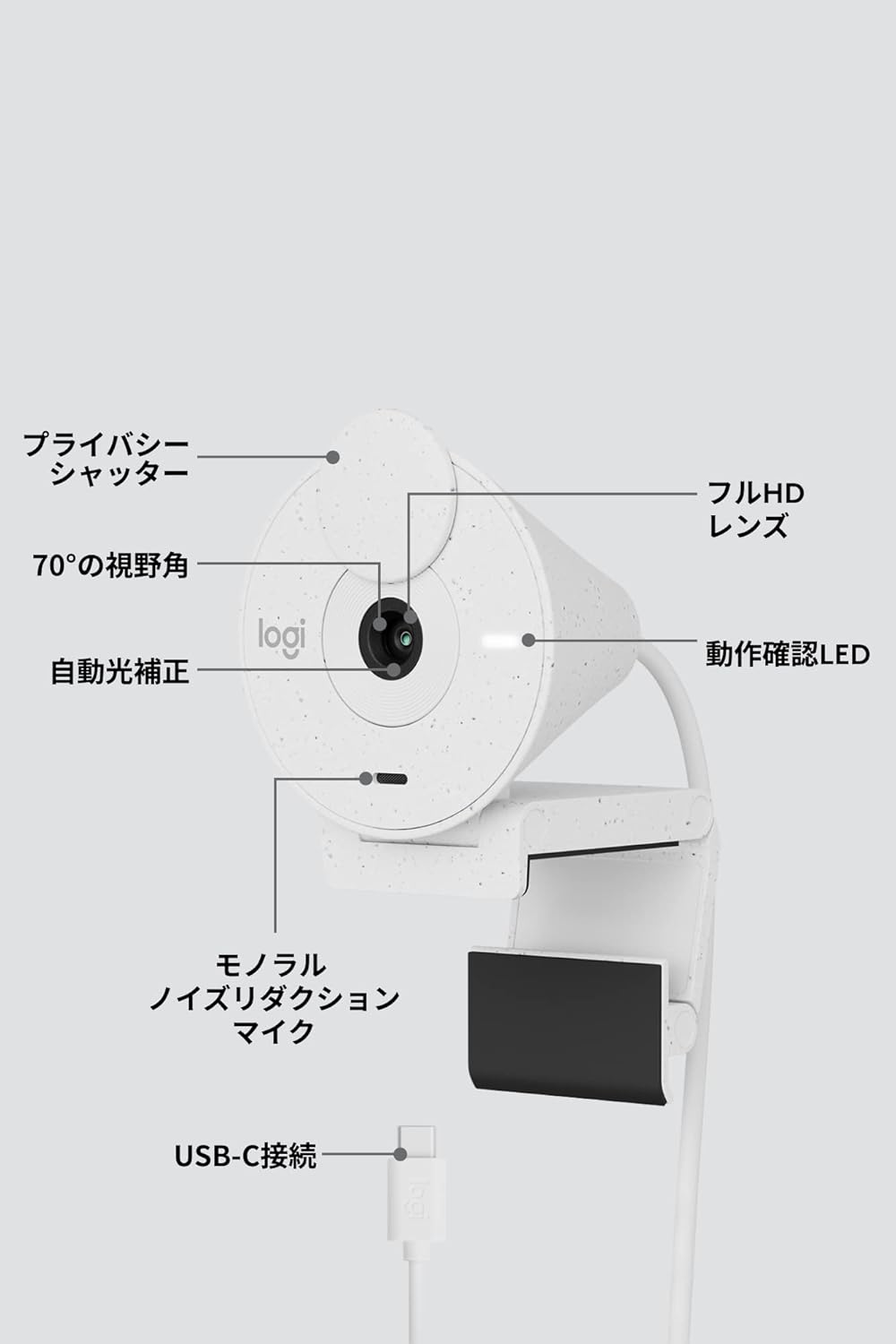
Figi 9: Webcam Component Diagram
8. Garanti ak sipò
8.1 Garanti manifakti a
This Logicool Brio 300 webkamera vini ak yon Garanti manifakti 1 zan soti nan dat acha a. Garanti sa a kouvri domaj nan materyèl ak atizan konn fè nan itilizasyon nòmal.
Kontni pake a gen ladan:
- Product Body (with integrated USB-C cable)
- Mount Clip and Removable Adapter
- Kat Garanti
- Règleman Garanti
8.2 Sipò pou Kliyan
For product defects or technical assistance, please contact the Logicool Customer Center:
- Nimewo telefòn: 050-3196-5644
- Orè operasyon: Monday - Friday (excluding holidays and December 31 - January 2), 9:00 AM - 6:00 PM JST
- Web Ankèt: https://support.logi.com/hc/ja/
Please note: The Logicool brand is used for products sold in Japan. Logitech is the international brand. Warranty coverage applies to genuine domestic products.
Ask a question about this manual
Ask about setup, troubleshooting, compatibility, parts, safety, or missing instructions. Manuals+ will review the question and use this page’s manual context to help answer it.