

1. Entwodiksyon
This manual provides essential information for the safe and efficient operation of your Sygonix Built-in Thermostat SY-5044424. This device is designed as a built-in solution for regulating and monitoring heat generators within heating, climate, and ventilation technology systems. Please read these instructions thoroughly before installation and use, and retain them for future reference.
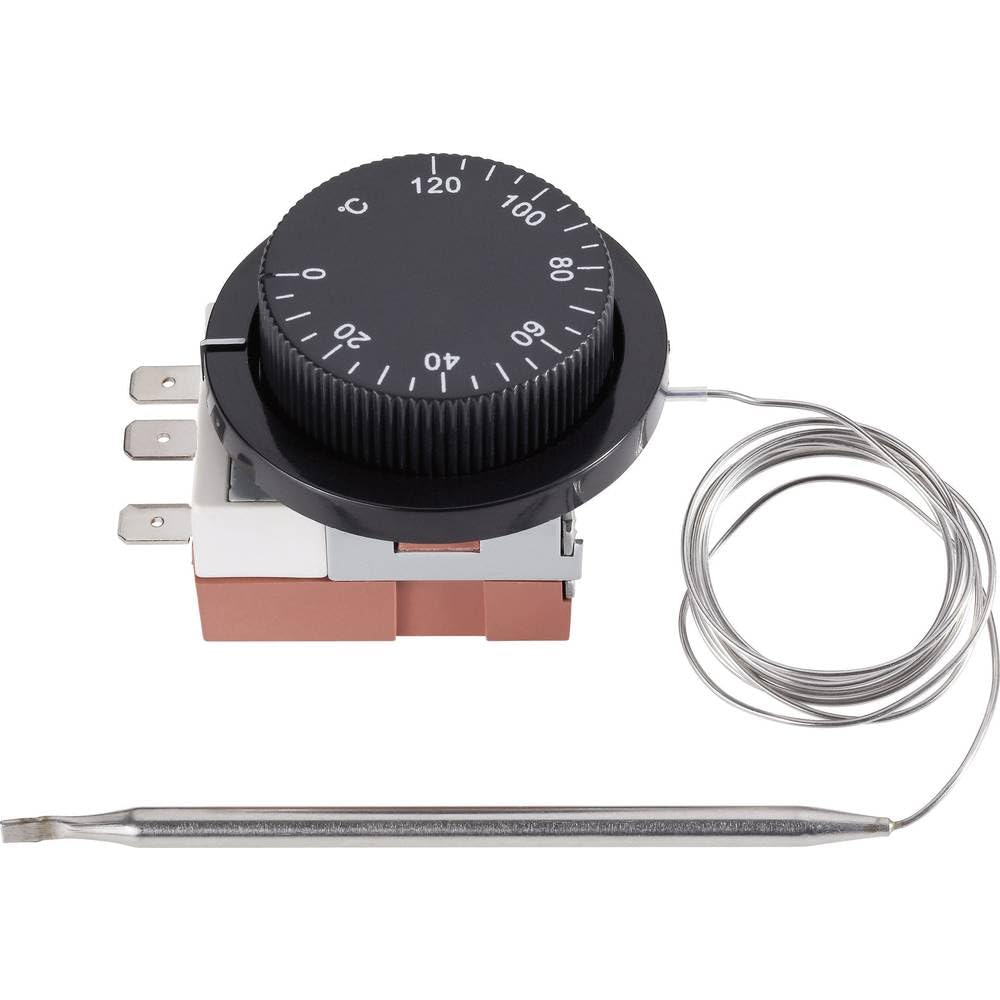
Image 1.1: The Sygonix Built-in Thermostat SY-5044424. This image shows the compact design of the thermostat, ready for integration into a control panel or wall unit.
2. Enstriksyon Sekirite
Avètisman: Failure to follow these safety instructions may result in fire, electric shock, injury, or damage to the product or property.
- Enstalasyon an dwe fèt pa yon elektrisyen kalifye, dapre tout kòd elektrik lokal ak nasyonal yo.
- Ensure the power supply is disconnected before installation, maintenance, or troubleshooting.
- Pa ekspoze aparèy la anba imidite, tanperati ekstrèm, oswa limyè solèy dirèk.
- Pa eseye modifye oswa repare aparèy la tèt ou. Kontakte pèsonèl sèvis kalifye.
- Kenbe materyèl anbalaj lwen timoun yo.
3. Pwodwi Features
- Setting range: 0 - 120 °C
- Switching differential: 3 ± 1.5 °C
- Konsepsyon entegre pou entegrasyon san pwoblèm
- Suitable for heating, climate, and ventilation systems
- Remote control capability (via RF connectivity)
4. Enstalasyon ak Enstalasyon
The Sygonix Built-in Thermostat is designed for integration into existing control systems or panels. Professional installation is highly recommended.
4.1. Verifikasyon Pre-enstalasyon
- Verify that the power supply matches the thermostat's requirements (230V).
- Ensure the installation location is free from excessive vibration, moisture, and direct heat sources.
- Confirm that all necessary mounting hardware is available.
4.2. fil elektrik
- Dekonekte pouvwa: Turn off the main power supply to the circuit where the thermostat will be installed. Use a voltage tester to confirm that power is off.
- Montaj: Secure the thermostat in its designated built-in location using the provided mounting hardware.
- Konekte fil yo: Follow the wiring diagram provided with the product packaging. Connect the power input, load output, and sensor wires to the appropriate terminals. Ensure all connections are secure.
- Plasman Capteur: Position the temperature sensor in an area that accurately reflects the ambient temperature to be controlled, away from drafts or direct heat sources.
- Retabli pouvwa: Yon fwa tout koneksyon yo byen fèm epi yo verifye, retabli kouran an nan sikwi a.
5. Operasyon Enstriksyon
The Sygonix Built-in Thermostat is designed for straightforward temperature control. Specific operation details may vary based on the integrated system and any connected remote control unit.
5.1. Premye Limen
- Upon first power-on, the thermostat may display a default temperature or enter a calibration mode. Refer to the specific display indicators in your product packaging.
5.2. Mete Tanperati
- Use the integrated controls (if any) or a compatible remote control unit to adjust the desired temperature. The setting range is 0 to 120 °C.
- The thermostat will activate or deactivate the connected heating/cooling device to maintain the set temperature within the specified switching differential.
5.3. Fonksyonalite kontwòl remote
- The thermostat supports RF connectivity for remote control. Pair your compatible remote control or smart system according to its specific instructions.
- Ensure the remote control unit is within the effective range and has fresh batteries (if applicable).
6. Antretyen
The Sygonix Built-in Thermostat requires minimal maintenance.
- Netwayaj: Gently wipe the surface of the thermostat with a soft, dry cloth. Do not use abrasive cleaners, solvents, or excessive moisture.
- Tèks regilye: Periodically inspect the wiring connections for any signs of wear or damage. Ensure the temperature sensor is clean and unobstructed.
- Sik pouvwa: If the device behaves unexpectedly, try disconnecting and reconnecting the power supply for a few minutes.
NAN. Depanaj
Si ou rankontre pwoblèm ak tèmosta ou a, gade pwoblèm ak solisyon komen sa yo:
| Pwoblèm | Kòz posib | Solisyon |
|---|---|---|
| Tèmosta a pa limen | Pa gen ekipman pou kouran; fil elektrik ki pa kòrèk | Check circuit breaker; verify wiring connections (ensure power is off first). |
| Lekti tanperati ki pa kòrèk | Sensor obstructed or misplaced; faulty sensor | Ensure sensor is clean and in an appropriate location; contact support if suspected faulty. |
| Heating/cooling device not responding | Incorrect wiring; thermostat setting issue; device malfunction | Verify wiring; check thermostat settings; test the heating/cooling device independently. |
| Remote kontwòl pa travay | Remote not paired; batteries low; out of range | Pair remote as per its instructions; replace batteries; ensure remote is within RF range. |
Si pwoblèm nan pèsiste apre ou fin eseye solisyon sa yo, tanpri kontakte sèvis kliyan.
8. Espesifikasyon
| Karakteristik | Detay |
|---|---|
| Mak | Sygonix |
| Nimewo Modèl | SY-5044424 |
| Koulè | Nwa |
| Dimansyon pwodwi | 7 x 5 x 18 cm; 14 kg (or 17D x 6W x 5H cm) |
| Kapasite | 10 lit |
| Pouvwa / Voltage | 280 |
| Voltage | 230 V |
| Nivo bri | 1 Desibèl |
| Karakteristik espesyal | Kontwòl Remote |
| Manifakti | Sygonix |
| Nimewo Atik | SY-5044424 |
| ASIN | B0BPX282HB |
| Kalite kontwolè | Kontwolè pòtatif |
| Itilizasyon pwodwi espesifik | Building heating and air conditioning |
| Kalite Kontwòl Tanperati | Kontwòl entelijan/a distans |
| Koneksyon Teknoloji | RF |
| Konpozan ki enkli | Mounting Materyèl |
| Anviwònman Range | 0 - 120 °C |
| Chanje diferans | 3 ± 1.5 °C |
9. Garanti ak sipò
For warranty information and technical support, please refer to the documentation included with your purchase or visit the official Sygonix websit la. Kenbe prèv acha ou pou reklamasyon garanti.