
1. Entwodiksyon
Thank you for choosing the typecase Touch iPad Keyboard Case. This manual provides detailed instructions for setting up, operating, and maintaining your keyboard case to ensure optimal performance and longevity. Please read this manual thoroughly before use.
2. Konpatibilite
Kouvèti klavye sa a fèt pou modèl iPad espesifik. Tanpri verifye nimewo modèl iPad ou a pou asire konpatibilite.
- iPad 10th Generation (10.9-inch, 2022): Modèl A2696, A2757, A2777
- iPad A16 (11th Generation, 2025): Modèl A3354, A3355, A3356
To verify your iPad model:
- Metòd 1: Check the back of your iPad for the model number (e.g., A2696).
- Metòd 2: Go to iPad Settings > General > About > Model Number. Tap the model number to display the A-number.
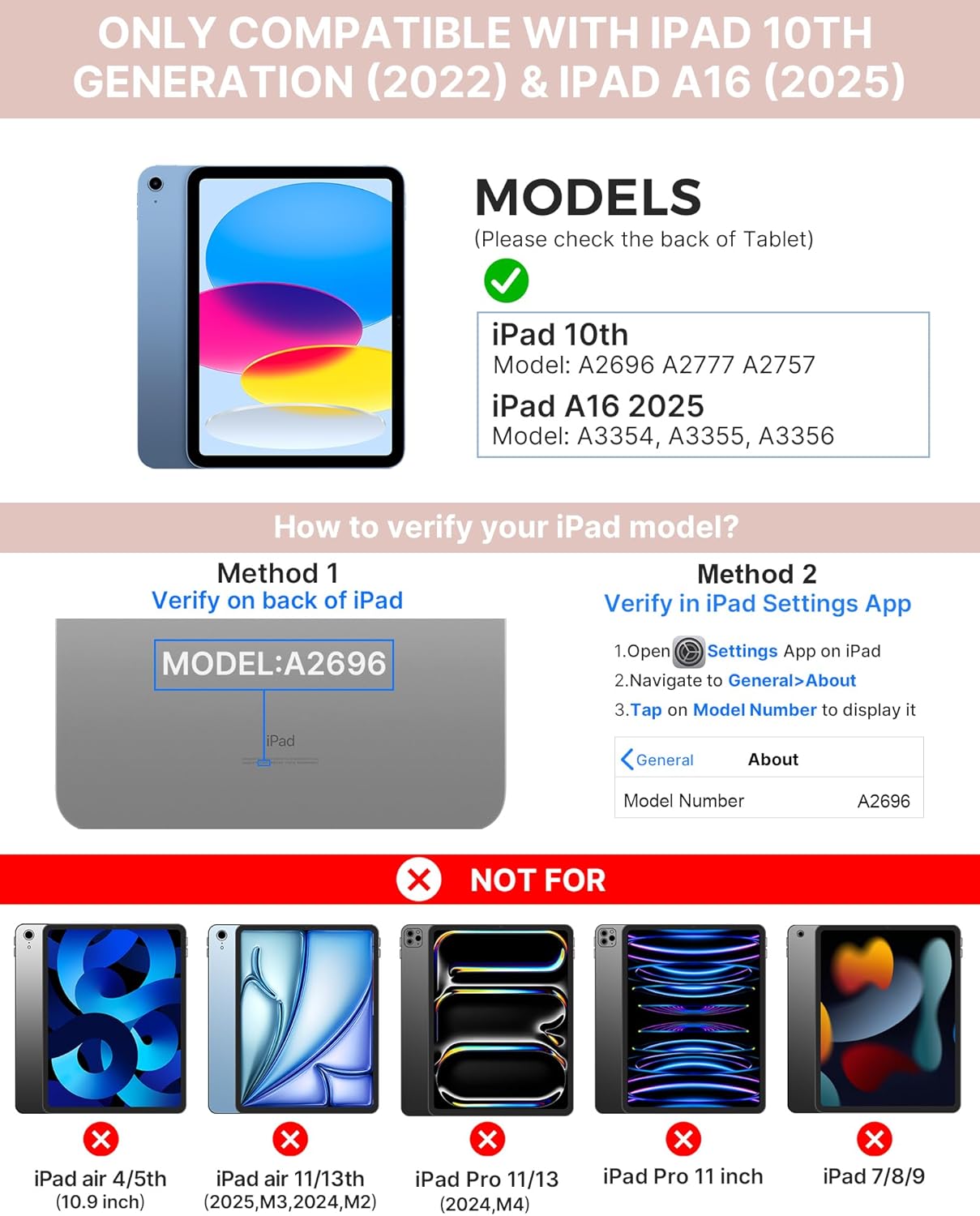
Image: Visual guide for identifying compatible iPad models and verifying the model number on the device or through settings.
3. Pake kontni
Pake a gen ladan:
- 1 x typecase Touch iPad Keyboard Case
- 1 x USB-C chaje kab
- 1 x manyèl itilizatè
4. Enstriksyon Enstalasyon
4.1 Chaje klavye a
Anvan premye itilizasyon an, chaje klavye a nèt. Konekte kab chaje USB-C ki vini ak li a nan pò chaje klavye a ak yon sous kouran. Limyè endikatè chaj la ap montre eta chaj la.
- Standby: Jiska 1 Ane
- Daytime use (2 hours/day with backlight off): Jiska 3 Mwa
- Nighttime use (2 hours/day with backlight on): Jiska 2 semèn

Image: Close-up of the keyboard's USB-C charging port and battery life specifications.
4.2 Koneksyon ak iPad
- Asire w klavye a chaje.
- Turn on the keyboard by pressing the power button. The Bluetooth indicator light will flash.
- Sou iPad ou a, ale nan Anviwònman> Bluetooth.
- Aktive Bluetooth la. iPad ou a ap chèche aparèy ki disponib yo.
- Select "typecase Keyboard" from the list of devices.
- Follow any on-screen prompts to complete the pairing process. The Bluetooth indicator light on the keyboard will turn solid when successfully paired.
5. Operasyon Enstriksyon
5.1 Enstale iPad ou a
Gently insert your iPad into the case, ensuring all edges are securely seated. The case provides full protection for your device.
5.2 Fonksyon klavye
The keyboard features a standard 78-key layout with a dedicated row of iPadOS shortcut keys for enhanced productivity.

Imaj: Anlè view of the keyboard layout, highlighting the 78-key design and iPadOS shortcuts.
Kle retroeklere
The keyboard features 11-color RGB LED backlighting with adjustable brightness levels. This allows for comfortable typing in various lighting conditions.
- Peze a kle anpoul pou chanje koulè limyè dèyè yo.
- Peze Fn + kle anpoul la ajiste klète ekleraj.
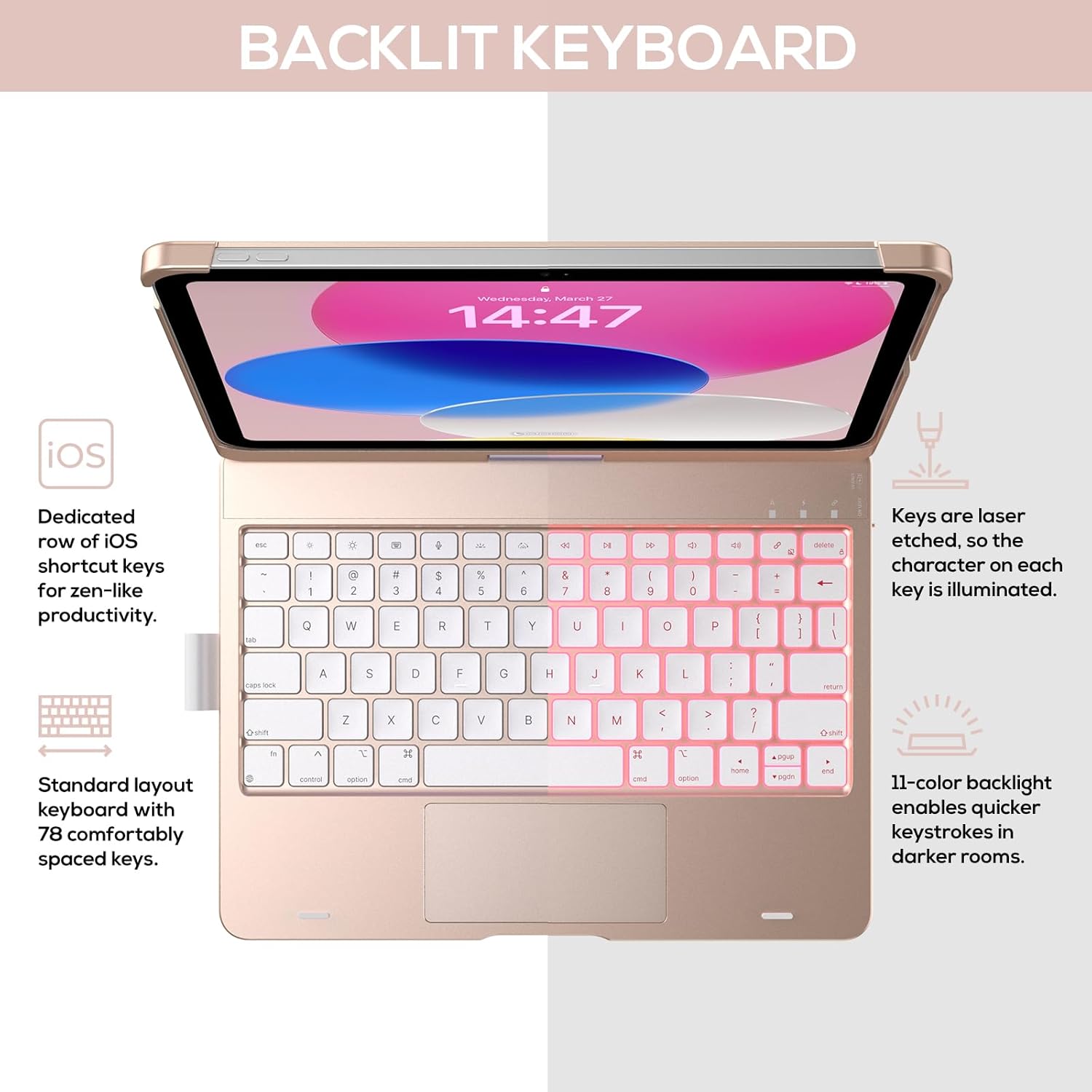
Image: The keyboard with illuminated keys, demonstrating the 11-color backlight and dedicated iOS shortcut keys.
5.3 Trackpad Multi-Touch
The integrated precision trackpad supports multi-gesture controls, enhancing productivity for tasks like document editing, web browsing, and presentation building.
- Tape yon sèl dwèt: Click/Select
- woulo liv de dwèt: Scroll monte/desann oswa agoch/adwat
- Zongle pou rale: Zoom nan / soti
- Glise twa dwèt anlè: Louvri Chanjman Aplikasyon
- Glise twa dwèt anba: Retounen nan ekran lakay ou

Image: Diagram showing common multi-touch gestures for the trackpad, including managing files, web navigasyon, ak chanjman aplikasyon.
5.4 360° Rotatable Hinge and Use Modes
The patented 360° hinge allows for versatile use of your iPad in 7 unique modes, adapting to various tasks from typing to viewing.
- Mòd Laptop: Traditional laptop setup for typing.
- Mòd Kanpe: Ideyal pou viewkontni.
- Mòd Tant: Stable for touch interaction or presentations.
- Mòd tablèt: Fold the keyboard behind the iPad for tablet use. Keys are protected in this mode.
- Mòd Kwen: Angled for comfortable drawing or writing.
- Mòd pataje: Vire ekran an pou pataje kontni ak lòt moun.
- Mòd Pwoteksyon: Close the case to fully protect the iPad.
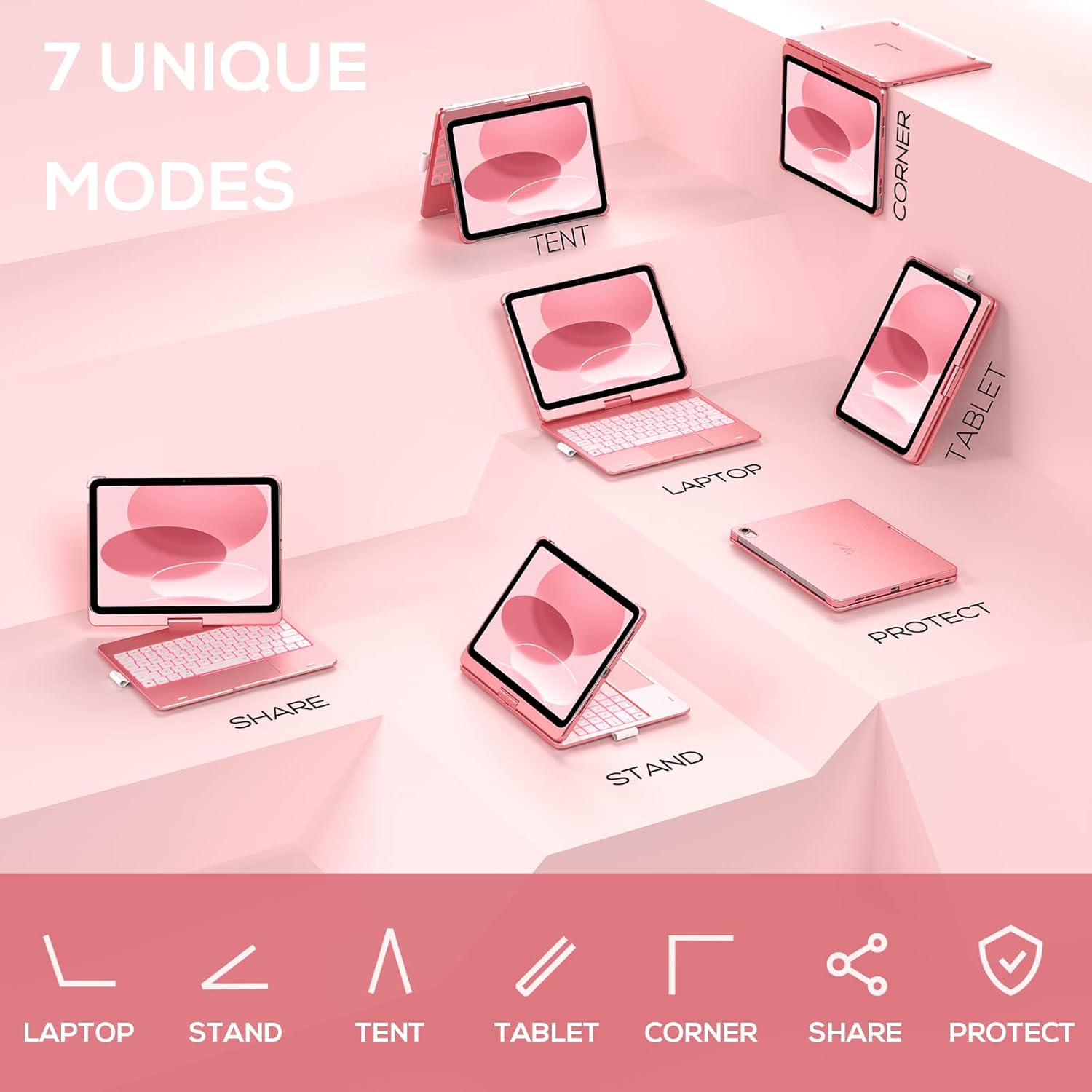
Image: A visual representation of the seven different configurations the keyboard case can be used in, including laptop, stand, and tablet modes.
5.5 Auto Sleep/Wake Function
The case features an auto sleep/wake function. Opening the case will wake your iPad, and closing it will put your iPad to sleep, helping to conserve battery life for both the iPad and the keyboard.

Image: A user's hand on the trackpad, illustrating the built-in trackpad and the auto sleep/wake feature that activates when the case is opened or closed.
5.6 Pòt Kreyon Apple
An integrated holder is provided for your Apple Pencil, ensuring it is securely stored and easily accessible.
6. Antretyen
6.1 Netwayaj
To clean the keyboard case, use a soft, damp cloth. Avoid using harsh chemicals or abrasive materials, as these may damage the surface. Ensure the charging port is dry before charging.
6.2 Depo
Lè w pa itilize l pou yon bon bout tan, sere kouvèti klavye a nan yon kote ki fre epi sèk. Li rekòmande pou w chaje klavye a nèt anvan w sere l pou yon bon bout tan pou kenbe batri a an bon eta.
NAN. Depanaj
7.1 Klavye a pa konekte
- Asire w klavye a limen epi li chaje.
- Tcheke si Bluetooth la aktive sou iPad ou a.
- Bliye aparèy la nan paramèt Bluetooth iPad ou a epi eseye konekte li ankò.
- Rekòmanse iPad ou a ak klavye a.
7.2 Kle yo pa reponn
- Asire w klavye a byen konekte via Bluetooth.
- Tcheke nivo batri klavye a.
- Netwaye tout debri ki ozalantou kle yo.
7.3 Trackpad Not Working
- Asire w klavye a konekte.
- Check iPad settings for trackpad functionality (Settings > General > Trackpad).
- Rekòmanse klavye a ak iPad la.
7.4 Limyè dèyè a pa fonksyone
- Asire w ke klavye a limen.
- Press the backlight control keys (light bulb key, Fn + light bulb key) to activate or adjust.
- Check battery level; low battery may disable backlighting.
8. Espesifikasyon
| Nimewo Modèl | KB201T-100 |
| Dimansyon pwodwi | 11 x 8.6 x 1.5 pous (11"L x 8.6"W x 1.5"H) |
| Pwa atik | 1.43 liv |
| Koneksyon Teknoloji | Bluetooth |
| Deskripsyon klavye | Flexible, 78-key layout with iPadOS shortcuts |
| Karakteristik espesyal | 360° Rotatable, 11-Color Backlit, Ergonomic, Lightweight, Multi-Touch Trackpad, Auto Sleep/Wake, Apple Pencil Holder |
| Klavye ekleraj | Rgb (Koulè NAN) |
| Kalite batri | 1 batri ityòm Polymère (enkli) |
9. Garanti ak sipò
typecase is committed to product quality and customer satisfaction. This product comes with the following support:
- Sèvis Ranplasman: Within 1 year of purchase.
- Règleman ranbousman: Nan 30 jou apre acha a.
For any issues or inquiries, please contact typecase customer support for quick feedback and assistance.

Image: Information on typecase's after-sales service, including replacement, refund, and customer support.