
Entwodiksyon
Mèsi pou acha aasing the Andoer D2 Handheld RGB LED Video Light Wand. This manual provides detailed instructions for the safe and effective use of your new light wand. Please read this manual thoroughly before operation and retain it for future reference.
Enfòmasyon sou Sekirite
- Pa ekspoze aparèy la nan dlo oswa nan gwo imidite.
- Evite ekspoze je dirèk nan sous limyè a.
- Do not disassemble or modify the device. Repairs should only be performed by authorized personnel.
- Kenbe soti nan atenn timoun yo.
- Sèvi sèlman ak kab chaje ki founi an oswa kab chaje ki sètifye a.
- Pa opere nan anviwònman ki gen gaz oswa likid ki ka pran dife.
Kontni pake
Tanpri verifye sa ki nan pake a lè w ap ouvri l. Si gen nenpòt atik ki manke oswa ki domaje, kontakte machann ou an.
- Andoer D2 Handheld RGB LED Video Light Wand
- USB Kalite-C Chaje Kab
- Manyèl Itilizatè (dokiman sa a)
Pwodwi souview
Familiarize yourself with the components and controls of the Andoer D2 light wand.
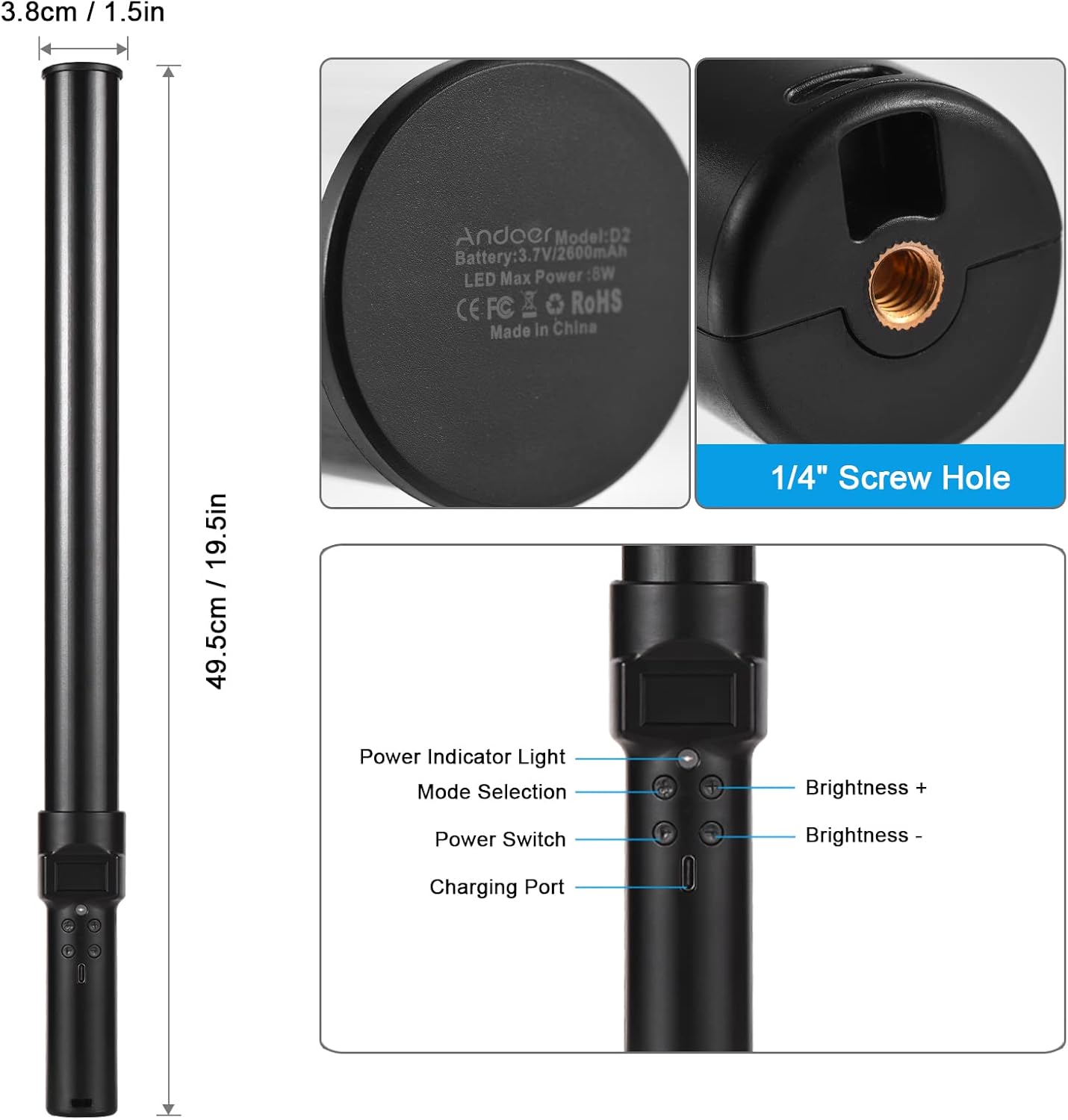
Imaj: Plis paseview of the Andoer D2 light wand, showing its dimensions (approximately 49.5cm / 19.5in long and 3.8cm / 1.5in diameter) and control panel. The control panel includes a Power Indicator Light, Mode Selection button, Power Switch, Brightness + button, Brightness - button, and a Charging Port.
Fonksyon panèl kontwòl:
- Pouvwa switch: Turns the light wand on or off.
- Seleksyon mòd: Cycles through different lighting modes (e.g., CCT mode, RGB color effects).
- Klere +: Increases the light brightness.
- Klere -: Decreases the light brightness.
- Limyè endikatè pouvwa: Shows the power status and charging status.
- Pò Chaje (Kalite-C): Itilize pou chaje batri entèn lan.
Enstalasyon
Inisyal chaj:
Before first use, fully charge the light wand. Connect the provided USB Type-C cable to the charging port on the device and the other end to a USB power adapter (not included) or a computer USB port. The power indicator light will show charging status.

Imaj: Yon fèmen view of the Type-C charging port, indicating where to connect the charging cable.

Imaj: The Andoer D2 light wand shown alongside its USB Type-C charging cable, illustrating the charging setup.
Opsyon Montaj:
The Andoer D2 light wand can be used handheld for flexible lighting or mounted for stable positioning. It features a standard 1/4-inch screw hole at the bottom.

Imaj: Yon detaye view of the 1/4-inch screw hole located at the base of the light wand, demonstrating how it can be attached to a light stand or tripod for stable use. Note that the light stand/tripod is sold separately.
- Itilizasyon pòtatif: Simply hold the light wand to direct light as needed.
- Tripod/Light Stand Mounting: Screw the 1/4-inch thread at the bottom of the light wand onto a compatible tripod or light stand. Ensure it is securely fastened before use.
Enstriksyon Operasyon
Limen/Etenyen:
Peze epi kenbe la Chanjman pouvwa bouton pou limen oswa etenn baton limyè a.
Ajiste klète:
The light wand offers 12 levels of adjustable brightness. Use the Klate + bouton pou ogmante klète a ak la Klète - bouton diminye li.

Imaj: Illustration of the 12 levels of adjustable brightness, demonstrating the range from dim to bright light output.
Ajiste Tanperati Koulè (CCT Mode):
In CCT mode, you can adjust the color temperature between 2500K (warm light), 5500K (neutral/daylight), and 8500K (cold light). Press the Seleksyon mòd button to cycle to CCT mode, then use the Klate + epi Klète - buttons to adjust the color temperature.

Imaj: Visual representation of the adjustable color temperatures, ranging from warm (2500K) to neutral (5500K) to cool (8500K) light.
Activating Colorful Light Effects (RGB Mode):
The light wand features 7 colorful light effects: red, green, blue, orange, purple, light blue, and red & blue flash. Press the Seleksyon mòd button to cycle through these RGB effects. Brightness can still be adjusted in these modes using the Klate + epi Klète - bouton.
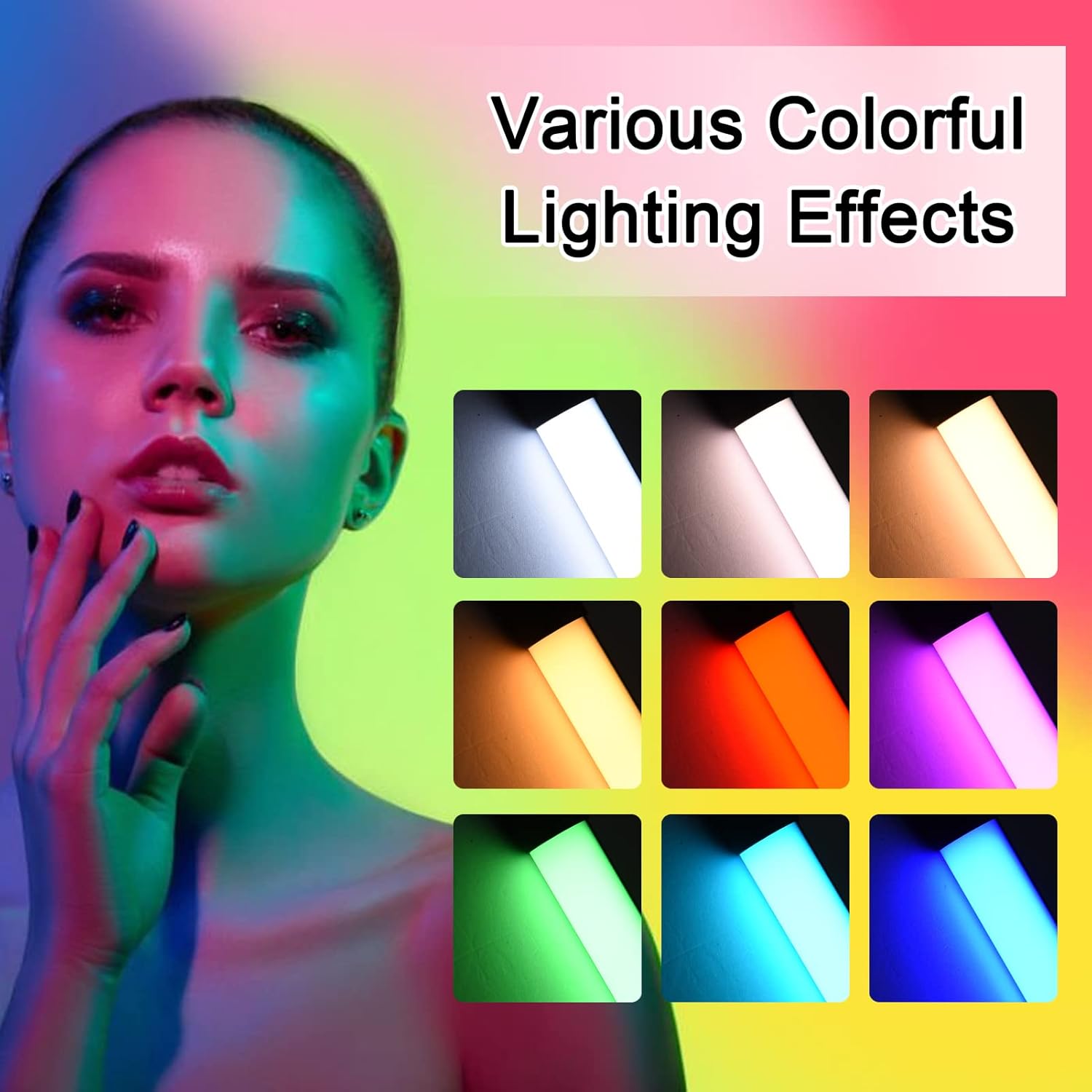
Imaj: A visual guide to the 7 colorful light effects available, showcasing the vibrant range of colors the light wand can produce.
Chaje
The Andoer D2 light wand has a built-in 2600mAh rechargeable lithium battery. When the battery is low, the power indicator light will signal. To charge:
- Connect the small end of the USB Type-C charging cable to the charging port on the light wand.
- Connect the standard USB end of the cable to a USB power source (e.g., wall adapter, power bank, computer USB port).
- The power indicator light will illuminate or change color to indicate charging. It will change again or turn off when fully charged.
A full charge provides approximately 2.5 hours of continuous use at maximum brightness.
Antretyen
- Clean the light wand with a soft, dry cloth. Do not use abrasive cleaners or solvents.
- Sere aparèy la nan yon kote ki fre epi sèk, lwen limyè solèy dirèk ak tanperati ekstrèm.
- If not used for extended periods, charge the battery every 3 months to maintain battery health.
Depanaj
| Pwoblèm | Kòz posib | Solisyon |
|---|---|---|
| Limyè pa limen. | Batri ap vide. | Charge the light wand using the provided USB Type-C cable. |
| Limyè a fèb oswa li ap tranble. | Batri ki ba. | Rechaje aparèy la. |
| Pa ka chanje koulè oswa mòd. | Incorrect button press or temporary software glitch. | Ensure you are pressing the Mode Selection button. Try turning the device off and on again. |
| Aparèy pa chaje. | Faulty cable, power adapter, or charging port. | Try a different USB Type-C cable or power adapter. Ensure the cable is fully inserted. |
Espesifikasyon
| Karakteristik | Detay |
|---|---|
| Modèl | D2 (SJI3033515989406YA) |
| Mak | Andoer |
| Tanperati Koulè | 2500K / 5500K / 8500K (Reglabl) |
| Nivo klète | 12 nivo |
| Efè limyè kolore | 7 effects (Red, Green, Blue, Orange, Purple, Light Blue, Red & Blue Flash) |
| Kapasite batri | 2600mAh ityòm batri |
| Port chaje | USB Kalite-C |
| Dire Batri (Klète Maksimòm) | Apeprè. 2.5 èdtan |
| Montaj | 1/4-inch screw hole |
| Dimansyon | Approx. 49.5cm (19.5in) length, 3.8cm (1.5in) diameter |
Garanti ak sipò
Andoer products are designed and manufactured to the highest quality standards. For warranty information or technical support, please refer to the warranty card included with your purchase or visit the official Andoer websit la. Tanpri konsève prèv acha ou a pou reklamasyon garanti.
Andoer Official Websit: Andoer Store on Amazon