
1. Pwodwi souview
The GIGABYTE G24F 2 is a 23.8-inch gaming monitor designed for an immersive visual experience. It features a Super Speed IPS panel, Full HD (1920 x 1080) resolution, and a high refresh rate for smooth gameplay.

Figi 1.1: Devan view of the GIGABYTE G24F 2 gaming monitor.
Karakteristik kle:
- Gwosè panèl: 23.8-inch SS IPS display
- Rezolisyon: 1920 x 1080 (FHD)
- Tan repons: 1ms MPRT
- Pousantaj rafrechisman: 165Hz (Overclockable to 180Hz)
- Koulè Saturation: 95% DCI-P3, 125% sRGB
- Klate: 300 cd / m2 (TYP)
- Pwopòsyon kontras: 1100:1
- Koneksyon: 2 x HDMI 2.0, 1 x DisplayPort 1.2 (HDR capable), 2 x USB 3.2 Gen 1 Downstream, 1 x USB 3.2 Gen 1 Upstream, 1 x Earphone Jack
- Karakteristik espesyal: OSD Sidekick, Aim Stabilizer, Black Equalizer, Dashboard, Crosshair, Timer, Counter, Auto-Update, Smart OD, HDR Ready, Flicker-free, Kensington lock
2. Enfòmasyon sou Sekirite
Tanpri li tout enstriksyon yo ak anpil atansyon anvan ou itilize monitè a. Kenbe manyèl sa a pou referans pita.
- Pa ekspoze monitè a anba lapli oswa imidite pou evite dife oswa risk pou li pran chòk elektrik.
- Pa ouvri monitè a casing. Pa gen pyès ki ka sèvi ak men itilizatè a anndan an. Konfye tout antretyen bay pèsonèl kalifye.
- Mete monitè a sou yon sifas ki plat e ki estab pou anpeche l tonbe.
- Asire w ke gen bon vantilasyon toutotou monitè a. Pa bloke ouvèti vantilasyon yo.
- Sèvi sèlman ak adaptè kouran ak kab manifakti a bay yo.
- Debranche monitè a nan priz kouran an pandan tanpèt zèklè oswa lè ou pa itilize li pou yon bon bout tan.
- Clean the screen with a soft, lint-free cloth. Avoid using liquid cleaners directly on the screen.
3. Pake kontni
Verifye ke tout atik yo prezan nan pakè ou a:
- GIGABYTE G24F 2 Monitor
- Sipò Monitè (Baz ak Kou)
- Pouvwa kab
- HDMI kab
- USB Cable (Upstream)
- Quick Start Gid (QSG)
- Kat Garanti

Figi 3.1: Dèyè view of the monitor, illustrating the stand attachment area.
4. Enstalasyon
4.1 Asanble kanpe la
- Retire konpozan monitè a ak sipò a nan anbalaj la avèk prekosyon.
- Kole kou sipò a sou panèl monitè a. Asire w ke li byen klike nan plas li oubyen li byen fikse ak vis si yo genyen.
- Kole baz sipò a nan kou sipò a. Sere vis oswa vis pous yo ki anba baz la.
- Mete monitè a ki fin rasanble a sou yon sifas ki plat e ki estab.
4.2 Konekte monitè a
Connect the monitor to your computer and other devices using the appropriate cables.

Figure 4.1: Monitor connectivity ports.
- Koneksyon pouvwa: Konekte kab kouran an nan antre kouran monitè a epi answit nan yon priz kouran.
- Koneksyon videyo:
- For optimal performance, use the DisplayPort 1.2 cable to connect to your computer's graphics card.
- Alternatively, use one of the two HDMI 2.0 ports.
- Koneksyon USB an amon: Connect the provided USB 3.2 Gen 1 Upstream cable from your computer to the monitor's upstream USB port to enable the monitor's downstream USB ports.
- USB Downstream Connections: Connect USB devices (e.g., keyboard, mouse) to the monitor's two USB 3.2 Gen 1 Downstream ports.
- Sòti odyo: Connect headphones or external speakers to the Earphone Jack.
5. Opere ki monitè kè bebe a
5.1 Power On/Off
Press the power button, usually located on the bottom or rear of the monitor, to turn the monitor on or off. The power indicator light will show the monitor's status.
5.2 Meni OSD (On-Screen Display).
The OSD menu allows you to adjust various monitor settings. Navigate the OSD using the joystick or buttons typically found on the rear of the monitor.

Figure 5.1: OSD Sidekick software for convenient monitor control.
For advanced control, install the OSD Sidekick software on your PC. This utility allows you to adjust monitor settings directly from your desktop.
5.3 Karakteristik jwèt yo
The GIGABYTE G24F 2 includes several features to enhance your gaming experience:
- Aim Stabilizer: Reduces motion blur and improves visual clarity in fast-paced games.
- Nwa egalize: Enhances visibility in dark areas of the game without overexposing bright areas.

Figure 5.2: Black Equalizer in action.
- Dach: Displays real-time hardware information (e.g., CPU/GPU temperature, usage) directly on the screen.

Figure 5.3: Dashboard displaying system metrics.
- Crosshair: Provides a customizable on-screen crosshair to assist with aiming.

Figure 5.4: On-screen Crosshair.
- Timer/Counter: On-screen timers and counters for in-game tracking.
- Smart OD: Optimizes overdrive settings for the best response time.
- Mizajou otomatik: Ensures the monitor's firmware and OSD Sidekick software are up-to-date.
5.4 Anviwònman ekspozisyon
- Pousantaj rafrechisman: The monitor supports up to 165Hz, with an overclock option to 180Hz, for fluid motion.
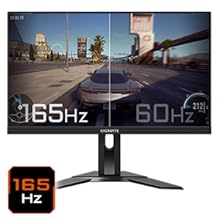
Figure 5.5: Visual comparison of 165Hz vs. 60Hz refresh rate.
- Tan repons: Enjoy a 1ms MPRT (Moving Picture Response Time) for minimal ghosting.
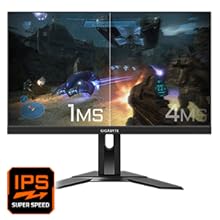
Figure 5.6: Visual comparison of 1ms vs. 4ms response time.
- Gamme koulè: The monitor covers 95% DCI-P3 and 125% sRGB for vibrant and accurate colors.
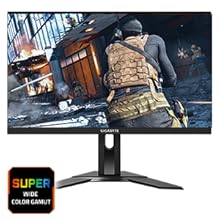
Figure 5.7: Wide color gamut for rich visuals.
- Limyè ble ki ba: Reduces blue light emissions to protect your eyes during extended use.
Figure 5.8: Low Blue Light feature for reduced eye strain.
- San tranbleman: Elimine tranbleman ekran an pou yon pi bon konfò vieweksperyans nan.

Figure 5.9: Flicker-Free technology for comfortable viewing.
5.5 Videyo Karakteristik Pwodwi a
Videyo 5.1: Yon overview of the GIGABYTE G24F 2 monitor's features and specifications.
6. Antretyen
Bon antretyen asire lonjevite monitè ou a.
- Netwaye ekran an: Siye ekran an dousman avèk yon twal mou, sèk, ki pa gen pousyè. Pou mak ki difisil pou retire, siye l dousman.ampRense twal la avèk dlo oswa yon pwodui netwayaj ekran espesyalize (aplike l sou twal la, pa dirèkteman sou ekran an).
- Netwayaj C aasing: Sèvi ak yon twal mou epi sèk pou siye monitè a.asing. Evite pwodui netwayaj abrazif.
- Vantilasyon: Asire w ke ouvèti vantilasyon ki sou monitè a pa gen pousyè ak anyen ki bloke yo.
- Pouvwa Off: Turn off and unplug the monitor when not in use for extended periods.
NAN. Depanaj
If you encounter issues with your monitor, refer to the following table for common problems and solutions.
| Pwoblèm | Kòz posib | Solisyon |
|---|---|---|
| Pa gen imaj sou ekran an | Power cable not connected; Video cable not connected; Incorrect input source selected | Tcheke koneksyon kab kouran an ak kab videyo a; Chwazi sous antre ki kòrèk la atravè OSD a. |
| Imaj la twoub oswa defòme | Incorrect resolution; Loose video cable | Mete rezolisyon ekran an sou 1920x1080; Asire w ke kab videyo a byen konekte. |
| Pa gen son nan kas ekoutè/oratè yo | Audio cable not connected; Volume too low; Incorrect audio output selected on PC | Check audio cable connection; Adjust volume; Select monitor as audio output on PC. |
| Pò USB pa travay | Kab USB amon an pa konekte | Connect the USB 3.2 Gen 1 Upstream cable from the monitor to your PC. |
| Ekran k ap flache | Refresh rate issue; Faulty cable | Ensure refresh rate is set correctly; Try a different video cable. |
8. Espesifikasyon
Detailed technical specifications for the GIGABYTE G24F 2 monitor.

Figi 8.1: Dimansyon monitè a.
| Karakteristik | Detay |
|---|---|
| Mak | GIGABYTE |
| Non modèl | G24F 2 |
| Nimewo Modèl | 9DG24F2-00-1ABIN |
| Gwosè ekran | 23.8 pous |
| Rezolisyon | 1920 x 1080 piksèl (FHD 1080p) |
| Aspè rapò | 16:9 |
| Kalite ekspozisyon | LCD (SS IPS Panel) |
| Rafrechisman pousantaj | 165 Hz (180Hz OC) |
| Tan repons | 1 Milliseconds (MPRT) |
| Klète | 300 candela_per_square_meter (TYP) |
| Pwopòsyon kontras | 1100:1 |
| Saturasyon koulè | 95% DCI-P3, 125% sRGB |
| Viewing Ang | 178 Degre |
| Koneksyon | 2 x HDMI 2.0, 1 x DisplayPort 1.2, 2 x USB 3.2 Gen 1 Downstream, 1 x USB 3.2 Gen 1 Upstream, 1 x Earphone Jack |
| Adaptive Sync | Premium FreeSync |
| Konsomasyon pouvwa | 17.5 Watts |
| Pwa atik | 3.2 Kilogram |
| Dimansyon atik (D x W x H) | 5.3P x 54.1W x 32.6H santimèt |
| Kalite aliye | Mi mòn |
| Karakteristik pwodwi | Flicker-Free, Height Adjustment, High Dynamic Range, Tilt Adjustment |
9. Garanti ak sipò
The GIGABYTE G24F 2 monitor comes with a 3-ane garanti soti nan manifakti a.
For technical support, warranty claims, or further inquiries, please contact GIGABYTE customer service:
- Manifakti: GIGABYTE Technology (India) Pvt Ltd
- Adrès: B-808, Naman Midtown, Elphinstone Road, Mumbai – 400013 – INDIA
- Telefòn: +91-22-40633222
Tanpri konsève prèv acha ou a pou sèvis garanti a.