
Axis Communications 02342-001
User Manual: AXIS P1468-LE Compact Outdoor Camera
Model: 02342-001 | Brand: Axis Communications
Entwodiksyon
The AXIS P1468-LE is a robust, outdoor-ready network camera designed for advanced surveillance scenarios. It delivers excellent image quality and incorporates deep learning-based analytics at the edge, enhancing its capabilities for intelligent monitoring. This camera also features built-in cybersecurity measures to ensure secure operation. This manual provides essential information for the setup, operation, and maintenance of your AXIS P1468-LE camera.
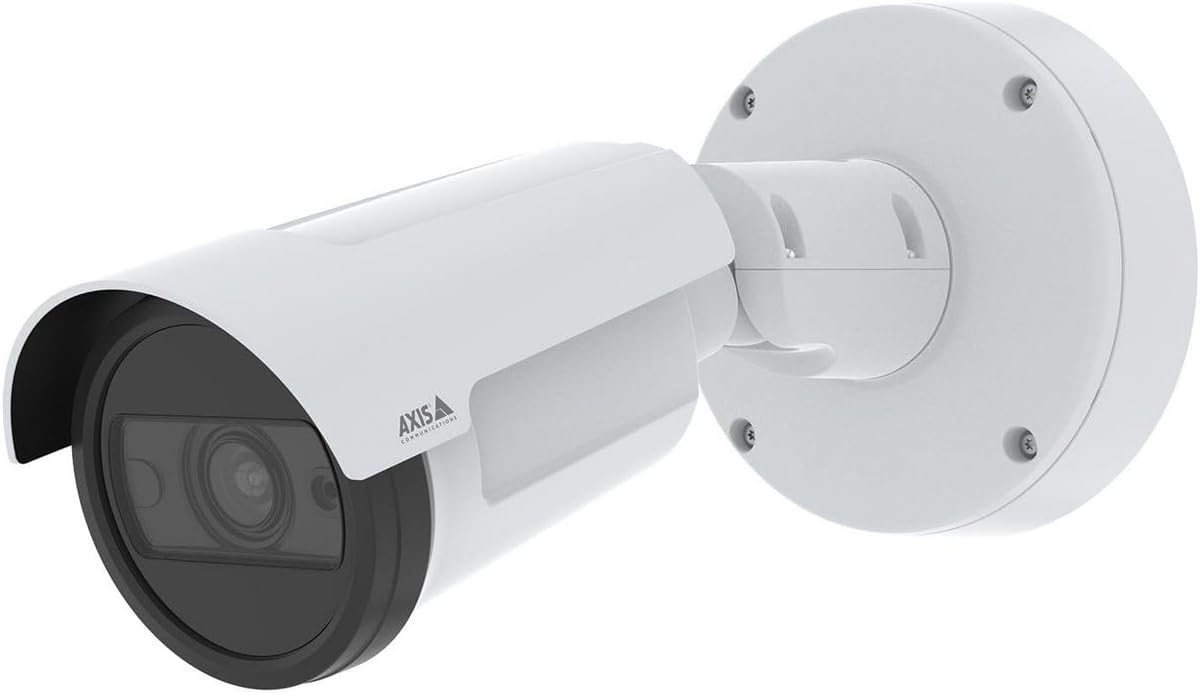
Figi 1: The AXIS P1468-LE Compact Outdoor Camera, showcasing its white cylindrical body, integrated sunshield, and wall-mount bracket. The camera features a dark lens housing and the Axis Communications logo on its side.
Enstalasyon
1. Pake kontni
Anvan ou kòmanse enstalasyon an, verifye si tout konpozan yo la:
- AXIS P1468-LE Rezo Kamera
- Gid enstalasyon
- Mounting Sipò ak Materyèl
- Modèl egzèsis
- Resistorx® T20 tool
2. Monte Kamera a
The AXIS P1468-LE is designed for wall or ceiling mounting. Ensure the mounting surface is strong enough to support the camera's weight and withstand environmental conditions.
- Chwazi Kote: Chwazi yon kote ki bay domèn ou vle a view and is within reach of network and power connections.
- Prepare sifas: Use the provided drill template to mark the drilling holes on the mounting surface.
- Enstale bracket: Secure the mounting bracket using appropriate screws and anchors for your surface type.
- Atache Kamera a: Mount the camera body onto the bracket, ensuring it is securely fastened. Adjust the camera's angle for optimal viewing.
3. Koneksyon Rezo ak Kouran
Connect the camera to your network and power source. The camera supports Power over Ethernet (PoE) for simplified installation.
- Ethernet kab: Connect a standard Ethernet cable from your network switch (preferably PoE-enabled) to the camera's Ethernet port.
- Pouvwa (Si ou vle): If PoE is not used, connect a compatible power adapter (not included) to the camera's power input. Refer to specifications for voltage kondisyon.
4. Inisyal Konfigirasyon
After physical installation, access the camera's web koòdone pou konfigirasyon inisyal la.
- Dekouvri Kamera: Use the AXIS IP Utility or AXIS Device Manager software to discover the camera on your network.
- Aksè Web Entèfas: Louvri a web navigatè a epi antre adrès IP kamera a.
- Mete Modpas Root: For security, you will be prompted to set a new root password upon first access.
- Konfigirasyon Anviwònman: Follow the on-screen wizard to configure basic settings such as IP address, date/time, and video stream settings.
Opere kamera a
1. Viv View ak Anrejistreman
Jwenn aksè a an dirèk kamera a view and manage recording settings through its web interface or a compatible Video Management Software (VMS).
- Viv View: Navigate to the "Live View" tab to see the real-time video feed.
- Anrejistreman: Configure recording schedules, motion detection triggers, and storage locations (e.g., SD card, network storage) under the "Recordings" or "Events" section.
2. Karakteristik avanse
The AXIS P1468-LE offers several advanced features for enhanced surveillance:
- Deep Learning Analytics: Utilize built-in analytics for object classification, motion detection, and other intelligent event triggers. Configure these under the "Applications" or "Analytics" menu.
- Cybersecurity Features: The camera includes features like signed firmware and secure boot to prevent unauthorized access and ensure system integrity. Regularly check for firmware updates to maintain security.
- Ekleraj IR: The integrated IR LEDs provide clear video in low-light or complete darkness. This feature is typically automatic but can be adjusted in video settings.
Antretyen
1. Netwaye Kamera a
Regular cleaning ensures optimal image quality and extends the camera's lifespan.
- Lantiy: Gently wipe the lens with a soft, lint-free cloth moistened with a mild cleaning solution or lens cleaner. Avoid abrasive materials.
- Lojman: Netwaye lojman kamera a ak piblisiteamp twal. Pa sèvi ak detèjan oswa solvang fò.
2. Mizajou Firmware
Keep the camera's firmware updated to benefit from the latest features, performance improvements, and security patches.
- Tcheke pou Mizajou: Visit the Axis Communications website or use AXIS Device Manager to check for available firmware updates for your model.
- Enstalasyon: Follow the instructions provided by Axis for safe firmware installation. Ensure a stable power supply during the update process.
Depanaj
| Pwoblèm | Kòz posib | Solisyon |
|---|---|---|
| Pa gen manje videyo | Power issue, network cable disconnected, incorrect IP address. | Check power supply/PoE, ensure Ethernet cable is securely connected, verify camera's IP address and network settings. |
| Pòv bon jan kalite imaj | Dirty lens, improper focus, low light conditions, incorrect video settings. | Clean the lens, adjust focus via web interface, ensure IR illumination is active in low light, check resolution and compression settings. |
| Pa ka jwenn aksè web koòdone | Incorrect IP address, network connectivity issue, firewall blocking access. | Verify IP address, check network connection, temporarily disable firewall to test, reset camera to factory defaults if necessary. |
Espesifikasyon
| Karakteristik | Detay |
|---|---|
| Mak | Aks Kominikasyon |
| Non modèl | AXIS P1468-LE - Netzwerk-Überwachungskam |
| Nimewo Modèl Atik | 02342-001 |
| ASIN | B0BNZ1MW19 |
| Itilizasyon Andedan kay la / Deyò | Deyò |
| Koneksyon Teknoloji | Branche |
| Pwotokòl Koneksyon | HomePlug |
| Kalite kontwolè | Iris |
| Kalite aliye | Mi mòn |
| Koulè | Blan |
| Kantite Atik | 1 |
| Konpozan ki enkli | Kamera/akseswa |
| Kantite Chanèl | 4 |
| Teknoloji kominikasyon san fil | Wi-Fi |
| Materyèl | Metal |
| Wattage | 16 wat |
| Dimansyon atik (LxWxH) | 19.69 x 19.69 x 11.02 pous |
| Batri obligatwa? | Non |
| Pwa atik | 1.5 kilogram (3.3 liv) |
| Kalite Zoom | Zoom optik |
| Kalite Alèt | Mouvman sèlman |
| Kalite chanm | Biwo |
| Kalite sous limyè | Enfrawouj |
| Fòma Capture Videyo | MPEG-4 |
| Konte inite | 1.0 Konte |
| Teknoloji Capteur Foto | CMOS |
| Rating Pwoteksyon Entènasyonal | IP66, IP67 |
| Metòd kontwòl | App |
| Sistèm operasyon | iOS |
| Manifakti | AXIS - CAMERA |
| Dat Premye Disponib | 31 jiyè 2022 |
| Itilizasyon Rekòmande Pou Pwodwi | Siveyans |
| Karakteristik espesyal | Mac, Netcam, PC, Wireless connectivit |
Garanti ak sipò
1. Garanti pwodwi
Axis Communications products typically come with a limited hardware warranty. For specific warranty terms and conditions applicable to your AXIS P1468-LE camera, please refer to the warranty documentation included with your purchase or visit the official Axis Communications websit.
2. Sipò teknik
For technical assistance, troubleshooting, or further inquiries regarding your AXIS P1468-LE camera, please contact Axis Communications support:
- Sipò sou entènèt: Vizite la Axis Communications Support Portal for FAQs, documentation, and software downloads.
- Enfòmasyon pou kontakte: Find regional contact details for phone or email support on the official Axis Communications websit.
When contacting support, please have your camera's model number (02342-001) and serial number ready.
Ask a question about this manual
Ask about setup, troubleshooting, compatibility, parts, safety, or missing instructions. Manuals+ will review the question and use this page’s manual context to help answer it.