
1. Entwodiksyon
This manual provides detailed instructions for the safe and effective use of your PowerSmith PILC95500 Rechargeable LED Color Match Inspection Light. This device is designed to assist in tasks requiring accurate color assessment and defect detection, such as automotive paint inspection and interior paint evaluation. Please read this manual thoroughly before initial use and retain it for future reference.

Image: The PowerSmith PILC95500 inspection light, highlighting its 500 lumen output and CRI 95+ color matching capability.
2. Enfòmasyon sou Sekirite
Toujou obsève prekosyon sekirite debaz yo lè w ap itilize aparèy elektrik pou diminye risk dife, chòk elektrik ak aksidan pèsonèl.
- Pa gade dirèkteman nan sous limyè ki ap dirije a.
- Kenbe aparèy la lwen dlo oswa lòt likid.
- Pa eseye demonte oswa modifye aparèy la.
- Use only the provided charging cable or a certified USB-C cable.
- Sere aparèy la nan yon kote ki sèk, fre lè li pa itilize.
- Kenbe soti nan atenn timoun yo.
- Avètisman Pwopozisyon 65 Kalifòni: Pwodui sa a ka ekspoze ou nan pwodwi chimik ki gen ladan plon, ki se Eta Kalifòni konnen ki lakòz kansè ak domaj nesans oswa lòt domaj repwodiktif. Pou plis enfòmasyon ale nan www.P65Warnings.ca.gov.
3. Pake kontni
Verifye ke tout atik yo prezan lè w ap debale yo:
- PowerSmith PILC95500 Inspection Light
- USB-C Chaje Kab
- Sèvi mayetik
- Manyèl Pwopriyetè a
4. Pwodwi Features
The PowerSmith PILC95500 is equipped with several features designed for versatility and performance:
- High CRI (95+) LED: Provides accurate color rendering for precise color matching and defect detection.
- Dual Color Temperatures: Switch between 5000K (daylight) and 3500K (warm white) modes to suit different inspection needs.
- 500 Lumèn Sòti: Bright illumination for clear visibility of surfaces.
- Batri rechargeable ityòm-ion: Built-in 3.7V, 2.6Ah battery offers up to 2.5 hours of runtime.
- USB-C chaje: Entèfas chaj modèn ak pratik.
- Kwòk pandye entegre: For hands-free operation, allowing the light to be suspended.
- 180° Kickstand: Provides adjustable positioning on flat surfaces.
- baz mayetik: Attaches securely to metallic surfaces for hands-free use.
- 1/4" Threaded Fitting: Compatible with standard tripods for stable, adjustable placement.

Image: The inspection light demonstrating its 180° kickstand, magnetic base, and hanging hook for versatile positioning.

Image: Detail of the rotatable hanging hook.
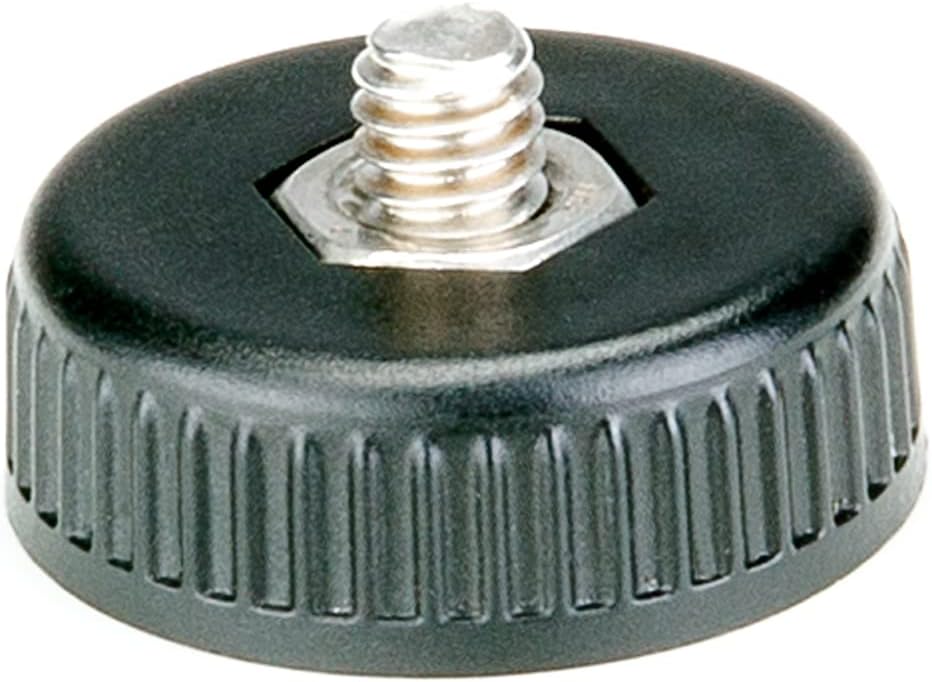
Image: The detachable magnetic base.

Image: The 1/4" threaded fitting for tripod mounting.
5. Enstalasyon
5.1 Premye chaj
Before first use, fully charge the inspection light. The battery holds its charge for up to 18 months in storage.
- Jwenn pò USB-C chaje sou aparèy la.
- Konekte kab chaje USB-C ki vini ak li a nan pò a.
- Plug the other end of the cable into a compatible USB power adapter (not included) or a powered USB port.
- The battery indicator lights will illuminate to show charging status. A full charge typically takes 3 hours.
- Yon fwa konplètman chaje, dekonekte kab la.

Image: Visual representation of the rechargeable lithium-ion battery and USB-C charging capability.
5.2 Attaching the Magnetic Base
The included magnetic base can be attached to the 1/4" threaded fitting for hands-free operation on metallic surfaces.
- Locate the 1/4" threaded fitting at the bottom of the light.
- Screw the magnetic base onto the fitting until secure.
- To remove, unscrew the base.
6. Operasyon Enstriksyon
6.1 Pouvwa pou limen/etenn ak seleksyon mòd
The device features sealed on/off and mode switches.
- Peze bouton pouvwa a yon fwa pou limen limyè a.
- Press the mode button to cycle between the 5000K and 3500K color temperature settings.
- Peze bouton pouvwa a ankò pou fèmen limyè a.

Imaj: Dèyè view of the inspection light, indicating the location of the power button, mode button, and battery level indicator.
6.2 Using for Inspection
The high CRI and dual color temperatures are optimized for detecting imperfections and matching colors.
- For automotive paint inspection, use the light to identify swirls, scratches, and other defects. The 5000K setting often mimics natural daylight, aiding in accurate color assessment.
- For interior paint and wallcovering defect identification, both color temperatures can be used to reveal inconsistencies under different lighting conditions.
- Position the light at various angles and distances from the surface to highlight different types of imperfections.

Image: The inspection light being used to detect scratches and swirl marks on automotive paint, demonstrating its effectiveness for paint correction.

Image: The light hanging from a ladder, illustrating hands-free operation.

Image: The light magnetically attached to a car door for stable positioning during inspection.
7. Antretyen
7.1 Netwayaj
To ensure optimal performance and longevity, keep the light clean.
- Siye eksteryè a ak yon mou, damp twal.
- Pa sèvi ak pwodui netwayaj abrazif oswa solvang.
- Asire w ke pò chaje a pa gen pousyè ak debri.
7.2 Depo
Lè w pa itilize li pou yon bon bout tan:
- Sere aparèy la nan yon kote ki fre, sèk.
- Evite tanperati ekstrèm.
- Periodically charge the battery to maintain its health, especially if stored for several months.
NAN. Depanaj
Gade tablo ki anba a pou pwoblèm komen ak solisyon yo.
| Pwoblèm | Kòz posib | Solisyon |
|---|---|---|
| Limyè pa limen. | Batri ap vide. | Chaje aparèy la avèk kab USB-C a. |
| Pwodiksyon limyè se dim. | Nivo batri ki ba. | Rechaje batri a. |
| Pa ka chanje tanperati koulè a. | Mode button not pressed correctly or device malfunction. | Ensure the light is on and press the mode button firmly. If issue persists, contact customer support. |
| Aparèy pa chaje. | Cable or adapter issue; charging port obstruction. | Check cable and adapter. Ensure USB-C port is clean. Try a different cable/adapter. |
9. Espesifikasyon
| Karakteristik | Detay |
|---|---|
| Nimewo Modèl | PILC95500 |
| Limyè Sòti | 500 Lumen |
| CRI (Endèks rann koulè) | 95+ |
| Tanperati Koulè | 5000K, 3500K |
| Kalite batri | 3.7V, 2.6Ah Lityòm-Ion |
| Run Tan | Jiska 2.5 èdtan |
| Tan chaj | Apeprè 3 èdtan |
| Port chaje | USB-C |
| Dimansyon | 6.2 x 3 x 11.2 pous |
| Pwa | 9.9 ons |
| Pwodwi pou Telefòn enkli | Magnetic base, USB-C charging cable |
10. Garanti ak sipò
10.1 2-Year Limited Warranty
The PowerSmith PILC95500 Inspection Light comes with a 2-Year Limited Warranty. This warranty covers defects in materials and workmanship under normal use. For specific terms and conditions, please refer to the warranty documentation included with your product or contact customer support.

Image: PowerSmith 2-Year Warranty emblem, indicating US-based supplier and customer service.

Image: Banner confirming the 2-Year Commercial / Industrial / Contractor Warranty.
10.2 Sipò pou Kliyan
For technical assistance, warranty claims, or general inquiries, please contact PowerSmith customer support. Contact information can typically be found on the product packaging or the official PowerSmith websit.
Note: PowerSmith provides US-based customer support.