
1. Entwodiksyon
This manual provides comprehensive instructions for the Angrox MR21GA Magic Remote Control, designed as a replacement for various LG Smart TV models. It details the remote's features, setup, operation, maintenance, and troubleshooting to ensure optimal performance and user experience.

Image: Front, side, and back views of the Angrox MR21GA Magic Remote Control, highlighting its ergonomic design and button layout.
2. Konpatibilite
The Angrox MR21GA Magic Remote Control is compatible with the following LG Smart TV series:
- LG 2021 OLED Series: A1, B1, C1, G1
- LG 2021 QNED TV Series: QNED91, QNED99
- LG 2021 NanoCell TV Series: NANO75, NANO80, NANO81, NANO86, NANO88, NANO91, NANO96
- LG 2021 UHD TV Series: UP76-78, UP80, UP81
Nòt enpòtan:
The voice, magic pointer, and shortcut key functions of this remote control require your LG TV to inherently support these features and have Bluetooth connectivity enabled for proper operation.

Image: Visual representation of the MR21GA Magic Remote Control's compatibility with LG UHD, OLED, QNED, and NanoCell 4K/8K Smart TVs.
3. Karakteristik
3.1. Pointer and Wheel Control (Air Mouse)
The remote features a pointing and scrolling function, similar to a computer mouse. You can easily select functions by moving and clicking the cursor on the screen. To activate the pointer, gently shake the remote left or right, or press the Home, Input, or Settings buttons. If the pointer is not responding smoothly, reset it by moving it to the edge of the screen.

Image: Demonstration of the remote's mouse-like pointing and wheel control, allowing for intuitive navigation on the TV screen.
3.2. Kontwòl vwa
The remote is equipped with a voice control function, allowing you to search for content or control your TV using voice commands. Simply press the microphone button and speak your command. Ensure your TV has a stable network connection for optimal voice recognition performance.

Image: Illustration of the voice remote control feature, demonstrating how to use voice commands to quickly access content.
3.3. Raccourci kle
The remote includes 6 dedicated shortcut keys for quick access to popular streaming services and functions. These include Netflix, Prime Video, Disney+, Rakuten TV, LG Channels, and Google Assistant/Alexa, allowing you to find your content faster.

Imaj: Plis paseview of the 6 hot-keys (Netflix, Prime Video, Disney+, Rakuten TV, LG Channels, Google Assistant/Alexa) for instant access to services.
4. Enstalasyon
4.1. Enstalasyon batri
The remote requires 2 AA batteries (not included). To install, open the battery compartment cover on the back of the remote. Insert the batteries, ensuring correct polarity (+/-). Close the cover securely.

Imaj: Detaye view of the remote's battery compartment and the process of inserting AA batteries.
4.2. Pairing Enstriksyon
There are two methods to pair your Angrox MR21GA Magic Remote Control with your LG Smart TV:
- Premye Metòd:
Turn on your TV. After approximately 20 seconds, point the remote towards the TV and press the Wou (OK) button. The remote control will automatically register, and a pairing completion message will appear on your TV screen. - Dezyèm Metòd:
If the first method does not work, press and hold the Lakay bouton ak a Retounen button simultaneously for 5 seconds. Then, press the Wou (OK) button. The remote should then pair with your TV.

Image: Step-by-step guide on how to pair the remote control with your LG Smart TV using two different methods.
5. Operasyon Enstriksyon
5.1. Fonksyon bouton yo finiview
Familiarize yourself with the functions of each button on your remote control:
| Bouton/Icône | Fonksyon |
|---|---|
| Pouvwa | Limen oswa etenn televizyon an. |
| Bouton nimewo (0-9) | Seleksyon dirèk chanèl. |
| LIST / GUIDE | Launches the TV guide or channel list. |
| QUICK ACCESS (0) | Accesses or edits Quick Access settings. |
| Volim (+/-) | Ajiste nivo volim. |
| bèbè | Aktive oubyen dezaktive son televizyon an. |
| Microphone / Voice | Activates voice recognition function (press and hold while speaking). |
| Lakay | Montre meni Kay la. |
| Retounen | Moves to the previous step or closes the menu. |
| Antre | Chwazi yon sous opinyon. |
| Anviwònman | Enters the Quick Settings menu. Long press for All Settings menu. |
| Wou (OK) | Confirms selection, scrolls through content. |
| Netflix, Prime Video, Disney+, Rakuten TV | Direct access to respective streaming services. |
| LG Channels / Google Assistant / Alexa | Direct access to LG Channels or voice assistant. |
Note: For buttons marked with a circle (O) in some diagrams, a long-press (holding for more than a second) may activate additional functions.
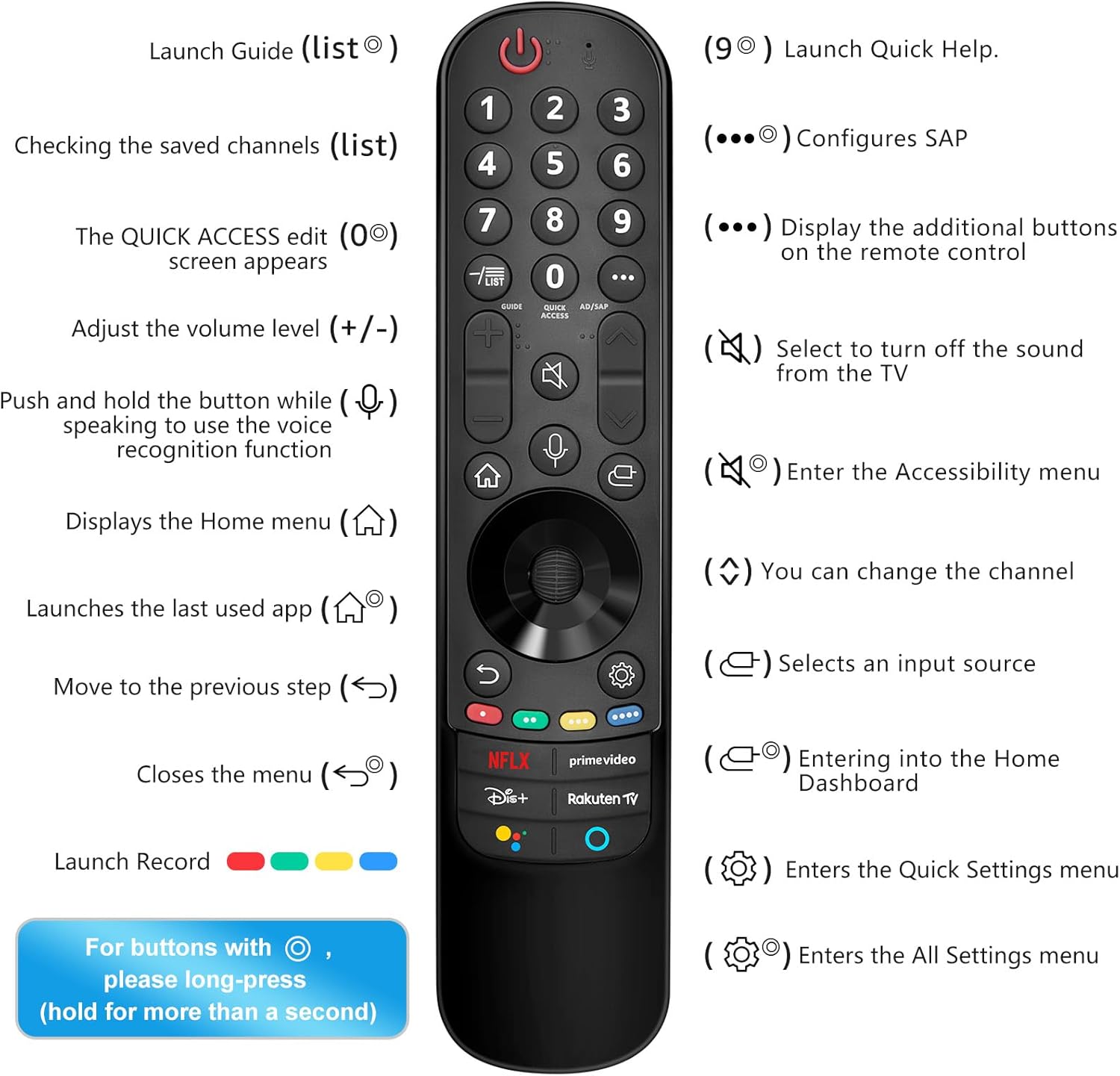
Image: Comprehensive guide to the remote control's buttons and their corresponding functions, including long-press actions.
6. Antretyen
Pou asire bon jan fonksyonman ak lonjevite kontwòl remote ou a, swiv enstriksyon antretyen sa yo:
- Netwayaj: Siye telekòmand lan avèk yon twal mou epi sèk. Pou pousyè tè ki difisil pou retire, siye l yon ti kras.ampRense twal la avèk dlo oswa yon pwodui netwayaj dou ki pa abrazif. Pa sèvi ak pwodui chimik ki agresif oswa materyèl abrazif.
- Ranplasman batri: Replace batteries when the remote's responsiveness decreases or it stops functioning. Always replace both batteries at the same time with new AA alkaline batteries.
- Depo: Sere telekòmand lan nan yon kote ki fre epi sèk, lwen limyè solèy dirèk, tanperati ekstrèm ak imidite ki wo.
- Evite gout: Pwoteje telekòmand lan kont enpak fizik, paske si li tonbe, li ka domaje konpozan entèn yo.
NAN. Depanaj
If you encounter issues with your Angrox MR21GA Magic Remote Control, refer to the following troubleshooting tips:
| Pwoblèm | Solisyon posib |
|---|---|
| Telekòmand lan pa reponn. | Check battery installation and replace with fresh AA batteries. Ensure there are no obstructions between the remote and the TV. |
| Pointer not appearing or moving smoothly. | Ensure your TV supports the pointer function. Try shaking the remote gently. If the pointer is erratic, move it to the edge of the screen to reset its position. Re-pair the remote if necessary. |
| Kontwòl vwa a pa fonksyone. | Verify your TV's network connection. Ensure your TV supports voice control. Speak clearly and hold the microphone button while speaking. |
| Remote not pairing. | Ensure TV is on. Try both pairing methods described in Section 4.2. Make sure your TV's Bluetooth is enabled. If issues persist, try restarting the TV. |
| Specific shortcut keys not working. | Ensure your TV's software is up to date. Verify that the corresponding app is installed and accessible on your TV. |
8. Espesifikasyon
| Atribi | Detay |
|---|---|
| Mak | Angrox |
| Non modèl | MR21GA |
| Aparèy konpatib | Television (LG Smart TVs) |
| Karakteristik espesyal | Voice control, pointer function, dedicated streaming service shortcut keys |
| Sous pouvwa | Batri Powered |
| Kalite batri | AA (2 required, not included) |
| Konpozisyon batri | Alkalin |
| Koneksyon Teknoloji | Voice Control (Bluetooth dependent on TV) |
| Kantite bouton | 37 |
| Maksimòm Range | 9 mèt (apeprè 30 pye) |
| Dimansyon pwodwi | 23.8 x 7.6 x 4.8 cm (apeprè 9.37 x 2.99 x 1.89 pous) |
| Pwa pwodwi | 60 g (apeprè 2.12 ons) |
9. Garanti ak sipò
Information regarding specific warranty terms and customer support for the Angrox MR21GA Magic Remote Control is typically provided at the point of purchase or within the product packaging. Please refer to any included documentation or contact the seller directly for details on warranty coverage and technical assistance.