
Entwodiksyon
This manual provides essential information for the installation, operation, and maintenance of your Sapphire AMD Radeon RX 7900 XTX Gaming Graphics Card. Please read this manual thoroughly before installation to ensure proper setup and optimal performance. This graphics card is designed for high-performance computing and gaming, featuring 24GB GDDR6 memory and AMD RDNA 3 architecture.
Enstalasyon ak Enstalasyon
Proper installation is crucial for the stability and performance of your graphics card. Ensure your system meets the minimum requirements before proceeding.
Kondisyon sistèm
- Plak mèr: PCI Express x16 slot available.
- Pwovizyon pou pouvwa: Minimum 750W power supply recommended with appropriate PCIe power connectors.
- Sistèm operasyon: Windows 10/11 64-bit or Linux 64-bit.
- memwa: 16GB system RAM recommended.
Enstalasyon fizik
- Prepare Sistèm ou an: Power off your computer and unplug all cables. Open your computer case.
- Jwenn plas PCIe a: Identify an available PCI Express x16 slot on your motherboard. Remove any expansion slot covers that obstruct the installation.
- Mete Kat Grafik la: Carefully align the graphics card with the PCIe slot and press down firmly until it is securely seated. Ensure the retention clip on the PCIe slot locks into place.
- Sekirize kat la: Use screws to secure the graphics card to the computer case at the expansion slot bracket.

Figi 1: Angle view of the graphics card, highlighting the PCIe connector and display outputs.
- Konekte pouvwa: Connect the required PCIe power cables from your power supply to the graphics card. This model typically requires two 8-pin PCIe power connectors. Ensure all connections are firm.
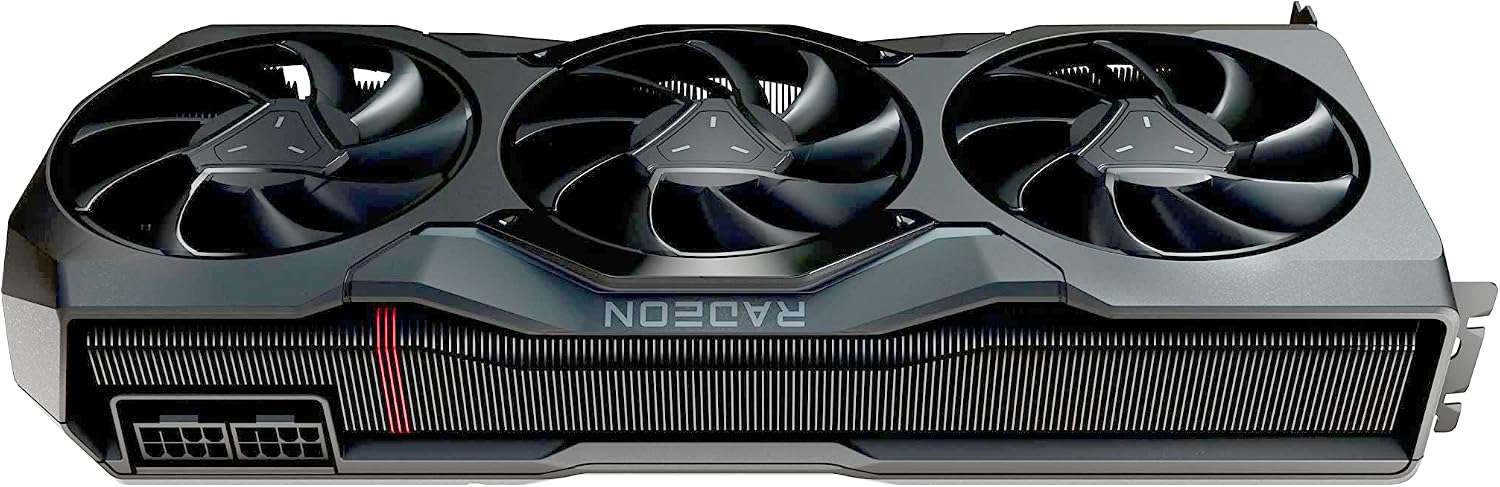
Figi 2: Top view of the graphics card, showing the location of the power connectors.
- Close Case and Connect Displays: Close your computer case, reconnect all peripherals, and connect your display cables (HDMI, DisplayPort, or USB-C) to the graphics card's output ports.

Figure 3: Close-up of the graphics card's output ports, including HDMI, DisplayPort, and USB-C.
Enstalasyon chofè
After physical installation, power on your computer. The operating system may install a basic driver, but for full functionality and performance, you must install the latest AMD Radeon Software Adrenalin Edition drivers.
- Telechaje Chofè yo: Vizite ofisyèl AMD la websit (www.amd.com/support) and download the latest drivers for your Radeon RX 7900 XTX graphics card.
- Enstale chofè yo: Run the downloaded installer and follow the on-screen instructions. A restart may be required after installation.
Enstriksyon Operasyon
Once installed and drivers are updated, your Sapphire AMD Radeon RX 7900 XTX is ready for use.
Operasyon debaz
- Pouvwa sou: Start your computer. The graphics card will initialize and output video to your connected display(s).
- Montre konte genyen: Use your operating system's display settings to configure resolution, refresh rate, and multiple monitors.
AMD Radeon Software Adrenalin Edition
This software provides a comprehensive suite of tools for managing your graphics card.
- Ajisteman pèfòmans: Adjust clock speeds, fan curves, and power limits for optimal performance or power efficiency.
- Karakteristik Gaming: Enable features like AMD FidelityFX Super Resolution (FSR) for enhanced visual quality and performance.
- Siveyans: Monitor GPU temperature, clock speeds, fan speeds, and power consumption in real-time.
- Mizajou chofè: Check for and install the latest driver updates directly through the software.
Antretyen
Regular maintenance helps ensure the longevity and consistent performance of your graphics card.
Netwayaj
- Retire pousyè: Periodically clean dust from the fans and heatsink using compressed air. Ensure the system is powered off and unplugged before cleaning. Hold the fan blades gently to prevent them from spinning rapidly during cleaning, which can damage the bearings.
- Netwayaj eksteryè: Wipe the exterior of the card with a soft, dry, anti-static cloth.

Figi 4: Devan view of the graphics card, showing the three cooling fans.
Mizajou lojisyèl
Keep your AMD Radeon Software and graphics drivers updated to benefit from performance improvements, bug fixes, and new features.
Depanaj
Si ou rankontre pwoblèm, gade etap depanaj komen sa yo.
Pa gen Sorti Display
- Tcheke Câbles: Ensure all display cables are securely connected to both the graphics card and the monitor.
- Koneksyon pouvwa: Verify that all PCIe power connectors are firmly seated in the graphics card.
- PCIe Seating: Re-seat the graphics card in its PCIe slot to ensure it is properly connected.
- Antre pou kontwole: Confirm your monitor is set to the correct input source (HDMI, DisplayPort, USB-C).
Overheating or Performance Drops
- Airflow: Ensure your computer case has adequate airflow. Check that case fans are functioning correctly and not obstructed.
- Pousyè: Clean any dust accumulation from the graphics card's fans and heatsink.
- Chofè: Update to the latest graphics drivers.
- Siveyans lojisyèl: Use AMD Radeon Software to monitor GPU temperatures. If junction temperatures consistently reach 110°C or higher under load, this may indicate a cooling issue. Consider adjusting fan curves or power limits within the software.
Enstabilite Sistèm oswa Aksidan
- Reyenstalasyon Chofè: Perform a clean installation of your graphics drivers using AMD's recommended procedure.
- Pwovizyon pou pouvwa: Verify your power supply unit (PSU) meets the recommended wattage and is providing stable power.
- BIOS/UEFI: Asire w ke BIOS/UEFI kat manman w lan mete ajou ak dènye vèsyon an.
Espesifikasyon
| Karakteristik | Detay |
|---|---|
| Koprosesè grafik | AMD Radeon RX 7900 XTX |
| Mak | Safi |
| Gwosè RAM grafik la | 24 GB |
| Kalite RAM grafik | GDDR6 |
| Entèfas memwa | 384-bit |
| Vitès revèy memwa | 20 GHz |
| Entèfas Sorti Videyo | 1 x HDMI, 2 x DisplayPort, 1 x USB-C |
| Entèfas kat grafik | PCI Express 4.0 |
| Faktè fòm | 3 slot, ATX |
| Kantite Fanatik | 3 |
| Display Maximum Resolution | 7680 x 4320 |
| Dimansyon atik (L x W) | 11.3"L x 4.85"Lajè |
| Nimewo Modèl | 21322-01-20G |
| UPC | 840777088586 |
Enfòmasyon sou Garanti
This Sapphire AMD Radeon RX 7900 XTX Graphics Card comes with a Garanti manifakti 2 zan.
The warranty covers defects in materials and workmanship under normal use. It does not cover damage caused by improper installation, accident, abuse, misuse, natural disaster, or unauthorized modification. Please retain your proof of purchase for warranty claims.
For detailed warranty terms and conditions, please refer to the official Sapphire Technology websit oswa kontakte sipò kliyan yo.
Sipò ak Kontakte
For further assistance, technical support, or warranty inquiries, please contact Sapphire Technology directly.
- Sapphire Technology Official Websit: www.sapphiretech.com
- AMD Support: For driver downloads and general AMD GPU information, visit www.amd.com/support
When contacting support, please have your product model number (21322-01-20G) and proof of purchase readily available.