
Entwodiksyon
Thank you for choosing the Ledwood Apollo S TWS Earphones. This manual provides detailed instructions on how to set up, operate, maintain, and troubleshoot your new wireless earbuds. Please read this manual carefully before use to ensure optimal performance and longevity of your device.
Kontni pake
- Ledwood Apollo S TWS Earphones (Left and Right)
- Ka chaje san fil
- USB Chaje Kab
- Manyèl itilizatè
Pwodwi souview
The Ledwood Apollo S TWS Earphones feature a sleek design and provide a seamless wireless audio experience. The compact charging case not only protects your earbuds but also provides additional battery life on the go. The case includes a digital screen to display the current battery level.
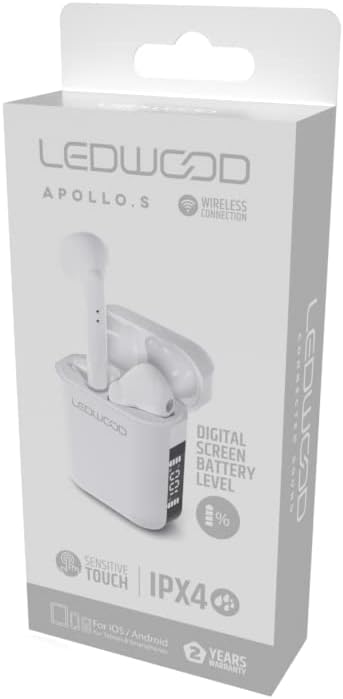
Image showing the Ledwood Apollo S TWS Earphones inside their charging case, highlighting the compact design and in-ear style.
Enstalasyon
1. Chaje ekoutè yo ak bwat la
- Place both earphones into the charging case. Ensure they are properly seated.
- Konekte kab chaje USB a nan pò chaje ki sou bwat la epi branche lòt bout la nan yon adaptè kouran USB (pa enkli) oswa nan yon pò USB òdinatè.
- The digital screen on the charging case will display the current battery level during charging.
- Allow the earphones and case to fully charge before first use. The earphones will indicate full charge (e.g., LED indicator changes color or turns off).
2. Konekte ak aparèy ou an
- Asire w ke ekoutè yo chaje epi mete yo nan bwat chaje a.
- Open the charging case. The earphones will automatically enter pairing mode (indicated by flashing LED lights on the earbuds).
- Sou telefòn entelijan ou oswa aparèy ki gen Bluetooth, ale nan paramèt Bluetooth yo.
- Chèche pou available devices and select "Ledwood Apollo S" from the list.
- Once connected, the earphones will provide an audio confirmation, and the LED indicators will stop flashing.
- If pairing fails, turn off Bluetooth on your device, place the earphones back in the case, close the case, then repeat the steps.
Enstriksyon Operasyon
The Ledwood Apollo S earphones feature sensitive touch controls for easy management of calls and music playback.
Kontwòl manyen
- Jwe/Poz: Tape yon sèl sou chak ekoutè.
- Pwochen Track: Tape de fwa sou ekoutè dwat la.
- Track Previous: Tape de fwa sou ekoutè gòch la.
- Reponn/Fen Apèl: Yon sèl ti tape sou nenpòt ekoutè pandan yon apèl k ap antre oswa yon apèl aktif.
- Rejte apèl: Peze epi kenbe youn nan ekoutè yo pandan 2 segonn pandan yon apèl k ap antre.
- Aktive Asistan Vwa: Tape twa fwa sou nenpòt ekoutè.
- Volim moute: Peze epi kenbe ekoutè dwat la.
- Volim desann: Peze epi kenbe ekoutè gòch la.
Antretyen
Netwayaj
- Netwaye ekoutè yo ak bwat chaje a regilyèman avèk yon twal mou, sèk, epi ki pa gen pousyè.
- Pa sèvi ak pwodui netwayaj abrazif, alkòl, oswa solvan chimik.
- Asire w ke kontak chaje yo sou tou de ekoutè yo ak sou bwat la pwòp epi san debri pou kenbe yon chajman kòrèk.
Depo
- Lè w pa ap itilize ekoutè yo, sere yo nan bwat chaje yo pou pwoteje yo epi kenbe yo chaje.
- Sere aparèy la nan yon kote ki fre epi sèk, lwen tanperati ekstrèm ak limyè solèy dirèk.
Depanaj
- Kas ekoutè yo pa konekte: Ensure both earphones are charged. Place them back in the case, close it, then reopen to re-enter pairing mode. Check your device's Bluetooth settings.
- Pa gen son ki soti nan youn nan ekoutè yo: Try resetting the earphones by placing them in the case, closing it, and then taking them out again. Re-pair with your device.
- Pwoblèm chaj: Clean the charging contacts on both the earphones and the case. Ensure the charging cable is securely connected and the power source is functional.
- Ba volim: Ajiste volim nan sou aparèy ki konekte a epi avèk kontwòl taktil ekoutè yo.
Espesifikasyon
| Non modèl | Apollo S |
| Nimewo Modèl | LD-APOLLO-S-BLK |
| Koneksyon Teknoloji | San fil (Bluetooth) |
| Metòd kontwòl | Touche, Kontwòl Volim |
| Style | Nan zòrèy |
| Nivo rezistans dlo | IPX4 (Rezistan a ekla) |
| Karakteristik espesyal | Fast Charging, Digital Screen Battery Level |
| Materyèl | Bwa |
| Manifakti | Ledwood |
Garanti ak sipò
The Ledwood Apollo S TWS Earphones come with a 2-ane garanti apati dat acha a, ki kouvri domaj fabrikasyon. Tanpri konsève prèv acha ou pou reklamasyon garanti.
For technical support, troubleshooting assistance, or warranty inquiries, please contact Ledwood customer service through their official websit oswa revandè kote yo te achte pwodwi a.
For more information, visit the official Ledwood websit: www.ledwood.com (Nòt: Sa a se yon espas rezève URL as no specific support link was provided).