
Entwodiksyon
This manual provides detailed instructions for the assembly, operation, and maintenance of your VIVO DESK-E3CVC Electric 2-Tier Corner L-Shaped Standing Desk. This desk, featuring a light wood top and white frame with light gray drawers, is designed to offer a versatile and ergonomic workspace with electric height adjustment and integrated storage. Please read this manual thoroughly before assembly and use to ensure safe and efficient operation.
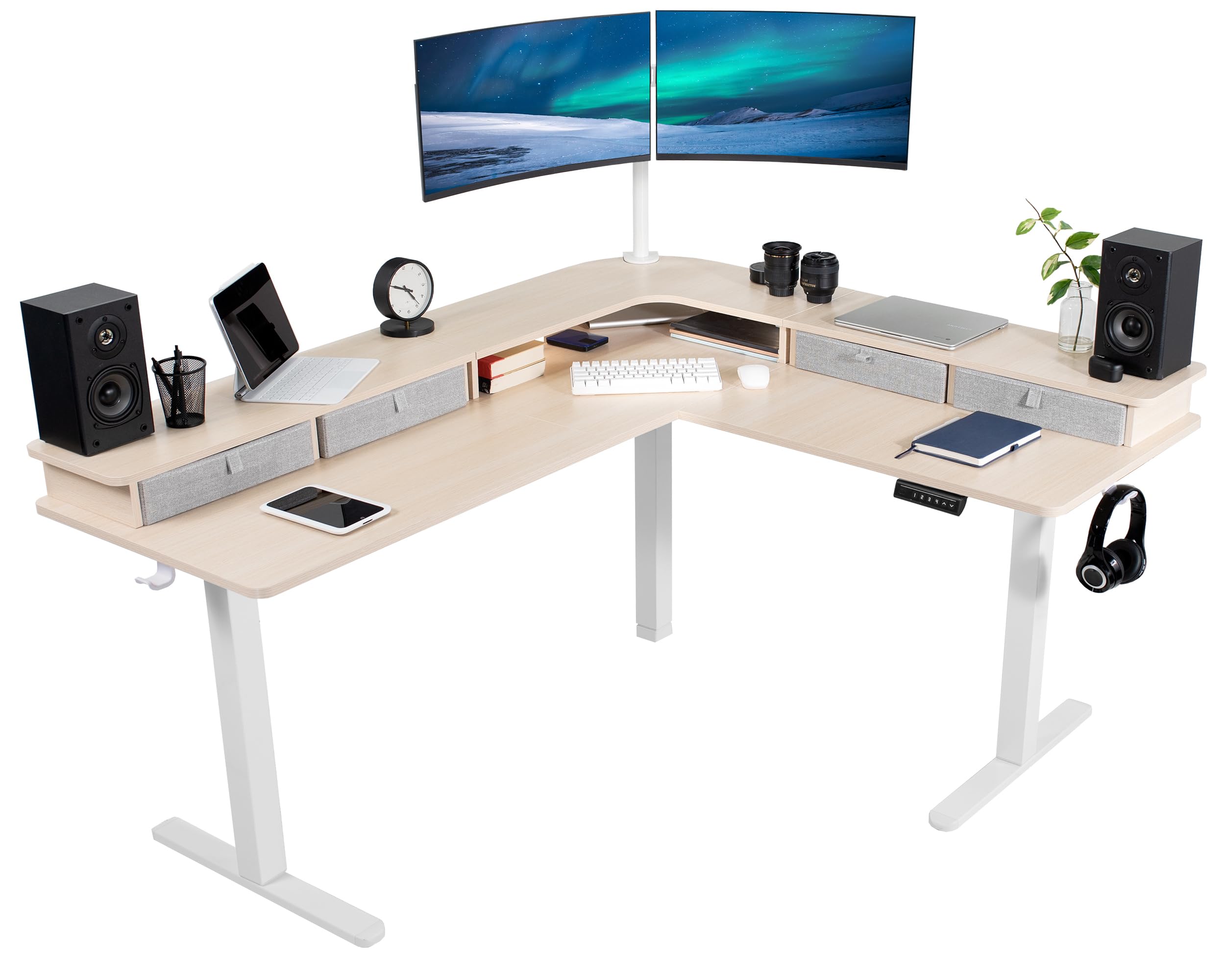
Image: The VIVO DESK-E3CVC Electric 2-Tier Corner L-Shaped Standing Desk in a light wood finish with a white frame, shown in a modern office setting.
Enfòmasyon sou Sekirite
Always ensure the desk is properly assembled and the casters are securely attached. When adjusting the height, use the memory controller carefully to maintain stability. Keep the desk away from heat sources and do not place heavy objects on the desk that could cause it to tip over. Always follow the manufacturer's instructions for assembly, use, and maintenance.
- Asire ke tout eleman yo byen tache anvan ou itilize.
- Do not overload the desk; the maximum weight capacity is 225 liv.
- Kenbe timoun ak bèt kay lwen biwo a pandan w ap ajiste wotè a.
- Avoid placing liquids directly on the desk surface to prevent damage to electronic components.
- Dekonekte kouran an anvan ou netwaye oswa fè nenpòt antretyen.
Kontni pake
Verify that all components are present and undamaged before beginning assembly. The package includes:
- L-Shaped 3-Part Desktop (Light Wood Top)
- Electric Desk Frame (White)
- Kontwolè memwa
- 4 x Storage Drawers (Light Gray)
- 4 x 2" Casters
- 2 x kab klip
- 2 x Accessory Hooks
- Materyèl ak Zouti Asanblaj

Imaj: Gwo plan view of the included accessories: four light gray storage drawers, four 2-inch casters, two cable clips, and two accessory hooks.
Enstriksyon Asanble
Assembly requires two people for optimal safety and ease. Follow the included printed instructions for detailed steps. An official assembly video is also available to guide you through the process.
Video: Official VIVO assembly guide for the 2-Tier 63 x 55 Inch Corner Electric Desk with Storage (DESK-E3CVB, similar to DESK-E3CVC). This video demonstrates the step-by-step process for setting up the desk frame and attaching the desktop sections.
- Depake konpozan: Retire tout pyès yo nan anbalaj la avèk prekosyon epi mete yo sou yon sifas pwòp e mou pou evite reyur.
- Asanble ankadreman biwo a: Follow the instructions to connect the leg columns, feet, and crossbars to form the electric desk frame. Ensure all screws are tightened securely.
- Tache seksyon Desktop yo: Position the L-shaped desktop sections onto the assembled frame. Secure them using the provided screws. Note that some holes may require self-tapping.
- Enstale Panèl Kontwòl la: Mount the memory controller to the underside of the desk in an easily accessible location. Connect the motor and power cables as directed.
- Ajoute Pwodwi pou Telefòn: Attach the storage drawers, casters (if desired), cable clips, and accessory hooks according to your preference.
- Jesyon kab: Use the included cable clips to organize and secure power cords and other cables, preventing entanglement during height adjustments.
Rekòmandasyon: It is often easier to assemble the desk right-side-up and then carefully attach the top sections, even if it requires lying on your back for some steps, rather than assembling upside-down and attempting to flip the heavy desk.
Enstriksyon Operasyon
Ajisteman Wotè
The VIVO DESK-E3CVC features a powerful electric motor for smooth height adjustments. The desk can be adjusted from a minimum height of 30.4 pous to a maximum height of 48.5 pous (main desktop).
- Sèvi ak la Anlè (▲) epi Desann (▼) arrows on the memory controller to manually adjust the desk height.
- The digital display will show the current height.

Image: Diagram illustrating the height adjustment range of the VIVO standing desk, from 30.4 inches to 48.5 inches, highlighting the powerful motor and collision protection.
Prereglaj memwa
The memory controller allows you to save up to four preferred height settings for quick adjustments.

Image: Close-up of the desk's control panel, showing the digital height display and four numbered memory preset buttons, along with up and down adjustment arrows.
- Pou sove yon predefinisyon:
- Ajiste biwo a nan wotè ou vle a avèk flèch Anwo/Anba yo.
- Peze a "S" button (Set). The display will flash.
- Immediately press one of the numbered preset buttons (1, 2, 3, oswa 4) to save the current height to that position.
- Pou itilize yon predefinisyon:
- Simply press the corresponding numbered preset button (1, 2, 3, oswa 4Biwo a ap deplase otomatikman nan wotè ki anrejistre a.
Pwoteksyon kolizyon
The desk is equipped with a collision protection feature. If the desk encounters an obstruction during height adjustment, it will automatically stop and reverse slightly to prevent damage.
Antretyen
- Netwayaj: Siye sifas biwo a ak yon mou, damp cloth. Avoid abrasive cleaners or harsh chemicals. For the frame, use a mild detergent if necessary.
- Tèks regilye: Tcheke tout vis ak koneksyon yo detanzantan pou asire yo rete sere. Sere yo ankò si ou detekte nenpòt bagay ki lach.
- Jesyon kab: Ensure cables are neatly organized and not pinched or stretched during height adjustments.
- Swen motè: The electric motor is designed for long-term use and requires minimal maintenance. Avoid obstructing the motor or forcing adjustments.
Depanaj
| Pwoblèm | Kòz posib | Solisyon |
|---|---|---|
| Biwo a pa deplase. | Power cable disconnected; motor overload; control panel issue. | Check power connections. Reduce weight on the desk. Reset the system by unplugging for 10 seconds and plugging back in. |
| Uneven height adjustment. | Uneven weight distribution; loose connections. | Distribute weight evenly. Check and tighten all frame connections. |
| Biwo a rete pandan ajisteman an. | Collision detection activated; motor overheating. | Remove any obstructions. Allow motor to cool down for 20 minutes before resuming operation. |
| Prereglaj memwa yo pa fonksyone. | Pwosedi pou sove ki pa kòrèk. | Refer to the "Memory Presets" section for correct saving steps. |
Espesifikasyon
| Karakteristik | Detay |
|---|---|
| Nimewo Modèl | DESK-E3CVC |
| Fòm Biwo | L-Shape, 2-Tier |
| Dimansyon Desktop | 63" lajè x 55.2" pwofondè |
| Ranje Ajisteman Wotè | 30.4" to 48.5" (main desktop) |
| Kapasite pwa | 225 liv |
| Kalite motè | Elektrik sèl motè |
| Prereglaj memwa | 4 |
| Top Materyèl | Engineered Wood (Light Wood Finish) |
| Materyèl ankadreman | Alloy Steel (White Finish) |
| Enkli Depo | 4 Light Gray Drawers |
| Asanble obligatwa | Wi (Rekòmande pou 2 moun) |

Image: Overhead diagram of the L-shaped desk, showing key dimensions such as 63" and 55.2" lengths, 23.5" depth, and 27.8" corner depth. Also indicates the 225 lbs weight capacity.
Garanti ak sipò
The VIVO DESK-E3CVC Electric 2-Tier Corner L-Shaped Standing Desk comes with a 3-ane garanti limite covering parts and labor. For technical assistance, troubleshooting, or warranty claims, please contact VIVO customer support.
- Manifakti: VIVO
- Kalite garanti: Limited (3 years)
- Kontakte sipò: Gade ofisyèl VIVO a website or the contact information provided with your purchase for customer service details.


