
1. Entwodiksyon
This manual provides detailed instructions for the setup, operation, and maintenance of your Graflsoa PG-9078 Bluetooth Wireless Gamepad. Please read this manual thoroughly before using the product to ensure proper functionality and to maximize your gaming experience. This gamepad is compatible with iOS, Android, Tablet, Phone, PC, Smart TV, and Set Top Box devices.
2. Enfòmasyon sou Sekirite
- Do not expose the gamepad to extreme temperatures, humidity, or direct sunlight.
- Evite lage gamepad la oswa soumèt li a gwo enpak.
- Do not attempt to disassemble or modify the gamepad. This will void the warranty.
- Keep the gamepad away from water and other liquids.
- Sèvi sèlman ak kab chaje ki vini ak li a oswa yon kab ekivalan sètifye.
- Store the gamepad in a clean, dry place when not in use.
3. Pake kontni
Tanpri verifye sa ki nan pake a lè w ap debale l:
- Graflsoa PG-9078 Wireless Gamepad
- USB Chaje Kab
- Manyèl Itilizatè (dokiman sa a)
4. Pwodwi souview
Familiarize yourself with the components and features of your PG-9078 gamepad.
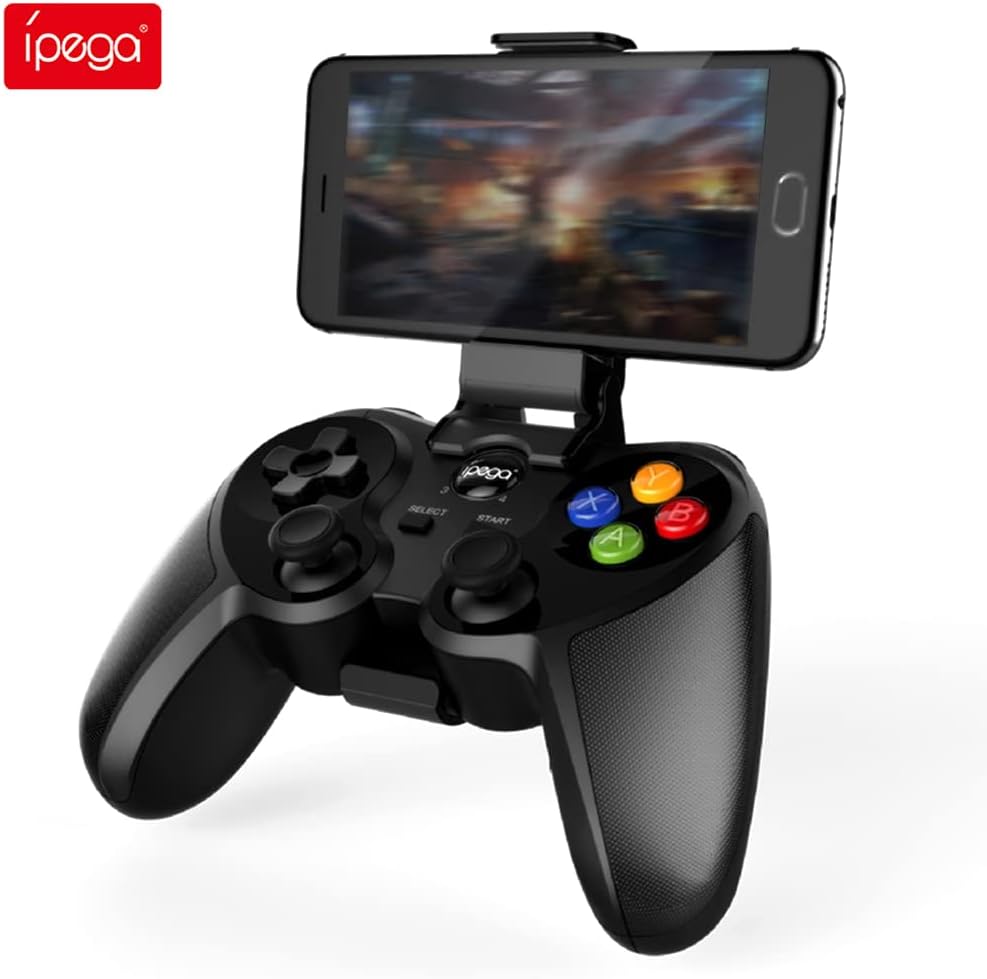
Figure 4.1: Graflsoa PG-9078 Wireless Gamepad with a smartphone mounted in the integrated holder.
The Graflsoa PG-9078 is a versatile Bluetooth gamepad designed for various gaming platforms. It features a comfortable ergonomic design, precise controls, and an integrated phone holder.
4.1 Karakteristik kle
- Sipò Telefòn Entegre: Supports smartphones from 4 to 5.5 inches, with an adjustable angle for optimal viewing.
- Hall Effect Sensor Switches: Provides durable and responsive trigger input.
- High Accuracy Joysticks: 360-degree precision joysticks with anti-slip texture to prevent operational errors.
- Bouton ki reponn: Fast response time for all face buttons and shoulder buttons.
- Analog L2/R2 Triggers: Offers precise control for racing and other games requiring nuanced input.
- Koneksyon Bluetooth: Stable wireless connection with a transmission distance of up to 8 meters.

Figure 4.2: The adjustable phone holder, designed to securely hold smartphones between 4 and 5.5 inches. The angle can be freely adjusted for user comfort.

Figure 4.3: The high-accuracy joystick, featuring 360-degree movement and an anti-slip texture for enhanced control.

Figure 4.4: The highly sensitive and responsive face buttons and shoulder buttons, designed for quick input.
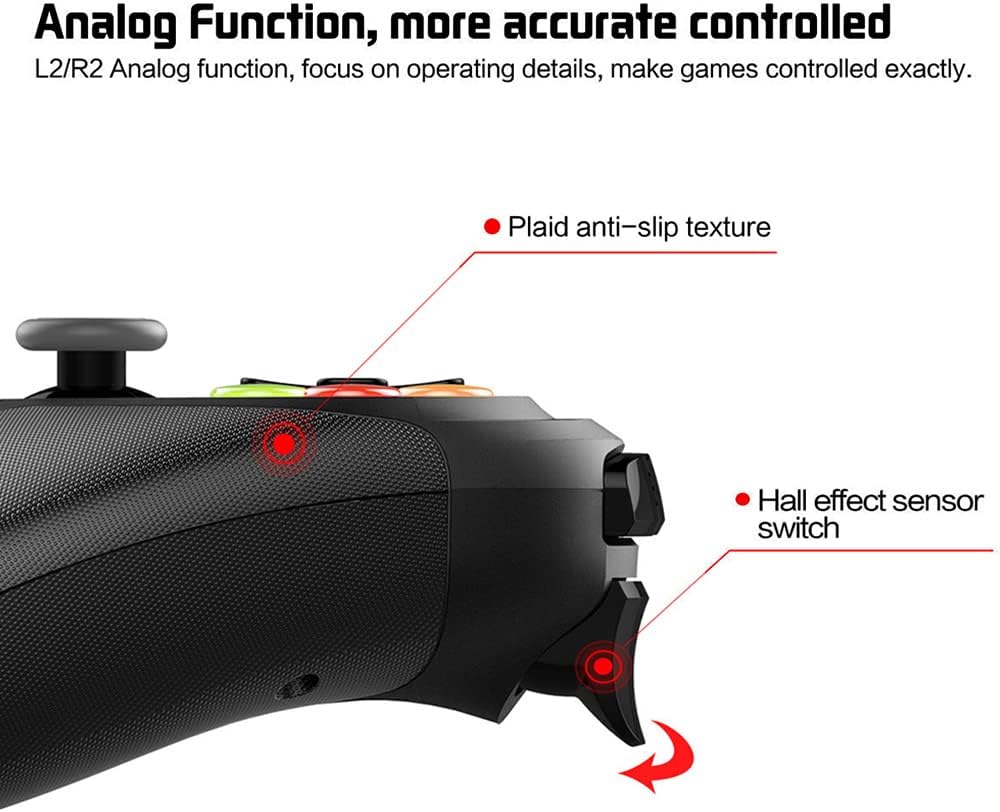
Figure 4.5: The L2/R2 analog triggers, providing accurate and detailed control for various in-game actions.

Figure 4.6: The gamepad utilizes Bluetooth technology for wireless connectivity, offering a stable connection up to 8 meters.
5. Enstriksyon Enstalasyon
5.1 Chaje Gamepad la
- Connect the small end of the USB charging cable to the charging port on the gamepad.
- Konekte pi gwo bout kab chaje USB a nan yon sous kouran USB (pa egzanp, yon pò USB òdinatè, yon adaptè USB nan miray).
- The charging indicator light on the gamepad will illuminate during charging and turn off or change color when fully charged.
- Yon chaj konplè pran apeprè 2-3 èdtan anjeneral.
5.2 Mete Sipò Telefòn nan
- Locate the phone holder attachment point on the top of the gamepad.
- Carefully slide the phone holder into the designated slot until it clicks securely into place.
- Adjust the angle of the holder to your preferred viewpozisyon ing.
- Gently place your smartphone (4-5.5 inches) into the holder, ensuring it is securely gripped.
5.3 Bluetooth Pairing
The PG-9078 supports multiple connection modes. Select the appropriate mode for your device.
5.3.1 Android Standard Mode
- Asire w ke gamepad la etenn.
- Peze epi kenbe la "X" button + HOME button simultaneously until the indicator light flashes rapidly.
- On your Android device, enable Bluetooth and search for available devices.
- Select "PG-9078" from the list to pair. The indicator light will become solid once connected.
5.3.2 iOS Standard Mode
- Asire w ke gamepad la etenn.
- Peze epi kenbe la "Y" button + HOME button simultaneously until the indicator light flashes rapidly.
- On your iOS device, enable Bluetooth and search for available devices.
- Select "PG-9078" from the list to pair. The indicator light will become solid once connected.
5.3.3 PC/Smart TV Mode (Direct Play)
- Asire w ke gamepad la etenn.
- Peze epi kenbe la "A" button + HOME button simultaneously until the indicator light flashes rapidly.
- On your PC or Smart TV, enable Bluetooth and search for available devices.
- Select "PG-9078" from the list to pair. The indicator light will become solid once connected.
Note: After successful pairing, the gamepad will automatically connect to the last paired device when powered on in the same mode.
6. Operasyon Enstriksyon
6.1 Power On/Off
- Pouvwa sou: Peze a bouton HOME for 1 second. The indicator light will flash, then connect to the last paired device.
- Pouvwa Off: Peze epi kenbe la bouton HOME for 5 seconds until the indicator light turns off. The gamepad will also automatically power off after 5 minutes of inactivity.
6.2 Gamepad Modes
The PG-9078 supports different modes for optimal compatibility:
- Android Standard Mode (X + HOME): For most Android games and emulators.
- iOS Standard Mode (Y + HOME): For iOS games that support MFi controllers or specific gamepad protocols.
- PC/Smart TV Mode (A + HOME): For direct play on Windows PCs (requires Bluetooth adapter) and compatible Smart TVs.
Note: Game compatibility varies by platform and game title. Some games may require specific mapping or may not support external controllers.
6.3 Sèvi ak Kontwòl yo
The gamepad features standard controls:
- Pad direksyonèl (D-Pad): Pou yon antre direksyonèl presi.
- Bwat analogik gòch/dwat: Pou mouvman 360 degre ak kontwòl kamera.
- Bouton figi (A, B, X, Y): Pou aksyon nan jwèt la.
- Bouton zepòl (L1, R1): For quick actions.
- Deklanchè Analòg (L2, R2): For pressure-sensitive input, ideal for acceleration/braking in racing games.
- SELECT/START Buttons: For menu navigation and game functions.
- Bouton HOME: For power on/off and mode switching.

Figure 6.1: Proper grip and button access on the Graflsoa PG-9078 gamepad, highlighting its ergonomic design and Hall effect sensor switches.
7. Antretyen
- Netwayaj: Use a soft, dry cloth to wipe the surface of the gamepad. Do not use harsh chemicals or abrasive cleaners.
- Depo: Sere gamepad la nan yon kote ki fre epi sèk, lwen limyè solèy dirèk ak tanperati ekstrèm.
- Swen batri: To prolong battery life, avoid fully discharging the gamepad frequently. Charge it regularly, even if not in constant use. If storing for an extended period, charge it to about 50% every few months.
NAN. Depanaj
8.1 Gamepad Does Not Power On
- Ensure the gamepad is charged. Connect it to a power source using the USB cable and allow it to charge for at least 30 minutes before attempting to power on again.
- Peze epi kenbe bouton HOME pou 1 segonn pou limen.
8.2 Pa kapab konekte atravè Bluetooth
- Ensure the gamepad is in the correct pairing mode for your device (Android: X+HOME, iOS: Y+HOME, PC/Smart TV: A+HOME).
- Asire w ke Bluetooth aktive sou aparèy ou an epi ou ka detekte li.
- Move the gamepad closer to your device (within 8 meters).
- Forget/remove "PG-9078" from your device's Bluetooth list and attempt to pair again.
- Restart both your device and the gamepad.
8.3 Bouton/Joystick yo pa reponn
- Verify that the gamepad is successfully connected to your device.
- Check game settings to ensure controller support is enabled and controls are mapped correctly.
- Some games may not fully support external gamepads.
- Try restarting the gamepad and your device.
9. Espesifikasyon
| Modèl | PG-9078 |
| Koneksyon | Bluetooth Wireless |
| Gamme Bluetooth | Jiska 8 mèt |
| Konpatibilite | iOS, Android, Tablet, Phone, PC, Smart TV, Set Top Box |
| Phone Holder Support | 4 - 5.5 inch smartphones |
| Karakteristik espesyal | Hall Effect Sensor Switches, 360-degree High Accuracy Joysticks, Analog L2/R2 Triggers |
| Sous pouvwa | Rechargeable Battery (Internal) |
10. Garanti ak sipò
For warranty information and technical support, please refer to the documentation provided with your purchase or contact your retailer. Keep your proof of purchase for any warranty claims.