
1. Entwodiksyon
The Audeze Filter Speakerphone is a portable conference device designed for clear voice communication. It features advanced Artificial Intelligence (A.I.) noise filtering and proprietary planar magnetic speaker technology to optimize speech clarity. This manual provides instructions for setting up, operating, maintaining, and troubleshooting your Audeze Filter Speakerphone.
2. Ki sa ki nan bwat la
Upon unboxing your Audeze Filter Speakerphone, verify that all the following items are included:
- Audeze Filter Speakerphone Unit
- USB-C USB-C chaje kab
- USB-C pou USB-A adaptè
- Quick Start Guide (Multi-language)
- Leatherette Magnetic Closure Carry Case
- Anti-slip Pad with Audeze Logo
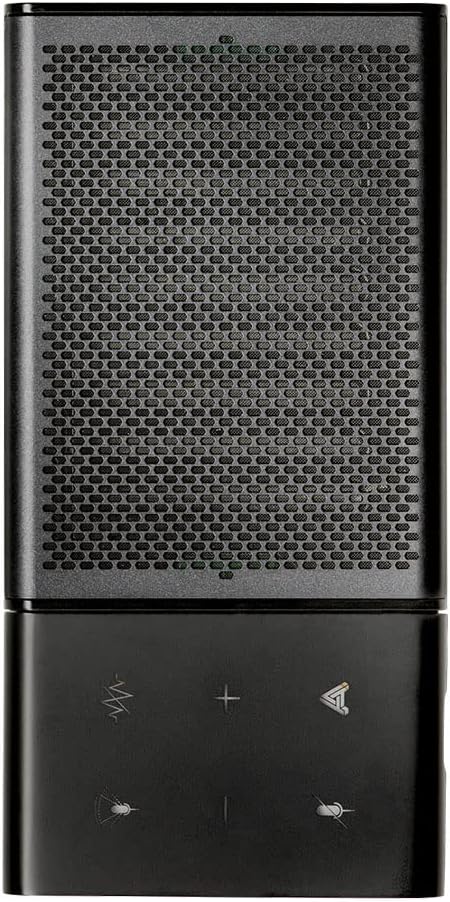
Image: All items included in the Audeze Filter Speakerphone package.
Videyo: Yon finiview of the Audeze Filter Speakerphone, including unboxing and initial setup. This video demonstrates the physical components and accessories.
3. Pwodwi souview
The Audeze Filter is designed for portability and ease of use, featuring a sleek aluminum chassis. It is comparable in size to a large cellphone when folded.
3.1 Karakteristik Fizik
- Kontwòl: Touch-sensitive buttons for mute, AI filter, volume adjustment, and call management.
- Mikwofòn: Intelligent beamforming microphone array.
- Oratè: Patented Audeze Planar Magnetic Speaker optimized for speech clarity.
- USB-C pò: Pou chaje ak koneksyon filaire.
- Bouton pouvwa: Sitiye sou bò a pou aksè fasil.
- Endikatè ki ap dirije: Bay fidbak sou sitiyasyon an.
- Konsepsyon pliable: Allows the speaker to stand upright for optimal sound direction or fold flat for portability.

Image: Close-up of the speakerphone's control panel and speaker grille.

Image: The Audeze Filter Speakerphone in its upright position, ready for use.

Image: Dimensions of the Audeze Filter Speakerphone.

Image: The Audeze Filter Speakerphone in its compact, folded state.

Image: The Audeze Filter Speakerphone neatly stored in its protective carry case.
4. Enstalasyon
4.1 Chaje Aparèy la
The Audeze Filter has a built-in rechargeable Lithium Polymer battery, providing up to 15 hours of usage. To charge:
- Connect the provided USB-C cable to the USB-C port located on the inside of the speakerphone when it is unfolded.
- Connect the other end of the USB-C cable to a power source (e.g., computer, wall adapter). If your power source only has a USB-A port, use the included USB-C to USB-A adapter.
- Yon chaj konplè pran apeprè 2.5 èdtan.
4.2 Power On/Off
To power on the device, press the singular power button located on the side. The LED indicator will illuminate. To power off, press and hold the power button.
4.3 Bluetooth Pairing
The Audeze Filter supports Bluetooth connectivity for wireless use with compatible devices.
- Power on the Audeze Filter. It will automatically enter pairing mode, indicated by a blinking LED.
- Sou aparèy ou an (telefòn entelijan, tablèt, òdinatè pòtab), ale nan paramèt Bluetooth yo.
- Select "Audeze Filter" from the list of available devices to connect.
- For Android devices, a prompt may appear for quick connection. For other operating systems like Windows or macOS, you may need to manually select it in Bluetooth settings.
4.4 USB Wired Connection
For a direct and stable connection, you can use the USB-C cable:
- Connect one end of the USB-C cable to the Audeze Filter's USB-C port.
- Connect the other end to your computer's USB-C port. Use the provided USB-C to USB-A adapter if necessary.
- The device will be recognized as an audio input/output device.
5. Operating the Speakerphone
5.1 Kontwòl
The Audeze Filter features intuitive touch controls on its surface:
- Bouton bèbè: Located at the upper left, mutes/unmutes the microphone.
- AI Filter Button: Located to the right of the mute button, cycles through AI Noise Suppression settings (Off, Low, Medium, High).
- Bouton Volim (+/-): Adjust speaker volume. Long-press to skip tracks (forward/reverse) when listening to media.
- Bouton multifonksyon: Located at the lower right, used for accepting and rejecting phone calls.
5.2 AI Noise Filtering
The Audeze Filter utilizes A.I. to identify and remove background noises, enhancing voice clarity. It is trained to recognize over 1000 different sounds, such as barking dogs, crying babies, fan noises, and car sounds.
- Adjust the level of noise suppression (Low, Medium, High) via the AI Filter button on the device or through the companion app.
5.3 Mikwofòn Beamforming
The intelligent beamforming microphone array allows you to adjust the microphone pickup pattern to suit your environment:
- 30°: Ideal for a single user directly in front of the speakerphone.
- 90°: Suitable for a small group or two people facing the speakerphone.
- 180°: For users on one side of a table.
- 360°: Best for multiple participants around the speakerphone in a conference setting.
5.4 Companion App (Audeze Hub)
The Audeze Hub app, available for iOS and Android, provides advanced control and customization options for your Audeze Filter Speakerphone.
- Endikatè lavi batri: View percen batri ki rete atage.
- Speaker Boost: Increase speaker loudness by up to 15dB for larger rooms or louder environments.
- Distans Mikwofòn: Fine-tune the microphone pickup range from 0.5 meters to 5.5 meters to optimize for different room sizes and participant distances.
- Mic bèbè: One-tap microphone mute control.
- Oto-fèmen: Configure the device to automatically shut down after 30 minutes, 1 hour, 2 hours, 4 hours, or disable this feature.
- Enstriksyon vwa: Adjust the volume level of voice prompts from 0% to 100%.
- Mizajou mikrolojisyèl: Keep your device updated with the latest features and improvements by checking for and installing firmware updates directly through the app.
Video: This video provides a comprehensive demonstration of the Audeze Filter Speakerphone, including its unboxing, physical features, and a detailed walkthrough of the Audeze Hub companion app's functionalities, such as AI noise suppression, speaker boost, and microphone distance settings. It also includes a practical test of the AI noise filtering feature.
6. Antretyen
To ensure the longevity and optimal performance of your Audeze Filter Speakerphone, follow these maintenance guidelines:
- Netwayaj: Sèvi ak yon twal mou, sèk pou netwaye eksteryè aparèy la. Evite itilize pwodwi chimik piman bouk oswa materyèl abrazif.
- Depo: When not in use, store the speakerphone in its provided leatherette carry case to protect it from scratches and dust.
- Tanperati: Evite ekspoze aparèy la nan tanperati ekstrèm oswa anba limyè solèy dirèk pou yon bon bout tan.
NAN. Depanaj
If you encounter issues with your Audeze Filter Speakerphone, refer to the following common solutions:
- Difficulty Hearing Others / Low Volume:
- Check the volume level on the device and your connected computer/smartphone.
- Use the Audeze Hub app to activate the Speaker Boost karakteristik.
- Others Cannot Hear You Clearly / Background Noise:
- Asire w ke mikwofòn la pa muet.
- Ajiste a AI Suppression Bri level (Low, Medium, High) via the device button or the Audeze Hub app.
- Ajiste a Beamforming setting to focus on the speaker(s) and minimize ambient noise.
- In the Audeze Hub app, verify the Distans Mikwofòn setting is appropriate for your position relative to the speakerphone.
- Pwoblèm koneksyon Bluetooth:
- Ensure the speakerphone is powered on and in pairing mode (blinking LED).
- Turn off and on Bluetooth on your connecting device.
- Bliye aparèy la nan paramèt Bluetooth ou epi re-pè.
- Try connecting via the USB-C cable as an alternative.
- Pwoblèm Mizajou Firmware:
- Ensure the device has sufficient battery charge before attempting an update.
- Maintain a stable Bluetooth connection between the speakerphone and the device running the Audeze Hub app during the update process.
8. Espesifikasyon
| Karakteristik | Detay |
|---|---|
| Materyèl | Aliminyòm |
| Non modèl | Filter Speakerphone |
| Kalite Oratè | Speakerphone |
| Karakteristik espesyal | A.I. Noise filtering |
| Itilizasyon Rekòmande | For Computers, For Smartphones or Tablets, For Online Meetings, For Travel |
| Aparèy konpatib | Android, Mac, Windows, iPhones |
| Konpozan ki enkli | USB-C kab |
| Dimansyon pwodwi | 0.3"D x 2.5"W x 6"H |
| Pwa atik | 280 gram (9.9 ons) |
| Teknoloji kominikasyon san fil | Bluetooth |
| Sous pouvwa | Batri Powered |
| Batri | 1 batri ityòm Polymère obligatwa (enkli) |
| Kalite chofè odyo | Chofè mayetik plan |
| Oratè maksimòm pwodiksyon pouvwa | 10 Watts |
| Koneksyon Teknoloji | Bluetooth, USB |
| Audio Sòti Mode | Stereo |
| Kalite aliye | Tabletop mòn |
| Tan pou chaje | 2.5 èdtan |
9. Garanti ak sipò
The Audeze Filter Speakerphone comes with a Garanti konplè. For detailed warranty information, product support, or to contact customer service, please visit the official Audeze Store: