
1. Entwodiksyon
Thank you for choosing the UNITED LED40HS82A11 40-inch Full HD Smart Android TV. This television combines a vibrant Full HD display with the power of Android 11, offering a seamless entertainment experience. With built-in Chromecast and Airplay, Wi-Fi, Ethernet, and support for various digital broadcasting standards (DVB/T2/S2/C, MPEG-4, HEVC Main 10), your new TV is designed for versatile use, from watching movies and playing games to browsing the internet.
This manual provides essential information for setting up, operating, and maintaining your television. Please read it thoroughly before using the product and keep it for future reference.

Imaj 1.1: Devan view of the UNITED LED40HS82A11 TV with Android TV interface.
2. Enfòmasyon sou Sekirite
Before operating your TV, please read all safety instructions carefully. Improper use can result in electric shock, fire, or damage to the appliance.
- Pwovizyon pou pouvwa: Ensure the TV is connected to an AC 100-240V, 50/60Hz power supply. Do not overload power outlets.
- Vantilasyon: Pa bloke ouvèti vantilasyon yo. Kite ase espas otou televizyon an pou bon sikilasyon lè a.
- Dlo ak imidite: Pa ekspoze televizyon an anba lapli oswa imidite. Pa mete objè ki plen likid, tankou vaz, sou televizyon an.
- Sous Chalè: Kenbe televizyon an lwen sous chalè tankou radyatè, recho, oswa lòt aparèy ki pwodui chalè.
- Netwayaj: Debranche televizyon an nan priz miray la anvan ou netwaye li. Sèvi ak yon twal mou epi sèk. Pa sèvi ak pwodui netwayaj likid oswa pwodui netwayaj an ayewosòl.
- Sèvis: Pa eseye fè sèvis pwodui sa a tèt ou. Refere tout sèvis yo bay pèsonèl sèvis kalifye.
- Timoun: Supervise children to ensure they do not play with the TV.
3. Pake kontni
Tanpri verifye si atik sa yo enkli nan pake televizyon ou an:
- UNITED LED40HS82A11 40-inch Full HD Smart Android TV
- Kontwòl remote (avèk 2 pil AAA 1.5V)
- Kòd pouvwa
- Sipò televizyon (2 moso) ak vis
- MiniAV Adapter Cable
- Manyèl Itilizatè (dokiman sa a)
Si gen nenpòt atik ki manke oswa ki domaje, tanpri kontakte machann ou an.
4. Enstalasyon
4.1 Tache kanpe la
- Mete televizyon an ak anpil atansyon fas anba sou yon sifas mou ak plat (pa egzanp, yon dra oswa kim) pou evite domaje ekran an.
- Aliyen pye sipò yo ak fant ki koresponn yo anba televizyon an.
- Secure each stand leg with the provided screws. Ensure they are tightened firmly.
- Leve televizyon an ak anpil atansyon pou l kanpe dwat epi mete l sou yon sifas ki estab e plat.
4.2 Montaj sou miray (opsyonèl)
This TV is compatible with VESA standard wall mounts. The VESA mounting pattern for this model is typically 200x200mm. Please consult a professional for wall mounting to ensure proper installation and safety. Wall mount bracket and screws are not included.
4.3 Konekte Aparèy Ekstèn yo
Your TV offers various connectivity options for external devices.
Imaj 4.1: Dèyè view of the TV with port layout.
- HDMI: Connect Blu-ray players, game consoles, set-top boxes, or other HDMI-enabled devices. The TV supports multiple HDMI inputs.
- USB: Connect USB storage devices (e.g., flash drives) to play media fileTelevizyon an gen 1 pò USB.
- MiniAV: Use the provided MiniAV adapter cable to connect older devices with composite video and stereo audio outputs.
- Sòti ekoutè: Konekte kas ekoutè pou tande prive.
4.4 Antenna/Cable Connection
Connect your terrestrial antenna (DVB-T/T2) or satellite dish (DVB-S/S2) cable to the appropriate input on the back of the TV. For cable TV (DVB-C), connect the cable to the antenna input.
4.5 Network Connection (Wi-Fi & Ethernet)
Your TV can connect to the internet via Wi-Fi or an Ethernet cable.
- Wi-Fi: During the initial setup or via the settings menu, select your Wi-Fi network and enter the password.
- Ethernet: Connect an Ethernet cable from your router to the LAN port on the back of the TV.
5. Premye Enstalasyon
- Pouvwa sou: After connecting all necessary cables, plug the power cord into an electrical outlet. Press the power button on the remote control or on the TV.
- Premye konfigirasyon: Televizyon an ap gide ou nan pwosesis konfigirasyon inisyal la.
- Seleksyon Lang: Chwazi lang ou prefere.
- Rezo Enstalasyon: Connect to your Wi-Fi network or use an Ethernet connection.
- Kont Google: Sign in with your Google account to access the Google Play Store, personalized recommendations, and other Android TV features.
- Chèn Scan: The TV will prompt you to scan for available channels based on your antenna/cable connection.
- Anviwònman konfidansyalite: Review epi ajiste paramèt konfidansyalite yo jan ou vle.
- Enstalasyon konplè: Once all steps are finished, your TV is ready for use.
6. Opere televizyon ou
6.1 Fonksyon kontwòl Remote
The remote control allows you to navigate the TV's features. Familiarize yourself with the buttons:
- Pouvwa: Limen / fèmen televizyon an.
- Antre: Chwazi sous antre a (HDMI, AV, TV).
- Bouton Navigasyon (Anwo/Anba/Agoch/Dwat): Deplase nan meni ak opsyon yo.
- OK/Antre: Konfime seleksyon yo.
- Retounen: Retounen nan ekran anvan an.
- Kay: Aksè ekran prensipal Android TV a.
- Volim monte/desann: Ajiste volim nan.
- Chèn monte/desann: Chanje chanèl televizyon yo.
- Google Asistan: Aktive kòmandman vokal yo.
- Bouton Aplikasyon yo: Aksè dirèk nan aplikasyon difizyon popilè yo.
6.2 Navigating Android TV Interface
The Android TV home screen provides access to your installed apps, live TV, and recommended content. Use the navigation buttons on your remote to browse categories like Search, Home, Discover, and Apps.

Image 6.1: Android TV home screen with various applications.
6.3 Seleksyon Sous Antre
Peze a Antre button on your remote control to switch between connected devices (e.g., HDMI 1, HDMI 2, AV) and the built-in TV tuner.
6.4 Chanèl Akor
If you connected an antenna or cable, you can access live TV channels. Use the Chèn monte/desann buttons to change channels. To perform a new channel scan or adjust channel settings, go to the TV's settings menu.
6.5 Itilizasyon Fonksyonalite Entelijan
- Aplikasyon: Telechaje epi enstale yon pakèt aplikasyon nan Google Play Store la.
- Chromecast entegre: Cast content (videos, photos, music) from your compatible smartphone, tablet, or computer directly to your TV. Look for the Chromecast icon in supported apps.
- Antèn: For Apple device users, Airplay allows you to stream content or mirror your screen to the TV.
- Navigasyon Entènèt: Sèvi ak yon web browser app to surf the internet.
7. Antretyen
7.1 Netwaye televizyon an
- Toujou debranche televizyon an anvan ou netwaye li.
- Sèvi ak yon twal mou, sèk, ki pa gen pousyè pou siye ekran an ak kabinè a.
- Pou mak ki difisil pou retire sou ekran an, fwote l yon ti kras.ampRense twal la avèk dlo oswa yon pwodui netwayaj ekran espesyalize (pa flite dirèkteman sou ekran an).
- Evite itilize pwodui netwayaj abrazif, sir, oswa solvan paske yo ka domaje fini televizyon an.
7.2 Mizajou lojisyèl
Your Android TV may receive software updates to improve performance and add new features. It is recommended to keep your TV connected to the internet to receive these updates automatically. You can also check for updates manually in the TV's settings menu.
NAN. Depanaj
Si w rankontre pwoblèm ak televizyon w lan, gade pwoblèm ak solisyon komen sa yo:
- Pa gen pouvwa:
- Tcheke si kòd kouran an byen branche nan televizyon an ak nan priz miray la.
- Ensure the wall outlet is working by plugging in another device.
- Eseye peze bouton pouvwa a sou televizyon an menm, pa sèlman sou telekòmand lan.
- Pa gen imaj, men gen son:
- Asire w ke ou chwazi bon sous opinyon an.
- Tcheke koneksyon kab yo ak aparèy ekstèn yo.
- Eseye rekòmanse televizyon an ak aparèy ki konekte a.
- Pa gen son, men imaj la prezan:
- Tcheke nivo volim nan epi asire w ke televizyon an pa sou silans.
- Verify audio settings in the TV menu and on the external device.
- Try a different HDMI cable or input.
- Kontwòl Remote pa travay:
- Ranplase pil yo nan kontwòl remote la.
- Asire w pa gen okenn obstak ant telekòmand lan ak detèktè IR televizyon an.
- Dirije telekòmand lan dirèkteman nan direksyon televizyon an.
- Pwoblèm koneksyon Wi-Fi:
- Rekòmanse routeur ou ak modèm ou.
- Tcheke si modpas Wi-Fi ou te antre a kòrèk.
- Move the TV closer to the router or use an Ethernet cable for a stable connection.
Pou pwoblèm ki pi konplèks, tanpri kontakte sèvis kliyan.
9. Espesifikasyon
Here are the technical specifications for the UNITED LED40HS82A11 TV:
| Karakteristik | Spesifikasyon |
|---|---|
| Mak | UNITED |
| Non modèl | LED40HS82A11 |
| Gwosè ekran | 40 pous |
| Rezolisyon ekspozisyon | Full HD (1920 x 1080 piksèl) |
| Sistèm operasyon | Android 11 |
| Koneksyon Teknoloji | Wi-Fi, Ethernet, Bluetooth, HDMI, USB |
| Karakteristik espesyal | Smart TV, Flat Screen, Chromecast Built-in, Airplay, Pre-installed Apps |
| Tuner | DVB/T2/S2/C |
| Dekodaj videyo | MPEG-4, HEVC Main 10 |
| Rafrechisman pousantaj | 60 Hz |
| Aspè rapò | 16:9 |
| Pò USB | 1 |
| Aparèy konpatib | Ekoutè |
| Koulè | Nwa |
| Manifakti | CHANGHONG EUROPE ELECTRIC SRO |
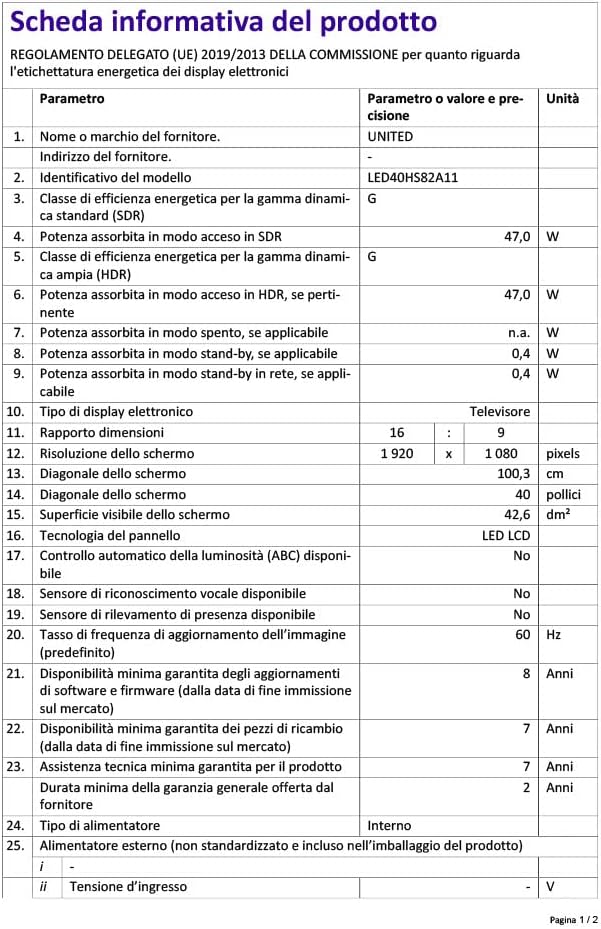
Image 9.1: EU Energy Label for LED40HS82A11.
For detailed product information, including energy consumption data, please refer to the official EU EPREL database via the QR code on the energy label or by visiting https://eprel.ec.europa.eu/qr/1068369.
10. Garanti ak sipò
For warranty information, please refer to the warranty card included with your product or contact your retailer. The manufacturer, CHANGHONG EUROPE ELECTRIC S.R.O., provides general support for this product.
Please note that information regarding software update guarantees and spare parts availability is not explicitly provided for this model. For any technical assistance or service inquiries, please contact the customer support channels provided by your point of purchase.