
Entwodiksyon
The Khadas Edge2 ARM PC Pro is a high-performance single board computer designed for a wide range of applications, from edge computing and AI to multimedia and general desktop use. Featuring the Rockchip RK3588S2 SoC, it offers robust processing power, advanced graphics capabilities, and extensive connectivity options in a compact form factor.
Pwodwi souview
The Edge2 ARM PC Pro is a compact and powerful mini PC. Below are images detailing its physical layout and ports.

Top view of the Khadas Edge2 ARM PC Pro, showing the sleek design and heat sink area.

Anba view of the Khadas Edge2 ARM PC Pro, highlighting the mounting points and overall compact size.
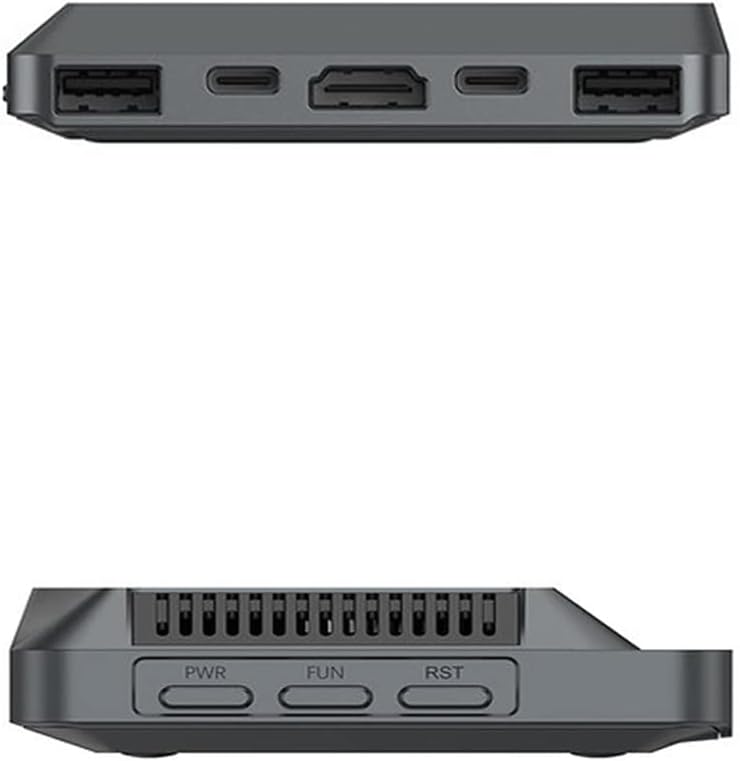
Side view of the Khadas Edge2 ARM PC Pro, displaying various ports including USB and HDMI.

Detailed diagram of the Khadas Edge2 ARM PC Pro's ports and buttons, including Power, Function, Reset, USB 3.1, USB-C (3.1 & DP & PD), USB-C (PD Only), HDMI Output, USB 2.0, and Pogo Pads.
Enstalasyon
Konekte periferik
- Koneksyon pouvwa: Connect a compatible USB-C power adapter to the USB-C (PD Only) port.
- Koneksyon ekspozisyon: Connect your monitor to the HDMI output port or a compatible USB-C port with DisplayPort (DP) functionality. The Edge2 supports up to four independent displays via HDMI, USB-C (DP), and two DSI interfaces.
- Aparèy USB: Connect your keyboard, mouse, and other USB peripherals to the available USB 3.1 and USB 2.0 ports.
- Rezo Koneksyon: For wired network access, connect an Ethernet cable (if an adapter is used, as the device itself doesn't list an Ethernet port directly in the main image, but Wi-Fi 6 is built-in). For wireless, ensure Wi-Fi is enabled and connect to your network.
Premye bòt
After connecting all necessary peripherals, press the Power button to start the device. The Khadas Edge2 supports multiple operating systems, including Android, Ubuntu, and others, which can be installed via the built-in OOWOW system.

The Khadas Edge2 supports various operating systems like Ubuntu and Android, shown here on a display.
Enstriksyon Operasyon
Sistèm operasyon (OS)
The Khadas Edge2 ARM PC Pro supports Android 12, Linux 5.10, and Ubuntu 22.04. The specific operating instructions will vary depending on the OS installed. Refer to the respective OS documentation for detailed usage guides.
OOWOW System
The built-in OOWOW system simplifies OS installation and management. It allows for quick and easy installation of supported operating systems onto the onboard eMMC storage.

The OOWOW system interface, used for easy operating system installation and management.
Karakteristik
- High-Performance SoC: Equipped with the Rockchip RK3588S2, an 8nm lithography process 8-core 64-bit CPU (2.25GHz Quad core ARM Cortex-A76 and 1.8GHz Quad core Cortex-A55) and an integrated ARM Mali-G610 MP4 quad-core GPU (up to 1GHz).
- Neural Processing Unit (NPU): Features a built-in NPU with up to 6 TOPS performance, supporting deep learning frameworks like TensorFlow, Pytorch, and MxNET for AI applications.
- Koneksyon Wi-Fi 6: Utilizes the AP6275P Wi-Fi 6 PCIe module, supporting IEEE 802.11 ax/ac/a/b/g/n and 2T2R for stable and fast wireless data transmission.
- 8K Video Decoding & Encoding: Supports 8K, 60fps H.265/VP9 video decoding and 8K, 30fps H.265/H.264 video encoding. It can handle up to 32-channels of 1080P, 30fps decoding or 16-channels of 1080P, 30fps encoding simultaneously.
- Quad Display Interfaces: Hardware supports up to four independent displays via 1x HDMI, 1x USB-C (DP), and 2x DSI interfaces. The actual number of independent displays may be limited by the operating system.
- Maker Friendly: Includes multiple FPC connectors for accessories and extensions: 1x 30-pin 0.5mm MIPI-DSI, 1x 40-pin 0.5mm MIPI-DSI, 3x 30-pin 0.5mm MIPI-CSI, 2x 30-pin 0.5mm FPC, and 1x 7-pin Pogo Pad (USB, UART, 5V).

Close-up of the Rockchip RK3588S2 System-on-Chip, the core processor of the Edge2.

A bar chart illustrating the download and upload speeds of Edge2 compared to other models like Edge and VIM4.

Collage of images showing potential applications of the Khadas Edge2, including robotics, software development, VR/AR, and industrial automation.
Espesifikasyon
| Karakteristik | Detay |
|---|---|
| Processeur | Rockchip RK3588S2 (8-core 64-bit, 2.25 GHz Quad core ARM Cortex-A76 + 1.8 GHz Quad core Cortex-A55) |
| GPU | ARM Mali-G610 MP4 (jiska 1GHz) |
| NPU | 6 TOPS Pèfòmans |
| RAM | 16 GB DDR4 |
| Depo | Embedded MultiMediaCard (eMMC) - 64GB for Pro model |
| Koneksyon san fil | Wi-Fi 6 (802.11ax), Bluetooth 5.0 |
| Dekodaj videyo | 8K a 60fps H.265/VP9 |
| Kodaj videyo | 8K a 30fps H.265/H.264 |
| Entèfas ekspozisyon | 1x HDMI, 1x USB-C (DP), 2x DSI |
| Pò USB | 1x USB 3.0, 1x USB 2.0, 2x USB-C (one with DP & PD, one PD only) |
| Sistèm operasyon yo | Android 12, Linux 5.10, Ubuntu 22.04 |
| Dimansyon | 5.39 x 4.45 x 1.3 pous |
| Pwa | 8.1 ons |
Ki sa ki nan bwat la
The Khadas Edge2 ARM PC Pro package typically includes:
- Khadas Edge2 ARM PC Pro Single Board Computer
- Heatsink cooling kit (may be included depending on specific package)
- Note: Power adapter, cables, and other accessories are often sold separately. Please check your specific product packaging for exact contents.
Antretyen
- Netwayaj: Sèvi ak yon twal mou epi sèk pou netwaye deyò aparèy la. Evite pwodui netwayaj likid oswa solvan.
- Vantilasyon: Ensure the device has adequate ventilation to prevent overheating. Do not block the heatsink or air vents.
- Depo: Store the device in a cool, dry environment away from direct sunlight and extreme temperatures.
- Mizajou lojisyèl: Regularly check for and install operating system and firmware updates to ensure optimal performance and security.
Depanaj
Pwoblèm komen ak solisyon yo
- Aparèy la pa limen:
- Ensure the USB-C power adapter is correctly connected to the USB-C (PD Only) port and is providing sufficient power.
- Verifye priz kouran an fonksyonèl.
- Pa gen okenn rezilta ekspozisyon:
- Check HDMI or USB-C (DP) cable connections to both the Edge2 and the monitor.
- Asire w ke monitè a limen epi li configuré sou sous antre ki kòrèk la.
- Eseye yon lòt kab ekran oswa monitè si ou genyen.
- Pwoblèm koneksyon Wi-Fi/Bluetooth:
- Verify that Wi-Fi/Bluetooth is enabled in the operating system settings.
- Ensure the device is within range of the wireless network/Bluetooth device.
- Restart the Edge2 and your router/Bluetooth device.
- Operating system not booting:
- If the OS is corrupted, use the OOWOW system to reinstall the operating system. Refer to the OOWOW documentation for detailed steps.
Videyo pwodwi ofisyèl la
Official introduction video for the Khadas Edge2 Mini ARM PC, highlighting its features and applications.
Garanti ak sipò
Pou enfòmasyon sou garanti ak sipò teknik, tanpri al gade paj ofisyèl Khadas la. websit la oubyen kontakte sèvis kliyan yo dirèkteman. Kenbe prèv acha ou pou reklamasyon garanti.
Ou ka vizite a Khadas Store on Amazon pou plis enfòmasyon sou pwodwi a ak resous sipò.