
1. Entwodiksyon
This user manual provides comprehensive instructions for the installation, operation, and maintenance of your Weiser SmartCode Keypad Electronic Deadbolt. This advanced keyless entry system offers enhanced security and convenience for your home.
The SmartCode deadbolt features a sleek design, a backlit keypad for visibility, and the ability to store up to 50 user codes. It operates on 4 AA batteries and includes SmartKey re-key technology for added security and flexibility.
2. Enfòmasyon sou Sekirite
Please read and understand all instructions before installing and using this product. Keep this manual for future reference.
- Do not attempt to disassemble or modify the lock. This may cause damage to the product and void the warranty.
- Sèvi ak sèlman kalite pil espesifye a (4 pil alkalin AA). Pa melanje pil fin vye granmoun ak pil nèf oubyen diferan kalite pil.
- Asire w ke polarite ki kòrèk la rete lè w ap mete pil yo.
- Keep all keys and user codes in a secure location.
- Avoid exposing the lock to extreme temperatures or direct moisture.
- Regularly check the lock's functionality and battery level.
3. Pake kontni
Verifye ke tout konpozan yo prezan anvan ou kòmanse enstalasyon an:

Image: Complete package contents of the Weiser SmartCode Keypad Electronic Deadbolt.
- Electronic Deadbolt (Exterior Keypad Assembly)
- Electronic Deadbolt (Interior Battery Unit)
- Latch
- Plak grèv
- Plak aliye
- Materyèl Enstalasyon (Vis)
- 2 kle
- Zouti SmartKey
- Manyèl enstalasyon (dokiman sa a)
Note: 4 AA batteries are required and not included in the package.
4. Enstalasyon ak Enstalasyon
The Weiser SmartCode deadbolt is designed for easy installation. For a seamless setup experience, it is highly recommended to use the free BILT app, which provides step-by-step interactive 3D instructions with voice and video guidance.
4.1 Konpatibilite Pòt
This lock is designed to fit standard doors 1-3/8" to 1-3/4" (35 mm - 44 mm) thick with an adjustable backset (2-3/8" or 2-3/4"). It is ideal for most exterior and interior residential doors.
4.2 Etap Enstalasyon (Plis paseview)
- Prepare pòt la: Ensure your door is properly drilled and aligned for a deadbolt installation.
- Enstale Latch la: Insert the latch into the door edge, ensuring the correct backset is selected.
- Enstale Asanble Eksteryè a: Place the exterior keypad assembly onto the door, feeding the cable through the cross bore.
- Enstale Plak Montaj la: Fikse plak montaj la sou pòt la avèk vis yo bay yo, epi asire kab la pase nan plak la.
- Connect the Cable and Install Interior Assembly: Connect the cable from the exterior assembly to the interior battery unit. Mount the interior unit to the mounting plate.
- Enstale pil: Insert 4 AA alkaline batteries into the interior unit, observing polarity.
- Fè Pwosesis Ouvèti Pòt la: This crucial step teaches the lock the orientation of your door. Follow the specific instructions in the full manual or BILT app.
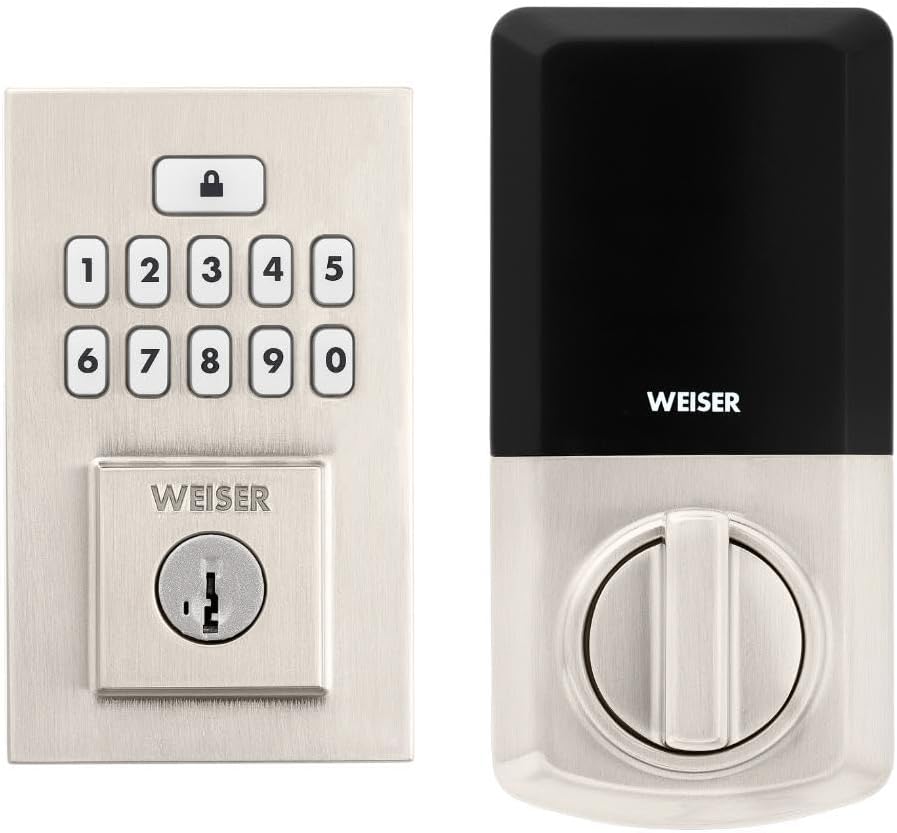
Image: Assembled Weiser SmartCode Keypad Electronic Deadbolt, showing both exterior and interior components.

Image: Close-up of the exterior keypad, featuring the backlit numeric buttons and keyhole.
5. Operasyon Enstriksyon
5.1 Fèmen pòt la
- Bloke yon sèl-Touch: Press the Lock button (top button with padlock icon) on the keypad. The deadbolt will extend.
- Karakteristik Auto-Lock: If enabled, the deadbolt will automatically extend after a set period (e.g., 30 seconds) once unlocked.
5.2 Debloke Pòt la
- Sèvi ak yon Kòd Itilizatè: Enter your personalized 4-8 digit user code on the keypad. The deadbolt will retract.
- Sèvi ak kle a: Mete kle fizik la nan twou kle a epi vire l pou debloke l.
5.3 Pwogramasyon Kòd Itilizatè
The lock supports up to 50 user codes and 1 master code. Refer to the detailed programming instructions in the full manual for adding, deleting, or modifying codes.
- Kòd Mèt: The master code is used to add and delete user codes. It does not unlock the door.
- Kòd itilizatè: These codes are used to unlock the door.


Image: Icons illustrating user management, programming, and auto-lock features.
5.4 SmartKey Re-key Technology
The SmartKey re-key technology allows you to re-key your lock in seconds, maintaining key control and protecting against lost, stolen, or unauthorized keys without removing the lock from your door. Use the provided SmartKey tool and follow the instructions carefully.

Image: SmartKey Security feature, demonstrating how to re-key the lock.
6. Antretyen
6.1 Ranplasman batri
The lock operates on 4 AA alkaline batteries. When the batteries are low, the lock will provide an audible and/or visual low battery warning. Replace all four batteries simultaneously to ensure optimal performance.
- Remove the battery cover on the interior unit.
- Retire ansyen pil yo epi jete yo byen.
- Mete nouvo pil alkalin AA yo, asire polarite ki kòrèk la (+/-).
- Ranplase kouvèti batri a.
Note: Battery life can vary based on usage frequency and environmental conditions. If the auto-lock feature is frequently used, battery life may be shorter.
6.2 Netwayaj
Netwaye kadna a ak yon twal mou.amp twal. Evite itilize pwodui netwayaj abrazif, solvan, oswa espre chimik, paske sa yo ka domaje fini an ak konpozan elektwonik yo.
NAN. Depanaj
| Pwoblèm | Kòz posib | Solisyon |
|---|---|---|
| Lock does not respond or keypad is not lit. | Pil ki mouri. | Ranplase tout kat pil AA yo. |
| Lock beeps 3 times during programming or code entry. | Incorrect code, programming error, or lock not handed correctly. | Verify the code. Re-attempt programming steps carefully. Perform the door handing process again. If issues persist, reset the unit to factory settings (refer to full manual). |
| Deadbolt extends when door is open (Auto-lock issue). | The lock does not have a sensor to detect if the door is open or closed. Auto-lock activates after the set time regardless of door position. | This is normal operation. Ensure the door is closed before the auto-lock time expires, or disable the auto-lock feature if it causes inconvenience. |
| Keypad is difficult to see at night. | Backlight not active. | The keypad is backlit and stays lit for 30 seconds after inactivity. Ensure there is enough battery power. |
| Lock is not operating smoothly. | Misalignment of door or strike plate, or internal mechanism issue. | Check door and frame alignment. Ensure the strike plate is correctly installed. If the issue persists, contact customer support. |
8. Espesifikasyon
| Karakteristik | Detay |
|---|---|
| Nimewo Modèl | 9GED92600-003 |
| Dimansyon pwodwi | 6.99 x 2.86 x 13.97 cm (2.75 x 1.13 x 5.5 pous) |
| Pwa atik | 454 g (1 lb) |
| Koulè | Nikèl saten |
| Style | Haitian |
| Fini | Bwose |
| Materyèl | Metal |
| Kalite fèmen | Deadbolt, Elektwonik |
| Klavye | 10-Button, Backlit |
| Kòd Itilizatè yo | Up to 50 user codes, 1 master code |
| Sous pouvwa | 4 batri AA (pa enkli) |
| Konpatibilite epesè pòt | 1-3/8" to 1-3/4" (35 mm - 44 mm) |
| Backset | Adjustable 2-3/8" or 2-3/4" |
| Karakteristik espesyal | Weather Resistant, Anti-Bump, Auto-Lock, One-Touch Lock, Back-Lit Keypad, SmartKey Security |
| ANSI Grade | Klas 2 |
| Peyi orijin | Lachin |
9. Garanti & Sipò
9.1 Enfòmasyon sou Garanti
The Weiser SmartCode Keypad Electronic Deadbolt comes with a 1-ane garanti apati dat acha a. Garanti sa a kouvri domaj nan materyèl ak nan fabrikasyon anba itilizasyon nòmal. Tanpri konsève prèv acha ou pou reklamasyon garanti.
For full warranty details and limitations, please refer to the official Weiser websit oswa kontakte sipò kliyan.
9.2 Sipò pou Kliyan
For technical assistance, troubleshooting, or warranty inquiries, please contact Weiser customer support:
- Sipò sou entènèt: Vizite Weiser ofisyèl la websit pou FAQ, leson videyo, ak fòm kontak.
- Sipò telefòn: Refer to the contact information provided on the Weiser packaging or website for phone support hours.
- BILT App: Utilize the BILT app for interactive 3D installation and programming guidance.
When contacting support, please have your product model number (9GED92600-003) and purchase date available.