
1. Entwodiksyon
This manual provides detailed instructions for the proper use and maintenance of your Obbug Bluetooth Headset, Model YYK-530. Please read this manual thoroughly before using the product to ensure optimal performance and longevity.
2. Pake kontni
Verifye ke tout atik yo prezan nan pakè ou a:
- 1 x Obbug Bluetooth Headset
- 1 x ka chaje
- 1 x USB Kalite-C Chaje Kab
- 1 x Ear Hat (replacement ear tip)
- 1 x manyèl itilizatè
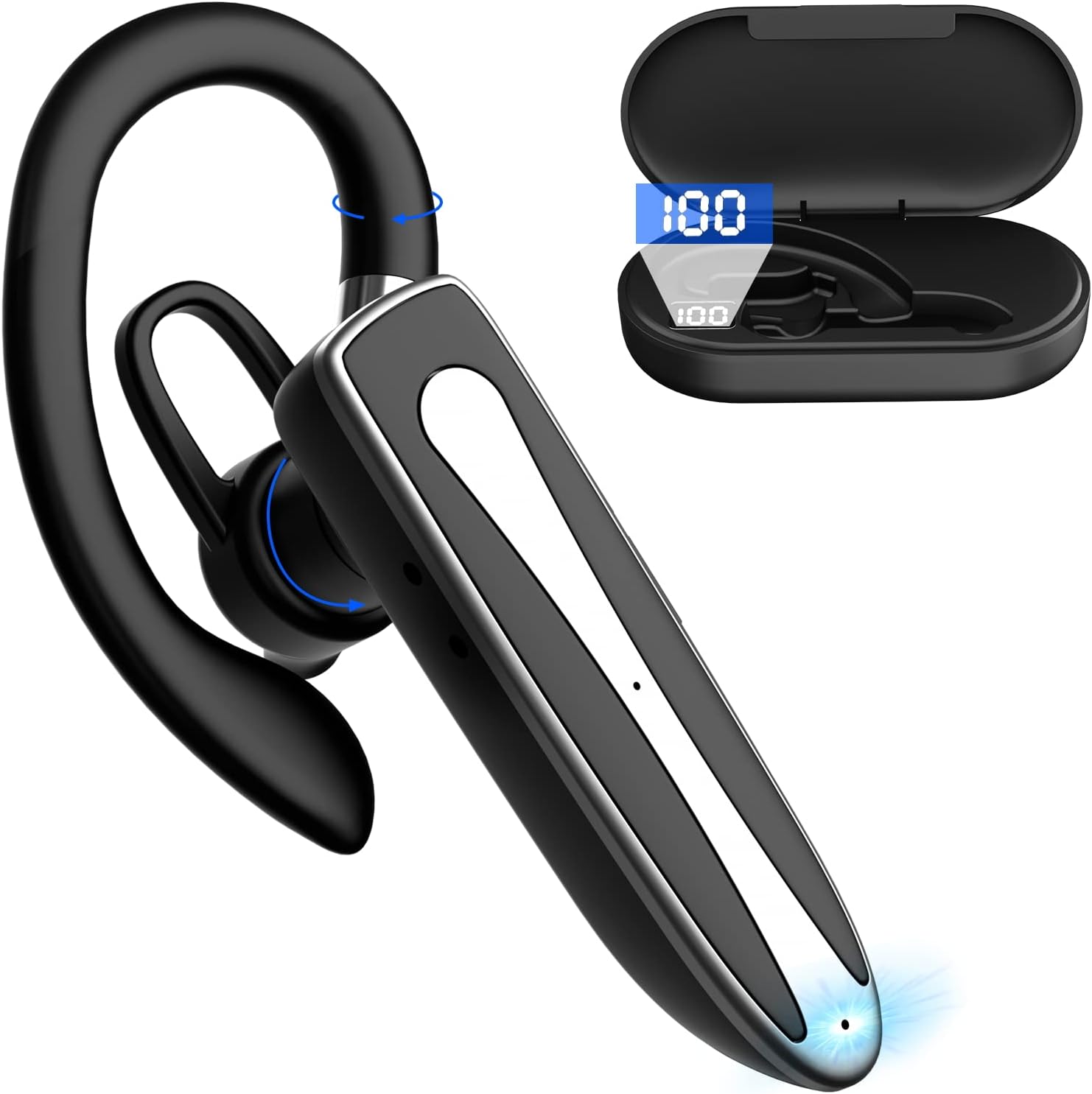
Image 2.1: Obbug Bluetooth Headset YYK-530 and its charging case.
3. Pwodwi Features
- Teknoloji Bluetooth 5.1: Provides stable connection and clear audio.
- Pwolonje lavi batri: Up to 80 hours of continuous use with the charging case.
- Konfòtab ak reglabl konsepsyon: Flexible earhook and rotatable boom mic for left or right ear wear.
- CVC8.0 Noise Reduction: Amelyore klète apèl la lè li diminye bri anbyen.
- Lajè konpatibilite: Connects with most Bluetooth-enabled devices including smartphones, tablets, and computers.
- Apèl men lib: Integrated microphone for convenient communication.

Image 3.1: Illustration of CVC8.0 Noise Reduction for clear audio.
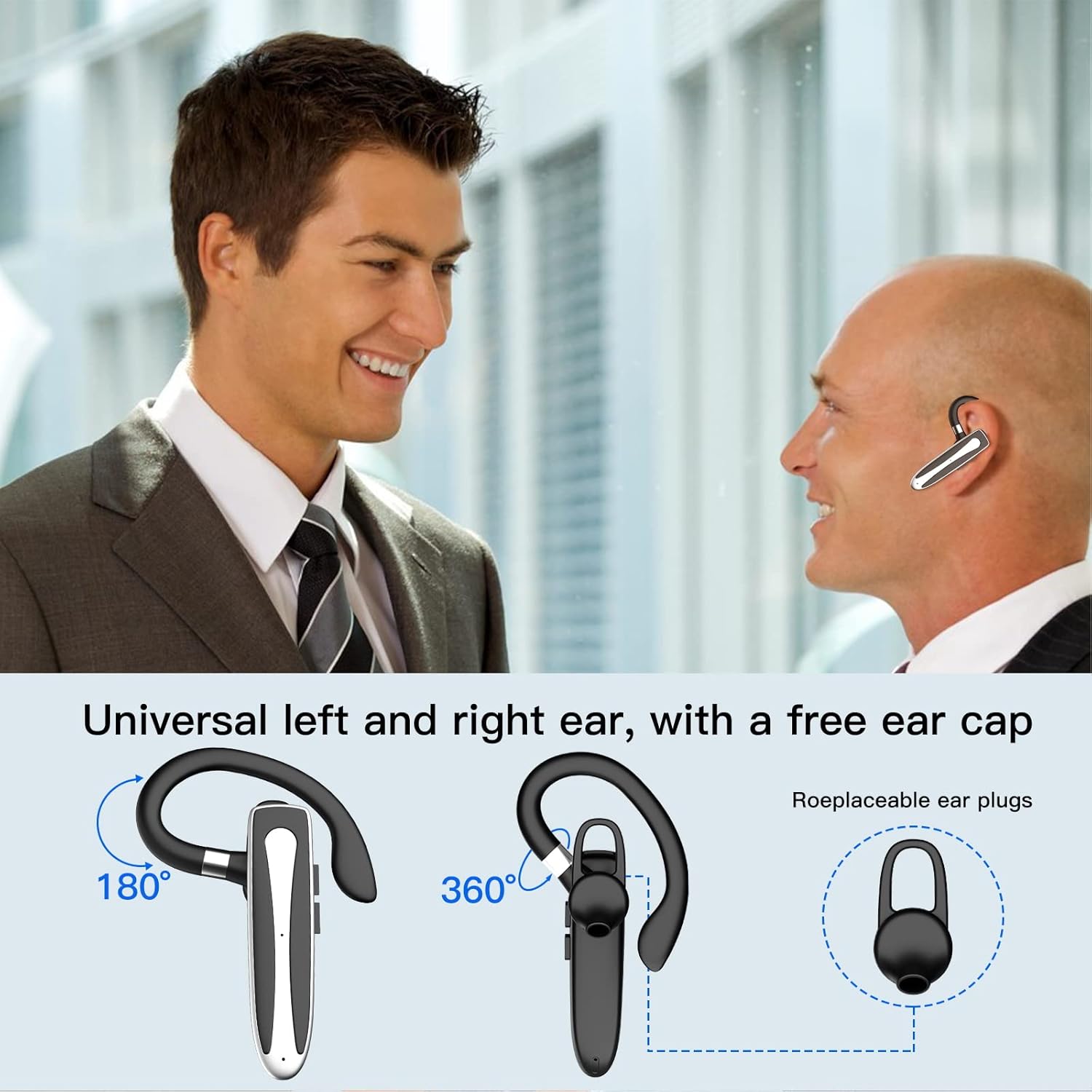
Image 3.2: Diagram illustrating the dual microphone noise reduction processing.
4. Enstalasyon
4.1 Charging the Headset and Case
Before first use, fully charge the headset and its charging case.
- Place the headset into the charging case.
- Connect the USB Type-C cable to the charging port on the case and to a power source (e.g., USB wall adapter, computer USB port).
- The charging indicator on the case will show charging status. A full charge typically takes 1.5 hours.

Image 4.1: The Type-C charging port on the charging case.

Image 4.2: Battery life and charging time information for the headset and case.
4.2 Pairing ak yon Aparèy
The headset uses Bluetooth 5.1 for wireless connection.
- Pouvwa sou: Take the headset out of the charging case, or press and hold the Multi-function Button until the indicator light flashes blue and red, indicating pairing mode.
- Aktive Bluetooth: Sou aparèy ou an (telefòn entelijan, tablèt, elatriye), ale nan paramèt Bluetooth epi aktive Bluetooth.
- Chwazi Aparèy: In the list of available devices, select "YYK-530".
- Konfime Koneksyon: Once connected, the headset indicator light will flash blue slowly, and your device will show "Connected".

Image 4.3: Illustration of optimal Bluetooth connection distance (within 10 meters).
4.3 Connecting to Two Devices Simultaneously
The headset supports connecting to two Bluetooth devices at the same time.
- Connect the headset to the first device (e.g., Phone A) as described in Section 4.2.
- Turn off Bluetooth on the first device. The headset will re-enter pairing mode.
- Connect the headset to the second device (e.g., Phone B) as described in Section 4.2.
- Turn on Bluetooth on the first device. The headset should automatically reconnect to both devices.
You can now answer calls or play music from either connected device.

Image 4.4: Step-by-step guide for connecting the headset to two devices.
4.4 Mete kas ekoutè a
The headset is designed for comfortable wear on either the left or right ear.
- The earhook can rotate 360° vertically and 360° horizontally to fit your preferred angle.
- The retractable earhook can be adjusted to fit the shape of your ear.

Image 4.5: The headset's adjustable design for left or right ear wearing.
5. Operasyon Enstriksyon
5.1 Power On/Off
- Pouvwa sou: Take the headset out of the charging case, or press and hold the Multi-function Button for approximately 3 seconds until the indicator light flashes blue.
- Pouvwa Off: Place the headset back into the charging case, or press and hold the Multi-function Button for approximately 5 seconds until the indicator light flashes red and then turns off.
5.2 Jesyon Apèl
- Reponn/Fen Apèl: Peze bouton milti-fonksyon an yon fwa.
- Rejte apèl: Peze epi kenbe bouton milti-fonksyon an pou apeprè 2 segonn.
- Recomposition Dènye Nimewo: Peze bouton milti-fonksyon an de fwa.
5.3 Mizik lèktur
- Jwe/Poz: Peze bouton milti-fonksyon an yon fwa.
- Pwochen Track: Peze epi kenbe bouton Volim Monte a.
- Track Previous: Peze epi kenbe bouton Volim desann.
5.4 Kontwòl Volim
- Ogmante Volim: Peze bouton Ogmante Volim nan.
- Diminye Volim: Peze bouton Diminye Volim nan.
5.5 Aktivasyon Asistan Vwa
Activate your device's voice assistant (Siri, Google Assistant) directly from the headset.
- Aktive Asistan Vwa: Triple-press the Multi-function Button.

Image 5.1: The headset supports activation of Siri and Google Assistant.
6. Antretyen
- Clean the headset and charging case regularly with a soft, dry cloth.
- Evite ekspoze aparèy la nan tanperati ekstrèm, imidite, oswa sibstans koroziv.
- Sere kas ekoutè a nan bwat chaje li lè w pa ap itilize li pou pwoteje l epi kenbe l chaje.
- Pa eseye demonte oswa repare aparèy la tèt ou. Kontakte sèvis kliyan pou asistans.
NAN. Depanaj
7.1 Headset Not Powering On
- Ensure the headset is fully charged. Place it in the charging case and connect the case to a power source.
- Press and hold the Multi-function Button for 3-5 seconds to power on.
7.2 Pa ka konekte ak aparèy la
- Ensure the headset is in pairing mode (indicator flashes blue and red).
- Etenn Bluetooth sou aparèy ou an epi aktive l ankò.
- Ensure the headset is within 10 meters of your device and there are no significant obstacles.
- Efase lis koneksyon Bluetooth la sou aparèy ou an epi eseye konekte ankò.
7.3 Pa gen son oswa move kalite son
- Ajiste volim nan tou de sou kas ekoutè a ak sou aparèy ki konekte a.
- Asire w ke kas ekoutè a byen konekte ak aparèy ou an.
- Pwoche pi pre aparèy ou an pou asire w ke ou nan zòn Bluetooth la.
- Tcheke pou wè si gen nenpòt entèferans ki soti nan lòt aparèy san fil.
8. Espesifikasyon
| Karakteristik | Spesifikasyon |
|---|---|
| Non modèl | YYK-530 |
| Mak | Obbug |
| Koneksyon Teknoloji | San fil (Bluetooth) |
| Bluetooth vèsyon | 5.1 |
| Gamme Bluetooth | Jiska 33 pye (10 mèt) |
| Kontwòl bri | Sound Isolation (CVC8.0 Noise Reduction) |
| Fòm ekoutè | Zen Zòrèy |
| Dire batri (Kas ekoutè) | 5 èdtan (apeprè) |
| Dire batri (ak bwat chaje) | Up to 80 Hours (approx.) |
| Tan pou chaje | 1.5 èdtan |
| Port chaje | USB Kalite-C |
| Nivo rezistans dlo | Ki enpèmeyab |
| Pwa atik | 4.9 ons (0.14 kilogram) |
| Gamme frekans | 20Hz - 20,000Hz |
| Aparèy konpatib | Cellphones, Desktops, Laptops, Telephones |

Image 8.1: The headset is compatible with a wide range of Bluetooth-enabled devices.
9. Garanti ak Sipò Kliyan
The Obbug Bluetooth Headset comes with a 1-month replacement warranty.
For any questions, issues, or support needs, please contact our customer service. We offer 24-hour customer service to assist you.
Tanpri gade dokiman acha ou a pou jwenn enfòmasyon kontak espesifik.