
Entwodiksyon
This manual provides detailed instructions for the installation, operation, and maintenance of your Tiandy TC-C38XS 8MP IR Turret Camera. Please read this manual thoroughly before using the product to ensure correct usage and to prevent damage.
Enfòmasyon sou Sekirite
- Ensure the power supply meets the camera's requirements (DC 12V or PoE).
- Pa ekspoze kamera a nan tanperati ekstrèm, imidite, oswa anviwònman koroziv.
- Avoid pointing the camera directly at strong light sources for extended periods.
- Manyen kamera a avèk prekosyon pou evite domaj fizik.
- Se pèsonèl kalifye ki ta dwe fè enstalasyon an, dapre kòd elektrik lokal yo.
Kontni pake
Verifye ke tout konpozan yo prezan nan pake a:
- Tiandy TC-C38XS IR Turret Camera
- Vis ak ploge miray pou monte
- Konektè ki enpèmeyab pou kab Ethernet
- Gid pou kòmanse rapidman (si sa aplikab)
- Modèl pou fè egzèsis (si sa aplikab)
Pwodwi souview
The Tiandy TC-C38XS is an 8MP IR Turret Camera designed for outdoor surveillance, featuring a full metal housing and advanced imaging capabilities.
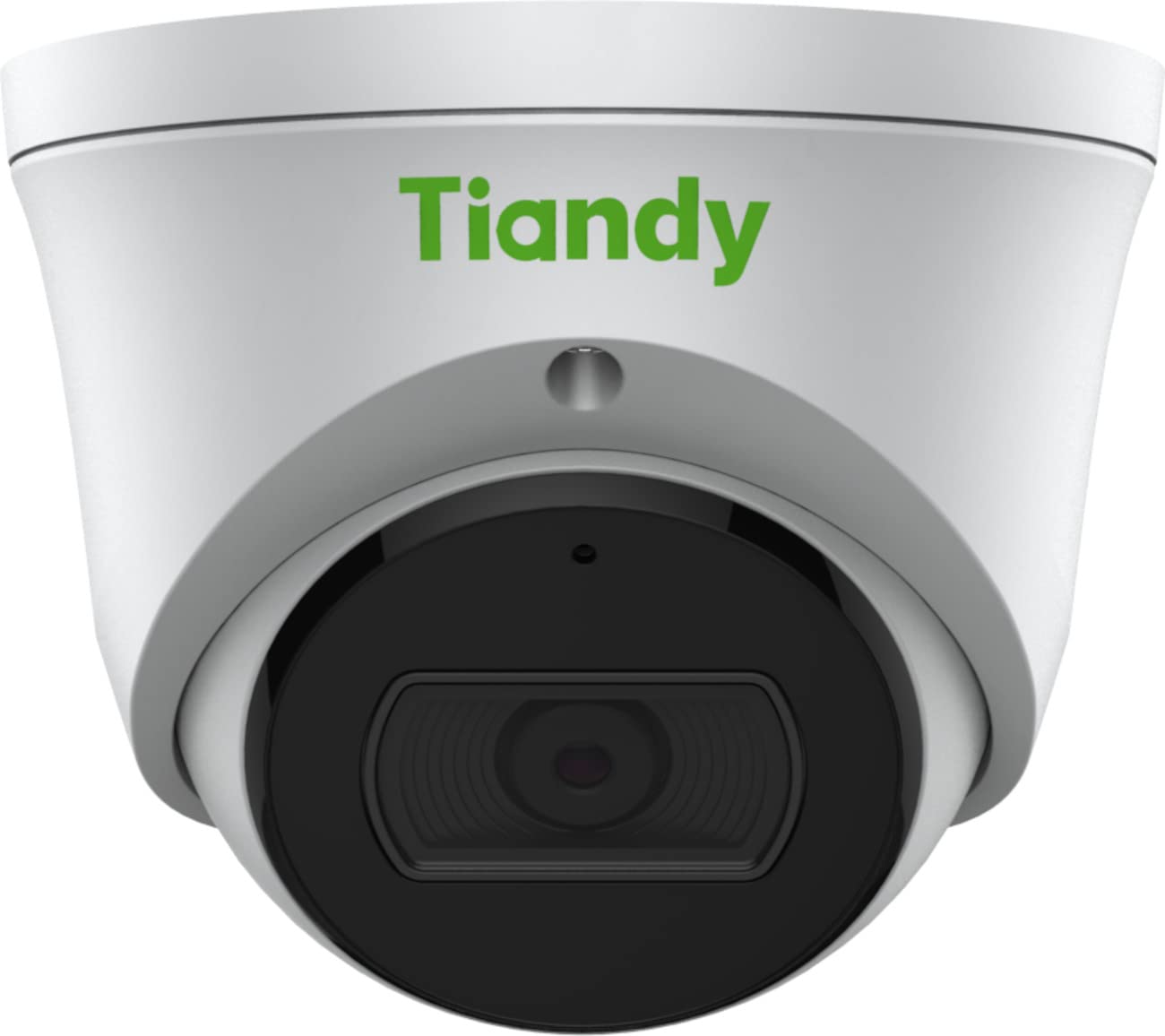
Figi 1: Devan view of the Tiandy TC-C38XS IR Turret Camera, showing the lens and IR illuminators.

Figi 2: Angle view of the Tiandy TC-C38XS IR Turret Camera, highlighting its compact turret design.

Figi 3: Technical drawing showing the dimensions of the Tiandy TC-C38XS IR Turret Camera (approx. 116.6mm diameter, 96mm height).
Karakteristik kle:
- Rezolisyon 8 Megapiksèl: Captures video at up to 3840x2160 at 20fps.
- 1/2.8" CMOS Sensor: Provides clear images even in low-light conditions.
- Smart IR: Infrared illumination up to 30 meters (98.42 feet) for night vision.
- 120dB WDR: Wide Dynamic Range for balanced images in high-contrast scenes.
- Mikwofòn entegre: Pou siveyans odyo.
- Depo abò: Supports MicroSD cards up to 512 GB.
- Full Metal Housing: Konstriksyon dirab pou itilizasyon deyò.
Enstalasyon
1. Monte Kamera a
The TC-C38XS is designed for wall mounting. Choose a suitable location that provides the desired field of view and is within reach of network and power cables.
- Use the provided drill template (if included) to mark the screw holes on the mounting surface.
- Fè twou gid epi mete ploge miray si w ap monte l sou masonri oswa miray sèk.
- Fikse baz kamera a sou sifas montaj la avèk vis yo bay yo.
- Adjust the camera's angle: The camera supports pan 0 to 340°, tilt 0 to 75°, and rotate 0 to 360° for optimal positioning. Loosen the adjustment screws, position the camera, and then tighten the screws to secure it.
2. fil elektrik ak pouvwa koneksyon
The camera supports Power over Ethernet (PoE) or a DC 12V power supply.
- Koneksyon PoE: Connect a standard Ethernet cable from a PoE-enabled switch or NVR to the camera's RJ45 port. This provides both power and data connectivity. Ensure the waterproof connector is properly installed to protect the Ethernet port from moisture.
- DC 12V Connection: If PoE is not used, connect a DC 12V power adapter (not included) to the camera's power input port. Then, connect a standard Ethernet cable from your network to the camera's RJ45 port for data.
After connecting, the camera will power on and begin its startup sequence.
Opere
1. Initial Network Configuration
To access the camera's web interface for configuration, you will need to find its IP address on your network. This can typically be done using a manufacturer-provided IP search tool or by checking your router's connected devices list.
- Konekte òdinatè w lan nan menm rezo a ak kamera a.
- Louvri a web navigatè a epi antre adrès IP kamera a.
- Log in using the default username and password (refer to the Quick Start Guide or manufacturer's documentation for default credentials). It is highly recommended to change the default password immediately for security.
2. Fonksyon debaz yo
- Viv View: Access the live video feed through the web interface or compatible NVR/VMS software.
- Anrejistreman: Configure recording schedules and methods (continuous, motion-triggered) to the on-board MicroSD card (up to 512 GB) or a connected NVR.
- Deteksyon Mouvman: Set up motion detection zones and sensitivity. The camera can trigger alarms (e.g., email notifications) upon detection.
- Smart IR: The camera automatically adjusts IR intensity to prevent overexposure in night vision, ensuring clear images up to 30 meters.
- Anviwònman imaj: Adjust saturation, brightness, contrast, and sharpness via the client software or web browser to optimize image quality.
- Odyo: Utilize the built-in microphone for audio monitoring.
Antretyen
1. Netwayaj
Netwayaj regilye ede kenbe yon bon jan kalite imaj optimal.
- Gently wipe the camera lens with a soft, clean cloth. If necessary, use a mild lens cleaning solution.
- Do not use harsh chemicals or abrasive materials, as they can damage the lens coating or housing.
- Periodically clean the camera housing to remove dust and debris.
2. Mizajou Firmware
Tcheke manifakti a regilyèman website for firmware updates. Firmware updates can improve performance, add new features, and enhance security. Follow the instructions provided with the firmware update package carefully.
3. Jesyon Kat MicroSD
If using on-board storage, regularly check the status of the MicroSD card. Format the card periodically to maintain performance and prevent data corruption. Back up important recordings before formatting.
Depanaj
| Pwoblèm | Kòz posib | Solisyon |
|---|---|---|
| No image/No power | Incorrect power supply; Loose cable connection; PoE issue. | Check power adapter (DC 12V) or PoE switch. Ensure all cables are securely connected. |
| Pa ka jwenn aksè a kamera a atravè rezo a | Incorrect IP address; Network configuration error; Firewall blocking. | Verify IP address. Check network cable. Disable temporary firewall for testing. Ensure camera and computer are on the same subnet. |
| Pòv bon jan kalite imaj | Dirty lens; Insufficient lighting; Incorrect image settings. | Clean the lens. Adjust image settings (brightness, contrast, WDR). Ensure IR is functioning correctly at night. |
| Deteksyon mouvman pa travay | Incorrect sensitivity settings; Detection zone not configured; Obstructions. | Review paramèt deteksyon mouvman nan la web interface. Adjust sensitivity and redraw detection zones. Clear any obstructions in the camera's view. |
| Kat MicroSD a pa anrejistre | Card full; Card not formatted; Card faulty; Recording schedule not set. | Check card capacity. Format the MicroSD card via the camera's interface. Replace card if faulty. Verify recording schedule. |
Espesifikasyon
| Karakteristik | Detay |
|---|---|
| Modèl | TC-C38XS |
| Capteur Imaj | 1/2.8" CMOS |
| Max. Rezolisyon | 3840x2160 (8MP) |
| To Frame | Up to 20fps (3840x2160), 30fps (1080p) |
| Min. Ekleraj | Color: 0.003Lux@ (F1.6, AGC ON), B/W: 0Lux with IR |
| Lantiy | Fiks 2.8mm |
| Jaden nan View (FOV) | Orizontal: 100.1 ° |
| IR Range | Up to 30m (98.42 feet) with Smart IR |
| Wide dinamik Range (WDR) | 120dB |
| Konpresyon videyo | S+265/H.265/H.264/M-JPEG |
| Odyo | Mikwofòn entegre |
| Abò Depo | Kat MicroSD jiska 512 GB |
| Entèfas rezo a | 1 RJ45 10M / 100M pwòp tèt ou-adaptasyon Ethernet pò |
| Pwovizyon pou pouvwa | DC 12V, PoE (802.3af) |
| Materyèl | Full Metal Lojman |
| Dimansyon | Approx. 4.59 x 4.59 x 3.77 inches (116.6mm diameter, 96mm height) |
| Pwa | Apeprè. 0.88 liv (0.4 kg) |
| Kondisyon Fonksyònman | L 'deyò |
| Pwotokòl | TCP/IP, HTTP, HTTPS, DHCP, DNS, RTP, RTSP, etc. |
| Deklanche Alam | Motion Detection, Mask Alarm, Disk Full, etc. |
| Analytics videyo | Tripwire, Perimeter |
Enfòmasyon sou Garanti
Tiandy products typically come with a limited manufacturer's warranty. For specific warranty terms and conditions, please refer to the warranty card included with your product or visit the official Tiandy websit la. Kenbe resi acha ou kòm prèv acha pou reklamasyon garanti.
Sipò
If you encounter any issues or have questions regarding your Tiandy TC-C38XS camera that are not covered in this manual, please contact your authorized Tiandy reseller or visit the official Tiandy support website for further assistance. You may also find FAQs and additional resources online.
- Manifakti: Tiandy
- Nimewo Modèl: TC-C38XS
- UPC: 785249841675


