
Entwodiksyon
The IMICE T97 RGB Honeycomb Gaming Mouse is designed to provide a precise and comfortable experience for gaming and general computer use. It features a high-precision 4800 DPI sensor, a durable and ergonomic design, and is compatible with various operating systems. This manual will guide you through the setup, operation, and maintenance of your new gaming mouse.
- Mak: IMICE
- Kalite: Sourit
- Konpatibilite: Òdinatè ak Laptops
- Karakteristik kle: High precision 4800 DPI, comfortable and durable design, anti-sweat design, precise positioning.
- Koulè: Nwa
Enstriksyon Enstalasyon
1. Konekte sourit la
The IMICE T97 mouse uses a standard USB connection for plug-and-play functionality. No additional drivers are typically required for basic operation on supported operating systems.
- Jwenn yon pò USB ki disponib sou òdinatè w lan oswa laptop.
- Insert the USB connector of the IMICE T97 mouse firmly into the USB port.
- Sistèm operasyon ou an ta dwe detekte epi enstale chofè ki nesesè yo otomatikman. Pwosesis sa a ka pran kèk minit.
- Once installed, the mouse will be ready for use.
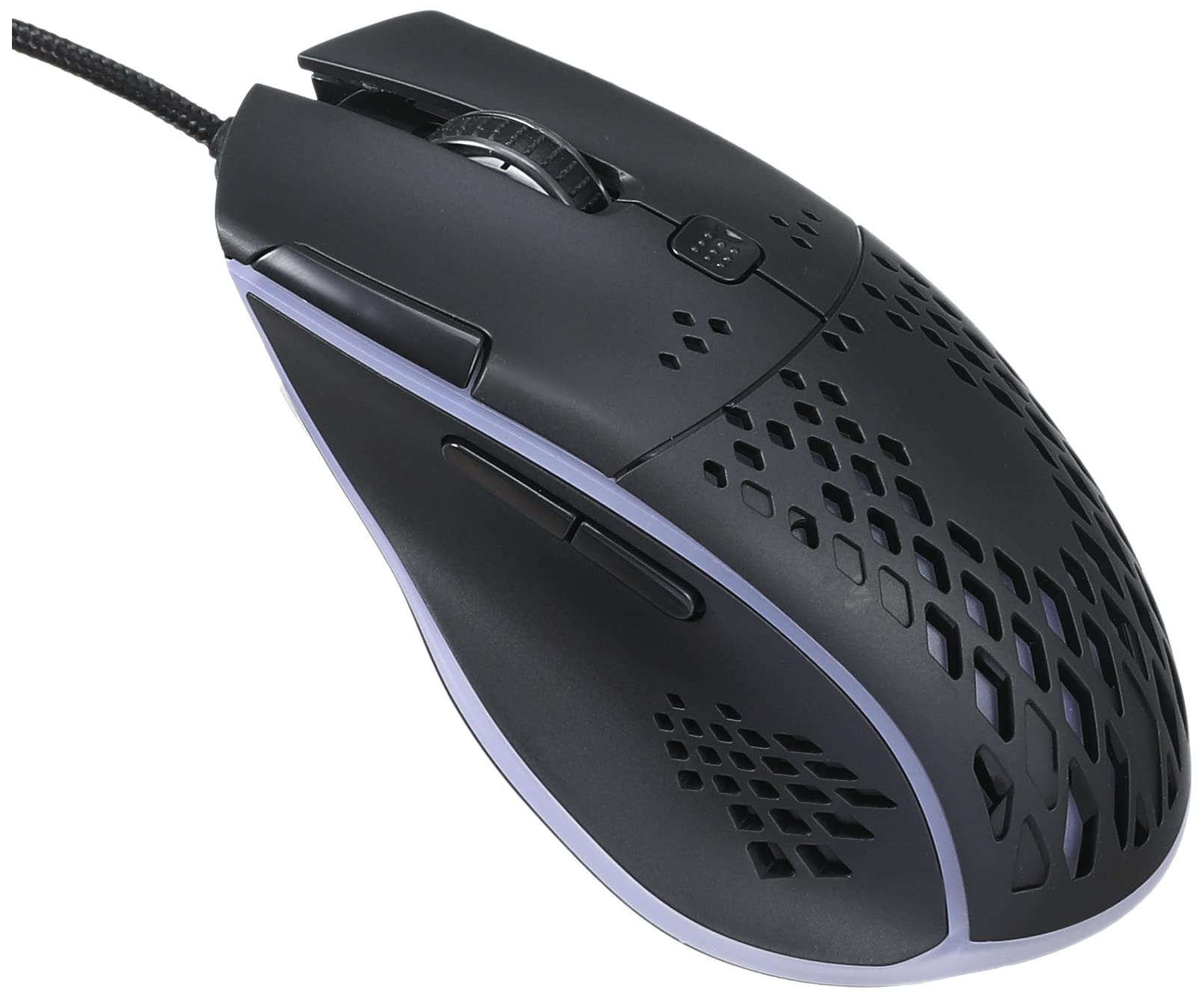
Imaj: Devan anwo view of the IMICE T97 RGB Honeycomb Gaming Mouse, showing its ergonomic shape and honeycomb shell design.
Itilizasyon Sourit la
Fonksyon debaz yo
- Klike Goch: Primary action, selection, activation.
- Klike sou dwa: Meni kontèks, aksyon segondè.
- wou woulo liv: Defile dokiman yo anlè/anba epi web paj yo. Ou kapab klike tou pou fonksyonalite klike sou bouton mitan an.
- Bouton bò: (If present, typically for forward/back navigation in browsers or custom functions in games). The T97 model typically includes two side buttons.
DPI Ajisteman
The IMICE T97 mouse features adjustable DPI (Dots Per Inch) settings, allowing you to change the cursor sensitivity. This mouse supports up to 4800 DPI. There is usually a dedicated button, often located behind the scroll wheel, to cycle through different DPI levels. Press this button to switch between sensitivity settings to find your preferred speed.
RGB ekleraj
The mouse features RGB lighting, which typically cycles through various colors automatically. There may not be user-configurable software for lighting control, and it operates as a default aesthetic feature.

Imaj: Anba view of the IMICE T97 RGB Honeycomb Gaming Mouse, showing the optical sensor, product label with model T97, and regulatory marks.
Antretyen
Netwayaj
- Dekonekte sourit la nan òdinatè w la anvan ou netwaye li.
- Sèvi ak yon twal mou, sèk, ki pa gen pousyè pou siye sifas sourit la.
- Pou pousyè tè ki difisil pou retire, yon ti kras dampRense twal la avèk dlo oswa yon solisyon netwayaj dou (evite pwodui chimik ki fò).
- Use a cotton swab or compressed air to clean around buttons and the scroll wheel.
- Asire w pa gen likid ki antre nan konpozan entèn sourit la.
Depo
Sere sourit la nan yon kote ki fre epi sèk, lwen limyè solèy dirèk ak tanperati ekstrèm lè w pa itilize li pou yon bon bout tan.
Depanaj
| Pwoblèm | Solisyon |
|---|---|
| Sourit la pa reponn. |
|
| Mouvman kurseur a pa regilye oswa li sote. |
|
| Buttons or scroll wheel are not working. |
|
| Cannot find software for customization. | The IMICE T97 mouse is primarily designed for plug-and-play operation. Dedicated software for advanced customization (like button remapping or detailed RGB control) may not be available or easily accessible for this model. Most functions are hardware-controlled. |
Espesifikasyon
| Mak | IMICE |
| Modèl | T97 |
| Koulè | Nwa |
| Koneksyon Teknoloji | USB |
| DPI (Maksimòm) | 4800 DPI |
| Karakteristik espesyal | Comfortable design, RGB lighting, honeycomb shell |
| Oryantasyon men | Anbidextr |
| Itilizasyon Rekòmande | Gaming |
| Aparèy konpatib | Odinatè pèsonèl, Laptop |
| Sistèm operasyon konpatibilite | Linux, Windows XP (and newer versions) |
| Pwa atik | 120 gram |
| Dimansyon Shipping | 15 x 11 x 5 cm |
| Batri enkli | No (Wired USB mouse) |
| ASIN | B0BD2DDWNQ |
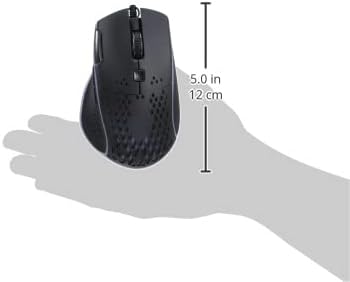
Imaj: Bò kote view of the IMICE T97 RGB Honeycomb Gaming Mouse held in a hand, illustrating its compact size (approximately 5.0 inches or 12 cm in length).
Enfòmasyon sou Garanti
Please refer to the retailer or your purchase documentation for specific warranty terms and conditions. IMICE products typically come with a limited warranty against manufacturing defects. Keep your proof of purchase for warranty claims.
Sipò pou Kliyan
For technical assistance or further inquiries, please contact your retailer or visit the official IMICE website for support resources. Ensure you have your product model (T97) and purchase details ready when contacting support.