
1. Entwodiksyon
The Black Box Boxilla KVM Manager, model BXAMGR-R2-ULT, is a robust and TAA-compliant KVM management solution designed to streamline network operations. This device allows for efficient management and control of an unlimited number of devices within your KVM infrastructure, eliminating the need for multiple licenses. It ensures compliance with government and public sector standards, providing a secure and reliable platform for KVM management.
This manual provides comprehensive instructions for the setup, operation, maintenance, and troubleshooting of your Boxilla KVM Manager.
2. Enfòmasyon sou Sekirite
Please read and understand all safety instructions before operating this device. Failure to follow these instructions may result in electric shock, fire, or damage to the product.
- Asire w ke aparèy la konekte ak yon priz kouran ki gen tè.
- Pa ekspoze aparèy la nan dlo oswa imidite twòp.
- Pa louvri aparèy la casing. Konfye tout antretyen bay pèsonèl kalifye.
- Opere aparèy la nan limit tanperati ak imidite ki espesifye yo.
- Dekonekte kouran an anvan ou netwaye oswa deplase aparèy la.
3. Pake kontni
Verifye ke tout atik yo prezan nan pakè a:
- Black Box Boxilla KVM Manager (BXAMGR-R2-ULT)
- Adaptè pouvwa
- Gid Quick Start
- Materyèl pou monte (si sa aplikab)
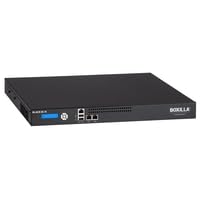
Image of the Black Box Boxilla KVM Manager, model BXAMGR-R2-ULT, showing its front panel and compact design.
4. Enstalasyon
Follow these steps for initial setup of your Boxilla KVM Manager:
- Depake aparèy la: Carefully remove the KVM manager and all accessories from its packaging.
- Plasman: Place the device on a stable, flat surface or mount it in a rack using the provided hardware. Ensure adequate ventilation around the unit.
- Konekte kab rezo yo: Connect the KVM manager to your network infrastructure using standard Ethernet cables. Refer to your network topology for specific port connections.
- Konekte pouvwa: Plug the power adapter into the KVM manager's power input, then connect it to a grounded electrical outlet. The device will power on automatically.
- Premye konfigirasyon: Aksè nan aparèy la web koòdone atravè a web browser using its default IP address (refer to the Quick Start Guide for default IP and login credentials). Follow the on-screen prompts to configure network settings, user accounts, and initial KVM device discovery.
5. Operasyon Enstriksyon
Once the Boxilla KVM Manager is set up, you can begin managing your KVM devices. The primary interface for operation is the web-based management console.
- Konekte: Louvri a web browser and navigate to the IP address or hostname of your Boxilla KVM Manager. Enter your username and password.
- Aparèy Dekouvèt: Use the discovery tools within the interface to find and add KVM transmitters and receivers to your management system.
- Jesyon itilizatè: Create and manage user accounts, assigning appropriate access levels and permissions for KVM control.
- Session Management: Initiate, monitor, and terminate KVM sessions to connected devices.
- Siveyans sistèm: Review system logs, device status, and network performance metrics through the dashboard.
- Mizajou mikrolojisyèl: Tcheke epi aplike mizajou firmwèr yo regilyèman pou asire pèfòmans ak sekirite optimal.
6. Antretyen
Regular maintenance ensures the longevity and optimal performance of your Boxilla KVM Manager.
- Netwayaj: Sèvi ak yon twal mou epi sèk pou netwaye deyò aparèy la. Pa sèvi ak pwodui netwayaj likid oswa ayewosòl.
- Vantilasyon: Ensure that ventilation openings are clear of dust and obstructions to prevent overheating.
- Firmware: Keep the device firmware updated to the latest version. Refer to the Black Box support website for updates and instructions.
- Konfigirasyon backup: Periodically back up your device configuration settings to prevent data loss in case of an unforeseen issue.
NAN. Depanaj
This section addresses common issues you might encounter with the Boxilla KVM Manager.
| Pwoblèm | Kòz posib | Solisyon |
|---|---|---|
| Aparèy pa limen. | No power supply, faulty power adapter, or power outlet issue. | Check power cable connection. Verify power outlet functionality. Try a different power adapter if available. |
| Pa ka jwenn aksè web koòdone. | Incorrect IP address, network connectivity issue, or firewall blocking access. | Verify the device's IP address. Check network cable connections. Ensure your computer is on the same network segment. Temporarily disable firewall for testing. |
| KVM devices not discovered. | Network configuration issues, KVM devices not powered on, or incorrect discovery settings. | Ensure KVM transmitters/receivers are powered and connected. Verify network settings on Boxilla and KVM devices. Check discovery range settings in the web koòdone. |
| Pèfòmans ralanti. | Network congestion, outdated firmware, or high CPU/memory usage. | Check network bandwidth. Update firmware to the latest version. Monitor system resources via the web koòdone. |
8. Espesifikasyon
Detailed specifications for the Black Box Boxilla KVM Manager BXAMGR-R2-ULT:
- Nimewo Modèl: BXAMGR-R2-ULT
- ASIN: B0BCX8GNRR
- Dimansyon pwodwi: 11 x 10 x 6 pous
- Manifakti: Black Box Network
- Premye disponib: 30 me 2023
- Lisans: Unlimited Device License
- Konfòmite: Konfòme TAA
9. Garanti ak sipò
For warranty information and technical support, please refer to the official Black Box Network websit la oubyen kontakte depatman sèvis kliyan yo. Kenbe resi acha w la pou reklamasyon garanti.
Black Box Network Official Websit: www.blackbox.com