
Entwodiksyon
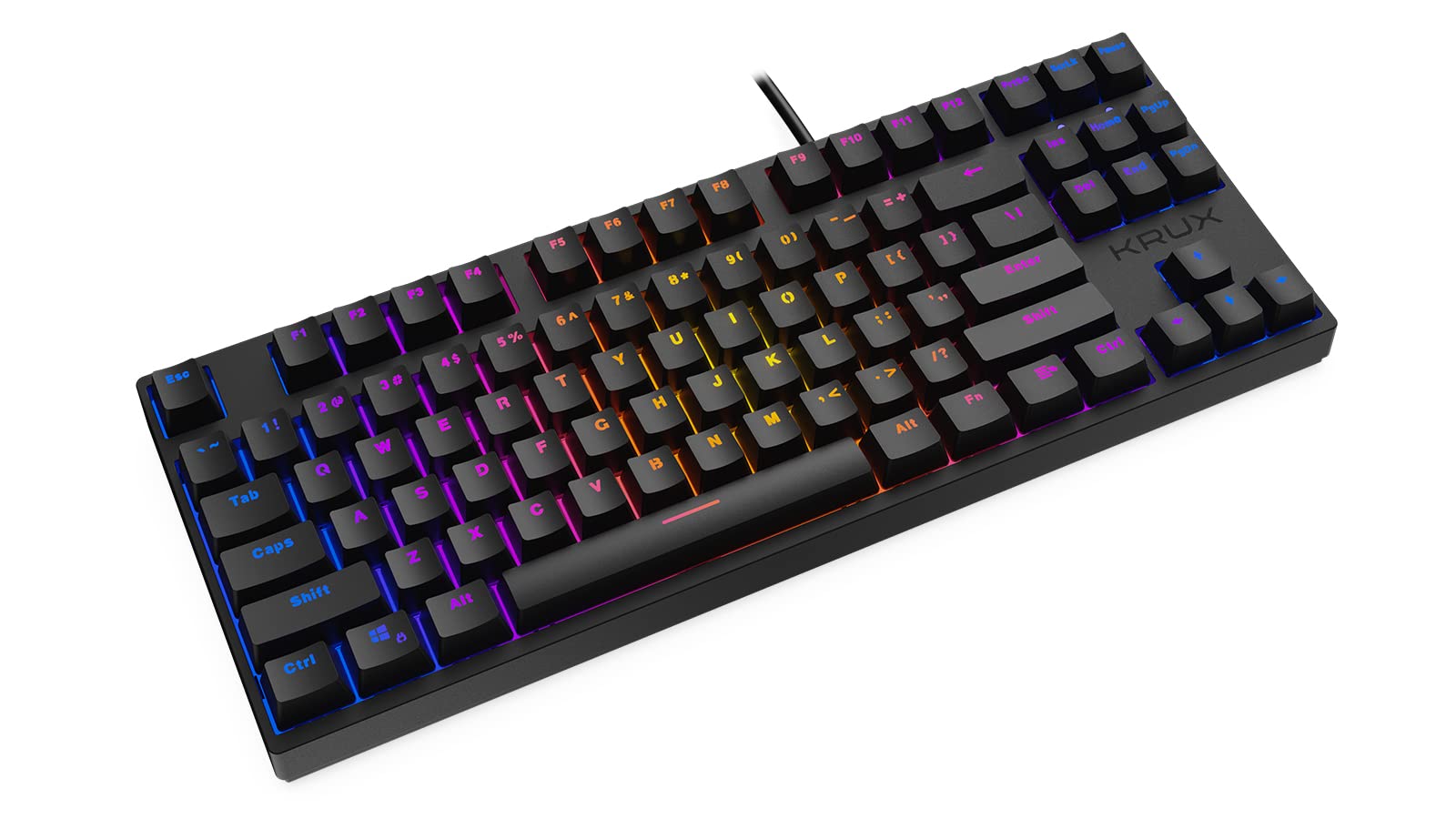
Thank you for choosing the KRUX Atax Pro RGB Outemu Brown KRX0039 Wired Gaming Keyboard. This manual provides essential information for setting up, operating, maintaining, and troubleshooting your new mechanical gaming keyboard. Please read this manual thoroughly before use to ensure optimal performance and longevity of your device.
Enstalasyon
Follow these steps to set up your KRUX Atax Pro RGB keyboard:
- Depake klavye a: Retire klavye a nan anbalaj li avèk prekosyon. Asire w ke tout konpozan yo la.
- Konekte ak òdinatè: Plug the USB-A connector of the keyboard cable into an available USB-A port on your computer or laptop.
- Enstalasyon chofè: The keyboard is plug-and-play. Your operating system (Windows, macOS, Linux) should automatically detect and install the necessary drivers. No additional software installation is typically required for basic functionality.
- Pozisyon: Place the keyboard on a stable, flat surface. Adjust the rear feet for your preferred typing angle.
Enstriksyon Operasyon
The KRUX Atax Pro RGB keyboard offers various functions beyond standard typing:
Fonksyon kle debaz yo
- Kle Estanda: All standard alphanumeric and symbol keys function as expected.
- Kle Fonksyon (F1-F12): These keys perform their standard functions.
- Gwoup Navigasyon: Includes Insert, Home, Page Up, Delete, End, Page Down for document navigation.
- Kle flèch: Standard directional control.
Kontwòl ekleraj RGB
The keyboard features customizable RGB backlighting. Use the following key combinations with the Fn key (located near the right Alt key) to control lighting effects:
- Fn + F1-F12: Specific multimedia or system functions (refer to keycap legends for exact functions).
- Fn + PrtSc: Cycle through various RGB lighting modes.
- Fn + Scrlk: Ajiste klète ekleraj.
- Fn + Pause: Change backlight color or direction in certain modes.

Karakteristik Gaming
- N-Kle Rollover: The keyboard supports N-key rollover, allowing multiple simultaneous key presses to be registered accurately, which is beneficial for gaming.
- Anti-Ghosting: Prevents unintended key presses from registering when multiple keys are pressed at once.
Antretyen
Bon antretyen asire lonjevite ak pèfòmans klavye ou a:
- Cleaning the Keycaps: Sèvi ak yon mou, damp cloth with mild soap and water to gently wipe the keycaps. Avoid excessive moisture.
- Netwayaj Anba Kap Kle yo: For deeper cleaning, you may carefully remove keycaps using a keycap puller (not included) and use compressed air to remove dust and debris from the switches.
- Netwayaj chasi a: Wipe the keyboard chassis with a dry or slightly damp twal.
- Evite likid: Do not spill liquids on the keyboard. If a spill occurs, immediately unplug the keyboard and allow it to dry completely before reconnecting.
- Depo: Sere klavye a nan yon kote ki fre epi sèk, lwen limyè solèy dirèk ak tanperati ekstrèm.

Depanaj
If you encounter issues with your KRUX Atax Pro RGB keyboard, try the following solutions:
- Klavye a pa reponn:
- Asire w kab USB a byen branche nan tou de klavye a ak òdinatè a.
- Eseye branche klavye a nan yon lòt pò USB.
- Rekòmanse òdinatè w lan.
- Teste klavye a sou yon lòt òdinatè pou elimine yon pwoblèm espesifik nan sistèm nan.
- RGB Backlighting Not Working:
- Check if the backlight brightness is turned down (Fn + Scrlk).
- Cycle through lighting modes (Fn + PrtSc) to see if it reactivates.
- Asire w klavye a ap resevwa ase kouran nan pò USB a.
- Kle espesifik ki pa anrejistre:
- Remove the keycap and check for any debris or obstruction around the switch. Use compressed air to clean.
- If the issue persists, it may indicate a faulty switch.
- Ghosting or Input Lag:
- Asire w ke chofè USB òdinatè w la yo ajou.
- Avoid connecting the keyboard through unpowered USB hubs.
Espesifikasyon
| Karakteristik | Detay |
|---|---|
| Mak | KRUX |
| Non modèl | Atax PRO RGB Outemu Brown TKL |
| Nimewo Modèl | KRX0039 |
| Koneksyon Teknoloji | USB-A (Avèk fil) |
| Deskripsyon klavye | Mekanik |
| Chanje Kalite | Outemu Brown (Tactile) |
| Kantite kle | 87 |
| Ekleraj | RGB |
| Koulè | Nwa |
| Itilizasyon Rekòmande | Gaming |
| Pwa atik | 940 gram |
| Aparèy konpatib | Laptop, PC |

Garanti ak sipò
Garanti: Pwodwi sa a vini ak yon Garanti manifakti 2 zan from the date of purchase. This warranty covers defects in materials and workmanship under normal use. It does not cover damage caused by misuse, accident, modification, or unauthorized repair.
Sipò teknik: For technical assistance, warranty claims, or further inquiries, please contact KRUX customer support through their official website or the retailer where the product was purchased. Please have your product model number (KRX0039) and proof of purchase ready when contacting support.